Introduction
RoboSAPIENS develops methods that let robots adapt their controllers and configurations when they encounter changes that were not fully anticipated at design time, while keeping those adaptations bounded by safety, robustness, and performance requirements. The project combines open-ended adaptation with assurance rather than treating adaptation alone as success [1, 2].
The RoboSAPIENS Trustworthiness Checker (TC) is a runtime-monitoring component for that setting. It evaluates observations from a robot or a surrounding software system against an executable monitor specification and exposes named result streams. Those results can provide runtime evidence to an adaptation or assurance process. The TC does not itself perform the complete adaptation loop, and a monitor verdict alone does not guarantee that a robotic system is trustworthy.
What the checker does
A TC run combines three user-visible parts:
- a monitor specification states the properties or stream computations to evaluate;
- an input source supplies observations as logical ticks or timed signal samples;
- an output destination exposes the resulting values or verdicts.
The checker supports finite replay and long-lived monitoring. A finite timestamped file is useful for testing a property against a known trace. Live sources connect the same monitoring role to MQTT, Redis Pub/Sub, selected Redis knowledge keys, ROS 2, or a named multi-source configuration. Results can go to stdout, MQTT, Redis, ROS 2, or an explicit multi-destination configuration. The input and output catalogues describe the observable formats and route choices.
The current implementation also includes DSRV runtime reconfiguration through control-capable live sources, selected distributed-monitoring paths, input-window policies, a Python binding, FMI 2.0 Co-Simulation FMU packaging, and a Docker deploy image. Start with the capability catalogue for the supported paths and their important restrictions.
Two monitor languages
DSRV is the default stream runtime-verification language. A DSRV model declares named input and output streams and defines each output from current or historical stream values. The language also includes defer and dynamic constructs for monitors whose data dependencies or properties change while they run. DynSRV describes the dynamic-property context and language semantics [3]; the DSRV tutorial documents the syntax and behavior implemented by this repository.
MSTLO monitors Signal Temporal Logic properties over timestamped signals. It is a separate TC language and runtime, with choices for monitoring algorithm, synchronization, and variable bindings. The mstlo paper describes its online STL monitoring approach [4]; the MSTLO tutorial shows the TC property-file format, millisecond timestamps, and emitted verdicts.
See languages and runtimes when choosing between DSRV, MSTLO, finite execution, live execution, reconfiguration, and distributed monitoring.
Choose a path
- Getting started installs Rust with rustup and runs a small DSRV running-total example on Linux or Unix. It also points native Windows and WSL users to the relevant setup.
- Tutorials build from one finite trace to DSRV and MSTLO authoring, live transports, reconfiguration, distributed monitoring, and Docker operation.
- Feature catalogues answer what the TC supports across inputs, outputs, languages, runtimes, integrations, and deployment.
- Reference gives generated CLI facts and focused configuration, wire, and process contracts.
- Architecture explains internal dataflow execution, then links to input, output, and reconfiguration architecture.
References
- RoboSAPIENS project website, “Redefining the future of robotics trustworthy adaptation.”
- P. G. Larsen et al., “Robotic safe adaptation in unprecedented situations: the RoboSAPIENS project,” Research Directions: Cyber-Physical Systems, vol. 2, 2024. doi:10.1017/cbp.2024.4.
- M. H. Kristensen, T. Wright, C. Gomes, L. Esterle, and P. G. Larsen, “DynSRV: Dynamically Updated Properties for Stream Runtime Verification,” Runtime Verification, 2025. doi:10.1007/978-3-032-05435-7_7.
- A. K. Thomsen et al., “mstlo: Efficient Online Monitoring of Signal Temporal Logic,” 2026. arXiv:2605.26847.
The work presented here is supported by the RoboSAPIENS project, funded by the European Commission's Horizon Europe programme under grant agreement number 101133807.
Getting started
This page installs the build prerequisites and runs an example Trustworthiness Checker (TC) monitor. The example introduces the basic shape of a DSRV program, reads four input values, prints a running total, and exits. It requires no broker, ROS installation, or optional Cargo feature.
Linux or Unix
The TC requires Rust 1.95 and a native C/C++ build toolchain. Install Git, curl, and the build tools with your platform package manager. For example, on Ubuntu or Debian:
sudo apt-get update
sudo apt-get install build-essential curl git
On Fedora:
sudo dnf install gcc gcc-c++ curl git
Install Rust with rustup
Download the official rustup installer, inspect it, and install the minimal Rust 1.95 toolchain:
curl --proto '=https' --tlsv1.2 -sSf https://sh.rustup.rs \
  --output /tmp/rustup-init.sh
less /tmp/rustup-init.sh
sh /tmp/rustup-init.sh -y --profile minimal --default-toolchain 1.95
rm /tmp/rustup-init.sh
. "$HOME/.cargo/env"
rustc --version
cargo --version
The download comes from the official rustup service and requires network access. rustc --version must report Rust 1.95 or newer. The repository declares Rust 1.95 as its minimum supported Rust version.
Get the source
Clone the repository and enter its root directory:
git clone https://github.com/INTO-CPS-Association/robosapiens-trustworthiness-checker.git
cd robosapiens-trustworthiness-checker
If you already have a checkout, run the remaining commands from its repository root.
Run a running-total example
The first DSRV example has one input, x, and one output, z:
in x: Int
out z: Int
z = default(z[1], 0) + x
in x declares the value supplied to the monitor. out z declares the result it exposes. The equation adds the current x to the previous value of z; default(..., 0) starts the total at zero when there is no previous value.
The repository stores this program as examples/counter.dsrv and supplies four input values in examples/counter.input. Run that example from the repository root:
cargo run --quiet -- examples/counter.dsrv \
  --input-file examples/counter.input \
  --output-stdout
Cargo builds the TC on the first run. The example evaluates the four inputs and writes this exact result to stdout:
z[0] = 1
z[1] = 2
z[2] = 3
z[3] = 4
The process exits after the fourth input. The output index is zero-based, so z[0] is the first result. DSRV calls each input position a logical tick; z[1] reads z from the preceding tick.
Windows paths
For a native Windows build, install rustup and the MSVC C++ prerequisites, then run the compact PowerShell example in Extended Windows usage. That page also covers Docker Desktop transports and testing a cross-compiled Windows executable with Wine on Linux.
Under WSL, use the Linux instructions on this page inside the WSL distribution. Install Rust and build tools inside WSL rather than reusing a Windows Rust installation. See Windows Subsystem for Linux for filesystem and Docker Desktop considerations.
Editor Support
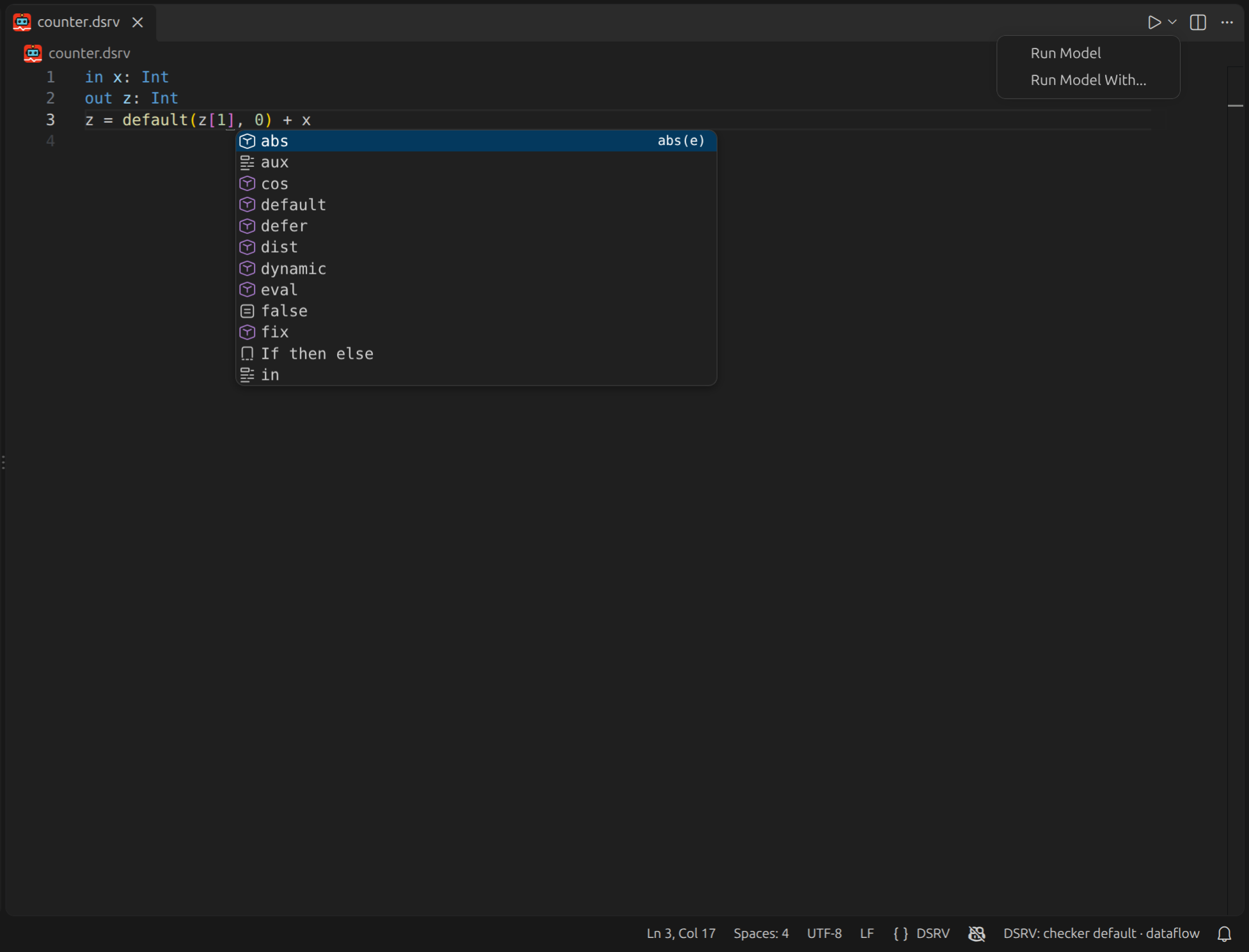
A Visual Studio Code extension provides syntax highlighting, completion, and inline diagnostics for .dsrv files, and runs a model from the editor without switching to a shell. It ships with its own copy of the checker and of the language server, so none of the build steps above are needed to use it.
The language features come from the DSRV language server, which reuses this repository's parser and type checker, so the errors shown while editing are the ones the checker reports, with the caveat described under Editor support.
See Editor Support for what it provides and how to point it at your own build instead of the bundled one.
Continue from the first run
- Write and run DSRV models explains declarations, equations, timestamped traces, history,
defer, anddynamic. - Monitor timed signals with MSTLO runs a timestamped Signal Temporal Logic property.
- Capabilities maps live inputs, outputs, reconfiguration, distributed monitoring, and integrations to focused pages.
- General usage gives the shortest command shape for each input route.
- Editor support provides an overview of the DSRV VS Code extension.
Tutorial: write and run DSRV models
DSRV is the Trustworthiness Checker's default language for stream runtime verification: computing results and checking properties as sequences of observations arrive. A model declares named input streams and defines other streams through equations. Each stream has a value at a logical tick, and an equation can use values from the current tick or stored history.
These equations can express both derived measurements and Boolean properties. For example, a model can:
- combine two sensor readings from the same tick;
- accumulate a running total and check whether it remains below a limit;
- compare a reading with its previous value to detect a change.
An output can be an Int total, a Bool verdict, or another declared type. The equation determines what that result means: false indicates a violation only if the output represents a condition that should hold. DSRV also lets an input carry an expression, so some calculations can be supplied while the monitor is running.
DSRV's built-in temporal unit is a logical tick, an ordered position in the stream. Referring to the previous tick does not by itself imply that one second has elapsed. A DSRV model can also express elapsed-time properties by receiving a clock or timestamp as an input and using it explicitly in its equations. When a requirement is naturally written with bounded temporal operators over timestamped numeric signals, MSTLO provides those operators and their associated online monitoring semantics directly; see the MSTLO tutorial.
Here you will run an addition model, build a running total, and check a Boolean property of that total. All three use finite input files and print their results to stdout. You will also supply a calculation as input using defer and learn how dynamic handles subsequent changes.
Prerequisites
- Run the commands from the repository root.
- Have a Rust toolchain available for Cargo.
- Use the models and input traces included in the repository.
- The commands use Unix shell line continuations. In PowerShell, put each command on one line.
Adding two input streams
The first model declares two inputs, one output, and an equation that adds the current inputs:
in x: Int
in y: Int
out z: Int
z = x + y
in names values supplied by the input source; out names results to expose. The equation defines z at each tick as the sum of that tick's x and y. The : Int annotations make the model's interface explicit, and the type checker verifies the addition before monitoring begins.
The repository stores this model as examples/simple_add.dsrv. Its trace, examples/simple_add.input, supplies two pairs of integer values:
0: x = 1
   y = 2
1: x = 3
   y = 4
Assignments grouped under the same timestamp form one simultaneous logical tick. The model therefore adds 1 + 2 at tick 0 and 3 + 4 at tick 1. Run it with:
cargo run --quiet -- examples/simple_add.dsrv \
  --input-file examples/simple_add.input \
  --output-stdout
The exact stdout is:
z[0] = 3
z[1] = 7
Here z[0] labels the result at tick 0, and 3 is its value. The Int type is declared in the model; stdout prints the value in DSRV source form. The process exits after both input pairs have been evaluated. It creates no external resources that require cleanup. DSRV and its default runtime are selected automatically; no language or runtime flag is needed for these examples.
Type declarations and checking
Write explicit types on input and output declarations by default. They document the values a source must provide, let the checker reject incompatible equations early, and keep transport mappings aligned with the model. Common scalar types are Int, Float, Bool, and Str; compound types include List<T>, Map<T>, tuples, and Struct<...>. Receiving structured input below shows how to declare and supply named fields.
For example, changing y to Str while retaining z = x + y makes the addition model ill-typed; you can inspect that model in examples/simple_add_illtyped.dsrv. Use Any only when a stream is intentionally heterogeneous or its concrete type cannot be declared. The default untimed semantics checks explicit annotations and infers information for declarations that lack one.
Reading input rows as logical ticks
The leading timestamps in a DSRV input file identify logical ticks. They must not decrease. Repeated timestamp lines remain in the same tick; if the same declared input is assigned more than once at that timestamp, the last assignment is used. Variables that the model does not declare as inputs are ignored. If a declared input is missing from a tick, the checker does not substitute an implicit zero and may produce no visible output for a calculation that needs it.
Reading rule. Cells at the same horizontal position belong to the same logical tick, and assignments grouped in one input cell are simultaneous. A gap is an absent logical position rather than another assignment within a neighboring tick.
Gaps between timestamps are expanded into missing-value ticks: a jump from 1: to 3: leaves tick 2 present but without input values. The timestamps do not make the process wait for wall-clock time to pass.
Accumulating a running total
This model adds each new x value to its previous result:
in x: Int
out z: Int
z = default(z[1], 0) + x
In a DSRV equation, z[1] reads z from one logical tick earlier. This is a relative history offset; the z[1] label in stdout instead identifies the result at absolute tick 1. Using history lets the equation refer to its own previous result without depending on its current result.
At the first tick, z[1] has no history and yields Deferred. default(z[1], 0) supplies zero for that state, so the total begins with the first x value. At later ticks, the equation adds the current x to the preceding total.
The repository stores this program as examples/counter.dsrv. Its accompanying input, examples/counter.input, supplies x = 1 at four consecutive timestamps. Run both with:
cargo run --quiet -- examples/counter.dsrv \
  --input-file examples/counter.input \
  --output-stdout
The exact Trustworthiness Checker stdout is:
z[0] = 1
z[1] = 2
z[2] = 3
z[3] = 4
The process exits after the fourth input value. It needs only Cargo and the files included in the repository.
Checking a property of the total
To check whether the accumulated total is still below 3, keep the calculation and expose a Boolean condition:
in x: Int
aux total: Int
out below_limit: Bool
total = default(total[1], 0) + x
below_limit = total < 3
aux defines a named stream for use within the model without exposing it as an output. below_limit uses the current total, so the new input is included before the condition is evaluated. Both equations describe values at each tick; they are not instructions to update variables one after another.
The repository stores this variant as examples/counter_threshold.dsrv. Run it against the same four inputs:
cargo run --quiet -- examples/counter_threshold.dsrv \
  --input-file examples/counter.input \
  --output-stdout
The exact stdout is:
below_limit[0] = true
below_limit[1] = true
below_limit[2] = false
below_limit[3] = false
| Logical tick | Input x | Current total | total < 3 |
|---|---|---|---|
| 0 | 1 | 1 | true |
| 1 | 1 | 2 | true |
| 2 | 1 | 3 | false |
| 3 | 1 | 4 | false |
The strict comparison becomes false when the total reaches 3. It checks the condition separately at each tick; a false result does not stop the monitor. This run exits after the fourth input, with no external resources to clean up.
Handling missing values and unavailable history
The examples so far provide every input at every tick. DSRV distinguishes a missing current value from a result that is waiting for information:
| State | Meaning | Behavior in these examples |
|---|---|---|
NoVal | No input value is available at the current tick | Stdout omits a NoVal result. It is not an implicit zero. |
Deferred | A result is waiting for information, such as history before the start of the trace | default(total[1], 0) replaces this state with zero. |
default handles Deferred; it does not fill missing NoVal inputs. A running total with gaps therefore needs an explicit policy for missing observations. Do not assume that the initialization in this example supplies that policy.
Receiving structured input
A sensor reading can carry both a measurement and its validity status in one input value. Declare a Struct to give each field its own type:
in reading: Struct<level: Int, status: Struct<valid: Bool>>
out below_limit: Bool
below_limit = reading.status.valid && reading.level < 3
reading is one input stream. Its level field contains an integer, and its status field contains another struct with a Boolean valid field. Dot notation selects a field: reading.level reads the measurement, and reading.status.valid follows the nested fields. The output is true when the reading is valid and its level is below 3.
The repository stores this model as examples/structured_reading.dsrv. Its trace, examples/structured_reading.input, supplies JSON5 objects:
0: reading = {level: 2, status: {valid: true}}
1: reading = {level: 3, status: {valid: true}}
2: reading = {level: 1, status: {valid: false}}
In the declaration, level: Int specifies a field's type. In the input object, level: 2 supplies its value. JSON5 permits the unquoted field names shown here; ordinary JSON objects such as {"level": 2, "status": {"valid": true}} also work. Keep each complete assignment on one line, including nested objects.
Each assignment supplies the whole reading value for that tick. It does not update individual fields of the previous reading. Supply the fields used by the model at every tick that contains a reading; reading.level = 2 is not an input-file assignment to a nested field.
Run the example with:
cargo run --quiet -- examples/structured_reading.dsrv \
  --input-file examples/structured_reading.input \
  --output-stdout
The exact stdout is:
below_limit[0] = true
below_limit[1] = false
below_limit[2] = false
At tick 1 the level reaches 3; at tick 2 the level is below 3 but the reading is invalid. Both produce false. The process exits after the third reading.
For field requirements, struct constructors, and transport payloads, see Structured input values.
Receiving an expression with defer
The equations above are fixed when the model is loaded. Use defer when the expression to evaluate will arrive later as an input. For example, this model waits for an expression on e, then uses it to calculate z from the continuing input stream:
in x: Int
in e: Expr<Int>
out z: Int
z = defer(e)
Expr<Int> declares that e carries an expression whose result must be an Int. In the input file, the expression is written in quotes, as in "x + 1"; its declared type records what it must produce. The received expression is parsed and type-checked when it arrives. Because the result type belongs to the source declaration, defer(e) needs no local type ascription. A Boolean property source would use Expr<Bool> and produce a Bool output.
The repository stores this program as examples/dups/defer.dsrv. At timestamp 1, its input file, examples/dups/defer.input, supplies e = "x + 1"; later rows continue to supply x. Run the example from the repository root:
cargo run --quiet -- examples/dups/defer.dsrv \
  --input-file examples/dups/defer.input \
  --output-stdout
This run emits one visible line for every output index from 1 through 14. The beginning and end of the output are:
z[1] = 2
z[2] = 3
...
z[14] = 15
There is no visible z[0] line because e is absent at tick zero and the stdout sink suppresses the resulting NoVal. At tick 1, defer accepts "x + 1" and produces 2. It then keeps evaluating that expression with each new x; later expressions on e do not replace it.
Updating an expression with dynamic
Use dynamic when later expressions should replace the active calculation. In the preceding model, replace the equation for z with this equation fragment:
z = dynamic(e)
The input declaration remains in e: Expr<Int>. As with defer, each accepted expression must produce an Int. An optional second argument restricts the streams that the expression may read: dynamic(e, {x}) makes only x available to it.
The following four-tick example compares the two operations. Here the expression input is named p: it starts as "x + 1", changes to "x * 2", then returns to "x + 1". dynamic(p) replaces its expression when the text changes; returning to old text starts a fresh evaluation. defer(p) keeps the first accepted expression and continues evaluating it as x changes.
Reading rule. Cells aligned at one horizontal position belong to the same logical tick. The thin spans show how long each expression remains active. At tick 2, dynamic(p) uses "x * 2" and produces 6, while defer(p) still uses "x + 1" and produces 4.
dynamic and defer operate within a model. To replace the monitor configuration through a control route, see Reconfigure a running monitor.
For the language's dynamically updated-property context, see Kristensen et al., “DynSRV: Dynamically Updated Properties for Stream Runtime Verification” (2025).
Troubleshooting
- If a model does not parse, check declaration names, equation syntax, and the
dsrvfile path before changing runtime options. - If the checker does not exit after reading a file, confirm that the selected input is
--input-file; MQTT, Redis, and ROS sources remain active while waiting for messages. - If a result is absent, check whether the current value is
NoValorDeferred. Stdout suppressesNoVal; aDeferredvalue prints as⊥and is not a numeric fallback.
Tutorial: monitor timed signals with MSTLO
Signal Temporal Logic (STL) expresses requirements about how numeric signals change over time. An STL property combines numeric predicates, such as temperature < 80, with Boolean operators and time-bounded temporal operators. It can express requirements such as:
- a value must remain within a safe range for the next five seconds;
- a request must receive a response within 200 milliseconds;
- a signal must eventually cross a threshold while another signal remains stable.
MSTLO is an online monitor for STL. It consumes timestamped signal samples as they arrive and evaluates an STL property at successive points in signal time. Depending on the selected semantics, it can report Boolean satisfaction, a numeric robustness margin, an early verdict once the answer is certain, or bounds on the robustness while part of the relevant time interval remains unobserved.
MSTLO is a direct fit when a requirement is naturally written with bounded temporal operators over timestamped numeric signals. DSRV can also express elapsed-time properties when a clock or timestamp is supplied as an input and used explicitly in its equations; it is also an option for models organized around logical ticks or structured values such as lists, maps, tuples, and records. This tutorial checks whether a signal stays above a threshold for two seconds and whether it exceeds another threshold at least once. You will run a finite trace, read timestamped Boolean verdicts, and see why a delayed verdict needs samples from its future interval.
Prerequisites
- Run commands from the repository root.
- Have Rust 1.95, Cargo, and the native build toolchain installed.
- The commands below use Unix shell line continuations. In PowerShell, put each command on one line.
Defining timed properties
Start with this condition: at a given time, x must remain above 3 throughout the next two seconds. Write it as a named STL property:
always_x: G[0,2](x > 3)
G[0,2](p) means that p holds globally: throughout the interval from the current time through two seconds later, including both endpoints. Here the predicate is the strict comparison x > 3, so x = 3 would violate it. The name always_x becomes the output stream name.
The example also checks a compound condition: x must exceed 5 at least once in the next two seconds and remain positive throughout that interval. The complete model in examples/simple_stl.mstlo is:
always_x: G[0,2](x > 3)
combo: (F[0,2](x > 5)) && (G[0,2](x > 0))
F[0,2](p) means that p holds eventually: at least once in the interval. && requires both sub-formulas to hold. These properties are evaluated repeatedly along the signal, with a new interval starting at each verdict timestamp.
Each property starts with property_name: formula. # starts a comment, and a formula may continue on following lines. MSTLO interval literals use seconds and may have fractional bounds. Future operators must be bounded so the delayed monitor can determine how much future signal it needs.
Provide timestamped samples
The accompanying examples/simple_stl.input file supplies six samples one second apart:
0: x = {"time": 0, "value": 5.0}
1: x = {"time": 1000, "value": 4.0}
2: x = {"time": 2000, "value": 6.0}
3: x = {"time": 3000, "value": 2.0}
4: x = {"time": 4000, "value": 5.0}
5: x = {"time": 5000, "value": 7.0}
Keep the file's logical ticks separate from the signal's time:
| Example | Meaning | Unit |
|---|---|---|
Leading 2: | File-input ordering and logical tick boundary | Logical tick |
"time": 2000 | Signal timestamp used by MSTLO | Milliseconds |
G[0,2] | Future interval relative to a verdict timestamp | Seconds |
For example, the line beginning 2: supplies x = 6 at signal time 2000 ms. A two-second formula interval spans 2000 ms; it does not mean two file ticks. The samples happen to be one second apart here, but timestamps can express other spacings. MSTLO inputs require non-negative integer millisecond timestamps and numeric values.
Run delayed qualitative monitoring
Choose delayed-qualitative to obtain Boolean verdicts after each two-second interval is fully observed. The TC integrates the mstlo library through --language mstlo, which also selects its runtime. Omit --runtime for this language.
Run the model and trace:
cargo run --quiet -- examples/simple_stl.mstlo \
  --input-file examples/simple_stl.input \
  --output-stdout \
  --language mstlo \
  --semantics delayed-qualitative \
  --execution-policy synchronous \
  --mstlo-synchronization none
The command prints the following stdout and exits when the finite input has been processed:
always_x[0] = {"time":0,"value":true}
combo[1] = {"time":0,"value":true}
always_x[2] = {"time":1000,"value":false}
combo[3] = {"time":1000,"value":true}
always_x[4] = {"time":2000,"value":false}
combo[5] = {"time":2000,"value":true}
always_x[6] = {"time":3000,"value":false}
combo[7] = {"time":3000,"value":true}
This single-signal run uses --mstlo-synchronization none because no alignment between different signals is needed. The synchronous execution policy processes each input tick before admitting the next one.
Read the delayed verdicts
In always_x[2] = {"time":1000,"value":false}:
always_xidentifies the property;[2]is the zero-based stdout event index, shared across all properties;"time":1000says the verdict applies at signal time1000ms;falsesays that the property is violated over the interval starting there.
For these properties, the monitor needs samples through verdict time + 2000 ms. Start by following always_x:
| Verdict time (ms) | Required interval (ms) | Values of x in the interval | always_x |
|---|---|---|---|
| 0 | 0–2000 | 5, 4, 6 | true |
| 1000 | 1000–3000 | 4, 6, 2 | false |
| 2000 | 2000–4000 | 6, 2, 5 | false |
| 3000 | 3000–5000 | 2, 5, 7 | false |
The verdict at 0 is emitted only after the sample at 2000 ms arrives. Its timestamp remains 0: it describes the start of the interval, not the time when the answer became available. Each later interval contains x = 2, which violates x > 3.
Reading rule. Cells at the same horizontal position have the same embedded MSTLO timestamp. A horizon bracket identifies the future samples needed for one verdict. The dashed guide marks when enough physical input has arrived to emit that verdict; the output cell remains aligned with the earlier timestamp to which the verdict applies.
Only verdicts through 3000 ms appear: evaluating a delayed two-second horizon at 4000 or 5000 ms would require samples beyond the end of this finite trace. End of file does not invent those future samples.
Now follow combo in the same output. Every complete interval contains either 6 or 7, satisfying F[0,2](x > 5), and every value is positive, satisfying G[0,2](x > 0). Its four verdicts are therefore all true. In particular, the value 2 violates always_x but still satisfies the positivity condition in combo.
Compare online semantics
The TC exposes the four MSTLO semantics described by Thomsen et al.:
| CLI value | Output | When a verdict is available |
|---|---|---|
delayed-qualitative | Boolean satisfaction | After the bounded future horizon is fully observed. |
delayed-quantitative | Real-valued robustness | After the horizon; positive values indicate satisfaction and negative values violation. |
eager-qualitative | Boolean satisfaction | As soon as the partial signal makes a Boolean verdict definitive; otherwise it waits. |
robustness-interval | Lower and upper robustness bounds | Refines an interval as samples arrive and may emit multiple updates for one verdict timestamp. |
Keep --semantics explicit when adapting the command. A different mode can change both the shape and the number of output events; the event indices above are specific to the delayed qualitative run.
--mstlo-algorithm incremental is the default and reuses monitor state between samples. naive re-evaluates from the available signal and is mainly useful as an alternate algorithmic mode. Algorithm choice should not change the property being monitored.
Parameterize a property
To choose a threshold at startup without editing the formula, use a $ parameter. The model in examples/simple_stl_threshold.mstlo contains:
always_x: G[0,2](x > $threshold)
Run it over the same signal, binding threshold to 3. This time, choose quantitative semantics to measure the margin above or below the threshold:
cargo run --quiet -- examples/simple_stl_threshold.mstlo \
  --input-file examples/simple_stl.input \
  --output-stdout \
  --language mstlo \
  --semantics delayed-quantitative \
  --execution-policy synchronous \
  --mstlo-synchronization none \
  --mstlo-vars threshold=3
The exact stdout is:
always_x[0] = {"time":0,"value":1.0}
always_x[1] = {"time":1000,"value":-1.0}
always_x[2] = {"time":2000,"value":-1.0}
always_x[3] = {"time":3000,"value":-1.0}
For G[0,2](x > $threshold), robustness is the smallest x - threshold over the interval. The first interval's minimum is 4, giving a margin of 1; each later interval contains 2, giving -1. The verdict timestamps and delayed horizons are the same as before. Only one property is running now, so its event indices are consecutive.
Every referenced parameter needs a numeric binding. Supply several bindings with repeatable or space-delimited --mstlo-vars name=value arguments.
Extend to multiple signals
When a formula combines signals sampled at different times, choose how to align them with --mstlo-synchronization: zero-order-hold keeps the most recent sample and is the default; linear interpolates between samples; none disables interpolation. This choice changes the values seen by the formula and can change its verdicts.
Preserve source timestamps when moving to MQTT or ROS: MSTLO values carry both time and value. See Inputs for the supported transport payloads and the ROS MstloTimedValue mapping, and the CLI reference for synchronization options.
Troubleshooting
If no verdict appears, first check that the embedded timestamps cover the formula's future horizon. Two seconds require 2000 ms of signal, regardless of how many file ticks have arrived.
For rejected commands, models, or input:
| Symptom | Check |
|---|---|
| Property-file format or name error | Start each property with a unique, non-empty name: followed by its formula. A continuation line is allowed after a property has started. |
| STL parse error naming a property and line | Check that formula's syntax and interval bounds. |
| Invalid timestamp or signal value | Supply a non-negative integer time in milliseconds and a numeric value. |
| Runtime option rejected | Omit --runtime; --language mstlo selects the runtime. |
| Redis knowledge input rejected | Use a supported timestamped input source. Redis knowledge input produces ordinary DSRV values. |
For all option spellings and defaults, see the generated CLI reference. For supported transports and the ROS MstloTimedValue mapping, see Inputs and Languages and runtimes.
Background
MSTLO implements online monitoring for STL, a temporal logic for real-valued signals. The paper introduces its delayed qualitative and quantitative semantics, eager Boolean verdicts, Robust Satisfaction Intervals, dense-time synchronization, runtime DSL, and incremental monitoring algorithm. Those concepts motivate the choices explained above; the TC repository and its pinned mstlo crate define the exact CLI, file format, transport payloads, and current limitations.
Andreas Kaag Thomsen, Niels Viggo Stark Madsen, Valdemar Tang Evans, Thomas David Wright, Lukas Esterle, and Peter Gorm Larsen, “mstlo: Efficient Online Monitoring of Signal Temporal Logic,” arXiv:2605.26847, 2026. arXiv:2605.26847.
Tutorial: monitor live MQTT input
Use MQTT when the checker should remain alive and react to messages published on input topics. This walkthrough adds the latest values received on topics x and y, publishes the result on topic z, and connects to a broker at localhost:1883.
Prerequisites
-
Run the commands from the repository root.
-
Have a Rust toolchain, an MQTT broker, and the
mosquitto_pubandmosquitto_subclients available. -
The broker must accept local connections on port 1883. The project Compose file can start EMQX for this walkthrough:
docker compose -f docker/docker-compose.yaml up -d emqxThis command may pull the
emqx:latestimage. An independently managed broker can be used instead; do not run the Compose cleanup command for that broker.
The generic --mqtt-input mode maps model input names to topics by name, and
--mqtt-output maps output names to topics by name. Input payloads are JSON5
values; the output MQTT backend wraps a value in an object such as
{"value":3}.
These MQTT shortcuts use protocol 3.1.1 by default. Add
--mqtt-protocol 5 to Terminal 1 to select MQTT 5 for both shortcuts.
Add two values received through MQTT
The DSRV program declares the two topic-backed inputs and their sum:
in x: Int
in y: Int
out z: Int
z = x + y
The repository stores this program as examples/simple_add.dsrv. Generic MQTT routing uses the DSRV names x, y, and z as topic names.
Start three terminals
Keep the broker running and use the following terminals. Source and working directory setup is needed only once per shell.
Terminal 1 — start the Trustworthiness Checker from the repository root:
cargo run --quiet -- examples/simple_add.dsrv \
  --mqtt-input --mqtt-output \
  --mqtt-port 1883
This is a live process. It waits for MQTT messages and does not exit after one calculation.
Terminal 2 — subscribe before publishing:
mosquitto_sub -h localhost -p 1883 -t z -v
Terminal 3 — publish one logical pair of inputs:
mosquitto_pub -h localhost -p 1883 -t x -m '1'
mosquitto_pub -h localhost -p 1883 -t y -m '2'
The subscriber should display a message with this topic and payload:
z {"value":3}
The first input alone may not produce a visible result because y has no value
for that evaluation. After both values have been received, z = x + y is
published. Publish x and y again to observe another output, for example
z {"value":7} for 3 and 4. The output block is representative of the
message framing; the broker/client adds no Trustworthiness Checker stdout line
because this run selects MQTT output rather than stdout.
There is no separate Trustworthiness Checker readiness endpoint. Broker
connectivity and topic visibility prove that the broker is reachable, not that
the monitor has subscribed and evaluated input. The first expected z message
is the useful end-to-end observation for this example.
Input windows
If publishers send updates close together, an input window can change how those updates become monitor ticks. For example, add these options to Terminal 1:
--input-window-ms 25 --input-window-mode batch
batch preserves logical ticks. atomic-step instead reduces updates observed
in a window with last-update-wins for each variable; it is a local reduction
window, not a broker transaction or a cross-source atomicity guarantee. A
window boundary can separate messages that arrive near its edge.
Reading rule. Cells sharing an x-position are one logical tick, and values grouped in a cell are simultaneous. In the atomic-step row, earlier positions are reduced into the single emitted evaluation tick; they are not pending ticks. The dashed flush guide is a physical window boundary, not another incoming logical tick.
Stop and clean up
-
Press
Ctrl-Cin Terminal 1 to stop the foreground Trustworthiness Checker. The checker does not document a custom graceful-signal protocol; stop it as a foreground process. -
Press
Ctrl-Cin Terminal 2. Terminal 3 commands exit after publishing. -
If the project Compose broker was started for this walkthrough, remove its container with:
docker compose -f docker/docker-compose.yaml downThe Compose file's named EMQX volumes are not removed by this command. Keep them for another run or remove them separately only when their persisted broker state is no longer needed.
Redis knowledge-state input
Use Redis knowledge input when the Trustworthiness Checker needs the current
value of selected Redis keys, such as a current plan, mode, or adaptation state.
Use ordinary Redis Pub/Sub input (redis) for transient events such as “Analyse
completed”. The two sources are different:
| Information | Redis mechanism | Checker source kind |
|---|---|---|
| Current mode, plan, anomaly, or adaptation state | Selected key plus keyspace notification | redis-knowledge |
| Phase completion or component event | Pub/Sub channel | redis |
A keyspace notification is an invalidation, not the new value. The provider rereads each selected key and emits the decoded value only when it differs from the last value it emitted. It does not infer a key by changing a variable name; every knowledge key must be mapped explicitly.
Quickstart: monitor one key
This walkthrough runs the checker on the host and a disposable Redis server in a
Docker container. Run all host commands from the repository root. Docker may
pull redis:7-alpine; Podman can replace docker in these commands.
Start and check Redis
docker run --rm -d \
  --name tc-redis-knowledge \
  -p 6379:6379 \
  redis:7-alpine \
  redis-server --notify-keyspace-events KEA
The KEA setting enables the keyspace notifications used by this provider; the
checker does not set it on the server. Check the Redis service and setting:
docker exec tc-redis-knowledge redis-cli ping
docker exec tc-redis-knowledge \
  redis-cli CONFIG GET notify-keyspace-events
The first command should return:
PONG
PONG proves that Redis is reachable. It does not prove that the
Trustworthiness Checker is running, subscribed, or ready to evaluate input.
Seed and run the checker
This DSRV program exposes the selected state without changing it:
in robot_mode: Str
out observed_mode: Str
observed_mode = robot_mode
The repository stores this program as examples/redis-knowledge/robot-mode.dsrv. Store a JSON string in Redis database 2, the knowledge-source default:
docker exec tc-redis-knowledge \
  redis-cli -n 2 SET robot:mode '"idle"'
From the repository root, start the foreground checker:
cargo run --quiet -- examples/redis-knowledge/robot-mode.dsrv \
  --redis-knowledge-input \
  --redis-knowledge-key robot_mode=robot:mode \
  --redis-knowledge-database 2 \
  --redis-port 6379 \
  --output-stdout
publish_initial defaults to true, so the provider reads the existing key at
startup. The stdout sink's exact framing is:
<output-variable>[<zero-based-output-index>] = <DSRV-source-value>
For the sequence in this walkthrough, representative stdout is:
observed_mode[0] = "idle"
The first expected line is the useful readiness observation for the checker: it shows that the source connection, initial snapshot, model evaluation, and local stdout admission have progressed. A running checker process alone proves only liveness.
Change, repeat, and delete the key
In another terminal, still using the repository's Docker container, write a new value:
docker exec tc-redis-knowledge \
  redis-cli -n 2 SET robot:mode '"active"'
The checker should emit a second line. With no other visible updates, the representative output is:
observed_mode[1] = "active"
Writing the same decoded value again sends a Redis notification but does not produce another checker input:
docker exec tc-redis-knowledge \
  redis-cli -n 2 SET robot:mode '"active"'
Delete the key:
docker exec tc-redis-knowledge \
  redis-cli -n 2 DEL robot:mode
A missing selected key becomes Value::NoVal. The stdout sink suppresses
NoVal, so deletion produces no replacement line. API consumers can still
observe the emitted NoVal state. The checker remains running after each
change; it waits for another notification until you stop it.
MAPLE-K: current Knowledge plus phase events
The one-key run tests current state. A MAPLE-K flow commonly combines that state with transient phase events: in this representative layout, Analyse and Legitimate completion use Pub/Sub, while the selected plan uses a database-2 knowledge key. The names are deployment choices, not canonical Redis names.
| MAPLE-K information | Redis kind | Representative name | Checker input |
|---|---|---|---|
| Analyse completed | Pub/Sub channel | maple:analyse:completed | analyse_completed |
| Current selected plan | Key in database 2 | maple:plan:current | current_plan |
| Legitimate completed | Pub/Sub channel | maple:legitimate:completed | legitimate_completed |
The MAPLE-K example exposes the current plan only after both phase-completion events are true:
in analyse_completed: Bool
in current_plan: Str
in legitimate_completed: Bool

out legitimate_plan: Str
legitimate_plan = if analyse_completed && legitimate_completed then current_plan else "plan-not-legitimate"
The repository stores this program as examples/redis-knowledge/maple-plan.dsrv. Its mixed-source configuration, examples/redis-knowledge/maple-inputs.json5, connects the two event channels and current-plan key:
{
  sources: {
    "maple-events": {
      kind: "redis",
      host: "localhost",
      routes: {
        analyse_completed: "maple:analyse:completed",
        legitimate_completed: "maple:legitimate:completed",
      },
    },
    "maple-knowledge": {
      kind: "redis-knowledge",
      host: "localhost",
      database: 2,
      publish_initial: true,
      keys: {
        current_plan: "maple:plan:current",
      },
    },
  },
}
Stop the one-key checker first if it is still running, then seed and start the mixed-input checker from the repository root:
docker exec tc-redis-knowledge \
  redis-cli -n 2 SET maple:plan:current '"inspect-area"'

cargo run --quiet -- examples/redis-knowledge/maple-plan.dsrv \
  --input-config examples/redis-knowledge/maple-inputs.json5 \
  --redis-port 6379 \
  --output-stdout
Publish the two phase events from another terminal:
docker exec tc-redis-knowledge \
  redis-cli PUBLISH maple:analyse:completed true

docker exec tc-redis-knowledge \
  redis-cli PUBLISH maple:legitimate:completed true
After both true values have been observed, stdout should contain a line framed
like:
legitimate_plan[<zero-based-output-index>] = "inspect-area"
The exact index is representative rather than fixed because it depends on which input ticks produce a visible output. Change the selected plan:
docker exec tc-redis-knowledge \
  redis-cli -n 2 SET maple:plan:current '"return-to-base"'
The latest phase values remain retained for the sparse inputs, so the later key update can produce a line framed like:
legitimate_plan[<later-zero-based-index>] = "return-to-base"
Without an input window, the key snapshot and each Pub/Sub event are independent logical ticks. A later plan update does not implicitly start a new MAPLE-K cycle; it is evaluated using the latest retained input values.
The atomic-step window is a timing reduction, not a transaction
A count-bounded variant is:
cargo run --quiet -- examples/redis-knowledge/maple-plan.dsrv \
  --input-config examples/redis-knowledge/maple-inputs.json5 \
  --redis-port 6379 \
  --input-window-mode atomic-step \
  --input-window-update-limit 3 \
  --output-stdout
A time-bounded variant is:
cargo run --quiet -- examples/redis-knowledge/maple-plan.dsrv \
  --input-config examples/redis-knowledge/maple-inputs.json5 \
  --redis-port 6379 \
  --input-window-mode atomic-step \
  --input-window-ms 10 \
  --output-stdout
atomic-step is applied after the sources have been composed. The 10 ms
option is a local timing window: updates observed within that window are reduced
with last-update-wins per variable. Events near the boundary can fall into
different windows. The window does not provide cross-source or global atomicity,
does not make Redis writes transactional, and does not guarantee that all events
of one MAPLE-K iteration are grouped together. An update limit is likewise a
flush threshold; a logical tick is never split merely to satisfy the limit.
Values, options, and limits
Knowledge keys are decoded as JSON5 first, then as plain UTF-8 text:
| Stored value | Checker value |
|---|---|
true | Boolean |
42 | Integer |
3.5 | Floating-point value |
"active" | String |
{mode: "active"} | Object/map |
[1, 2, 3] | List |
inspection robot | Plain string fallback |
| Missing key | NoVal |
Python pickle and arbitrary binary values are not supported. A stored JSON5
null is a decoded value and is distinct from a missing key.
| Option | Effect |
|---|---|
--redis-knowledge-input | Select knowledge keys as the single input source |
--redis-knowledge-key INPUT=KEY | Explicitly map a checker input to a key; repeat it |
--redis-knowledge-database N | Select the database; default is 2 |
--redis-knowledge-publish-initial true|false | Override startup snapshot emission |
--redis-knowledge-no-initial | Disable the startup snapshot |
--input-config PATH | Combine named redis-knowledge and other sources |
--redis-port PORT | Fallback port when a source has no port |
With --redis-knowledge-no-initial, no startup output is expected from the
knowledge snapshot; the first visible result must follow a changed-key
notification. The provider subscribes before taking a snapshot and refetches
dirty keys, but keyspace notifications are not a durable change log. Rapid writes
may be coalesced, so every transient state is not guaranteed to be observed.
Transport failures retry indefinitely by default, starting at 250 ms and backing
off to a maximum of 5 seconds. --redis-knowledge-retry-max-attempts N,
--redis-knowledge-retry-forever,
--redis-knowledge-retry-initial-delay-ms N, and
--redis-knowledge-retry-max-delay-ms N adjust that policy. A knowledge source
carries data only; it cannot declare the reconfiguration control route.
Redis knowledge is incompatible with MSTLO. --language mstlo uses a dedicated
MSTLO runtime, while this provider produces ordinary Value input; the checker
rejects the combination with:
Redis knowledge input produces ordinary `Value` input and is unsupported for MSTLO
Use an MSTLO-compatible source and codec instead of a Redis knowledge key when monitoring an MSTLO model.
Troubleshooting
No update appears after SET
Check the notification setting and the exact database/key used by the checker:
docker exec tc-redis-knowledge \
  redis-cli CONFIG GET notify-keyspace-events
docker exec tc-redis-knowledge \
  redis-cli -n 2 GET robot:mode
KEA must be enabled for this provider, and a knowledge mapping must name the
same key explicitly.
The initial value is missing
Check whether --redis-knowledge-no-initial was supplied. If it was not, verify
the selected database and key, then distinguish PONG (Redis reachability) from
the first checker stdout line (source snapshot and evaluation progress).
Pub/Sub works but knowledge does not
Check that the event is under a source's routes, the current value is under a
redis-knowledge source's keys, and the key was written in that source's
database. Pub/Sub channels do not replace knowledge-key mappings.
Stop and clean up
Stop the foreground Trustworthiness Checker with Ctrl-C before stopping Redis.
Then remove the disposable container:
docker stop tc-redis-knowledge
Because it was started with --rm, Docker removes the container after it stops.
If an interrupted run leaves the name occupied, use the explicit cleanup:
docker rm -f tc-redis-knowledge
Tutorial: use ROS input and output
The ROS adapter connects model variables to ROS 2 topics using checked-in topic and message-type mappings. This is a live workflow: the Trustworthiness Checker waits for ROS messages and publishes results until its foreground process is stopped.
Prerequisites and overlay
Run the setup from the repository root. You need a sourced ROS 2 installation,
colcon, the ros2 CLI, and the custom message package in ros_interfaces.
Replace <ros-distro> with the ROS 2 distribution installed on the machine:
source /opt/ros/<ros-distro>/setup.bash
cd ros_interfaces
colcon build
source install/setup.bash
cd ..
Build the overlay once unless ros_interfaces/ changes. Source both setup files
again in every terminal that runs cargo or ros2.
Add two values received through ROS
The DSRV program adds inputs x and y and exposes the result as z:
in x: Int
in y: Int
out z: Int
z = x + y
The repository stores this program as examples/simple_add.dsrv. Its input mapping binds x to /x and y to /y as std_msgs/msg/Int32; its output mapping binds z to /z with the same message type. From the repository root, start the checker in Terminal 1:
cargo run --features ros -- examples/simple_add.dsrv \
  --input-ros-file examples/ros/simple_add_mapping.json \
  --output-ros-file examples/ros/simple_add_output_mapping.json
In Terminal 2, from the repository root, source ROS and the overlay, then watch
z:
source /opt/ros/<ros-distro>/setup.bash
source ros_interfaces/install/setup.bash
ros2 topic echo /z
In Terminal 3, source the same environments and publish one input pair:
source /opt/ros/<ros-distro>/setup.bash
source ros_interfaces/install/setup.bash
ros2 topic pub --once /x std_msgs/msg/Int32 '{data: 1}'
ros2 topic pub --once /y std_msgs/msg/Int32 '{data: 2}'
Terminal 2 should show an Int32 message containing:
data: 3
---
The first publication alone may not yield a visible z value because the other
input is missing for that evaluation. The first z message proves that the
checker has received enough input, evaluated the model, and published through
its ROS output path. Topic discovery or a running checker process alone does not
provide a separate Trustworthiness Checker readiness signal.
MSTLO message compatibility
The ordinary DSRV mapping above carries ordinary typed values such as Int32.
MSTLO is different: select it with --language mstlo and use the generated
MstloTimedValue message, as shown by
examples/ros/mstlo_timed_value_mapping.json:
{
  "x": [
    "/signals/x",
    "MstloTimedValue"
  ]
}
MstloTimedValue is not a drop-in replacement for the ordinary DSRV/Value
ROS backend. Conversely, an ordinary Int32 mapping is not an MSTLO timed-value
mapping. Build and source the overlay before compiling the MSTLO path; do not
pass an explicit --runtime with --language mstlo, because MSTLO selects its
own runtime.
Stop and cleanup
The checker and ros2 topic echo are long-lived foreground processes. Press
Ctrl-C in Terminal 1 and Terminal 2 when finished; the --once publishers in
Terminal 3 exit after one message. This walkthrough creates no container or
persistent topic data, and the built ROS overlay can be kept for the next run.
Reconfigure a running monitor
Outcome
Replace a running monitor's DSRV specification through its live MQTT control route. This run is long-lived: the checker stays in the foreground until you stop it. The example uses the default generic MQTT input backend and stdout output; it does not use file input.
You need a reachable MQTT broker and mosquitto_pub (or an equivalent MQTT publisher).
Prerequisites
Run the commands from the repository root. Start an MQTT broker at
localhost:1883, or set the MQTT host using the repository's supported
configuration before starting the checker. The generic MQTT defaults are:
- data topics are the model variable names (
xandyhere); - the generic MQTT broker host is the compiled default
localhost; use--input-configwith an explicithostfor another hostname; - the port is
1883unless--mqtt-portor the selected source configuration supplies it; and - the reconfiguration topic is
reconfunless--reconf-topicis supplied.
Keep data and control topics distinct.
Start with an addition rule
The checker initially adds two MQTT inputs:
in x: Int
in y: Int
out z: Int
z = x + y
The repository stores this initial program as examples/simple_add.dsrv. In terminal 1, start it with a reconfiguration-capable runtime:
RUST_LOG=info cargo run -- \
  examples/simple_add.dsrv \
  --mqtt-input \
  --output-stdout \
  --runtime reconf-semi-sync \
  --reconf-topic reconf
Leave this process running and publish data from terminal 2.
Send data and a replacement
MQTT input payloads are JSON5 values, so scalar values can be sent directly:
mosquitto_pub -h localhost -p 1883 -t x -m '1'
mosquitto_pub -h localhost -p 1883 -t y -m '2'
The replacement keeps the same inputs and output but adds 10 to their sum:
in x: Int
in y: Int
out z: Int
z = x + y + 10
The current reconfiguration wire envelope is JSON5. Send that replacement with the same local input/output routes:
mosquitto_pub -h localhost -p 1883 -t reconf -m '{"specification":"in x\nin y\nout z\nz = x + y + 10","input":{},"output":{}}'
Then send another pair of values:
mosquitto_pub -h localhost -p 1883 -t x -m '2'
mosquitto_pub -h localhost -p 1883 -t y -m '3'
specification must be a non-empty string. input and output are optional
objects; in this example the empty objects keep the existing local route
catalog. The accepted input forms are source plus inputs, inputs, or
sources. The accepted output forms are destination plus outputs,
outputs, or destinations. spec is accepted as a legacy alias for
specification; unknown fields are rejected.
Observe the result
Stdout uses the form <variable>[<row>] = <rendered value>. Integer values
print as numbers. You should observe a result containing the initial value 3
and, after the control message, a result containing 15:
z[<row>] = 3
...
z[<row>] = 15
The row numbers and exact interleaving are not a contract for this asynchronous
MQTT demonstration. With INFO logging enabled, also look for an INFO message
describing the model change and the message Starting reconfigured runtime.
There is no separate user-facing reconfiguration acknowledgement.
A control message is locally ordered at the observed control barrier: pending local data before that barrier is emitted first, then the semisynchronous runtime rebinds its persistent I/O sessions and starts the replacement monitor generation. Compatible variable history can be transferred when context transfer is enabled. This is not a global transaction. There is no cross-process atomicity, and input changes, output changes, and remote delivery can be observed at different completion points. If the replacement fails to parse or typecheck, the process returns an error; external effects already applied are not rolled back.
Completion and cleanup
The task is complete when the replacement log and a post-replacement result are visible. Stop the foreground checker using the process supervisor or terminal control appropriate to your environment. The runbook does not establish a flush, persistence, or graceful-shutdown guarantee for that stop. Clean up any broker that you started separately.
Troubleshooting
- No output: verify that the broker is reachable at the configured host and
port, and that the published topics are exactly
x,y, andreconf. - The control message has no effect: publish the envelope as JSON5 to the
control topic and use
specification(or the supported legacyspecalias) rather than an invented field name. - The process exits after the control message: inspect its error output. A replacement that fails parsing or typechecking terminates the process; it is not rolled back.
- Trying to use
--input-file: file input is rejected for this runtime with--input-file cannot be used with --runtime reconf-semi-sync. A finite file cannot carry a live reconfiguration control stream.
For the deeper runtime boundary, see reconfiguration architecture.
Run static distributed monitoring
Outcome
Run a two-stage addition program assigned across two named locations. The distribution graph assigns intermediate sum w to node A and final sum v to node B, with a directed A to B edge.
This walkthrough evaluates node A's local assignment from a timestamped input file and writes w to stdout. It is not a cross-process broker deployment; dynamic scheduling, ROS, SAT, and container-backed paths are not required.
Prerequisites
Run from the repository root with Rust/Cargo available. The DSRV program first adds x and y, then adds that intermediate result to z:
in x: Int
in y: Int
in z: Int
in c: Any
out w: Int
out v: Int

w = x + y
v = z + w
The repository stores the program as examples/simple_add_distributable.dsrv, the node assignment as examples/simple_add_distribution_graph.json, and the input values as examples/simple_add.input. No ROS feature or broker setup is needed for the node-A walkthrough.
Start node A
cargo run -- \
  examples/simple_add_distributable.dsrv \
  --input-file examples/simple_add.input \
  --output-stdout \
  --distribution-graph examples/simple_add_distribution_graph.json \
  --local-node A
--distribution-graph selects the predefined graph and --local-node A selects node A's localized projection. In the program shown above, node A owns w. The included input supplies two pairs of x and y values, so stdout is:
w[0] = 3
w[1] = 7
The command exits after producing both local results. To exercise node B
separately, use an input trace that supplies its z and w dependencies; the
checked-in simple_add.input supplies neither a z value nor a cross-process
transport.
Current distributed-runtime boundary
The scheduler-owned CLI mode using --runtime distributed currently panics before processing the same program, input, and graph with:
Variable message types not set
It is therefore not presented as a successful runbook. This is an implementation limitation, not a readiness condition. Dynamic work assignment and ROS/SAT scheduling require their feature-specific environments; this page does not give them basic copy/paste commands.
Completion and semantics
The task is complete when the two w lines appear and the process exits. The
localized run's stdout is a local observation. Distributed transports do not create a cross-node transaction or a promised total observation order.
For output routing and destination completion limits, see output architecture.
Run the checker as a Docker service process
Outcome
Run the Trustworthiness Checker as a foreground process under a supervisor or container runtime. This page establishes the process contract first, then runs a two-input addition example in the repository's deploy image.
Process contract
The checker invocation is a foreground command whose DSRV file and options are supplied as process arguments. The example program adds two inputs:
in x: Int
in y: Int
out z: Int
z = x + y
The repository stores this program as examples/simple_add.dsrv and provides two input pairs in examples/simple_add.input. Run it locally from the repository root before packaging it:
cargo run -- \
  examples/simple_add.dsrv \
  --input-file examples/simple_add.input \
  --output-stdout
The input produces integer values 3 and 7; stdout writes them in DSRV
source form:
z[0] = 3
z[1] = 7
The exact output boundary depends on the selected runtime and destination:
--output-stdout writes results to stdout, while tracing diagnostics go to
stderr unless --log-file is supplied. A finite file run can complete; a live
transport run is a foreground process that remains available for input.
There is no verified readiness endpoint, image healthcheck, or user-facing readiness protocol. Process existence is therefore not readiness. Supervisors must choose an application-specific observation, such as the first expected result or a log observation, and must account for the selected input transport.
No explicit checker graceful-signal contract has been established here. Do not promise that termination flushes local or remote destinations, and do not treat an exit or a container stop as proof of remote persistence. The image does not establish persisted application state.
Build the deploy image
Run from the repository root with a Docker-compatible engine:
docker build -f docker/DockerfileDeploy -t trustworthiness-checker:deploy .
The image entrypoint is /usr/local/bin/trustworthiness_checker. The production
binary is built with the repository's jemalloc feature. The image does not copy
the repository's examples/ directory, so mount any model, input, or
configuration files that the process must read.
Run the addition example in a container
docker run --rm \
  --name trustworthiness-checker \
  -v "$PWD/examples:/work/examples:ro" \
  trustworthiness-checker:deploy \
  /work/examples/simple_add.dsrv \
  --input-file /work/examples/simple_add.input \
  --output-stdout
The checker is the container's foreground entrypoint/PID 1. The expected result
values are 3 and 7 on stdout. No port publishing is needed for this
stdout-only run; the image exposes no ports.
Logs, networking, and stop behavior
docker logsobserves the container's stdout and stderr. If logs must remain available after exit, omit--rm, then inspect them withdocker logs trustworthiness-checker.- A live MQTT or Redis deployment needs a shared Docker network and
container-visible service names. The generic shortcut modes use the compiled
default host
localhost; there is noMQTT_HOSTNAMEenvironment override. Use--input-configand, when needed,--output-configwith an explicithostset to the sibling service name. Publishing a host port is separate from putting the checker and broker on the same network. docker stop trustworthiness-checkersupplies Docker's normal termination behavior only. This image documents no checker-specific graceful shutdown, readiness, flush, or persistence guarantee.- If a stopped container must be removed, use
docker rm -f trustworthiness-checker; do not infer that forced removal preserved pending output.
The read-only example mount is input material, not an application state store. Add an explicit writable, durable mount only for a configuration or destination that the selected checker options actually use.
Troubleshooting
- The model or input is missing: verify the read-only mount and use paths
inside the container, such as
/work/examples/simple_add.dsrv. docker logsis unavailable: the container was likely started with--rmand has already exited; rerun without--rmwhile diagnosing.- A live broker cannot be reached: verify the shared network and the
configured source/destination
hostand port.localhostinside the checker container is the checker container, not a sibling broker. - A supervisor needs readiness or graceful shutdown: provide those policies outside this image; neither is a declared image contract.
For result routing and destination completion semantics, see output architecture.
Extended Windows usage
The main Getting started path is Linux/Unix-first. Use this page when working in Windows Subsystem for Linux (WSL), building the Trustworthiness Checker (TC) as a native Windows executable, connecting that executable to Docker Desktop services, or testing a cross-compiled Windows executable with Wine on Linux.
The native and Wine examples run the same typed four-tick running total as the Linux/Unix and WSL paths, write the results to stdout, and exit. Run commands from the repository root unless a section says otherwise.
Windows Subsystem for Linux (WSL)
WSL runs the Linux TC toolchain inside a Windows-hosted Linux distribution. Follow the Linux/Unix Getting started instructions inside that distribution: install the Linux build tools and rustup there, clone the repository, and run the running-total example with cargo. A Rust or Cargo installation on the Windows host is separate and is not used by the WSL shell.
Keep active source checkouts in the WSL filesystem, such as under ~/src, rather than under /mnt/c, for normal Linux filesystem performance. Windows drives remain available under /mnt/<drive> when a command needs to read or write a Windows-hosted file.
Docker Desktop can provide MQTT or Redis containers to WSL when Docker Desktop WSL integration is enabled for that distribution. This is optional for the running-total example in Getting Started. Confirm availability from WSL with docker version before following a Docker-backed tutorial.
A successful WSL run proves the Linux target in the selected WSL distribution. It does not build or test the native Windows MSVC executable. Use the next section for a native build, or Linux with Wine for the Windows GNU compatibility path.
Native Windows
Prerequisites
Install Visual Studio Build Tools with the Desktop development with C++ workload and a Windows SDK, plus Git and CMake.
Install Rustup from the Windows Package Manager community repository:
winget install --exact --id Rustlang.Rustup
Close and reopen PowerShell so that rustup and cargo are on PATH. Install Rust 1.95 and explicitly add the native Windows MSVC target:
rustup toolchain install 1.95 --profile minimal
rustup target add x86_64-pc-windows-msvc --toolchain 1.95
rustc +1.95 --version
rustup target list --toolchain 1.95 --installed
The installed-target list must contain x86_64-pc-windows-msvc.
Run the typed running total
The native Windows path uses the same model as Getting Started:
in x: Int
out z: Int
z = default(z[1], 0) + x
The repository stores this program as examples/counter.dsrv and supplies four input values in examples/counter.input. Start with this file-input run before configuring a live broker. Build without the optional MQTT and Redis integrations, then run the native executable:
cargo +1.95 build `
  --package trustworthiness_checker `
  --bin trustworthiness_checker `
  --no-default-features

& .\target\debug\trustworthiness_checker.exe `
  examples/counter.dsrv `
  --input-file examples/counter.input `
  --output-stdout
The process writes these results to stdout and exits:
z[0] = 1
z[1] = 2
z[2] = 3
z[3] = 4
This file-input process reaches end of input and exits without manual cleanup. To check the broader default feature set on a prepared Windows development host, run:
cargo +1.95 check --all-targets
cargo +1.95 test
The ros feature requires a sourced ROS 2 environment and the project message overlay. The testcontainers suites require the Docker-compatible environment described in the project testing instructions; the native Windows compatibility workflow does not run them.
Linux with Wine
Wine runs a Windows GNU executable on Linux. This is a fast compatibility check, but it does not replace a native Windows MSVC build.
Install the tools
On Fedora:
sudo dnf install curl wine mingw64-gcc mingw64-gcc-c++ cmake ninja-build
On Ubuntu or Debian:
sudo apt-get update
sudo apt-get install curl wine mingw-w64 cmake ninja-build
If Rustup is not installed, download its installer from the official Rust infrastructure, inspect it, and install the minimal profile:
curl --proto '=https' --tlsv1.2 -sSf https://sh.rustup.rs \
  --output /tmp/rustup-init.sh
less /tmp/rustup-init.sh
sh /tmp/rustup-init.sh -y --profile minimal
rm /tmp/rustup-init.sh
. "$HOME/.cargo/env"
Install Rust 1.95 and the Windows GNU target on either distribution:
rustup toolchain install 1.95 --profile minimal
rustup target add x86_64-pc-windows-gnu --toolchain 1.95
rustc +1.95 --version
rustup target list --toolchain 1.95 --installed
The installed-target list must contain x86_64-pc-windows-gnu.
The repository's .cargo/config.toml selects x86_64-w64-mingw32-gcc as the linker and Wine as the Cargo runner.
Initialize Wine and run the typed running total
From the repository root, create a project-local Wine prefix:
export WINEPREFIX="$PWD/target/wine-prefix"
export WINEDEBUG=-all
WINEARCH=win64 wineboot --init
Build the Windows GNU executable, run it through Wine, process the fixture, and exit:
WINEPREFIX="$PWD/target/wine-prefix" WINEDEBUG=-all \
cargo +1.95 run \
  --target x86_64-pc-windows-gnu \
  --package trustworthiness_checker \
  --bin trustworthiness_checker \
  --no-default-features \
  -- \
  examples/counter.dsrv \
  --input-file examples/counter.input \
  --output-stdout
The expected stdout is the same four-line result shown in the native Windows section. Remove target/wine-prefix if you want Wine to recreate a clean Windows environment on the next run.
Run with MQTT or Redis on Windows
After the file-input example works, use these live-input examples to run the TC natively in PowerShell with a local broker provided by Docker Desktop. The first docker run downloads a public image from Docker Hub if it is not already present. Run all commands from the repository root.
Unlike finite file input, the TC remains in the foreground while it waits for broker messages. Press Ctrl+C to stop it after observing the expected output.
MQTT input with Rumqttc
MQTT input and output use rumqttc and are compiled even with --no-default-features.
Start Mosquitto with the image's included unauthenticated local-development configuration. The published broker port is restricted to Windows loopback:
docker run --rm --detach `
  --name tc-mqtt `
  --publish 127.0.0.1:1883:1883 `
  docker.io/library/eclipse-mosquitto:2 `
  mosquitto -c /mosquitto-no-auth.conf
In the first PowerShell terminal, start the TC.
cargo +1.95 run `
  --package trustworthiness_checker `
  --bin trustworthiness_checker `
  --no-default-features `
  -- `
  tests/fixtures/simple_add_typed.dsrv `
  --mqtt-input `
  --mqtt-port 1883 `
  --output-stdout
After the TC has connected, publish two pairs of JSON integer values from a second PowerShell terminal:
docker exec tc-mqtt mosquitto_pub -t x -m 1
docker exec tc-mqtt mosquitto_pub -t y -m 3
docker exec tc-mqtt mosquitto_pub -t x -m 2
docker exec tc-mqtt mosquitto_pub -t y -m 4
The TC evaluates each received update as a logical input tick. Its stdout includes a line ending in = 4 after receiving x = 1 and y = 3, and a line ending in = 6 after receiving x = 2 and y = 4. Updates arrive independently, so stdout may also contain an intermediate result between the two pairs.
Stop the TC with Ctrl+C, then remove the broker:
docker rm --force tc-mqtt
Redis Pub/Sub input
Redis Pub/Sub input requires the redis Cargo feature. Start a local Redis server:
docker run --rm --detach `
  --name tc-redis `
  --publish 127.0.0.1:6379:6379 `
  redis:7-alpine
In the first PowerShell terminal, build with Redis support and start the TC:
cargo +1.95 run `
  --package trustworthiness_checker `
  --bin trustworthiness_checker `
  --no-default-features `
  --features redis `
  -- `
  tests/fixtures/simple_add_typed.dsrv `
  --redis-input `
  --redis-port 6379 `
  --output-stdout
After the TC has subscribed, publish the values from a second PowerShell terminal:
docker exec tc-redis redis-cli PUBLISH x 1
docker exec tc-redis redis-cli PUBLISH y 3
docker exec tc-redis redis-cli PUBLISH x 2
docker exec tc-redis redis-cli PUBLISH y 4
As with MQTT, stdout includes lines ending in = 4 and = 6 and may include an intermediate result. Redis Pub/Sub does not retain these messages, so publish only after the TC is running.
Stop the TC with Ctrl+C, then remove Redis:
docker rm --force tc-redis
Select MQTT output with --mqtt-output; it needs no additional Cargo feature. Redis output uses --redis-output and requires the redis feature. MQTT output waits for protocol acknowledgement; Redis output waits for the publish response. Neither confirms that another application consumed the value.
General usage: choose an input route
After completing Getting started, use this page to choose the shortest command for a monitoring route. The focused tutorials contain the complete prerequisites, observations, lifetime, and cleanup for each route.
Command shape
The command examples on this page use a POSIX shell on Linux or Unix. Run from the repository root:
cargo run -- <MODEL> <ONE_INPUT_SELECTION> [ONE_OUTPUT_SELECTION]
Exactly one input selection is required. The common selections are:
| Task | Input selection | Process shape |
|---|---|---|
| Replay a checked-in or user-created trace | --input-file PATH | Finite; exits after the file |
| Subscribe to MQTT topics named after model inputs | --mqtt-input | Live; waits for messages |
| Subscribe to Redis Pub/Sub channels | --redis-input | Live; waits for messages |
| Read selected Redis knowledge keys | --redis-knowledge-input | Live; key changes and optional startup snapshot |
| Read ROS 2 topics from a mapping | --input-ros-file PATH | Live; requires --features ros |
| Combine named local sources | --input-config PATH | Usually live; source lifetime applies |
With no output option, results go to stdout. Use --output-stdout to make that
choice explicit, or choose one output route such as --mqtt-output,
--redis-output, --output-ros-file PATH, or --output-config PATH.
The default language is dsrv, with gradually typed untimed semantics, the
dataflow runtime, and buffered execution. See cargo run -- --help for the
complete option set.
Compatibility boundaries
--language mstloselects the MSTLO runtime; do not also provide--runtime. Redis knowledge input is not compatible with MSTLO because it produces ordinaryValueinput. ROS MSTLO input instead requires the generatedMstloTimedValuecodec.--input-fileis finite replay input and cannot carry reconfiguration for a reconfigurable runtime. Use a live, control-capable source when runtime reconfiguration is required.--input-window-modeneeds--input-window-msor--input-window-update-limit.batchpreserves logical ticks;atomic-stepuses last-update-wins within the local window. It is not a transaction.--redis-inputmeans Redis Pub/Sub channels.--redis-knowledge-inputmeans selected keys plus keyspace notifications; it does not derive keys from variable names.
Choose a focused page
- Extended Windows usage — WSL, native PowerShell setup and invocation, Docker Desktop transport examples, and Wine-based testing of a cross-compiled Windows build.
- Write and run DSRV models — typed declarations, timestamped values, simultaneous inputs, ticks, history,
defer, and cautiousdynamicguidance. - Monitor timed signals with MSTLO — STL formulas, embedded dense-time timestamps, delayed and early verdicts, robustness, and synchronization.
- Live MQTT — broker, topics, JSON5 inputs, and wrapped MQTT outputs.
- ROS input/output — ROS 2 features, mappings, live messages, and MSTLO codec separation.
- Redis knowledge input — one-key state and a mixed Redis/MAPLE-K example.
- Input configuration and output configuration — route catalogues and multi-destination schemas.
- Reconfigure a running monitor and run distributed monitoring — live control and graph-localized workflows.
Capabilities
The Trustworthiness Checker (TC) turns a monitor specification and a stream of observations into named output streams. Choose the input and runtime according to whether the task is a finite replay, a live integration, a reconfiguration, or a multi-node deployment.
Main capabilities
| Need | Supported path | First page |
|---|---|---|
| Replay a known trace | Timestamped file input; the process exits after the trace | Write and run DSRV models |
| Author a monitor | DSRV declarations, equations, history indexing, and selected dynamic/deferred constructs | Write and run DSRV models |
| Observe a live system | MQTT, Redis Pub/Sub, Redis knowledge keys, ROS 2, or named source configurations | Inputs |
| Route verdicts | stdout, MQTT, Redis, ROS 2, or an explicit multi-destination output configuration | Outputs |
| Change a monitor while it runs | Reconfigurable DSRV runtime with a live control-capable source | Reconfigure a running monitor |
| Split monitoring work | Static distribution graphs or selected scheduler-backed distributed modes | Distributed configuration |
| Embed or package the checker | Python API, FMI 2.0 Co-Simulation FMU, or the release Docker image | Integrations and deployment |
Languages and runtimes
The TC accepts two specification languages. DSRV is the default stream-monitoring language; MSTLO selects a separate Signal Temporal Logic runtime. Runtime choice affects input timing, output shape, and whether a finite file or live control route is appropriate.
Languages
DSRV
Use the default dsrv language for declarations such as in x, out z, and equations over current and historical stream values. The CLI's DSRV-compatible semantics are untimed, typed-untimed, and causal. The default, untimed, checks annotations and infers missing types gradually; typed-untimed requires explicit annotations on all stream variables. Use --semantics causal --runtime semi-sync to track the external input observations supporting each result. Causal sets currently require semi-sync. The distributed DSRV runtime currently accepts only untimed.
Start with writing and running DSRV models. Language-level dynamic and defer are distinct from root monitor reconfiguration.
The DSRV dialects and experiments reference
explains what a source file can select and how those selections affect its
meaning.
MSTLO
Start with Monitor timed signals with MSTLO for a checked-in STL model, timestamped trace, exact delayed verdicts, and the semantics/synchronization choices. Select MSTLO with --language mstlo. The MSTLO runtime is selected automatically, so omit --runtime. Its main CLI-specific controls are:
--mstlo-algorithm naive|incremental;--mstlo-synchronization none|zero-order-hold|linear; and- repeatable
--mstlo-vars name=valuebindings.
Redis knowledge input produces ordinary DSRV Value values and is not supported for MSTLO. ROS MSTLO mappings use the generated MstloTimedValue message rather than the ordinary DSRV ROS value mapping.
DSRV runtime choices
| Runtime | Use when | Important boundary |
|---|---|---|
async | An asynchronous DSRV execution path is required | Uses asynchronous input/output handling. |
dataflow | Default DSRV execution for a finite or live monitor | buffered is the default execution policy; synchronous is also supported. |
semi-sync | A semisynchronous DSRV execution path is required | Do not treat it as a reconfiguration runtime. |
distributed | A distributed DSRV deployment is configured | DSRV semantics are restricted to untimed; the distributed deployment needs its transport and work assignment configured. |
reconf-semi-sync | Replace the running DSRV generation through a live control route | File input is rejected; a control-capable live source is required. |
reconf-dataflow | Use in-place dataflow reconfiguration | File input is rejected; reconfiguration flags apply only here or to reconf-semi-sync. |
The --execution-policy values are buffered and synchronous. They describe when supported runtimes accept the next logical tick; they do not turn transport delivery into a transaction.
Selecting a runtime
A running-total program demonstrates the default DSRV runtime:
in x: Int
out z: Int
z = default(z[1], 0) + x
The repository stores it as examples/counter.dsrv with four input values in examples/counter.input:
cargo run -- examples/counter.dsrv \
  --input-file examples/counter.input \
  --output-stdout
For live reconfiguration, start from an addition rule:
in x: Int
in y: Int
out z: Int
z = x + y
The repository stores it as examples/simple_add.dsrv. Start it with a live source so the control message can arrive:
cargo run -- examples/simple_add.dsrv \
  --mqtt-input \
  --output-stdout \
  --runtime reconf-semi-sync \
  --reconf-topic reconf
The second command remains in the foreground and is completed by a later control message or process termination; see Reconfigure a running monitor.
For exact accepted values and Clap-visible defaults, see the CLI reference. For runtime ownership and cutover mechanics, see dataflow architecture and reconfiguration architecture.
Inputs
Select exactly one CLI input mode. A finite file provides timestamped rows and lets the checker exit; MQTT, Redis, Redis knowledge, ROS 2, and named multi-source inputs are live sources whose process lifetime follows the source.
Input modes
| Mode | CLI selection | Wire or file shape | Process shape |
|---|---|---|---|
| Finite trace | --input-file PATH | timestamp: variable = JSON5 value rows | Finite; exits at end of file |
| Generic MQTT | --mqtt-input | JSON/JSON5 payload on a topic named after the model input | Live; one decoded message normally becomes one update |
| MQTT route catalog | --input-mqtt-file PATH | Compact variable-to-route JSON5 object | Live; routes can differ from variable names |
| Redis Pub/Sub | --redis-input | JSON/JSON5 payload on a channel named after the model input | Live; one decoded message normally becomes one update |
| Redis route catalog | --input-redis-file PATH | Compact variable-to-channel JSON5 object | Live |
| Redis knowledge state | --redis-knowledge-input | Selected Redis keys plus keyspace notifications | Live; startup snapshot is enabled by default |
| ROS 2 route catalog | --input-ros-file PATH | Compact route object with [topic, message type/codec] entries | Live; requires --features ros |
| Named sources | --input-config PATH | JSON5 source registry with MQTT, Redis, Redis knowledge, or ROS sources | Source-dependent; variables have one owner |
--input-config is exclusive with the other input-selection flags. Generic MQTT and Redis routes default to the model variable names. Redis knowledge mappings are explicit: use --redis-knowledge-key INPUT=KEY or a redis-knowledge source's keys object; the checker never derives a key implicitly from a variable name.
MQTT selectors use protocol 3.1.1 by default. Pass --mqtt-protocol 5 to select MQTT 5; a named MQTT source can set its own protocol field, and inherits the CLI selection when that field is omitted.
Route catalogs
The compact route form is a JSON5 object. A string supplies a route. A two-element array supplies a route and codec for transports, such as ROS, whose mapping needs one:
{
  x: "/robot/input/x",
  pose: ["/robot/pose", "Pose2D"],
}
MQTT and Redis inputs always decode JSON/JSON5 values; use string routes for them because an input codec in the two-element form is not applied by those adapters. ROS routes require a message-type codec, so the two-element form is meaningful there. The corresponding output route-file options use the same compact shape, but their codec behavior is output-specific. Validate a route catalog by passing it to the matching CLI option; parsing succeeds before the transport is opened.
Logical ticks and windows
A file timestamp groups assignments into one simultaneous logical tick. A transport message normally creates an independent InputBatch::update; messages from several sources are composed in the order observed by this process, not a distributed total order.
For example, this program adds two MQTT inputs:
in x: Int
in y: Int
out z: Int
z = x + y
The repository stores it as examples/simple_add.dsrv. Use an input window when nearby MQTT arrivals need local grouping:
cargo run -- examples/simple_add.dsrv \
  --mqtt-input \
  --output-stdout \
  --input-window-ms 25 \
  --input-window-mode batch
batch preserves logical ticks. atomic-step reduces updates in a window to one simultaneous step using last-update-wins for each variable. A window threshold is a flush threshold; a complete logical tick is never split, so an indivisible tick may cross the nominal update limit.
Redis knowledge state
Redis Pub/Sub is for transient events. Redis knowledge input reads current selected keys and uses keyspace notifications as invalidation signals. Its defaults are database 2 and an enabled startup snapshot. A missing key becomes NoVal; the stdout sink suppresses that value rather than printing a replacement. The complete walkthrough is Redis knowledge-state input.
Deeper references
- Input configuration reference — JSON5 source schema and validation boundaries.
- Live MQTT tutorial, ROS input/output, and Redis knowledge input — transport tasks.
- Input architecture — source ownership, resolution, composition, and reconfiguration boundaries.
Outputs
Choose where model output values are observed. If no output flag is selected, the CLI uses stdout. A single-destination shortcut is enough when results have one destination; use --output-config for explicit routing, delivery policies, mirroring, or several destinations.
Destinations
| Destination | CLI selection | Observable encoding |
|---|---|---|
| stdout | --output-stdout, or no output selection | <variable>[<zero-based row>] = <rendered value>; DSRV values use source syntax, MSTLO values use JSON. |
| MQTT | --mqtt-output or --output-mqtt-file PATH | Compact JSON envelope such as {"value":42}. |
| Redis | --redis-output or --output-redis-file PATH | JSON/JSON5 value itself, such as 42; no MQTT value envelope. |
| ROS 2 | --output-ros-file PATH | Message type and route come from the mapping; requires --features ros. |
| Multiple destinations | --output-config PATH | Each configured destination receives its selected output projection. |
The stdout sink increments its row index for each logical output tick. It suppresses auxiliary variables and NoVal values. For example, this DSRV program keeps a running total:
in x: Int
out z: Int
z = default(z[1], 0) + x
With four input values of 1, stdout is:
z[0] = 1
z[1] = 2
z[2] = 3
z[3] = 4
MQTT and Redis route files use the compact variable-to-route object described in the input catalogue. ROS entries include the message codec.
Multi-destination behavior
An output configuration names a default destination and a map of destinations. A secondary destination must establish its role with partition, mirror: true, or a route catalog. partition and mirror are mutually exclusive on one destination. limited-null is a bounded test sink and requires a positive limit.
Each destination has one delivery policy. Direct delivery is the default; a bounded queue enables background delivery, optionally with coalescing that preserves logical ticks. In the Rust API, feed admits output and send also flushes. MQTT flush waits for protocol acknowledgement. Neither flush nor close proves that a remote consumer has persisted or observed the message. Multi-destination output has no cross-transport transaction or rollback: one destination may observe a batch before another fails.
Built-in MQTT output publishes each result at QoS 1 (at least once). A Rust MqttClient::publish request for QoS 2 is rejected before transport submission on MQTT 5 because rumqttc does not expose rejected PubRec acknowledgements; negative MQTT 5 protocol acknowledgements are terminal for the driver.
Timed-provenance output
In DSRV under the causal semantics and the semisync runtime, the trustworthiness checker will provide additional output recording the Timed Provenance of output verdicts. For every output value, this reports which input values the output depended upon.
Given an example two-input specification,
in x: Int
in y: Int
out z: Int
z = x + y
which is recorded in examples/simple_add_typed.dsrv, we can run the specification under the causal semantics via,
cargo run -- examples/simple_add_typed.dsrv \
  --input-file examples/simple_add.input \
  --semantics causal --runtime semi-sync --output-stdout
The first input tick contains x = 1 and y = 2, producing:
z[0] = {"value":3,"causality":{"alternatives":[{"causes":[{"input":"x","logical_tick":0,"roles":[]},{"input":"y","logical_tick":0,"roles":[]}]}]}}
The logical_tick record the index of the corresponding input tick, counting from zero.
History references can retain causes from earlier ticks. Current cause set output does not use the roles roles
field so it is always empty.
Choose a task
- Write and run DSRV models — inspect exact stdout from finite traces.
- Live MQTT — publish JSON5 values and observe
{"value":...}. - ROS input and output — configure message types with the ROS feature.
- Output configuration reference — use JSON5 destinations, routes, selectors, and delivery policies.
- Output architecture — read the deeper routing, readiness, flush, and failure contract.
Integrations and deployment
The TC is a foreground process with a model path and CLI options. It can also be embedded through the Python binding, packaged as an FMI 2.0 Co-Simulation FMU, or built into the repository's Debian-based deploy image. Choose the integration from the observation and lifecycle contract you need.
Integration choices
| Surface | Use it when | Main contract |
|---|---|---|
| CLI | A supervisor or shell owns the process | One model plus one input selection; results and diagnostics use the selected channels. |
| Python | A Python process supplies synchronous observations | TcRuntime.provide_inputs() supplies one logical tick; next_output(timeout=...) returns one output mapping or None. |
| FMU | An FMI 2.0 Co-Simulation master owns stepping | The packaged adapter exposes typed DSRV Int, Float, Bool, and Str variables through FMI. |
| Docker deploy image | A container runtime owns the foreground CLI | The entrypoint is /usr/local/bin/trustworthiness_checker; model and input/config files must be mounted. |
The standalone Python README, FMU README, and integration index remain the detailed package-level contracts.
Python binding
The Python API supplies one complete observation per synchronous logical tick:
from trustworthiness_checker import TcRuntime

checker = TcRuntime.from_path("spec.dsrv")
checker.provide_inputs({"velocity": 3.0, "emergency_stop": False})
verdict = checker.next_output(timeout=1.0)
provide_inputs returns after the input tick is submitted; next_output returns one output mapping or None on timeout. Unknown input names raise ValueError. Ordinary results are flat dictionaries. Causal modes return {"values": ..., "causality": ...} and expose DeferredValue and NoValue explicitly. Build and test from the repository root with the locked integration environment:
uv run --project integrations/python --locked --group dev maturin develop
uv run --project integrations/python --locked --group dev pytest integrations/python/tests
FMU packaging
The FMU adapter currently targets CPython 3.12, UniFMU 0.14.x, and FMI 2.0 Co-Simulation. Build the checked-in velocity-safety example from the repository root:
integrations/fmu/scripts/build.sh \
  --spec-dir integrations/fmu/examples/velocity-safety
The artefact is written to integrations/fmu/dist/trustworthiness_checker.fmu. The adapter generates FMI metadata from the selected DSRV specification; use the integration's validation scripts for packaging and black-box checks. Build a separate artifact for each target platform.
Docker and supervisors
Build the deploy image from the repository root:
docker build -f docker/DockerfileDeploy \
  -t trustworthiness-checker:deploy .
The image does not contain repository examples. Mount the model, trace, or configuration paths that the process reads, and use service hostnames rather than localhost when a broker is a sibling container.
This running-total program reads each x value and adds it to the previous result:
in x: Int
out z: Int
z = default(z[1], 0) + x
The repository stores it as examples/counter.dsrv with input in examples/counter.input. Running it in the container needs no published port:
docker run --rm \
  -v "$PWD/examples:/work/examples:ro" \
  trustworthiness-checker:deploy \
  /work/examples/counter.dsrv \
  --input-file /work/examples/counter.input \
  --output-stdout
The checker is the foreground entrypoint. The current image provides no checker-specific readiness endpoint or healthcheck, and the process has no documented graceful-signal protocol. Treat the first expected result as an application observation, not process existence; do not infer remote persistence from container exit or local output flush. See Run the checker as a Docker service, Extended Windows usage, and the process contract for platform invocation, stop, logging, and networking boundaries.
External services
- MQTT and Redis are live dependencies for their corresponding sources and destinations. The default generic routes use model variable names; route catalogs or named configurations set deployment-specific names.
- ROS 2 requires a sourced ROS installation and the
ros_interfacesoverlay beforecargo run --features ros. - The Docker Compose file is a development/EMQX workspace; its
devservice runssleep infinity, not the production checker command.
For internal runtime and I/O ownership, use the dataflow runtime I/O architecture.
Editor support
The DSRV language has editor support for Visual Studio Code, provided by two separate components:
- the robosapiens-trustworthiness-checker-vscode extension, which supplies syntax highlighting, the
.dsrvfile association, and commands for running a model; - the dsrv-lsp language server, which supplies completion and diagnostics over the Language Server Protocol.
The language server links the Trustworthiness Checker (TC) as a library and reuses its parser and type checker, so editor diagnostics come from the same language definition the TC evaluates, though not necessarily from the same revision of it. See When diagnostics and runs disagree.
Both executables ship inside the extension. Installing it is the whole setup; nothing has to be built first.
What the extension provides
| Feature | Component | Notes |
|---|---|---|
Syntax highlighting for .dsrv files | Extension | Static grammar; no binary required |
| Keyword and function completion | Language server | Not yet context-aware |
| Syntax and type diagnostics | Language server | Reported as editor squiggles |
| Run the current model | Extension | Runs the checker as a VS Code task |
Install the extension
Search for RoboSAPIENS Trustworthiness Checker in the Extensions view (Ctrl+Shift+X) and install it.
The extension contains the binaries for every supported platform and uses the ones matching your machine.
To install it from a file instead, take robosapiens-trustworthiness-checker-vscode.vsix from the releases and run:
code --install-extension robosapiens-trustworthiness-checker-vscode.vsix
Bundled binaries
The extension contains a dsrv-lsp and a trustworthiness_checker for each of these platforms, and uses the pair matching the machine it runs on.
| Platform | Architecture |
|---|---|
| Linux | x86-64 |
| Windows | x86-64 |
| macOS | Apple silicon and Intel |
Completion, diagnostics and running a model all work on a fresh install on those platforms.
Each release pins the exact version of each executable it ships, rather than tracking the latest; bundled-binaries.json in the extension's repository records which ones a given version contains.
Using your own build
Set either path setting and the extension uses your executable instead of the bundled one.
| Setting | Points at |
|---|---|
DSRV.binaryPath | A trustworthiness_checker of your own |
DSRV.lspPath | A dsrv-lsp of your own |
Each accepts the executable itself, a directory containing it, or a bare command name to resolve from PATH. Given a Cargo checkout it also looks in target/release and target/debug, so pointing the setting at the repository root is enough.
The extension looks at the setting first, then at the bundled binary, then at PATH. An empty setting, the default, means the bundled binary is used.
To build the executables yourself, see Getting started for the checker, and build in release mode from the repository root:
cargo build --release --package trustworthiness_checker
The executable is written to target/release/trustworthiness_checker. Build the language server the same way from a dsrv-lsp checkout, which writes target/release/dsrv-lsp.
Run a model from the editor
Open a .dsrv file and press the run button in the editor bar.
| Command | What it does |
|---|---|
| DSRV: Run | Runs the model in the active editor with the configured semantics. Uses <name>.input when that file sits beside the model, and otherwise asks you to choose an input file. |
| DSRV: Run with... | The same, but asks which semantics to use for this run only, leaving the setting unchanged. |
| DSRV: Select semantics | Changes the configured semantics. This is also what the status bar item does when clicked. |
The command invoked is:
<trustworthiness_checker> <model.dsrv> --input-file <input> \
    --language dsrv [--semantics <semantics>] [--runtime <runtime>] \
    --output-stdout
The run appears in its own terminal as a VS Code task, which echoes that command line at the top.
Choosing semantics and a runtime
While a .dsrv file is open, the status bar shows which semantics a run will use. Click it to change the setting.
| Setting | Default | Meaning |
|---|---|---|
DSRV.semantics | empty | Which semantics to monitor with. Empty passes no --semantics, so the checker's own default applies. |
DSRV.runtime | empty | Which runtime to execute on. Empty passes no --runtime, so the checker's own default applies. |
Both are empty by default, which means running from the editor is the same command as running from a shell. The status bar shows DSRV: checker default in that case, because the default belongs to the checker and the extension does not restate it.
Semantics
| Value | Meaning |
|---|---|
untimed | Gradual typing: checks the annotations you wrote, infers the ones you did not, and uses type information during evaluation where supported. |
typed-untimed | Strict typing: requires annotations on all stream variables. |
causal | Produces values with causal sets identifying which input observations support them. |
The checker accepts further semantics that target MLTL and STL; the extension does not offer them, because it supports DSRV only. See the CLI reference for the full set.
Runtimes
causal only runs on the semi-synchronous runtime, so selecting it makes the extension pass --runtime semi-sync whatever DSRV.runtime says. The status bar shows this as DSRV: causal · semi-sync, and the echoed command line shows the flag.
Troubleshooting
No completion or diagnostics. The language server did not start. Check the DSRV output channel (View -> Output, then select DSRV). A message of the form Failed to start dsrv-lsp: spawn dsrv-lsp ENOENT means the executable was not found, which on a default installation should not happen. Check whether DSRV.lspPath is set and points somewhere that no longer exists. Clearing it falls back to the bundled server.
Setting dsrv-lsp.trace.server to verbose logs the traffic between the editor and the server in the same output channel.
A run reports that the checker could not be found. The same applies to DSRV.binaryPath: clear it to go back to the bundled checker. The error message offers to locate the executable for you, which writes the path into the setting.
A run exits immediately with a usage error. Read the echoed command line in the terminal. A --semantics or --runtime value edited by hand in settings.json may not be one your checker accepts; the extension's dropdowns only offer values that work with the bundled one.
Diagnostics disagree with what a run accepts. The two bundled executables contain copies of the DSRV front end built from different revisions of the checker, so in edge cases around typing they can disagree: the editor may not flag something a run rejects, or the other way round. When they disagree, the run is the authority.
If you build both yourself, rebuild dsrv-lsp against the checker revision you are running and the two agree. With the bundled binaries there is nothing to adjust; closing this gap is the next piece of work on the language server.
CLI argument reference (generated)
This fragment is generated from trustworthiness_checker::cli::args::Cli::command(); the hand-written semantic notes are in CLI notes and are included below.
Clap argument groups
These groups are the parser-level requirements and mutual-exclusion boundaries exposed by Clap. Additional cross-option validation is described in the surrounding reference pages.
| Group ID | Members | Required | Multiple |
|---|---|---|---|
Cli | no | yes | |
DistributionMode | centralised, distributed_work, distribution_graph, local_topics, mqtt_centralised_distributed, mqtt_dynamic_optimized, mqtt_randomized_distributed, mqtt_static_optimized, ros_centralised_distributed, ros_dynamic_optimized, ros_randomized_distributed, ros_static_optimized | no | no |
InputMode | input_config, input_file, input_mqtt_file, input_redis_file, input_ros_file, mqtt_input, redis_input, redis_knowledge_input | yes | no |
OutputSelection | mqtt_output, output_config, output_mqtt_file, output_redis_file, output_ros_file, output_stdout, redis_output | no | no |
1. Model, language, and semantics
| Argument ID | Spelling | Value names | Multiplicity | Required | Requires | Possible values | Clap default | Conflicts | Help | Feature note |
|---|---|---|---|---|---|---|---|---|---|---|
language | --language <LANGUAGE> | LANGUAGE | 1 value(s) | no | — | core-dsrv — Core DSRV: the basic temporal language, for files without a language linedistributed-dsrv — Distributed DSRV: DSRV with the distribution primitives, for files without a language linedsrv — DSRV runtime-verification languagemstlo — Signal Temporal Logic properties monitored by the MSTLO runtime | dsrv | — | Specification language to use | — |
model | <MODEL> | MODEL | 1 value(s) | yes | — | — | — | — | Path to the model specification file | — |
semantics | --semantics <SEMANTICS> | SEMANTICS | 1 value(s) | no | — | causal — Causal-set explanations for DSRV on the semi-sync runtimedelayed-qualitativedelayed-quantitativeeager-qualitativerobustness-intervaltyped-untimeduntimed — Untimed evaluation with gradual type checking and inference | untimed | — | Semantics engine to use for monitoring | — |
2. Finite file processing
| Argument ID | Spelling | Value names | Multiplicity | Required | Requires | Possible values | Clap default | Conflicts | Help | Feature note |
|---|---|---|---|---|---|---|---|---|---|---|
input_file | --input-file <INPUT_FILE> | INPUT_FILE | 1 value(s) | no | — | — | — | — | Path to input file containing trace data | — |
3. Live input sources
| Argument ID | Spelling | Value names | Multiplicity | Required | Requires | Possible values | Clap default | Conflicts | Help | Feature note |
|---|---|---|---|---|---|---|---|---|---|---|
input_config | --input-config <INPUT_CONFIG> | INPUT_CONFIG | 1 value(s) | no | — | — | — | — | Named multi-source input configuration file | — |
input_mqtt_file | --input-mqtt-file <INPUT_MQTT_FILE> | INPUT_MQTT_FILE | 1 value(s) | no | — | — | — | — | MQTT topics configuration file for input | — |
input_redis_file | --input-redis-file <INPUT_REDIS_FILE> | INPUT_REDIS_FILE | 1 value(s) | no | — | — | — | — | Redis topics configuration file for input | Requires the Cargo feature redis. |
input_ros_file | --input-ros-file <INPUT_ROS_FILE> | INPUT_ROS_FILE | 1 value(s) | no | — | — | — | — | ROS topics configuration file for input (requires running with --features ros) | Requires the Cargo feature ros. |
mqtt_input | --mqtt-input | flag (no value) | no | — | — | false | — | Enable generic MQTT input mode | — | |
redis_input | --redis-input | flag (no value) | no | — | — | false | — | Enable generic Redis Pub/Sub channel input mode | Requires the Cargo feature redis. | |
redis_knowledge_input | --redis-knowledge-input | flag (no value) | no | — | — | false | — | Enable Redis knowledge-state input mode (selected keys, not Pub/Sub channels) | Requires the Cargo feature redis. |
4. Output destinations and routing
| Argument ID | Spelling | Value names | Multiplicity | Required | Requires | Possible values | Clap default | Conflicts | Help | Feature note |
|---|---|---|---|---|---|---|---|---|---|---|
mqtt_output | --mqtt-output | flag (no value) | no | — | — | false | — | Enable generic MQTT output mode | — | |
output_config | --output-config <OUTPUT_CONFIG> | OUTPUT_CONFIG | 1 value(s) | no | — | — | — | — | Advanced multi-destination output configuration file | — |
output_mqtt_file | --output-mqtt-file <OUTPUT_MQTT_FILE> | OUTPUT_MQTT_FILE | 1 value(s) | no | — | — | — | — | MQTT topics configuration file for output | — |
output_redis_file | --output-redis-file <OUTPUT_REDIS_FILE> | OUTPUT_REDIS_FILE | 1 value(s) | no | — | — | — | — | Redis channels configuration file for output | Requires the Cargo feature redis. |
output_ros_file | --output-ros-file <OUTPUT_ROS_FILE> | OUTPUT_ROS_FILE | 1 value(s) | no | — | — | — | — | ROS topics configuration file for output | Requires the Cargo feature ros. |
output_stdout | --output-stdout | flag (no value) | no | — | — | false | — | Output monitoring results to stdout | — | |
redis_output | --redis-output | flag (no value) | no | — | — | false | — | Enable generic Redis output mode | Requires the Cargo feature redis. |
5. Runtime and execution policy
| Argument ID | Spelling | Value names | Multiplicity | Required | Requires | Possible values | Clap default | Conflicts | Help | Feature note |
|---|---|---|---|---|---|---|---|---|---|---|
execution_policy | --execution-policy <EXECUTION_POLICY> | EXECUTION_POLICY | 1 value(s) | no | — | buffered — Permit runtime-specific pipelining and output batchingsynchronous — Complete the current tick's downstream computation before accepting the next. This requires a runtime with a global logical-tick boundary | buffered | — | Input execution policy for Dataflow and MSTLO runtimes | — |
io_shutdown_timeout_ms | --io-shutdown-timeout-ms <MILLISECONDS> | MILLISECONDS | 1 value(s) | no | — | — | — | — | Whole graceful I/O shutdown limit; omitted means unlimited | — |
mstlo_algorithm | --mstlo-algorithm <MSTLO_ALGORITHM> | MSTLO_ALGORITHM | 1 value(s) | no | — | incrementalnaive | incremental | — | MSTLO monitor algorithm | — |
mstlo_synchronization | --mstlo-synchronization <MSTLO_SYNCHRONIZATION> | MSTLO_SYNCHRONIZATION | 1 value(s) | no | — | linearnonezero-order-hold | zero-order-hold | — | MSTLO multi-signal synchronization strategy | — |
mstlo_vars | --mstlo-vars <MSTLO_VARS>... | MSTLO_VARS | 1–unbounded value(s); repeatable; delimiter | no | — | — | — | — | MSTLO variable bindings as name=value pairs | — |
runtime | --runtime <RUNTIME> | RUNTIME | 1 value(s) | no | — | asyncdataflowdistributedreconf-dataflow — Reconfigurable dataflow runtimereconf-semi-sync — Independent semisynchronous reconfiguration reference runtimesemi-sync | dataflow | — | DSRV runtime system to use for execution | — |
6. Input windows and tick composition
| Argument ID | Spelling | Value names | Multiplicity | Required | Requires | Possible values | Clap default | Conflicts | Help | Feature note |
|---|---|---|---|---|---|---|---|---|---|---|
input_window_mode | --input-window-mode <INPUT_WINDOW_MODE> | INPUT_WINDOW_MODE | 1 value(s) | no | — | atomic-stepbatch | — | — | Input window semantics: batch preserves ticks; atomic-step applies last-update-wins | — |
input_window_ms | --input-window-ms <INPUT_WINDOW_MS> | INPUT_WINDOW_MS | 1 value(s) | no | — | — | — | — | Maximum input window delay in milliseconds | — |
input_window_update_limit | --input-window-update-limit <INPUT_WINDOW_UPDATE_LIMIT> | INPUT_WINDOW_UPDATE_LIMIT | 1 value(s) | no | — | — | — | — | Input-window flush threshold in variable updates; a logical tick is never split | — |
7. Reconfiguration
| Argument ID | Spelling | Value names | Multiplicity | Required | Requires | Possible values | Clap default | Conflicts | Help | Feature note |
|---|---|---|---|---|---|---|---|---|---|---|
no_context_transfer | --no-context-transfer | flag (no value) | no | — | — | false | — | Disable context transfer between old and new runtimes during reconfiguration | — | |
reconf_topic | --reconf-topic <RECONF_TOPIC> | RECONF_TOPIC | 1 value(s) | no | — | — | — | — | Override the selected source's reconfiguration route; otherwise use its configured route or reconf | — |
8. Distributed monitoring and scheduling
| Argument ID | Spelling | Value names | Multiplicity | Required | Requires | Possible values | Clap default | Conflicts | Help | Feature note |
|---|---|---|---|---|---|---|---|---|---|---|
centralised | --centralised | flag (no value) | no | — | — | true | — | Run monitoring in centralised mode (default) | — | |
dist_constraint_solver | --dist-constraint-solver <DIST_CONSTRAINT_SOLVER> | DIST_CONSTRAINT_SOLVER | 1 value(s) | no | — | brute-forcesat | brute-force | — | Solver used for distributed optimized scheduling | The sat value requires the Cargo feature sat. |
distributed_work | --distributed-work | flag (no value) | no | local_node | — | false | — | Wait for work assignment from scheduler in distributed mode | — | |
distribution_constraints | --distribution-constraints <DISTRIBUTION_CONSTRAINTS>... | DISTRIBUTION_CONSTRAINTS | 1–unbounded value(s); repeatable; delimiter | no | — | — | — | — | Distribution constraints for optimized scheduling | — |
distribution_graph | --distribution-graph <DISTRIBUTION_GRAPH> | DISTRIBUTION_GRAPH | 1 value(s) | no | — | — | — | — | Path to distribution graph JSON5 file for local monitoring | — |
local_node | --local-node <LOCAL_NODE> | LOCAL_NODE | 1 value(s) | no | — | — | — | — | Identifier for this node in distributed monitoring | — |
local_topics | --local-topics <LOCAL_TOPICS> | LOCAL_TOPICS | 1 value(s); repeatable | no | — | — | — | — | List of local topics to monitor in distributed mode | — |
mqtt_centralised_distributed | --mqtt-centralised-distributed <MQTT_CENTRALISED_DISTRIBUTED>... | MQTT_CENTRALISED_DISTRIBUTED | 1–unbounded value(s); repeatable; delimiter | no | — | — | — | — | Node locations for MQTT-based centralised distributed monitoring | — |
mqtt_dynamic_optimized | --mqtt-dynamic-optimized <MQTT_DYNAMIC_OPTIMIZED>... | MQTT_DYNAMIC_OPTIMIZED | 1–unbounded value(s); repeatable; delimiter | no | distribution_constraints | — | — | — | Node locations for MQTT-based dynamic optimized distributed monitoring | Optimized modes require distribution constraints. |
mqtt_randomized_distributed | --mqtt-randomized-distributed <MQTT_RANDOMIZED_DISTRIBUTED>... | MQTT_RANDOMIZED_DISTRIBUTED | 1–unbounded value(s); repeatable; delimiter | no | — | — | — | — | Node locations for MQTT-based randomized distributed monitoring | — |
mqtt_static_optimized | --mqtt-static-optimized <MQTT_STATIC_OPTIMIZED>... | MQTT_STATIC_OPTIMIZED | 1–unbounded value(s); repeatable; delimiter | no | distribution_constraints | — | — | — | Node locations for MQTT-based static optimized distributed monitoring | Optimized modes require distribution constraints. |
ros_centralised_distributed | --ros-centralised-distributed <ROS_CENTRALISED_DISTRIBUTED>... | ROS_CENTRALISED_DISTRIBUTED | 1–unbounded value(s); repeatable; delimiter | no | — | — | — | — | Node locations for ROS-based centralised distributed monitoring | Requires the Cargo feature ros. |
ros_dynamic_optimized | --ros-dynamic-optimized <ROS_DYNAMIC_OPTIMIZED>... | ROS_DYNAMIC_OPTIMIZED | 1–unbounded value(s); repeatable; delimiter | no | distribution_constraints | — | — | — | Node locations for ROS-based dynamic optimized distributed monitoring | Requires the Cargo feature ros; optimized modes also need constraints. |
ros_randomized_distributed | --ros-randomized-distributed <ROS_RANDOMIZED_DISTRIBUTED>... | ROS_RANDOMIZED_DISTRIBUTED | 1–unbounded value(s); repeatable; delimiter | no | — | — | — | — | Node locations for ROS-based randomized distributed monitoring | Requires the Cargo feature ros. |
ros_static_optimized | --ros-static-optimized <ROS_STATIC_OPTIMIZED>... | ROS_STATIC_OPTIMIZED | 1–unbounded value(s); repeatable; delimiter | no | distribution_constraints | — | — | — | Node locations for ROS-based static optimized distributed monitoring | Requires the Cargo feature ros; optimized modes also need constraints. |
scheduler_reconf_topic | --scheduler-reconf-topic <SCHEDULER_RECONF_TOPIC> | SCHEDULER_RECONF_TOPIC | 1 value(s) | no | scheduler_ros_node_name | — | reconfig | — | Base ROS topic for scheduler work/reconfiguration messages (used with --scheduling-mode ros) | Used by ROS scheduling; ROS operation requires the Cargo feature ros. |
scheduler_ros_node_name | --scheduler-ros-node-name <SCHEDULER_ROS_NODE_NAME> | SCHEDULER_ROS_NODE_NAME | 1 value(s) | no | — | — | tc_scheduler | — | ROS node name to use for scheduler communicator (used with --scheduling-mode ros) | Used by ROS scheduling; ROS operation requires the Cargo feature ros. |
scheduling_mode | --scheduling-mode <SCHEDULING_MODE> | SCHEDULING_MODE | 1 value(s) | no | — | mock — Mock scheduler implementation for testing and developmentros — ROS-topic--based distributed scheduler for production environments | mock | — | Scheduling mode for distributed coordination | The ros value requires the Cargo feature ros. |
9. MQTT, Redis, and ROS transport settings
| Argument ID | Spelling | Value names | Multiplicity | Required | Requires | Possible values | Clap default | Conflicts | Help | Feature note |
|---|---|---|---|---|---|---|---|---|---|---|
mqtt_port | --mqtt-port <MQTT_PORT> | MQTT_PORT | 1 value(s) | no | — | — | — | — | Port number for MQTT broker connection | — |
mqtt_protocol | --mqtt-protocol <MQTT_PROTOCOL> | MQTT_PROTOCOL | 1 value(s) | no | — | — | 3.1.1 | — | MQTT protocol version (3.1.1 or 5) | — |
redis_knowledge_database | --redis-knowledge-database <REDIS_KNOWLEDGE_DATABASE> | REDIS_KNOWLEDGE_DATABASE | 1 value(s) | no | — | — | — | — | Override the targeted Redis knowledge source database (default: 2) | Requires the Cargo feature redis. |
redis_knowledge_keys | --redis-knowledge-key <INPUT=KEY> | INPUT=KEY | 1 value(s); repeatable | no | — | — | — | — | Map a checker input variable to a Redis knowledge key; repeatable | Requires the Cargo feature redis. |
redis_knowledge_no_initial | --redis-knowledge-no-initial | flag (no value) | no | — | — | false | redis_knowledge_publish_initial | Disable the Redis knowledge initial snapshot | Requires the Cargo feature redis. | |
redis_knowledge_publish_initial | --redis-knowledge-publish-initial <BOOL> | BOOL | 1 value(s) | no | — | falsetrue | — | redis_knowledge_no_initial | Override whether Redis knowledge emits its initial snapshot into the checker input stream (true or false); this does not publish a Redis Pub/Sub message | Requires the Cargo feature redis. |
redis_knowledge_retry_forever | --redis-knowledge-retry-forever | flag (no value) | no | — | — | false | redis_knowledge_retry_max_attempts | Retry Redis knowledge transport failures forever | Requires the Cargo feature redis. | |
redis_knowledge_retry_initial_delay_ms | --redis-knowledge-retry-initial-delay-ms <MILLISECONDS> | MILLISECONDS | 1 value(s) | no | — | — | — | — | Initial Redis knowledge retry backoff delay | Requires the Cargo feature redis. |
redis_knowledge_retry_max_attempts | --redis-knowledge-retry-max-attempts <ATTEMPTS> | ATTEMPTS | 1 value(s) | no | — | — | — | redis_knowledge_retry_forever | Maximum Redis knowledge connection attempts, including the initial attempt | Requires the Cargo feature redis. |
redis_knowledge_retry_max_delay_ms | --redis-knowledge-retry-max-delay-ms <MILLISECONDS> | MILLISECONDS | 1 value(s) | no | — | — | — | — | Maximum Redis knowledge retry backoff delay | Requires the Cargo feature redis. |
redis_knowledge_source | --redis-knowledge-source <SOURCE_ID> | SOURCE_ID | 1 value(s) | no | — | — | — | — | Target this Redis knowledge source when --input-config declares more than one | Requires the Cargo feature redis. |
redis_port | --redis-port <REDIS_PORT> | REDIS_PORT | 1 value(s) | no | — | — | — | — | Port number for Redis server connection | — |
ros_dist_graph_topic | --ros-dist-graph-topic <ROS_DIST_GRAPH_TOPIC> | ROS_DIST_GRAPH_TOPIC | 1 value(s) | no | — | — | /dist_graph | — | Topic name used by ROS distribution graph provider | Used by ROS distribution graph providers; requires the Cargo feature ros. |
10. Logging and process operation
| Argument ID | Spelling | Value names | Multiplicity | Required | Requires | Possible values | Clap default | Conflicts | Help | Feature note |
|---|---|---|---|---|---|---|---|---|---|---|
help | -h, --help | flag (no value) | no | — | — | — | — | Print help (see more with '--help') | — | |
log_file | --log-file <LOG_FILE> | LOG_FILE | 1 value(s) | no | — | — | — | — | Write tracing logs to this file | — |
Semantic notes
The generated rows above are parser metadata. The following constraints come from CLI validation and adapter construction.
Invocation and selection
Run the main binary as trustworthiness_checker MODEL INPUT_SELECTION [OUTPUT_SELECTION]. From a repository checkout, use cargo run -- MODEL .... Exactly one member of the InputMode group is required. The OutputSelection group is optional: when no output member is selected, the adapter falls back to stdout.
The default values are DSRV, untimed with gradual typing, the dataflow runtime, and buffered execution. The default distributed mode is centralised. These defaults are parser defaults; a parsed command still has to pass runtime, language, feature, and resource validation.
Compatibility rules
--language mstloselects the MSTLO runtime. Omit--runtime; an explicit runtime is rejected.- DSRV accepts
untimed(gradual typing),typed-untimed(strict typing), orcausalthrough the CLI. Causal sets require--runtime semi-sync; they do not supportasync, dataflow, distributed, or reconfigurable runtimes. The DSRVdistributedruntime accepts onlyuntimed. gradual-typed-untimedremains an accepted compatibility alias foruntimed; help and generated reference show the canonical name.- For DSRV,
--execution-policy synchronousrequires thedatafloworreconf-dataflowruntime. MSTLO carries the selected policy in its automatically selected runtime. The policy is an input/evaluation boundary, not a transport transaction. --input-fileis rejected withreconf-semi-syncandreconf-dataflow. Reconfiguration needs a live, control-capable source.--reconf-topicand--no-context-transferrequire a reconfigurable runtime. The selected control route is the configured route, the CLI override, orreconfwhen no route is supplied.--input-window-moderequires--input-window-msor--input-window-update-limit. For file input,atomic-stepalso requires an update limit.- Redis knowledge options require
--redis-knowledge-inputor--input-config;--redis-knowledge-sourcerequires--input-config. Redis knowledge input is not supported for MSTLO. - MQTT input and output use rumqttc, with
--mqtt-protocol 3.1.1|5selecting the protocol for shortcut inputs and outputs. Named MQTT sources and destinations use their ownprotocolfield; an input source without the field inherits the CLI selection, while an output destination without it defaults to3.1.1. The former implementation-selector flags are no longer accepted. --distributed-workis present in generated parser metadata and requires--local-node, but the current adapter/runtime construction does not consume it to establish the waiting behavior described by its Clap help. Do not use it as an operational contract.
Features and resources
MQTT is always compiled; Redis is enabled by default. ROS routes, ROS distribution, and ROS scheduling require --features ros plus a sourced ROS 2 environment and interface overlay. SAT-backed distribution solving requires --features sat. Parsing an option does not prove that its external broker, ROS graph, or feature-gated backend can be opened.
Observable process behavior
The stdout sink writes <variable>[<zero-based row>] = <rendered value>. Ordinary DSRV values use source syntax; MSTLO values use JSON. Causal DSRV writes a JSON report containing value and causality after the same prefix. Redis carries that report directly; MQTT keeps its usual {"value": REPORT} envelope. Non-finite floats use JSON5. See causal-set output for a complete example and limitations. The sink suppresses auxiliary and NoVal outputs. Tracing defaults to stderr and can be appended to a file with --log-file PATH. File input is finite; live transports remain in the foreground until source/process termination or error. The checker currently has no separate readiness endpoint, custom signal handler, or cross-destination transaction.
Use the task pages for complete workflows: writing and running DSRV models, live MQTT, ROS input/output, Redis knowledge input, reconfiguration, distributed monitoring, and Docker service.
The separate developer-only tc-expand inspection tool
is intentionally absent from the monitoring command tree above.
DSRV syntax
This page records DSRV expression syntax and its boundary behavior. Start with
the DSRV tutorial if you are writing your
first monitor. For language and use experimental declarations,
see DSRV dialects and experiments.
Declarations and equations
A specification is a sequence of declarations. in x, out y and aux a
declare an input, an output and an auxiliary stream, optionally with a type
(out y: Int); var is an older spelling of aux. An equation y = e
defines an output or auxiliary stream. Inputs have no equation, and a stream
has at most one: a second equation for the same stream is an error.
An output or auxiliary stream can be declared and defined on one line:
in x: Int
out y: Int = x + 1
aux a = default(y[1], 0)
This is the same specification as declaring each stream and writing its equation separately. The checker prints specifications in that separate form.
The dynamic type Any
A stream without a type annotation is checked as Any under the default
untimed semantics with gradual typing, and Any can also be written. A value of
type Any is checked when it is used, not in advance: reading a field or a
map key, indexing a list or calling it as a function is accepted, and gives
Any again; List.len gives Int and Map.has_key gives Bool. A value
whose type is known is still checked in advance, so List.len of an Int
is a type error.
Type aliases
type State = Struct<speed: Int, stopped: Bool> declares a structural alias.
Aliases can name any supported type, refer to later declarations, and nest in
collections and structs. Duplicate names, unknown names, and recursive alias
cycles are rejected. Aliases do not create nominally distinct types: two aliases
that expand to the same structure are interchangeable.
An alias belongs to the module that declares it, in a namespace separate from
stream and local names. Forward references resolve within that module; imports
make selected aliases available to another module. A function imported from a
module keeps the aliases and language settings of the module that wrote its
body. An argument passed to that function keeps the caller's context. See
language settings for the modules
and functions experiments.
Struct field names in types can be quoted, as in
Struct<"quoted field": Int>. Printed specifications put alias declarations
before stream declarations and print other types in expanded structural form,
so the result parses back to the same specification.
Generic aliases
Under use experimental::{generics}, an alias can take type parameters:
type Boxed<A> = Struct<value: A, count: Int>. A use supplies one argument
per parameter, as in in x: Boxed<Str>, and an argument can be any type,
including another application: Boxed<Boxed<Int>>.
A generic alias has no type of its own, so it is resolved once per use rather than once for the file: an alias that is declared and never used need not resolve at all. Supplying the wrong number of arguments is an error, as is naming a generic alias with none or applying arguments to one that takes none. Arguments are resolved before they are substituted, so an argument that names the alias being applied is not a cycle; an alias whose own body reaches itself still is.
Parameters are positional and scoped to the alias that declares them. They are capitalised like any other type name, and a parameter shadows a declared alias of the same name within that body.
Embedded std::option
The embedded std::option module provides the generic alias
Option<T> = Union<Some: T, None> and the functions is_some, is_none, and
unwrap_or. It has no prelude: use std::option activates the module, and
use std::option::* also brings its names into unqualified scope. With a plain
module import, the current spellings are option::Option<T> for the type and
std::option::is_some, std::option::is_none, and
std::option::unwrap_or for functions.
A caller enables modules and generics to import and use Option<T>, plus
tagged_unions if it writes Some or None. Constructors need an expected
Option<T> type; an unanchored unwrap_or(None, 7) cannot infer one.
unwrap_or evaluates its fallback argument even for Some. The module does
not currently provide unwrap, or, map, or and_then. The
inspection example shows a complete
model using the module.
Tagged unions and match
Both are experimental, so a file that uses them declares them (see language settings):
use experimental::{tagged_unions, pattern_matching}

type State = Union<Stopped, Moving: Int>
A union names its alternatives. An alternative either carries a payload,
written after its tag, or carries none. Alternatives are a set, so
Union<Stopped, Moving: Int> and Union<Moving: Int, Stopped> are the same
type, and a repeated tag is rejected.
Tags are capitalised, and names that bind are not. In a file that has
taken on tagged_unions, a capitalised name in an expression is a tag, so
that file cannot also name a stream or a lambda parameter with a capital,
and says so where the name is declared.
Constructors are written as the tag, with the payload in parentheses when the alternative carries one:
aux state: State
state = Moving(speed)
Which union a tag belongs to comes from the type the expression is expected
to have, so libraries can share tag names. Where nothing says which union is
meant — an operand of ==, or a match scrutinee — the union is named:
State::Moving(speed). A tag that cannot be resolved is reported, and the
message names the unions in scope that do have it.
match decides between arms, and only the selected arm is evaluated:
out speed: Int
speed = match(state) {
  Moving(n) if n > limit -> limit,
  Moving(n) -> n,
  Stopped -> 0,
}
A pattern is a tag with an optional payload pattern, a tuple (a, b), a list
[a, b], a struct { field: p, .. }, an Int, Str, Bool or Unit
literal, an Int range (1..5, 1..=5), alternatives joined by |, a
lower-case name that binds what it matched, name @ pattern, or _. A
Float is not a pattern: comparing one with an operator says what was meant.
Or-alternatives bind the same names, and a name a pattern binds is in scope
for that arm's guard and body only.
Arms must leave no value unmatched: a union names every alternative, and anything else ends with a pattern that matches whatever it is given. An arm with a guard covers nothing, because its guard may refuse the value its pattern matched.
matches(e, p), with an optional guard, reports whether one pattern
selects:
out moving: Bool
moving = matches(state, Moving(n) if n > 0)
A scrutinee that has no value gives the match no value either, rather than
falling through to a later arm, and so does a guard without one.
Operators
The operators, from highest to lowest precedence, are:
| Operators | Meaning | Associativity |
|---|---|---|
calls, field access, x[n] | application, fields, stream history | left |
** | exponentiation | right |
unary -, !, not | numeric and Boolean negation | right |
as | scalar cast | left |
*, /, % | multiplication, division, remainder | left |
+, - | addition and subtraction | left |
<, <=, >, >= | ordering | left |
==, != | equality and inequality | left |
&&, and | conjunction | left |
| ` | , or` | |
=> | implication | left |
++ | string concatenation | left |
and, or, and not are reserved aliases for &&, ||, and !.
The casts experiment adds value as Type plus trunc, floor, ceil,
and round. Casts admit an identity conversion, Int as Float, and
Int/Float/Bool/Unit to Str; an identity conversion produces a
redundant-cast warning. Convert a Float to Int explicitly with one of the
four rounding functions. round follows IEEE 754 ties-to-even:
round(-3.5), round(-2.5), round(-1.5), and round(-0.5) are
-4, -2, -2, and 0; round(0.5), round(1.5), round(2.5), and
round(3.5) are 0, 2, 2, and 4. A non-finite or out-of-range result
is a runtime operation failure. as, trunc, floor, ceil, and round
are reserved words in every DSRV file, including files that do not enable the
experiment.
Integer power is checked: overflow terminates evaluation, and an integer
exponent must be non-negative. Power promotes mixed Int/Float operands to
Float, so 4 ** 0.5 is 2.0. It is right-associative and binds above unary
minus: 2 ** 3 ** 2 is 512, while -2 ** 2 is -4.
== and != compare whole values, including structs:
{x: 1, label: "p"} == {label: "p", x: 1} is true, since field order does
not matter, and nested structs compare field by field. Both operands must
have the same type, so comparing structs with different fields or field
types is a type error. A value of a permissive struct type
(Struct<x: Int, ...>) is compared with all its fields, the extra ones too.
This complete fixture parses and evaluates first-class !=, **, and the
keyword spelling and:
fn evaluate_revised_operator_syntax() -> anyhow::Result<()> {
    use trustworthiness_checker::dataflow::DataflowMonitor;
    use trustworthiness_checker::{ElaboratedDsrvSpecification, TypeCheckOptions, Value, VarName};

    let source = "in base: Int\n\
        in exponent: Int\n\
        out different: Bool\n\
        out signed_power: Int\n\
        out both_positive: Bool\n\
        different = base != exponent\n\
        signed_power = (-base) ** exponent\n\
        both_positive = base > 0 and exponent > 0";
    let (spec, warnings) =
        ElaboratedDsrvSpecification::parse_with(source, TypeCheckOptions::GRADUAL)?.into_parts();
    assert!(warnings.is_empty(), "{warnings:?}");
    let spec = spec.map_err(|errors| anyhow::anyhow!("{errors:?}"))?;
    let mut monitor = DataflowMonitor::compile_checked(spec)?;
    let outputs = monitor.output_vars().to_vec();
    let output_index = |name: &str| {
        outputs
            .iter()
            .position(|variable| variable == &VarName::new(name))
            .expect("declared output")
    };
    let mut row = vec![Value::NoVal; outputs.len()];

    monitor.evaluate(&[Value::Int(2), Value::Int(3)], &mut row)?;
    assert_eq!(row[output_index("different")], Value::Bool(true));
    assert_eq!(row[output_index("signed_power")], Value::Int(-8));
    assert_eq!(row[output_index("both_positive")], Value::Bool(true));
    Ok(())
}
Literals
Integer source magnitudes are limited to i64::MAX, so literals range from
-9223372036854775807 through 9223372036854775807.
Floats include 0.5, 1e6, 1E-6, and 1.5e+3; a digit is required on
each side of the decimal point, so 1.0 is a Float and 1. is not.
Leading-zero mantissas are allowed. Float underflow
rounds to signed zero, while a source literal that overflows to infinity is
rejected. NaN, inf, and Infinity remain identifiers rather than numeric
literals.
The accepted forms and malformed scientific literals are exercised by this complete parser example:
fn parse_numeric_literal_syntax() -> anyhow::Result<()> {
    use trustworthiness_checker::lang::dsrv::ast::{ExprView, SyntaxLiteral};
    use trustworthiness_checker::lang::dsrv::parser::parse_expr;
    use trustworthiness_checker::{CheckedDsrvSpecification, TypeCheckOptions, Value};

    let literals = [
        ("42", Value::Int(42)),
        ("0.5", Value::Float(0.5)),
        ("1.0", Value::Float(1.0)),
        ("1e6", Value::Float(1_000_000.0)),
        ("1E-6", Value::Float(1e-6)),
        ("1.5e+3", Value::Float(1_500.0)),
    ];
    for (source, expected) in literals {
        let expression = parse_expr(source)?;
        let matches_expected = match (&expected, expression.as_ref().view()) {
            (Value::Int(expected), ExprView::Val(SyntaxLiteral::Int(actual))) => {
                *actual == *expected
            }
            (Value::Float(expected), ExprView::Val(SyntaxLiteral::Float(actual))) => {
                actual.to_bits() == expected.to_bits()
            }
            _ => false,
        };
        assert!(matches_expected, "{source} parsed to an unexpected value");
    }

    for literal in ["1e2.3", "1.2e3.4"] {
        let source = format!("out result: Float\nresult = {literal}");
        let rejected = CheckedDsrvSpecification::parse_with(&source, TypeCheckOptions::STRICT)
            .map_or(true, |report| report.result().is_err());
        assert!(
            rejected,
            "{literal} must be rejected as a malformed numeric specification"
        );
    }
    Ok(())
}
Object literals
{x: 1, label: "p"} builds a struct value. A field name is an identifier
or, for any other name, a quoted string. A field whose value is the stream or
binder of the same name can be written by its name alone:
in x: Int
in label: Str
out reading: Struct<x: Int, label: Str, "unit name": Str> = {x, label, "unit name": "mm"}
Here {x, label, …} is {x: x, label: label, …}. A quoted field name has no
short form, and naming the same field twice is an error.
Delimited lists
One trailing comma is allowed in delimited value, call, variable-set, and collection, tuple, or struct type lists:
fn evaluate_trailing_commas_and_list_get() -> anyhow::Result<()> {
    use trustworthiness_checker::dataflow::DataflowMonitor;
    use trustworthiness_checker::{ElaboratedDsrvSpecification, TypeCheckOptions, Value, VarName};

    let source = "in values: List<Int,>\n\
        out first: Int\n\
        out count: Int\n\
        first = List.get(values, 0,)\n\
        count = List.len(values,)";
    let (spec, warnings) =
        ElaboratedDsrvSpecification::parse_with(source, TypeCheckOptions::GRADUAL)?.into_parts();
    assert!(warnings.is_empty(), "{warnings:?}");
    let spec = spec.map_err(|errors| anyhow::anyhow!("{errors:?}"))?;
    let mut monitor = DataflowMonitor::compile_checked(spec)?;
    let outputs = monitor.output_vars().to_vec();
    let output_index = |name: &str| {
        outputs
            .iter()
            .position(|variable| variable == &VarName::new(name))
            .expect("declared output")
    };
    let mut row = vec![Value::NoVal; outputs.len()];

    monitor.evaluate(
        &[Value::List(vec![Value::Int(7), Value::Int(9)].into())],
        &mut row,
    )?;
    assert_eq!(row[output_index("first")], Value::Int(7));
    assert_eq!(row[output_index("count")], Value::Int(2));
    Ok(())
}
Lambda parameters and function types do not gain a trailing-comma form.
Conditional chains
Use nested else if for a conditional chain. There is no elif keyword:
fn evaluate_else_if_chain() -> anyhow::Result<()> {
    use trustworthiness_checker::dataflow::DataflowMonitor;
    use trustworthiness_checker::{ElaboratedDsrvSpecification, TypeCheckOptions, Value, VarName};

    let source = "in temperature: Int\n\
        out level: Int\n\
        level = if temperature > 90 then 2\n\
                else if temperature > 70 then 1\n\
                else 0";
    let (spec, warnings) =
        ElaboratedDsrvSpecification::parse_with(source, TypeCheckOptions::GRADUAL)?.into_parts();
    assert!(warnings.is_empty(), "{warnings:?}");
    let spec = spec.map_err(|errors| anyhow::anyhow!("{errors:?}"))?;
    let mut monitor = DataflowMonitor::compile_checked(spec)?;
    let output = VarName::new("level");
    let mut row = vec![Value::NoVal];

    for (temperature, expected) in [(95, 2), (80, 1), (40, 0)] {
        monitor.evaluate(&[Value::Int(temperature)], &mut row)?;
        assert_eq!(
            row[monitor
                .output_vars()
                .iter()
                .position(|variable| variable == &output)
                .expect("declared output")],
            Value::Int(expected)
        );
    }
    Ok(())
}
Functions
\x: Int -> x + 1 is a function of one parameter; \acc: Int, x: Int -> acc + x
takes two. A function can be called in place, as in (\n: Int -> n * 2)(s),
or passed to List.map, List.filter and List.fold.
A parameter's type can be left out when the context determines it: in a
list callback, from the list's element type (and, for List.fold, the
initial value), and in a function called in place, from its arguments.
in xs: List<Int>
out ys: List<Int> = List.map(\x -> x + 1, xs)
out s: Int = List.fold(\acc, x -> acc + x, 0, xs)
out d: Int = (\n -> n * 2)(s)
A parameter written with a type keeps that type, and the context must agree
with it. Where nothing determines a missing type, for instance a function
stored in a list, strict type checking reports cannot infer the type of lambda parameter, and gradual checking gives the parameter the dynamic type
Any.
History and collection access
Square brackets on an expression are stream-history access: x[1] reads one
earlier logical tick. They are not general collection indexing. Use
List.get(values, index) for a dynamic list lookup.
DSRV dialects and experiments
A DSRV specification can select its dialect and experimental features. The checker resolves those declarations into one set of language settings before it expands or checks the specification. A file that states none of them is Full DSRV with no experiments, preserving the interpretation of existing specifications.
language core                       // optional: core or distributed
use experimental::{tagged_unions}   // optional
use experimental::high_level_dsrv   // prototype extended language
language and use are keywords everywhere, so they cannot be
used as stream names. The words after them are not reserved: a stream may
still be called core or experimental.
Dialects
| Dialect | Declared by | Contents |
|---|---|---|
| Core DSRV | language core | The basic temporal language: literals, variables, operators, if, x[n], default, when, update, is_defined, latch, init, dynamic, defer, one-line definitions (out y: Int = x), and scalar types (Int, Float, Str, Bool, Unit). |
| Full DSRV | the default | Core plus maths functions, type aliases, collections, structs, lambdas and calls. |
| Distributed DSRV | language distributed | Full plus the distribution primitives dist and monitored_at, for specifications placed across nodes. |
Core DSRV is the language closest to the published DSRV calculus. A Core file that uses anything outside Core is rejected at that construct:
invalid language settings: `abs` at Span { start: 39, end: 45 } is not part of Core DSRV
Text supplied at runtime through dynamic or defer in a Core
specification is held to Core as well.
Without the lazy_if experiment, Core and Full if expressions evaluate both
branches. The experiment changes this behavior as described under
Experiments.
dist and monitored_at belong to Distributed DSRV. A file that uses them
without language distributed is rejected at the construct. For
in x: Int
out y: Bool
y = monitored_at(x, a)
the checker reports
invalid language settings: `monitored_at` at Span { start: 26, end: 44 } needs `language distributed`
Declaring the dialect makes the file valid; running it is a separate question. Only the distributed runtime evaluates the distribution primitives, and the others refuse such a specification before it runs (see runtime capabilities). A Distributed file that does not use them runs anywhere Full DSRV runs.
From Rust, trustworthiness_checker::lang::dsrv::check_core_source accepts a
Core file and returns a CoreDsrvSpecification, a type that only a
successful Core check can produce.
Experiments
use experimental::{…} opts into implemented features that are still being
designed. They may change or disappear between releases. Several such lines
add up. Core DSRV accepts no experiments.
The table is the complete implemented experiment registry. In the last column,
all means every DSRV runtime; it does not include MSTLO. An experiment may
still use a construct that has a narrower runtime requirement.
| Experiment | User-visible behavior | Material dependencies and interactions | Supported runtimes |
|---|---|---|---|
tagged_unions | Adds Union<…> types and union constructors. | Constructors are used by pattern_matching; embedded libraries can expose union values under their own settings. | all |
pattern_matching | Adds match, matches, and their patterns. | Commonly used with tagged_unions; a selected match arm is already lazy and is distinct from lazy_if. | all except distributed |
generics | Adds parameters to type aliases and arguments to alias uses. | Used with modules by generic library types such as std::option::Option<T>. | all |
modules | Adds filesystem and embedded-module declarations and imports. | Each module's own header governs syntax written in that module; imports do not transfer the caller's experiments into it. | all |
functions | Adds named def functions. | Functions imported through modules are expanded under the defining module's language settings. | all |
constants | Adds const declarations and named stream offsets. | A constant declared inside a module also requires modules. | all |
casts | Adds as, trunc, floor, ceil, and round. | Float-to-integer conversion uses an explicit rounding function; see DSRV syntax. | all |
lazy_if | Makes if evaluate only its selected branch. | Changes behavior; each branch has a separate local timeline. A match arm is independently selected-only. | dataflow, reconf-dataflow |
use experimental::high_level_dsrv selects a prototype for an extended
Trustworthiness Checker language. It currently includes every experiment in
the table. use experimental::* currently selects the same set.
Command line
--language dsrv, the CLI default, makes no dialect request: a source header
selects Core or Distributed, and a file without one resolves to Full.
--language core-dsrv and --language distributed-dsrv request a dialect for
a file without a language line.
A matching source declaration and CLI request are accepted. A conflicting declaration is rejected rather than overridden:
invalid language settings: the file declares `language distributed` but `language core` was requested
CLI requests apply to the root specification and filesystem modules; each may use a matching header or inherit the request when its header is absent. Embedded libraries are different: their explicit headers remain their own. There is no CLI option that enables experiments; they are selected in source.
Runtime capabilities
A DSRV source file must enable the dialect or experiment for a construct it uses. The selected runtime must also be able to evaluate that construct. If a specification contains an unsupported construct, the runtime names it and refuses the specification before evaluating any stream.
| Capability | Constructs that require it |
|---|---|
| Distribution | dist, monitored_at (also require language distributed) |
| Tagged unions | Union values and constructors |
| Pattern matching | match, matches |
Lazy if | An if under the lazy_if experiment; ordinary if does not require it |
The matrix shows each runtime's evaluator capabilities. yes means the
runtime admits the construct; no means it refuses it. The distributed
runtime accepts only untimed semantics and needs distribution settings.
Reconfigurable runtimes need a live input pipeline.
| Runtime | distribution | tagged unions | pattern matching | lazy if |
|---|---|---|---|---|
async | no | yes | yes | no |
dataflow | no | yes | yes | yes |
distributed | yes | yes | no | no |
semi-sync | no | yes | yes | no |
reconf-semi-sync | no | yes | yes | no |
reconf-dataflow | no | yes | yes | yes |
The async, dataflow, and semi-sync rows are also exercised with file
input under each DSRV semantics. The other rows reflect the evaluators selected
by their runtime builders; those runtimes need additional setup to start.
A runtime expression accepted by dynamic or defer is checked when it is
accepted. An unsupported construct in it therefore fails during the run,
rather than at initial admission.
Input configuration reference
Use the CLI input group to select one finite file, one generic live source, one compact route catalog, or one named multi-source JSON5 configuration. The parser validates file shape before opening transports; successful parsing does not prove that a broker, ROS graph, or Redis server is reachable.
CLI selectors
| Selector | Configuration | Notes |
|---|---|---|
--input-file PATH | Timestamped text rows | Finite; incompatible with reconfigurable runtimes. |
--mqtt-input | Model variable names become MQTT topics | Live; uses rumqttc without an extra Cargo feature. |
--input-mqtt-file PATH | Compact { variable: route } JSON5 object | Live MQTT route catalog. |
--redis-input | Model variable names become Redis Pub/Sub channels | Live; requires Redis support. |
--input-redis-file PATH | Compact route catalog | Live Redis route catalog. |
--redis-knowledge-input | CLI key mappings and Redis knowledge defaults | Selected keys, not Pub/Sub channels; requires ordinary Value input. |
--input-ros-file PATH | Compact route/codec catalog | Requires --features ros. |
--input-config PATH | Named source registry below | Exclusive with the other selectors. |
Use --mqtt-protocol 3.1.1|5 to choose the wire protocol for MQTT input selectors; the default is 3.1.1. A named MQTT source can override that choice with its own protocol field; when the field is omitted, the source uses the CLI selection.
Exactly one selector is required. --redis-port and --mqtt-port apply to simple sources and to configured sources whose own port is omitted.
Structured input values
A DSRV input declared as Struct<level: Int, status: Struct<valid: Bool>> receives an object such as {level: 2, status: {valid: true}}. Each named field has its own declared type; nested Struct types describe nested objects. See Receiving structured input for a complete model, trace, and run.
For --input-file, put the object after the input variable's =:
0: reading = {level: 2, status: {valid: true}}
The input-file value is JSON5. Field names can be quoted or unquoted, string values need quotes, and Boolean values are true or false. Write each assignment on one physical line. An assignment replaces the entire input value for its logical tick; fields are not merged with an earlier object. The assignment name must be a declared input variable, so nested fields belong inside its object rather than on separate reading.level = ... lines.
Declared fields and supplied fields
- Use
Struct<level: Int, valid: Bool>when named fields have distinct types.Map<Int>instead describes an object whose values all have the same type, with keys chosen independently of a fixed field list. - Select declared fields in DSRV equations with dot notation, for example
reading.status.valid. A field absent from the declared struct type is a type-checking error. Struct<level: Int, ...>permits additional fields when type-checking struct expressions in a model. The listed fields retain their declared types. The ellipsis does not make them optional or declare types for the additional fields.- Incoming JSON5 objects are decoded independently of these model checks. Extra incoming fields are currently accepted even without
...; a struct annotation is not an input schema validator. Supply all fields the equations read, with values of the declared types. Accessing a missing field fails monitoring withMissing key for map get: FIELD; a wrong field type can fail when the value is used. Missing fields do not inherit previous values.
To construct a struct inside a DSRV equation, use an object expression such as {level: x, valid: true} or the explicit constructor Struct("level": x, "valid": true). These are expression fragments: x refers to a stream in the model. An input file instead supplies concrete JSON5 values; it cannot contain the Struct(...) constructor or evaluate x as a stream reference.
MQTT and Redis payloads
For JSON/JSON5 MQTT and Redis inputs, the route identifies the input stream, so send the object itself without the file's timestamp: reading = prefix. For example:
{"level": 2, "status": {"valid": true}}
MQTT input unwraps a top-level value field when one is present. To supply a struct that itself has a field named value, wrap the whole struct once more: {"value": {"value": 2, "valid": true}}. File input and Redis Pub/Sub decode the object directly and need no such wrapper.
Compact route catalog
A route catalog is a JSON5 object keyed by checker variable:
{
  x: "/robot/input/x",
  pose: ["/robot/pose", "geometry_msgs/msg/Pose"],
}
A string is the normal route form for MQTT and Redis. Their optional format in [route, format] must be json or json5; both accept JSON5 input values. ROS requires the two-element form, with its message type as the format. Route values must be non-empty. Input and output route-file options share this representation; each transport validates its supported formats before opening resources.
Named source configuration
--input-config accepts this resource-free source registry:
{
  default: "robot-events",
  sources: {
    "robot-events": {
      kind: "mqtt",
      host: "localhost",
      port: 1883,
      routes: {
        alarm: "/robot/alarm",
      },
      reconfiguration_route: "reconf",
    },
    "robot-knowledge": {
      kind: "redis-knowledge",
      host: "localhost",
      database: 2,
      publish_initial: true,
      keys: {
        current_plan: "robot:plan:current",
      },
      retry: {
        max_attempts: null,
        initial_delay_ms: 250,
        max_delay_ms: 5000,
      },
    },
  },
}
Source fields
| Field | Applies to | Meaning |
|---|---|---|
default | root | Optional source ID used when a binding does not name an owner. It must exist in sources. |
sources | root | Non-empty map of unique source IDs. A model variable may be owned by only one configured source. |
kind | source | mqtt, redis, redis-knowledge, or ros. |
host, port | MQTT/Redis sources | Optional connection address; omitted values use the adapter's defaults/CLI port. |
protocol | MQTT | "3.1.1" (default) or "5". |
routes | MQTT/Redis/ROS | Variable-to-route map. ROS routes normally include a codec. |
reconfiguration_route | MQTT/Redis/ROS | Optional control route; at most one configured source may declare it. Redis knowledge cannot be a control source. |
database | redis-knowledge | Redis database; default 2. |
publish_initial | redis-knowledge | Emit the selected-key startup snapshot into the checker input stream; default true. This is not a Redis Pub/Sub publication. |
keys | redis-knowledge | Required variable-to-key map. Key names are explicit and unique. |
retry | MQTT/Redis sources | Optional retry object: max_attempts (null means forever), initial_delay_ms (default 250), and max_delay_ms (default 5000). |
MQTT and plain Redis input retry transient transport failures indefinitely by default. An explicit retry policy can bound the total attempts, including the initial attempt. A rejected MQTT 5 protocol acknowledgement is terminal for the shared driver and is not retried as a transient connection failure. Redis knowledge uses its selected-key recovery policy; see its linked guide for snapshot behavior. Retry limits are separate from --io-shutdown-timeout-ms, whose omitted value permits unlimited graceful shutdown.
Unknown fields are rejected. A named source is structurally validated before it is opened; variable ownership, route codecs, feature availability, and external connection are later boundaries.
Redis knowledge CLI form
This DSRV program exposes the current robot_mode value as observed_mode:
in robot_mode: Str
out observed_mode: Str
observed_mode = robot_mode
The repository stores it as examples/redis-knowledge/robot-mode.dsrv. Run it against the selected Redis key with:
cargo run -- examples/redis-knowledge/robot-mode.dsrv \
  --redis-knowledge-input \
  --redis-knowledge-key robot_mode=robot:mode \
  --redis-knowledge-database 2 \
  --redis-port 6379 \
  --output-stdout
The default database is 2, the startup snapshot is enabled, and a missing key is represented as NoVal. The complete state/event distinction and cleanup steps are in Redis knowledge-state input.
Input windows
Window options apply after source composition:
--input-window-ms MILLISECONDSsets a maximum delay;--input-window-update-limit UPDATESsets a flush threshold;--input-window-mode batch|atomic-stepselects the reduction.
A mode needs at least one bound. batch preserves logical ticks. atomic-step applies last-update-wins to updates in each window; an indivisible logical tick is never split.
For deeper source ownership and composition semantics, see input architecture.
Output configuration reference
Use a shortcut for one destination or --output-config PATH for explicit routing and several destinations. The file is JSON5 and is parsed and validated before destination clients are opened.
Shortcuts
| Selector | Destination | Encoding |
|---|---|---|
no output selector or --output-stdout | stdout | name[index] = value with zero-based logical output index; the value is written as DSRV source (see below) |
--mqtt-output / --output-mqtt-file PATH | MQTT | {"value": <JSON value>} |
--redis-output / --output-redis-file PATH | Redis Pub/Sub | JSON value without the MQTT envelope |
--output-ros-file PATH | ROS 2 | Message type supplied by each route format; requires --features ros |
--output-config PATH | JSON5 destination registry | Supports local and transport destinations |
--output-config is checked before the shortcut selections. MQTT uses rumqttc and is available without an additional Cargo feature. MQTT output shortcuts use --mqtt-protocol 3.1.1|5, defaulting to 3.1.1. Configured MQTT destinations use their own protocol field, defaulting to 3.1.1 when it is omitted.
Values written to stdout
Each value is written as the DSRV expression that builds it, so a reported value can be pasted back into a specification:
count[0] = 3
average[0] = 1.5
label[0] = "ready"
samples[0] = [1, 2, 3]
reading[0] = Map("model": 2, "entropy": 0.5)
state[0] = Moving(3)
A union value is written as a bare constructor, without naming its union: the
value carries no schema, and the type expected where it is used resolves the
tag. It is source for a specification that has use experimental::{tagged_unions}, which is the only kind that could have built
it.
Two marks are not source, because they are states a running monitor is in
rather than things a specification can say: ⊥ for a value that cannot yet
be computed, and no_val for a stream that has no value this tick. A stream
with no value is left out of the output rather than written, so only ⊥
appears in practice. A non-finite Float is written as inf, -inf or
NaN, which DSRV has no literals for.
A string is escaped the way the grammar spells escapes (\t, \n, \',
\", \\). A string containing one of those characters does not yet read
back as itself, because the parser keeps an escape as the characters that
spell it rather than decoding it.
File shape
This example assigns otherwise-unassigned outputs to MQTT and mirrors them to Redis. The verdict output has an explicit route on both destinations.
{
  default: "telemetry",
  destinations: {
    telemetry: {
      kind: "mqtt",
      host: "localhost",
      port: 1883,
      routes: { verdict: "/robot/verdict" },
      delivery: {
        queue: { max_batches: 64, max_updates: 4096 },
        coalesce: { max_delay_ms: 2, update_limit: 256 },
      },
    },
    archive: {
      kind: "redis",
      host: "localhost",
      port: 6379,
      mirror: true,
      routes: { verdict: "monitor:verdict" },
    },
  },
}
Root fields
| Field | Required | Meaning |
|---|---|---|
destinations | yes | Non-empty map of destination IDs to destination configuration. IDs must be non-empty. |
default | no | Destination that owns otherwise-unassigned model outputs. It must name an existing destination. With several destinations, a unique unqualified destination may be inferred when default is omitted. |
Destination fields
| Field | Meaning |
|---|---|
kind | stdout, null, limited-null, mqtt, redis, or ros. |
host, port | Supported for MQTT and Redis. The port overrides the CLI port for that destination. |
protocol | MQTT wire protocol: "3.1.1" (default) or "5". |
retry | MQTT/Redis retry policy described below. |
limit | Required and positive for limited-null; invalid for other kinds. |
routes | Variable-to-route catalog. MQTT/Redis formats, if present, must be json or json5; ROS routes require a message-type format. |
partition | Explicit, non-empty set of variables assigned to this destination. Cannot be combined with mirror. |
mirror | Mirror all model outputs assigned to a primary destination. Defaults to false. |
delivery | One destination-local delivery policy. Omitted or empty means direct output. |
A secondary destination must establish its role with routes, partition, or mirror: true; it cannot silently receive all values. Unknown fields are rejected. The former variables, stages, and root shared_stages fields are no longer accepted.
Delivery policy
delivery.queue enables background delivery with bounded admission:
{ queue: { max_batches: 64, max_updates: 4096 } }
max_batches is a required positive hard limit. Optional max_updates must be positive and is a pressure threshold: one indivisible batch may cross it. Queued and in-flight batches remain charged until delivery completes. A full destination applies backpressure rather than dropping observations.
delivery.coalesce combines physical batches while preserving every logical tick:
{ coalesce: { max_delay_ms: 2, tick_limit: 128, update_limit: 256 } }
At least one positive delay or count threshold is required. Coalescing emits when a threshold or deadline is reached, on flush, close, or rebind, and when admission pressure requires progress. It does not apply last-update-wins reduction. Coalescing without an explicit queue uses a queue of 32 batches with no update-count threshold. Specify both objects to choose its admission limits, as in the complete example above.
Each destination makes progress within its capacity. A slow destination eventually backpressures the producer; a terminal destination error stops the session. Outputs already accepted by other destinations are not rolled back.
Retry and shutdown
An explicit retry object has this shape:
{
  max_attempts: 6,
  initial_delay_ms: 250,
  max_delay_ms: 5000,
}
max_attempts includes the initial attempt. It must be positive; null or omission within a retry object means unlimited attempts. Delays double up to max_delay_ms, which must be at least the positive initial delay. Omitting the entire output retry object uses six attempts, starting at 250 ms and capped at 5 seconds.
MQTT recovery belongs to the transport driver and retains protocol retransmission state. Built-in MQTT output publishes each result at QoS 1 (at least once). A Rust MqttClient::publish request for QoS 2 is rejected before transport submission on MQTT 5 because rumqttc does not expose rejected PubRec acknowledgements; negative MQTT 5 protocol acknowledgements are terminal for the driver. Redis output retries transient connection-establishment failures. A Redis publish error is terminal because retrying could repeat a value that already reached the server. Neither transport retries entire output batches at the session layer.
--io-shutdown-timeout-ms limits the whole graceful I/O shutdown, including input draining and output close. Omission means no time limit. Expiry reports incomplete shutdown and cancels remaining work; it does not extend the retry budget.
In the Rust API, feed admits a batch, send also flushes, and close drains and cleans up. Repeated close calls retain the same result. MQTT completion waits for the selected QoS acknowledgement; channel output completion means handoff to its channel. Neither proves that a remote application consumed or persisted the value. See outputs and output architecture.
Reconfiguration reference
Root reconfiguration replaces a running monitor specification through a live control-capable input route. It is available with --runtime reconf-semi-sync and --runtime reconf-dataflow; a finite --input-file cannot carry the control stream.
CLI controls
| Option | Meaning |
|---|---|
--runtime reconf-semi-sync | Replace the DSRV monitor/evaluation generation while retaining the opened input and output sessions. |
--runtime reconf-dataflow | Use the reconfigurable dataflow runtime. --execution-policy selects its policy. |
--reconf-topic ROUTE | Override the selected source's control route. Without it, use the source's configured route or reconf. |
--no-context-transfer | Disable context transfer between old and new runtimes. It is valid only with a reconfigurable runtime. |
The selected source must support control. MQTT, Redis Pub/Sub, and ROS sources can be control-capable; file and Redis knowledge sources are not control sources. With several configured sources, exactly one source declares reconfiguration_route.
For ROS, the control route is a persistent std_msgs/String subscription, while data routes use separate native subscriptions. Unchanged data subscriptions remain live, and changed ROS mappings are rebound in place at the control boundary.
Wire envelope
The control payload is JSON5 and has this shape:
{
  specification: "in x\nin y\nout z\nz = x + y + 10",
  input: {},
  output: {},
}
specification is required and non-empty. spec is accepted as a legacy alias. input and output default to empty objects, which retains the current local route catalogs in the common spec-only case.
An input configuration can use one of these forms:
{ source: "robot-events", inputs: { x: "/robot/x" } }
{ inputs: { x: "/robot/x" } }
{ sources: { "robot-events": { x: "/robot/x" } } }
An output configuration can use the corresponding forms:
{ destination: "telemetry", outputs: { z: "/robot/z" } }
{ outputs: { z: "/robot/z" } }
{ destinations: { telemetry: { z: "/robot/z" } } }
Within one object, inputs and sources are mutually exclusive; source requires inputs and cannot be combined with sources. The output forms follow the same rule for outputs, destinations, and destination. Unknown fields are rejected.
Application boundary
The envelope is structurally validated before it is compiled or resolved against durable local sources and destinations. A successful decode is not an acknowledgement that the replacement is valid for the selected runtime or that external resources opened.
At the local control barrier, already-pending data is emitted before the request. Both reconfigurable runtimes retain their opened input and output sessions. The dataflow runtime applies a planned monitor change in place; the semisynchronous runtime replaces the monitor/evaluation generation and transfers compatible history. Reconfiguration is locally ordered but not globally atomic. Planning, session rebind, monitor application, or acknowledgement failure can terminate the owner loop, and already-applied effects are not rolled back.
The dataflow runtime can continue draining data already admitted to the old side after local control delivery, before the replacement becomes active:
Reading rule. Regular marks are logical data ticks. Dashed vertical guides are physical control-delivery and local-activation boundaries, not extra ticks. The old-side interval is specific to the in-place dataflow monitor cutover; the semisynchronous runtime changes monitor generation while retaining its I/O sessions. Neither model creates a global order across independent producers.
There is no general remote acknowledgement in the CLI. Use an output observation appropriate to the destination and do not interpret local acknowledgement as remote persistence.
See Reconfigure a running monitor, input configuration, output configuration, and reconfiguration architecture.
Distributed configuration reference
Distributed monitoring assigns parts of one DSRV specification to named locations and exchanges the required intermediate values through a transport. Use a static distribution graph for a predefined assignment; scheduler-backed modes are separate live deployments and need their own transport, feature, and work-assignment setup.
Static graph
Pass a JSON5 graph with --distribution-graph PATH and select one local node with --local-node NAME:
{
  dist_graph: {
    central_monitor: 1,
    graph: {
      nodes: ["A", "B"],
      edge_property: "directed",
      edges: [[0, 1, 0]],
    },
  },
  var_names: ["x", "y", "z", "w", "v"],
  node_labels: {
    "0": ["w"],
    "1": ["v"],
  },
}
The node indexes in node_labels refer to the graph.nodes order. The labels identify computed streams assigned to each node; source route ownership remains a local input configuration concern.
The distributed addition example computes an intermediate sum w, then uses it in final sum v:
in x: Int
in y: Int
in z: Int
in c: Any
out w: Int
out v: Int

w = x + y
v = z + w
The repository stores it as examples/simple_add_distributable.dsrv. Run node A's local assignment with the included graph and input:
cargo run -- examples/simple_add_distributable.dsrv \
  --input-file examples/simple_add.input \
  --output-stdout \
  --distribution-graph examples/simple_add_distribution_graph.json \
  --local-node A
The example graph assigns w to A; the local stdout is:
w[0] = 3
w[1] = 7
This verifies the local graph projection only. It does not exercise cross-process MQTT exchange.
Scheduler-backed modes
The distribution flags select different builders:
| Mode | CLI option | Extra input |
|---|---|---|
| MQTT centralised distributed | --mqtt-centralised-distributed NODE... | Node locations; MQTT transport. |
| MQTT randomized distributed | --mqtt-randomized-distributed NODE... | Node locations; scheduler assigns a random labelling. |
| MQTT static optimized | --mqtt-static-optimized NODE... | --distribution-constraints VAR...; optional `--dist-constraint-solver brute-force |
| MQTT dynamic optimized | --mqtt-dynamic-optimized NODE... | Distribution constraints and scheduler state. |
| ROS variants | --ros-centralised-distributed, --ros-randomized-distributed, --ros-static-optimized, --ros-dynamic-optimized | --features ros; ROS distribution graph topic defaults to /dist_graph. |
| Scheduler work flag | --distributed-work | Parsed and requires --local-node, but the current runtime builder does not consume it to establish a wait-for-assignment contract. Do not rely on it operationally. |
--centralised is the default distribution selection. --local-topics supplies local topics for the relevant distributed modes. --scheduling-mode defaults to mock; ros uses the ROS scheduler communicator and requires ROS support. --scheduler-ros-node-name defaults to tc_scheduler, and --scheduler-reconf-topic defaults to reconfig.
The sat solver value requires the sat Cargo feature. The optimized modes require distribution constraints; parser acceptance alone does not start a scheduler or prove a complete distributed run. In particular, the generated CLI row for --distributed-work reproduces its current Clap help, while the adapter path provides no corresponding waiting behavior.
Ordering and completion
Each node builds its own input and output routes. Distributed transports do not provide a global observation order, cross-node transaction, or rollback. A local output admission or flush is not proof that every remote node or destination consumed the value.
Start with Run static distributed monitoring for the node-A addition walkthrough. The deeper assignment and runtime ownership material is in dataflow architecture.
Process contract
The checker is a foreground process. It reads a model path and CLI options, opens the selected input/output resources, evaluates observations, and either exits after finite input or remains available for live input.
Start and inputs
From a repository checkout:
cargo run -- MODEL INPUT_SELECTION [OUTPUT_SELECTION]
An installed binary has the same argument boundary without Cargo. MODEL is required and exactly one input selection is required. A finite --input-file run ends when the file is consumed. MQTT, Redis, Redis knowledge, ROS, and named live sources keep the process waiting for source items.
The current process has no separate readiness endpoint or healthcheck. Process existence proves neither that all routes opened nor that the first evaluation succeeded. For a supervisor, use an application-specific observation such as the first expected result or a selected log event.
Result and diagnostic channels
- stdout carries stdout-destination results in the form
<variable>[<zero-based row>] = <rendered value>; DSRV values use source syntax, and MSTLO values use JSON. - MQTT, Redis, ROS, and configured outputs use their transport-specific routes instead of stdout for those values.
- tracing diagnostics default to stderr;
--log-file PATHappends them to the specified file. - auxiliary and
NoValoutputs are suppressed by the stdout sink.
Keep result stdout separate from diagnostics when scripting. A live transport output is locally admitted or flushed according to the selected writer/backend; that does not prove broker acknowledgement, remote observation, or persistence unless the external system is observed separately.
Startup and failure boundaries
Argument parsing, CLI validation, model/configuration parsing, resource opening, evaluation, and output operations are separate failure points. An error at startup or during the run is returned as a process error; do not assign undocumented POSIX meanings to the resulting status. The exact diagnostic is written through the normal error/log path.
If a live source cannot be opened, first distinguish a parser/validation error from a transport connection error. If the process stays alive but no result appears, the useful next observation is the source route and payload, followed by the first complete input tick—not a process-alive check.
Stop and restart
The checker has no explicit signal handler or checker-specific graceful-shutdown protocol in the current implementation. Treat a foreground stop or container stop as process termination, not as a verified flush or remote-persistence operation. A restart creates a new process and does not imply restoration of in-memory monitor history or queued output.
For Docker-specific mounts, networking, and entrypoint behavior, see Run the checker as a Docker service. For complete option facts, see the generated CLI reference; for output completion and failure details, see outputs and output architecture.
I/O architecture
The I/O layer connects a monitor to the data it observes and the places that receive its results. Input reads observations from files, in-memory data, or live producers and presents them as named values. The runtime evaluates the model. Output selects the destinations for the computed values and delivers them using the appropriate transport.
This separation lets the same model receive data from different sources and send results to different destinations. Transport implementations handle connections, subscriptions, message formats, and acknowledgements. Shared I/O code handles source selection, combining input streams, routing output, buffering, and stopping resources.
From observations to results
A model declares input and output variables. Its I/O setup connects those names to external addresses, such as MQTT topics, Redis channels, or columns in a file. The runtime works with variable values rather than those external addresses.
flowchart TB
    accTitle: Observations, model evaluation, and result delivery
    accDescr: Files and in-memory data, or live producers, supply observations to the input layer. Input presents named values to the runtime, which evaluates the model. Output selects computed values for external destinations or embedded consumers. Multiple sources and destinations can participate in one run.

    stored["Files and in-memory data"] --> input["Input: read and combine observations"]
    live["Live producers: MQTT, Redis, ROS, or channels"] --> input
    input -->|"named input values"| runtime["Runtime: evaluate the model"]
    runtime -->|"computed output values"| output["Output: select destinations and deliver results"]
    output --> external["External destinations: stdout, MQTT, Redis, or ROS"]
    output --> embedded["Channel consumers, including Python/FMI"]
Reading rule. Arrows show the direction of data movement. The input and output branches represent available source and destination choices; a run uses the configured selection. Model evaluation belongs to the runtime between the two I/O directions. Multiple destinations receive separate deliveries, so one may succeed before another fails.
For example, suppose a model reads x from an MQTT topic, computes doubled = x * 2, and sends doubled both to stdout and to a second MQTT topic:
| Stage | First observation | Next observation |
|---|---|---|
| Input decodes the message and assigns its variable | x = 4 | x = 8 |
| Runtime evaluates the model | doubled = 8 | doubled = 16 |
| Output delivers to each selected destination | doubled = 8 | doubled = 16 |
Each column represents one model step, called a logical tick. A tick can contain several simultaneous variable updates. A batch carries one or more ordered ticks together. Delivering the two example ticks in one batch still means two model steps; it does not make the two values of x simultaneous.
Connecting model variables to sources and destinations
The application first describes the sources and destinations available to a run. Those descriptions contain transport settings and the information needed to locate values. They do not themselves open connections or start transport tasks.
Before opening resources, the I/O layer checks the requested variable assignments. Each input variable must have a selected source. Output assignments determine which destinations receive each computed variable, including additional copies when configured. The resulting assignments are called bindings. Transport implementations validate their addresses and formats.
Opening then creates the resources needed to read and deliver data. An ordinary run keeps them for its lifetime. A reconfigurable run can retain existing resources while supported bindings change. The public setup types are currently named InputPipeline and OutputPipeline; the opened input, writer, and session objects hold the active resources.
Reading input and delivering output
Input and output have different jobs even though they share implementation infrastructure:
| Input | Output |
|---|---|
| Yields observed values for evaluation. | Accepts computed values for delivery. |
| Combines active sources in the order observed locally. | Selects values for each configured destination. |
| Can collect several ticks into a batch, or explicitly reduce a collection to one model step. | Can coalesce several batches while preserving every output tick. |
| Stops new observations and drains accepted input during graceful shutdown. | Finishes pending delivery and closes destination resources. |
The runtime reads input through an asynchronous Rust Stream and submits output through a Sink. A stream yields the next item when available. A sink lets the producer wait for capacity, submit an item, and wait for delivery completion. The Sink recap explains those operations in more detail.
Input and output batches have distinct public types, InputBatch and OutputBatch, while sharing storage and traversal code. The directions also share diagnostic infrastructure, retry settings, and shutdown timing. The behavior of reading observations remains separate from the behavior of delivering results.
Slow transports, failure, and changes during a run
Live input and buffered output use bounded local queues. When downstream work cannot keep up, those bounds make producers wait instead of accumulating unlimited local work. Output defaults to direct delivery; background queuing and coalescing are explicit policies. Accepting a result into a queue is separate from completing its delivery. What completion establishes depends on the transport—for example, a broker acknowledgement does not mean that a subscriber has processed the result.
Transport implementations retry failures they can safely recover from, according to the configured retry policy. A terminal I/O failure stops the session and triggers cleanup. Graceful shutdown stops new input, processes accepted observations while evaluation can continue, finishes pending output, and closes resources under one shared deadline if configured.
Reconfiguration coordinates changes across input, output, and the model. Observations accepted under old bindings are processed under the old model before replacement. Existing resources are retained where supported. A failure partway through stops the run; already applied changes are not rolled back.
Further reading
- Batch representation: how updates, ticks, and batches are stored in segments, and how to iterate them.
- Input architecture: source selection, observation ordering, input windows, and stopping or updating sources.
- Output architecture: destination selection, the Rust Sink interface, buffering, coalescing, and delivery completion.
- I/O ownership and lifecycle: shared implementation, explicit drain and close operations, retry boundaries, and shutdown deadlines.
- Reconfiguration architecture: coordination between I/O changes and model replacement.
Batch representation
A batch is an ordered sequence of logical ticks. Internally it is stored as a flat list of segments, and each segment holds its updates in one of three layouts. Every public operation constructs, reads, or transforms a batch through its logical ticks, so the choice of layout never changes how many ticks a batch contains, their order, or which updates are simultaneous.
This page explains that representation for both directions. InputBatch and OutputBatch are separate public types, but they share the storage and iteration code in src/core/batch.rs.
Scope of the representation
Sources and runtimes produce data in different native shapes. An MQTT message carries one value, a channel source joins values that arrived together, a file yields table rows, and the dataflow runtime completes one output row per model step. The batch representation lets each producer keep its native shape while every consumer sees the same ordered ticks.
| The representation is responsible for | It is not responsible for |
|---|---|
| Recording which updates are simultaneous and in which order ticks occur. | Choosing sources or destinations; see input and output architecture. |
| Storing single updates, simultaneous updates, and fixed-layout rows without converting between them. | Deciding when to collect ticks into a batch; input windows and output coalescing do that. |
| Validating tick and layout shape when a batch is constructed. | Checking that a variable belongs to a model or a destination; runtimes and writers do that. |
| Providing borrowed and owned iteration over ticks and updates. | Assigning model time: a batch boundary adds no model step. |
Logical and physical units
| Entity | Responsibility |
|---|---|
update (InputUpdate, OutputUpdate) | One variable taking one value. |
| logical tick | A non-empty set of updates evaluated or published together as one model step. A tick names each variable at most once. Its width is its number of updates. |
batch (InputBatch, OutputBatch) | An ordered sequence of logical ticks, delivered together. |
segment (InputSegment, OutputSegment) | A physical run of consecutive ticks stored in one layout. A segment is never itself a batch. |
storage (Storage) | Either one segment or a flat list of segments; batches never contain other batches. |
tick and update views (Tick, UpdateRef) | Borrowed, layout-independent access to one tick and to one update. |
Both update types are aliases of one shared definition:
#[derive(Clone, Debug, PartialEq, Eq)]
pub struct Update<V> {
    pub variable: VarName,
    pub value: V,
}
A tick has no owned type of its own: owned code represents one as Vec<Update<V>>, and borrowed code uses the Tick view described under Iterating a batch.
A running example
The rest of this page uses one batch of four ticks:
| Tick | Updates | Width |
|---|---|---|
| 0 | x = 1 | 1 |
| 1 | x = 2, y = 20 | 2 |
| 2 | x = 3, y = 30 | 2 |
| 3 | x = 4, y = 40 | 2 |
It contains four ticks and seven updates. The example builds ticks 0 and 1 from listed ticks and ticks 2 and 3 from fixed-layout rows, then concatenates the two batches:
fn build_a_mixed_batch() -> anyhow::Result<trustworthiness_checker::OutputBatch<i32>> {
    use trustworthiness_checker::{OutputBatch, OutputUpdate, VarName};

    // Ticks 0 and 1: one independent update, then one simultaneous pair.
    let listed = OutputBatch::from_ticks(vec![
        vec![OutputUpdate::new("x".into(), 1)],
        vec![
            OutputUpdate::new("x".into(), 2),
            OutputUpdate::new("y".into(), 20),
        ],
    ])?;
    // Ticks 2 and 3: two rows sharing the layout [x, y], stored as one flat buffer.
    let layout: Vec<VarName> = vec!["x".into(), "y".into()];
    let rows = OutputBatch::packed_rows(layout, [3, 30, 4, 40])?;

    let batch = listed.concat(rows)?;

    assert_eq!(batch.tick_count(), 4);
    assert_eq!(batch.update_count(), 7);
    assert_eq!(batch.len(), 7); // `len` counts updates, not ticks
    Ok(batch)
}
len returns the update count, while is_empty asks whether the batch has any ticks. The example uses OutputBatch because packed-row construction is public only for output; InputBatch::packed_rows is available inside the crate to file and in-memory sources.
The resulting batch stores each part of the example in the layout it was built with:
Reading rule. Horizontal position is logical tick order, and a cell below a tick mark belongs to that tick. The PackedRows segment stores ticks 2 and 3 in one contiguous value buffer; each row of its layout is one tick. The bracket shows that all three segments sit side by side in one list, with no batch nested inside another.
Segments
Each segment kind groups its values into ticks differently:
| Segment | Stores | Ticks represented | Typical producers |
|---|---|---|---|
SingletonTicks | a list of updates | one width-one tick per update | MQTT, Redis, and ROS input (InputBatch::update); asynchronous, distributed, and MSTLO output |
Tick | a list of updates | exactly one tick containing all of them | channel-source joins (InputBatch::tick); semi-synchronous output rows |
PackedRows | a layout and a flat value buffer in row-major order | one tick per row, values.len() / layout.len() in total | file and in-memory row input; dataflow output |
SingletonTicks and Tick hold the same data, a list of updates, and differ only in how that list divides into ticks. PackedRows stores each variable name once, in its layout, instead of once per value. The input definition, which is internal to the crate, documents each kind:
/// A physical segment in an [`InputBatch`]. A segment is never itself a
/// batch: it is only one representation of an ordered range of logical ticks.
#[derive(Clone, Debug, PartialEq, Eq)]
pub(crate) enum InputSegment<V> {
    /// Each update is an independent width-one logical tick.
    SingletonTicks(Vec<InputUpdate<V>>),
    /// Exactly one simultaneous logical tick.
    Tick(Vec<InputUpdate<V>>),
    /// Fixed-width row-major ticks sharing one variable layout.
    PackedRows {
        layout: Box<[VarName]>,
        values: Vec<V>,
    },
}
The output segment has the same three kinds. Its packed layout is a ValidatedLayout, which is checked once and shared by reference between batches:
/// A physical output segment. A segment is never itself a batch: it is one
/// representation of an ordered range of logical output ticks.
#[derive(Clone, Debug, PartialEq)]
enum OutputSegment<V> {
    /// Each update is an independent width-one logical tick.
    SingletonTicks(Vec<OutputUpdate<V>>),
    /// Exactly one simultaneous logical tick.
    Tick(Vec<OutputUpdate<V>>),
    /// Fixed-width row-major ticks sharing one validated variable layout.
    /// Valid packed segments contain at least one complete row.
    PackedRows {
        layout: ValidatedLayout,
        values: Vec<V>,
    },
}
Construction validates each segment:
- A
Tickmust be non-empty and name each variable at most once. - A
PackedRowslayout must be non-empty and name each variable at most once, and the value count must be a whole number of rows. - A valid output
PackedRowssegment contains at least one row;OutputBatch::empty()represents empty output. An inputPackedRowssegment may have no rows: the crate-privateInputBatch::packed_rowsuses one to represent an empty batch with a known layout. SingletonTickshas no shape rule: each update is a complete tick. A variable may therefore appear in several successive singleton ticks.
Storage
A batch owns one Storage value. The single-segment case avoids allocating a list, which is the common shape for one message or one row:
#[derive(Clone, Debug, PartialEq, Eq)]
pub(crate) enum Storage<S> {
    Single(S),
    Segments(Vec<S>),
}
/// An ordered sequence of logical input ticks.
#[derive(Clone, Debug, PartialEq, Eq)]
pub struct InputBatch<V> {
storage: InputBatchStorage<V>,
}Constructors choose the initial layout:
| Constructor | Resulting storage |
|---|---|
update(variable, value) | one SingletonTicks segment with one update |
tick(updates) | one Tick segment |
from_ticks(ticks) | consecutive width-one ticks grouped into SingletonTicks; every wider tick as its own Tick segment |
OutputBatch::packed_rows(layout, values) | one PackedRows segment |
empty() | one empty SingletonTicks segment; output never represents emptiness with a packed segment |
When batches are combined, segments without ticks are dropped and the remaining segments keep their order. The two directions then differ:
- Input keeps adjacent segments separate.
InputBatch::concatmoves whole segments into one list. The input-window collector also joins segments without merging them, although it may split a segment between ticks to meet a window limit. - Output merges adjacent
SingletonTickssegments, and adjacentPackedRowssegments with the same layout.OutputBatch::concatand the crate-privateappendused by output coalescing both apply these rules.
Neither direction merges two ticks. Two batches with the same ticks can still differ in storage, and because batch equality compares storage, such batches do not compare equal.
Iterating a batch
A batch can be read in three ways. They differ in whether tick boundaries survive and whether packed rows are expanded:
| Iterator | Obtained from | Yields | Tick boundaries |
|---|---|---|---|
| borrowed ticks | batch.ticks(), or for tick in &output_batch | Tick<'_, V> | kept |
| borrowed updates | batch.updates() | UpdateRef<'_, V> | lost |
| owned ticks | output_batch.into_ticks(), or for tick in output_batch | Vec<Update<V>> | kept |
Their costs differ:
- Borrowed ticks (
InputTicks,OutputTicks) allocate nothing. A packed row becomes a tick that refers into the value buffer. - Borrowed updates (
InputUpdates,OutputUpdates) allocate nothing, and list the updates of every tick one after another. A packed value takes its variable name from its layout column. - Owned ticks (
OwnedInputTicks,OwnedOutputTicks) consume the batch and build oneVecper tick. This is the only place packed rows are expanded.
All three yield items in logical order: segment order, then position within a segment. Each is an ExactSizeIterator whose length comes from the batch's tick or update count, and none is double-ended.
A borrowed tick is a small Copy handle. It refers either to a slice of updates or to one packed row and its layout, and UpdateRef borrows one variable and value from either:
#[derive(Clone, Copy, Debug, PartialEq)]
pub struct UpdateRef<'a, V> {
    pub variable: &'a VarName,
    pub value: &'a V,
}

#[derive(Clone, Copy, Debug)]
enum TickRepresentation<'a, V> {
    Slice(&'a [Update<V>]),
    Packed {
        layout: &'a [VarName],
        values: &'a [V],
    },
}

#[derive(Clone, Copy, Debug)]
pub struct Tick<'a, V> {
    representation: TickRepresentation<'a, V>,
}
tick.updates() (or tick.iter()) yields the tick's UpdateRefs, tick.len() is its width, and tick.to_updates() clones it into a Vec<Update<V>>.
Iterating borrowed ticks gives the same result whichever segment stores a tick:
fn iterate_borrowed_ticks(batch: &trustworthiness_checker::OutputBatch<i32>) {
    use trustworthiness_checker::VarName;

    // Each item is one logical tick, whatever segment stores it.
    let widths: Vec<usize> = batch.ticks().map(|tick| tick.len()).collect();
    assert_eq!(widths, [1, 2, 2, 2]);

    // `&OutputBatch` iterates the same borrowed ticks.
    let mut updates = 0;
    for tick in batch {
        updates += tick.updates().count();
    }
    assert_eq!(updates, 7);

    // Tick 3 is read directly from the packed value buffer.
    let (x, y) = (VarName::from("x"), VarName::from("y"));
    let last = batch.ticks().last().expect("four ticks");
    let values: Vec<(&VarName, i32)> = last
        .updates()
        .map(|update| (update.variable, *update.value))
        .collect();
    assert_eq!(values, [(&x, 4), (&y, 40)]);
}
updates() suits code that needs every value but not their grouping, such as checking which variables a batch names. It cannot show which values were simultaneous, so evaluation code iterates ticks instead:
fn iterate_flat_updates(batch: &trustworthiness_checker::OutputBatch<i32>) {
    // `updates()` concatenates every tick, so it cannot show which values were simultaneous.
    let names: Vec<String> = batch
        .updates()
        .map(|update| update.variable.name())
        .collect();
    let values: Vec<i32> = batch.updates().map(|update| *update.value).collect();
    assert_eq!(names, ["x", "x", "y", "x", "y", "x", "y"]);
    assert_eq!(values, [1, 2, 20, 3, 30, 4, 40]);
}
Consuming a batch yields owned ticks; tick 2, stored as a packed row, becomes an ordinary list of updates:
fn take_owned_ticks(batch: trustworthiness_checker::OutputBatch<i32>) {
    use trustworthiness_checker::OutputUpdate;

    // Consuming the batch builds one `Vec` per tick; packed rows are expanded here.
    let ticks: Vec<Vec<OutputUpdate<i32>>> = batch.into_ticks().collect();
    assert_eq!(ticks.len(), 4);
    assert_eq!(
        ticks[2],
        [
            OutputUpdate::new("x".into(), 3),
            OutputUpdate::new("y".into(), 30),
        ]
    );
}
The two directions expose iteration differently. OutputBatch implements IntoIterator by value (owned ticks) and by reference (borrowed ticks), and into_ticks is public. InputBatch publicly offers the borrowed ticks() and updates() views:
fn iterate_input_batch() -> anyhow::Result<()> {
    use trustworthiness_checker::{InputBatch, InputUpdate, VarName};

    let batch = InputBatch::update("x", 1).concat(InputBatch::tick(vec![
        InputUpdate::new("x".into(), 2),
        InputUpdate::new("y".into(), 20),
    ])?)?;

    // An input batch offers the same borrowed tick and update views.
    let (x, y) = (VarName::from("x"), VarName::from("y"));
    let ticks: Vec<Vec<(&VarName, i32)>> = batch
        .ticks()
        .map(|tick| {
            tick.updates()
                .map(|update| (update.variable, *update.value))
                .collect()
        })
        .collect();
    assert_eq!(ticks, [vec![(&x, 1)], vec![(&x, 2), (&y, 20)]]);
    Ok(())
}
Its into_ticks is crate-private. Runtimes expand input ticks at their own boundary through it: borrowed_tick_stream turns the semi-synchronous runtime's input into one item per tick, into_tick_stream does the same for the distributed runtime, and the asynchronous input fanout and reconfigurable semi-synchronous runtime call into_ticks directly.
The dataflow runtime adapter does not iterate ticks when a batch is a single packed segment. It reads the layout and value buffer through the crate-private packed_rows_segment and evaluates each row in place, falling back to ticks() for every other shape; see Runtime adapter.
Operations that preserve ticks
Most operations change storage, if anything, but leave the ticks alone. One input policy deliberately creates a new tick:
| Operation | Ticks | Storage |
|---|---|---|
concat | preserved and ordered: first batch, then second | combined as described under Storage |
select_variables | each tick keeps only the selected variables; a tick left with none is removed | a packed segment stays packed with the selected columns; a segment with no selected column is removed |
map_values, map_update_values, try_map_values, try_map_update_values (output also map, try_map) | preserved | preserved |
input window, InputPolicy::Batch | preserved | may be split between ticks to meet a limit; a tick is never split |
input window, InputPolicy::WindowToStep | a window of ticks is reduced to one new tick | new Tick segment |
| output coalescing | preserved, including successive ticks for the same variable | merged as described under Storage |
Selecting a variable removes only the ticks that would become empty:
fn select_one_variable(batch: trustworthiness_checker::OutputBatch<i32>) -> anyhow::Result<()> {
    use std::collections::BTreeSet;

    // Tick 0 has no `y`, so it disappears; the other ticks keep only their `y` value.
    let only_y = batch.select_variables(&BTreeSet::from(["y".into()]))?;
    let widths: Vec<usize> = only_y.ticks().map(|tick| tick.len()).collect();
    assert_eq!(widths, [1, 1, 1]);
    let values: Vec<i32> = only_y.updates().map(|update| *update.value).collect();
    assert_eq!(values, [20, 30, 40]);
    Ok(())
}
The input architecture describes windows, and the output architecture describes destination selection and coalescing.
Implementation mapping
- Shared update, storage, borrowed tick and update iterators, and owned tick iterator:
Update,Storage,normalize,Tick,UpdateRef,Ticks,Updates, andOwnedTicksinsrc/core/batch.rs. - Input segments, validation, construction, selection, mapping, and tick streams:
InputSegment,InputBatch,into_tick_stream, andborrowed_tick_streaminsrc/core/input.rs. - Output segments, validated layouts, merging, and
IntoIterator:OutputSegment,OutputBatch, andstorage_from_segmentsinsrc/core/output.rs;ValidatedLayoutinsrc/core/layout.rs. - Packed-row sources:
src/io/file/input_stream.rsandsrc/io/map/input_stream.rs. - Input windows, including their segment-preserving batching and tick-creating reduction:
drive_windowinsrc/io/aggregation.rs. Output coalescing:src/io/output/delivery.rs. - Runtime producers and consumers:
consume_singleton_streamsandconsume_row_streamsinsrc/runtime/output_utils.rs; the packed-row path insrc/runtime/dataflow.rs. - Examples on this page:
tests/docs_examples.rs.
Input architecture
The input layer reads observations from files, in-memory data, or live producers and supplies them to the runtime for evaluation. It decides where each model input comes from, keeps the required connections and tasks alive, and stops them when they are no longer needed. Observations that belong to the same model step stay together; successive steps stay ordered.
Scope of the abstraction
| Concern | Input layer responsibility |
|---|---|
| Reading observations | Adapt files, in-memory data, MQTT, Redis, Redis knowledge state, feature-gated ROS, and channel producers to a common data stream. |
| Connecting model variables to sources | Check which source and address supply each variable before opening connections or files. |
| Preserving model steps | Keep simultaneous updates together and preserve the order of successive steps. |
| Collecting observations | Optionally deliver several steps in one batch, or explicitly reduce a collection to one step. |
| Managing resources | Retain active connections and tasks, stop new input when requested, and drain observations already accepted. |
| Receiving reconfiguration requests | Give supporting runtimes a separate kind of item for requests to replace the model or its input/output bindings. |
The runtime evaluates observations and coordinates reconfiguration. When several independent producers supply input, the input layer exposes the order it observes locally. It cannot determine a single global order between those producers. Reconfiguration can fail after some changes have taken effect; it does not roll them back.
The overview separates descriptions of available sources from the resources opened to read them:
flowchart TB
    accTitle: Input descriptions, opened owners, and runtime delivery
    accDescr: InputPipeline combines reusable source descriptions with an optional input policy. It resolves model bindings without opening resources. Ordinary opening returns an OpenedInput that composes source data and applies the policy. Reconfigurable opening retains owners in an InputPipelineSession and delivers observations, requests, and lifecycle markers to a reconfigurable runtime.

    sources["Source descriptions: InputSources"] --> resolve["Resolve model bindings"]
    model["Model inputs and optional InputConfiguration"] --> resolve
    resolve --> plan["ResolvedInput: selected sources and bindings"]
    plan --> ordinary["Open ordinary input: OpenedInput"]
    plan --> session["Open reconfigurable input: InputPipelineSession"]
    control["Selected reconfiguration source"] -.-> session
    ordinary --> data["Compose data and apply optional InputPolicy"]
    session --> items["Compose data and requests; apply optional InputPolicy"]
    data --> runtime["Ordinary runtime receives InputBatch values"]
    items --> reconf["Reconfigurable runtime receives data and control items"]
Reading rule. Solid arrows show choosing sources, opening them, and delivering their observations. The dashed arrow adds the source of reconfiguration requests. Opened input objects keep connections and tasks alive while the runtime reads from them. Ordinary runtimes receive data batches; reconfigurable runtimes can also receive requests and internal markers used to stop or update a source. The type names identify the implementation of each role; the sections below explain their contracts.
The logical data contract
An observation updates a named variable, such as x = 1. The type InputUpdate<V> stores that variable/value pair. A logical tick is one or more updates evaluated together in one model step; a valid constructed tick is nonempty and contains no duplicate variable. An InputBatch<V> is an ordered sequence of those ticks delivered as one physical unit. InputBatch::update constructs one independent width-one tick, InputBatch::tick constructs one simultaneous tick, and InputBatch::from_ticks constructs an ordered sequence.
For example, one batch can carry two model steps without making the second step part of the first:
fn group_updates_into_ticks() -> anyhow::Result<()> {
    use trustworthiness_checker::{InputBatch, InputUpdate};

    let batch = InputBatch::from_ticks(vec![
        vec![InputUpdate::new("x".into(), 1)],
        vec![
            InputUpdate::new("x".into(), 2),
            InputUpdate::new("y".into(), 3),
        ],
    ])?;

    assert_eq!(batch.tick_count(), 2);
    assert_eq!(batch.update_count(), 3);
    Ok(())
}| Logical unit | Updates | Runtime meaning |
|---|---|---|
| first tick | x = 1 | one independent model step |
| second tick | x = 2, y = 3 | one simultaneous model step |
| containing batch | first tick, then second tick | two ordered steps delivered together |
The runtime reads a stream of batches, with errors reported as stream items. InputStream is the type alias for that asynchronous stream; LocalStream is its boxed stream representation. Its type definition is:
pub type InputStream<V> = LocalStream<Result<InputBatch<V>, super::InputError>>;Receiving the example batch still requires two evaluation steps. The ticks() and into_ticks() iterators expose those steps in order; receiving them together does not make their updates simultaneous. The diagram shows how updates, ticks, batches, and streams relate:
flowchart TB
    accTitle: Logical input units
    accDescr: An InputUpdate names one variable and value. Updates grouped into a logical tick are evaluated together. InputBatch orders ticks for delivery, and InputStream carries those batches to a runtime tick boundary.

    update["InputUpdate: variable and value"] -->|"grouped into"| tick["Logical tick"]
    tick -->|"ordered in"| batch["InputBatch"]
    batch -->|"delivered by"| stream["InputStream"]
    stream -->|"consumed as ticks"| runtime["Runtime tick boundary"]
Reading rule. Solid arrows show how data is grouped and delivered. Updates in one tick are evaluated together. A batch can carry several ticks, which the runtime evaluates separately in their original order.
Principal entities
A source description records how to obtain observations. An opened owner holds the connections, tasks, and stop handles needed to read them. These types separate those responsibilities:
| Entity | Responsibility |
|---|---|
reusable source description (InputSource<V>) | Describes one file, in-memory, transport, knowledge-state, or channel source. It stores configuration and an optional reconfiguration route, but no opened transport handle. |
source registry (InputSources<V>) | Owns the SourceId-to-source catalog and optional default. It validates catalog ownership and selects a control-capable source without opening resources. |
input pipeline (InputPipeline<V>) | Couples the source registry to at most one InputPolicy; it resolves request-specific bindings and opens the source streams named by a resolved plan. |
resolved plan (ResolvedInput) | Records selected source identities and InputBinding route/format assignments for one request without owning resources. |
logical input (InputUpdate<V>, InputBatch<V>, InputStream<V>) | Represents variable/value updates, ordered logical ticks, and the ordinary data-only stream that delivers batches. |
reconfiguration adapter (ReconfigurableInput) | Selects the source of reconfiguration requests and opens input that carries both observations and requests. It can retain those sources in an InputPipelineSession. |
runtime owners (DataflowRuntime, ReconfSemiSyncRuntime) | Consume the control-aware stream using retained source owners and ordered binding changes. |
Each transport implementation manages its own external resources. Shared wrappers (OpenedInputSource, InputSourceSet, and OpenedInput) combine their streams, apply any collection policy, and coordinate stopping and draining. Merely describing or selecting a source does not open it; an opened owner is responsible for requesting shutdown when it is dropped.
The shared I/O lifecycle explains the infrastructure used by both directions, transport-local recovery, and the shutdown deadline shared by input draining and output close.
Resolution and opening
Before reading data, the input layer must decide which source supplies each model variable and how to find its value there. A binding records that choice: a source identity, a variable, and a route describing its address and optional format. The input layer checks that every requested variable has one source and that the selected transport accepts its route and format.
InputSources stores the available source descriptions under stable IDs. InputPipeline combines that catalog with an optional collection policy. Request-specific InputConfiguration can name a source explicitly for each binding. Otherwise, a variable is assigned to the source whose catalog declares it; a variable absent from those catalogs can use the default source if it supports a default route.
This resource-free selection step is called resolution. Internally, InputPipeline::resolve returns a ResolvedInput containing a ResolvedSource entry for each selected source and its InputBinding records. A Route contains an opaque address and optional FormatId. Transport implementations validate their meaning; shared composition code does not parse transport payloads.
Reconfiguration requests can arrive from a source that supplies no model observations. ReconfigurableInput records that source separately in ReconfigurationControl and includes it when opening input for a reconfigurable runtime.
The public InputPipeline::build operation performs resolution and then opens the selected sources. Only opening parses files, creates subscriptions or sockets, and starts source tasks as needed. It attaches source IDs to errors, combines the source streams in locally observed order, and applies the optional collection policy. The returned OpenedInput retains the resources while exposing their batches through Rust's Stream interface.
To stop input without discarding accepted observations, consume that owner with OpenedInput::into_drain. It stops new input and returns an InputDrain stream of the observations still available locally. Poll this stream to its end to complete shutdown and observe errors. into_drain_with_deadline bounds the operation by an absolute deadline. Dropping the live owner requests cancellation but provides no awaited drain-completion result.
Converting an arbitrary InputStream into an OpenedInput cannot supply a missing source-stop protocol, so that conversion has an empty drain. The pipeline and lifecycle-aware channel openers retain the ownership information needed for graceful draining.
This example defines two observations in memory, opens them for model input x, and reads both:
fn read_configured_input_batches() -> anyhow::Result<()> {
    use std::collections::BTreeSet;

    use futures::StreamExt;
    use trustworthiness_checker::io::{InputPipeline, InputSource};
    use trustworthiness_checker::{InputBatch, Value, VarName};

    smol::block_on(async {
        let source = InputSource::in_memory_ticks([
            InputBatch::update("x", Value::Int(4)),
            InputBatch::update("x", Value::Int(8)),
        ]);
        let pipeline = InputPipeline::new(source);
        let mut input = pipeline.build(BTreeSet::from([VarName::new("x")])).await?;

        let first = input.next().await.expect("first configured batch")?;
        let second = input.next().await.expect("second configured batch")?;
        assert_eq!((first.tick_count(), second.tick_count()), (1, 1));
        assert!(input.next().await.is_none());
        Ok(())
    })
}
InputSource remains reusable and unopened until build; the returned OpenedInput yields the two original logical ticks through its Stream implementation. Internally, build performs resource-free resolution before opening, but InputPipeline::resolve and InputPipeline::open are crate-private phases rather than separate public calls.
Different sources turn their data into ticks in different ways. Fixed-layout packed rows store successive ticks with the same variables in one flat buffer; they still represent separate model steps:
| Source form | Opened logical result |
|---|---|
| file | Parsed rows are emitted as fixed-layout PackedRows; absent sparse rows use the source value's missing-value representation. |
| in-memory rows | Selected columns are emitted as fixed-layout packed rows; the typed opener rejects unequal column lengths. |
| in-memory ticks | Existing InputBatch values are filtered to the requested variables without discarding their remaining tick boundaries. |
| MQTT or Redis Pub/Sub | A decoded route payload becomes an independent InputBatch::update. |
| Redis knowledge-state | Selected key updates produce ordinary Value batches through the same data-only protocol; this source is not control-capable. |
| ROS | Each subscribed message is decoded and mapped to an independent InputBatch::update. |
| configured channel source | Per-variable streams are joined into an InputBatch::tick, so the values available in one join iteration are simultaneous. |
The separate batch-channel API used by embedded callers accepts complete ticks and batches directly; it does not join one stream per variable.
When several sources are active, their combined stream yields whichever source item it observes next. Independent producers supply no ordering guarantee beyond that local observation.
Observations and reconfiguration requests
An ordinary runtime receives observations as InputBatch values. A reconfigurable runtime also needs to receive requests to replace its model or bindings. Those requests travel as separate typed items, so a control message cannot be mistaken for an observed value. The internal item definition is:
pub(crate) enum ReconfigurableInputItem<V> {
    Data(InputBatch<V>),
    Reconfigure(ReconfigurationRequest),
    Boundary(u64),
}

#[derive(Clone, Copy)]
enum RelayCommand {
    Boundary(u64),
    Resume,
}
Boundary(u64) is an internal lifecycle marker: an owner places it after observations admitted before a pause. It lets the session identify the end of that admitted data during a binding change. It is distinct from a user request to replace the model.
A source of reconfiguration requests must support a separate control route or channel. MQTT, Redis, ROS, and a channel source with a control fanout support this. ReconfigurableInput::new validates the selected source and stores its ID and route in ReconfigurationControl. File, in-memory row/tick, and Redis knowledge sources are not. With multiple configured sources, the control source is the one source that declares reconfiguration_route; with one configured source, that source must support control. A control-only source can therefore be separate from the sources that own model variables.
The ordering between observations and requests depends on how the transport receives them:
| Adapter | Current boundary behavior |
|---|---|
| MQTT | The shared rumqttc MQTT 3.1.1/5 owner (default 3.1.1) decodes data and control from one item stream, using QoS 1 subscriptions. On pause, a marker follows observations accepted under the old bindings, allowing those observations to be processed before the bindings change. Rejected MQTT 5 protocol acknowledgements are terminal for the driver. |
| Redis Pub/Sub | Data and control are decoded from one Pub/Sub stream. Pause stops admission and queues a boundary marker behind admitted items; the same owner applies subscription and route changes before resuming. |
| ROS | Data and control use independent subscriptions. The persistent control subscription yields requests across reconfigurations, while the data subscriptions remain separate; polling control first is a responsiveness choice, not a data-before-control ordering guarantee. |
| channel | Data and control use independent fanouts. The adapter polls control first for responsiveness, but the fanouts provide no cross-stream ordering edge. |
MQTT, Redis, and ROS reject using the same active route for both observations and requests. Channel input can use a separate control fanout. If the input layer is collecting observations when a request arrives, it emits that pending collection before forwarding the request. This preserves the order already observed by the collector. It cannot establish an order between independent producers, or produce further data after the source has ended.
Collecting observations into input windows
An input window is a temporary collection of incoming observations. It lets the input layer deliver several ticks together, or deliberately reduce them to one model step. It is separate from the monitor's history: the collection happens before evaluation. Without an InputPolicy, the input layer forwards source batches without this additional collection step.
InputWindow names the limits on that collection, not an active buffer or a worker. It contains an optional maximum delay and an optional update-count limit; at least one must be set. The count measures incoming variable/value updates, including repeated updates to the same variable. For example, {x = 1, y = 2} followed by {x = 3} counts as three updates across two ticks. The collector emits after reaching the threshold, but always retains a complete tick, so an indivisible tick can exceed the limit. With a maximum delay, it starts a timer when it has pending data; the timer does not wait for the count limit to be reached.
InputPolicy chooses what the collected observations mean:
| Policy | Result for {x = 1, y = 2}, then {x = 3} |
|---|---|
Batch(window) | One physical batch containing both original ticks: two model steps. |
WindowToStep { window, reduction: LastUpdateWins } | One simultaneous tick containing {x = 3, y = 2}: one model step. |
The diagram compares the two policies using those same observations:
Reading rule. Left-to-right position is logical tick order, while values aligned inside one box are simultaneous. InputPolicy::Batch changes the physical delivery unit but preserves both incoming ticks. InputPolicy::WindowToStep with LastUpdateWins deliberately creates one new simultaneous tick, retaining y = 2 and replacing the earlier x = 1 with x = 3.
For example, this runnable input uses a three-update limit to batch two ticks without changing either tick:
fn collect_ticks_without_merging_them() -> anyhow::Result<()> {
    use std::{collections::BTreeSet, num::NonZeroUsize};

    use futures::StreamExt;
    use trustworthiness_checker::io::{InputPipeline, InputPolicy, InputSource, InputWindow};
    use trustworthiness_checker::{InputBatch, InputUpdate, Value, VarName};

    smol::block_on(async {
        let source = InputSource::in_memory_ticks([
            InputBatch::tick(vec![
                InputUpdate::new("x".into(), Value::Int(1)),
                InputUpdate::new("y".into(), Value::Int(2)),
            ])?,
            InputBatch::update("x", Value::Int(3)),
        ]);
        let limits = InputWindow::new(None, NonZeroUsize::new(3))?;
        let pipeline = InputPipeline::new(source).with_policy(InputPolicy::Batch(limits))?;
        let mut input = pipeline
            .build(BTreeSet::from([VarName::new("x"), VarName::new("y")]))
            .await?;

        let batch = input.next().await.expect("collected batch")?;
        assert_eq!(batch.tick_count(), 2);
        assert_eq!(batch.update_count(), 3);
        assert!(input.next().await.is_none());
        Ok(())
    })
}
The implementation function drive_window, in src/io/aggregation.rs, constructs the stream adapter that maintains this collection. It is shared by ordinary and reconfigurable input. It runs when its returned stream is polled; it does not spawn a background worker. Internally, it tracks pending observations, applies the chosen policy, and yields completed batches.
A timer, update threshold, end-of-stream, source error, reconfiguration request, or lifecycle marker ends a pending collection. For a request, marker, or error, the adapter emits the collected data first and forwards the following item on the next pull. This keeps locally observed old data ahead of a reconfiguration request without inventing an order between independent producers.
The following interaction focuses on a request arriving while observations are pending:
sequenceDiagram
    accTitle: A pending input window is delivered before a reconfiguration request
    accDescr: The runtime polls the input collector while it holds observations. The collector receives a reconfiguration request from its source stream and yields the pending window result first. On the runtime's next poll, it yields the request without polling the source again.

    participant runtime as Reconfigurable runtime
    participant collector as Input window collector
    participant source as Source item stream

    Note over collector: Observations are pending
    runtime->>collector: Poll for the next item
    collector->>source: Poll for the next item
    source-->>collector: Reconfiguration request
    collector->>collector: Finish collection using InputPolicy
    collector-->>runtime: Data batch
    runtime->>collector: Poll for the next item
    collector-->>runtime: Reconfiguration request
Reading rule. Solid arrows are polls or local work; dashed arrows return stream items. The collector is the stream adapter built by drive_window. Batching returns the original ticks; reduction returns one simultaneous tick. The request follows that result on a separate poll. Lifecycle markers and source errors follow the same pending-data-first rule; EOF finishes the collection before the stream ends. A timer or count threshold can finish a collection without a request.
Internally, a batch stores separate updates, simultaneous ticks, or fixed-layout rows in segments; Batch representation describes them. Batching can split storage between ticks to meet a threshold, but never splits a simultaneous tick. Reducing a window also consumes complete ticks before emitting its result.
Persistent input sessions
Reconfiguration often changes the model while leaving some input sources in use. Keeping their connections and tasks avoids reopening unchanged sources. Both reconfigurable runtimes retain those resources in an InputPipelineSession, created by ReconfigurableInput::open_session.
The session keeps the active source bindings and a combined stream of observations and requests. For live input, a relay task forwards source items through a bounded channel. It can retain one queued item and one additional item being forwarded, so a slow runtime eventually stops further local admission. The session can cancel these tasks when input must stop.
A prepared change must still belong to the setup and session for which it was computed. PipelineGeneration identifies the durable input setup and is attached to each resolved plan. A new durable pipeline configuration gets a
new generation, which prevents a plan from an older configuration from being
applied. An opened input session also carries an opaque SessionId and
monotonic SessionRevision; reconfiguration checks both before it starts and
advances the revision only after the candidate has been applied.
To decide which resources can be kept, InputPipeline::plan_reconfiguration compares current and requested bindings by source ID. Unchanged owners remain live. MQTT, Redis, ROS, and channel owners apply changed bindings in place; removing an ID and adding a distinct ID retires one owner and opens another. Unsupported changes to a retained owner fail during preparation.
Stopping or updating an input source
When reconfiguration removes an input source, the runtime must stop receiving new observations from it while still processing observations that were already accepted. It stops new input, drains the accepted observations through the old model, and then releases the source's resources. This prevents accepted observations from being silently discarded or evaluated under the replacement model.
A source that remains in use may support changing its subscriptions or bindings without closing the connection. In that case, it pauses admission, lets the runtime process observations accepted under the old bindings, applies the binding changes, and resumes. An unchanged source keeps its existing resources.
flowchart TB
    accTitle: Stopping or updating a source during reconfiguration
    accDescr: A source removed by reconfiguration stops admitting new observations, drains accepted observations under the old model, and releases its resources. A retained source with supported binding changes pauses admission, drains to a marker after old observations, updates its bindings, and resumes. An unchanged source keeps its resources.

    change{"What happens to this source?"}
    change -->|"removed"| stop["Stop accepting observations"]
    stop --> drain["Process accepted observations under the old model"]
    drain --> retire["Release source resources after drain ends"]
    change -->|"bindings change"| pause["Pause admission of observations"]
    pause --> boundary["Process old observations through the pause marker"]
    boundary --> rebind["Update bindings and resume admission"]
    change -->|"unchanged"| keep["Keep existing source resources"]
Reading rule. Solid arrows show the steps for one source. Removing a source ends its lifetime after draining. A supported binding change retains its resources while admission pauses; the marker identifies the end of observations accepted under the old bindings. An added source opens separately. Resumed admission may queue observations, but evaluation under the replacement model waits for the coordinated reconfiguration to succeed.
The consuming InputPipelineSession::rebind operation coordinates these changes. Its callback gives the runtime accepted old-binding batches to evaluate before it opens additional sources and returns the updated session. The runtime records the new session revision only after input changes, output changes, and monitor replacement succeed. If stopping, draining, opening, or processing data fails, cleanup runs and the call cannot return the former live session.
The semisynchronous runtime follows the same input-lifetime rule. It processes old-binding observations before capturing the history needed by the replacement evaluator, retains the I/O sessions while replacing that evaluator, and then records successful session revisions.
Failure and resource boundaries
An invalid source assignment fails before resources are opened. A connection or subscription failure during opening is returned to the caller. Once a source is active, a terminal error is tagged with its source ID and ends its stream. If an input window holds observations at that point, it yields them before yielding the error.
Retryable connection failures are handled by the transport implementation before it reports a terminal stream error. Collecting or combining input does not restart failed transports or replay their batches. See recovery and terminal failure for the retry boundary.
Stopping input explicitly lets the runtime process accepted observations through the drain described above. Dropping a session instead requests cancellation of its source tasks. The graceful-shutdown contract explains the deadline shared by input draining and output completion, including what happens when that time runs out.
The input/output session and cutover details continue in persistent I/O sessions and root cutover. The downstream logical consumer is described in the dataflow execution model, and the broader replacement distinction is in reconfiguration architecture.
Implementation mapping
- Logical updates, batches, segment preservation, and
InputStream:src/core/input.rs. - Shared storage and traversal:
src/core/batch.rs; shared diagnostic representation:src/core/io_error.rs. InputSource,InputSources,InputPipeline, resolution, opening, and source-change planning:src/io/builders/input_stream_factory.rsandsrc/io/config/types.rs.- Window and control-barrier reductions:
src/io/aggregation.rs. ReconfigurableInput, private control items, source relays,InputPipelineSession, and removal drains:src/io/reconfigurable_input.rs.- Persistent dataflow ownership and ordered cutover:
src/runtime/dataflow.rs. - Semisynchronous evaluation replacement with retained I/O sessions:
src/runtime/reconfigurable_semi_sync.rs. - Source-specific logical shapes and transport behavior: the file, map, MQTT, Redis, ROS, and channel adapters under
src/io/; focused unit tests live beside those implementations.
Output architecture
The output layer sends computed values from the runtime to external destinations. Values produced together in one model step form a logical tick. The layer selects where those values go, keeps successive ticks separate, waits when a destination cannot accept more work, and closes the resources it opened at shutdown. The runtime submits results through an OutputWriter instead of handling each transport itself.
From a completed tick to configured destinations
| Concern | Output layer responsibility |
|---|---|
| Receiving results | Accept one or several model steps together while preserving which values belong to each step. |
| Selecting destinations | Determine which destination receives each variable, including copies sent to additional destinations. |
| Opening resources | Check the requested destinations and addresses before opening their connections, files, or tasks. |
| Delivering results | Send directly, or retain a bounded amount of work in a background delivery task. |
| Handling slow destinations | Make the producer wait when more results cannot yet be accepted. |
| Stopping or changing output | Finish pending delivery before closing resources or changing supported bindings, and report failures. |
The runtime chooses which values form each tick. Destinations can complete or fail independently; sending to several destinations does not make their effects atomic. Accepting a batch locally also does not establish that a remote service has stored or processed it.
Before delivery starts, destination descriptions and model bindings are checked without opening sockets, files, or tasks. Opening then chooses the smallest runtime path: one destination is connected directly, while several destinations require a router; live reconfiguration retains that router even when only one destination is active.
flowchart TB
    accTitle: Output binding, opening, and delivery
    accDescr: OutputPipeline resolves destination descriptions and model bindings into a resource-free ResolvedOutput. Opening either creates a direct writer for one destination or uses a router for several destinations. Opening a session always retains a router. Runtime batches reach destination delivery owners, which apply their configured policy before the native backend. Session reconfiguration updates the retained owners after flushing.

    registry["Destination descriptions and model bindings"] --> resolve["Resolve: OutputPipeline::resolve"]
    resolve --> plan["ResolvedOutput"]
    plan --> opening{"Opening path"}
    opening -->|"open: one destination"| direct["Direct OutputWriter"]
    opening -->|"open: several destinations"| router["OutputRouter"]
    opening -->|"open_session"| session["OutputPipelineSession"]
    session --> router
    direct --> delivery["Delivery policy per destination"]
    router -->|"selected values"| delivery
    delivery --> backend["Native backend owners"]
    control["Reconfiguration request"] -.->|"flush and rebind"| session
Reading rule. Follow the solid arrows from configuration checking through opening to the transport owner that performs delivery. open returns one writer: it connects directly to a single destination or routes to several. open_session keeps the router available for later interface changes, even with one destination. The dashed edge shows such a live reconfiguration after pending output has been flushed. The focused routing figure below expands how a batch is admitted and selected.
Components that implement delivery
The following types divide the work between data representation, configuration, live resources, and the writer presented to a runtime. A sink is a consumer to which asynchronous Rust code can submit values; its readiness and completion operations are explained below.
| Entity | Responsibility |
|---|---|
logical output (OutputBatch) | Carries ordered logical ticks in the native singleton, simultaneous, packed-row, or mixed representation chosen by the runtime. |
destination registry (OutputDestinations) | Holds stable destination identities and unopened OutputDestination backend, selection, route, and delivery configuration. |
output pipeline (OutputPipeline) | Resolves model outputs and request bindings, opens native backend owners, and attaches each destination's DeliveryPolicy. |
resolved output plan (ResolvedOutput) | Records complete ownership, mirroring, opaque routes, formats, delivery policies, interfaces, and destination selection without opening resources. |
delivery owner (Delivery<V>) | Applies one destination's direct, queued, or coalescing DeliveryPolicy around an opened backend writer. |
backend interface (OutputBackendConfig, OutputInterface) | Separates reusable backend configuration from the resolved bindings and routes supported by an opened owner. |
runtime-facing sink (OutputWriter) | Applies readiness, send, flush, and close ordering to complete output batches. |
live output session (OutputPipelineSession) | Retains fixed opened destination owners and router state so supported interfaces and selected variables can change in place. |
Each backend has a native opener for its resource: local sinks are opened by
crate-private functions, the public channel transport exposes output and
open_output, and MQTT, Redis, and ROS keep their transport-specific openers.
The shared OutputPipeline, OutputRouter, and Delivery types coordinate
selection, bounded delivery, rebind, and cleanup around those native owners.
There is no common backend wrapper hierarchy or out-of-band interface
reconfiguration handle; the opened OutputWriter owns the sink and its
supported rebind operation.
Preserving logical ticks in output batches
A runtime can emit one value, several simultaneous values, or several completed rows at once. In every case, downstream code must still be able to tell which values belong to the same logical tick and which belong to later ticks. OutputBatch<V> records that ordered sequence of non-empty ticks while allowing several physical storage forms.
Output shape belongs to the producing runtime:
| Producer | Native output representation |
|---|---|
| dataflow runtime | packed fixed-layout rows |
| semisynchronous runtime | simultaneous rows |
| MSTLO runtime | sparse singleton ticks; a variable may appear in more than one tick |
| asynchronous and distributed runtimes | singleton ticks in observed merge order |
Several of these forms can coexist in one batch, and joining their storage never merges distinct ticks or adds model time. Batch representation describes the storage forms, how batches are combined, and how consumers iterate ticks without expanding packed rows.
A batch is not an external transaction. Successful admission to an OutputWriter also does not prove that a remote service has persisted or consumed the values.
Choosing destinations before opening resources
Configuration must be rejected before it creates partial external state. The subsystem therefore first combines the declared model outputs, auxiliary variables, and request-local bindings into a complete plan without opening a backend. OutputPipeline::resolve performs that step and returns the immutable ResolvedOutput plan.
Resolution establishes primary ownership, explicit mirroring, opaque routes, formats, per-destination delivery policies, and destination selection. Every model output has at least one primary owner. Additional delivery is explicit; a default destination does not mirror to every configured destination.
An OutputBinding names a variable, its output or auxiliary role, and an
optional Route. A route carries an opaque address and optional FormatId; the
transport interprets those values when its native owner opens or rebinds. An
OutputInterface validates the bindings as one unique variable set shared by
the opened writer.
Resolution opens no backend. Opening validates the resolved structure again, then creates native destination owners and their Delivery wrappers in deterministic order. If a later destination fails to open, already-opened owners are closed before the error is returned. OutputPipeline::open uses a direct writer when exactly one destination is resolved and otherwise opens a session-backed router. OutputPipeline::open_session always retains the router because its fixed owners may receive new bindings during reconfiguration.
The following local null destination shows all three observable boundaries: checking a plan opens nothing, opening creates the destination owner, and flushing waits for the opened backend's completion contract.
fn write_one_output_row() -> anyhow::Result<()> {
    use trustworthiness_checker::io::output::{
        OutputBackendConfig, OutputDestination, OutputPipeline,
    };
    use trustworthiness_checker::{OutputBatch, Value, VarName};

    smol::block_on(async {
        let destination =
            OutputDestination::<Value>::new("local-null", OutputBackendConfig::null());
        let pipeline = OutputPipeline::from_destination(destination)?;

        let resolved = pipeline.resolve(
            [
                VarName::new("alert"),
                VarName::new("total"),
                VarName::new("scaled"),
            ],
            std::iter::empty::<VarName>(),
            None,
        )?;
        let mut writer = pipeline.open(resolved).await?;

        writer
            .feed(OutputBatch::update("total", Value::Int(8)))
            .await?;
        writer.flush().await?;
        writer.close().await?;
        Ok(())
    })
}
resolve is resource-free; open creates the native destination and shared delivery owners. feed admits the complete batch under the writer's readiness contract. flush waits for downstream completion, and send combines admission with that flush. Even that barrier states completion only at the opened backend's contract and does not imply remote persistence for a transport-backed destination.
Rust Sinks: readiness, admission, and completion
Before sending a batch, the runtime may have to wait for capacity. Once capacity is available, accepting the batch and completing its downstream delivery remain separate events. The asynchronous futures::Sink contract names these steps as follows:
| Operation | Contract |
|---|---|
poll_ready | Wait for capacity to accept an item. After Ready(Ok(())), the caller may submit one item. |
start_send | Transfer that item into the sink after readiness. Success means admission. |
poll_flush | Drive previously admitted items to the sink's completion boundary. |
poll_close | Finish pending delivery and close the sink. |
feed(item).await | Await readiness and submit the item, without flushing. |
send(item).await | Await readiness, submit the item, and flush. |
The polling methods are the implementation interface. A Pending result yields
control to the executor; the sink registers the supplied waker so the executor
can poll again when progress is possible. SinkExt provides the asynchronous
helpers used by callers. Implementing Sink does not itself create a worker.
OutputWriter implements this contract for a complete OutputBatch, adds
validation and sticky errors,
and forwards polling to the router or destination sink it owns. This is why the
example above uses feed followed by flush: the two calls expose the
admission and completion boundaries separately.
Routing one batch to its destinations
With several destinations, one slow destination can delay admission for the whole batch. After all active destinations report capacity, the router checks that every update is configured, selects the values assigned to each destination, and skips an empty selection. The following figure shows that path before each selected batch reaches its destination-specific delivery policy.
flowchart TB
    accTitle: Router admission and per-destination delivery
    accDescr: The shared router receives an OutputBatch and poll_ready waits for every active destination writer. start_send validates that every update belongs to the resolved destination union. A one-owner path forwards the original OutputBatch. A multi-owner router clones each destination's selected variables, skips empty selected batches, then sends through that owner's Delivery owner to its native backend. Any pending destination can hold global admission.

    batch["OutputBatch from runtime"] --> ready["poll_ready: every active destination writer"]
    ready --> validate["start_send: validate resolved variable union"]
    validate --> count{"Active owner count"}
    count -->|"one"| original["Forward original OutputBatch"]
    count -->|"several"| select["select_variables_cloned for each owner"]
    select --> selected["Nonempty selected OutputBatch"]
    select -. "empty selection" .-> skip["No send to that owner"]
    original --> local["Destination Delivery owner"]
    selected --> local
    local --> backend["Opened backend owner"]
    pressure["One pending owner holds producer admission"]
    ready -. "global readiness coupling" .-> pressure
Reading rule. Solid arrows carry an accepted batch along one of the alternative routing paths. Dashed arrows show consequences: an empty destination projection produces no send, while any destination that lacks capacity holds admission for all of them. Each destination preserves its own tick order, but successful delivery to one destination is not rolled back if another fails.
Selection can remove an entire tick for one destination when that tick contains none of its variables. It does not combine the ticks that remain:
Reading rule. Columns retain the original OutputBatch tick positions. A destination receives only nonempty projections, so its local sequence can omit an original tick, but values from separate original ticks never become simultaneous. The two destination lanes are independent delivery sequences, not an atomic cross-destination commit.
There is no cross-destination observation order or atomic commit.
Choosing direct or buffered delivery
An application can send directly when the destination's own backpressure is sufficient, or place a bounded worker queue in front of that destination. The default direct policy forwards each batch without creating a worker. The queued policy admits work into a delivery worker only while its QueueLimits permit it: max_batches bounds retained batches, and optional max_updates bounds their updates across queued and in-flight work. Because admission never splits a batch, one batch may carry the count across an update threshold.
Output coalescing
Coalescing collects several accepted output batches and joins them into one downstream batch. Every logical tick remains in order, including successive ticks that update the same variable. For example, a batch containing z = 1, then z = 2, followed by a batch containing z = 3, becomes one batch containing all three ticks.
The delivery worker owns the pending collection. tick_limit and update_limit trigger emission after a complete incoming batch has been appended, so that batch can take the collection over a threshold. max_delay_ms starts a timer with the first pending batch. Reaching the queue's batch or update capacity also triggers emission, allowing progress even when the configured coalescing threshold is larger than the queue. A flush, rebind, or close command finishes any pending collection before its own operation.
The figure follows two accepted batches until the destination completes their combined send. The capacity charge remains attached to both original batches throughout that interval.
flowchart TB
    accTitle: Output coalescing and retained queue capacity
    accDescr: Batch A contains two successive z updates, and batch B contains a third. The delivery worker appends A then B into one physical batch with three ordered ticks. Both original batch charges remain held during collection and downstream sending. Downstream send completion returns both charges to the producer's queue capacity.

    coalesce_a["Batch A: tick 1 z=1, tick 2 z=2"] -->|"first admitted batch"| coalesce_collect["Delivery worker collects A, then B"]
    coalesce_b["Batch B: tick 3 z=3"] -->|"second admitted batch"| coalesce_collect
    coalesce_collect -->|"threshold, timer, capacity, or barrier"| coalesce_joined["One batch: tick 1, tick 2, tick 3"]
    coalesce_joined --> coalesce_backend["Downstream send and completion"]
    coalesce_charge["Capacity charged: 2 batches, 3 updates"] -.->|"held during collection"| coalesce_collect
    coalesce_charge -.->|"held during sending"| coalesce_backend
    coalesce_backend -->|"successful completion"| coalesce_release["Return both batches' queue credits"]
Reading rule. Solid arrows show batch collection, delivery, and completion; dashed arrows show the capacity charged while work remains outstanding. The edge labels specify admission order. Coalescing removes the physical boundary between A and B while keeping all three model ticks. It does not replace earlier values with the latest value. The returned credits allow subsequent readiness checks to admit more work. The worker loop and credit accounting are implemented in src/io/output/delivery.rs.
Coalescing supplies a default queue limit of 32 batches. An explicit queue configuration can replace that limit and add an update bound:
{
  delivery: {
    queue: { max_batches: 64, max_updates: 4096 },
    coalesce: { tick_limit: 128, update_limit: 256, max_delay_ms: 2 },
  },
}
Omitting delivery, or writing delivery: {}, selects direct delivery.
queue: {} is invalid because max_batches is required, and coalesce: {} is
invalid because coalescing requires at least one threshold. Coalescing without
an explicit queue uses the default queue.
When a policy adds a delivery worker, that destination owns the worker's
local-executor task and cancellation handle.
flush, rebind, and close are ordered barriers: the worker drains pending
delivery, invokes the corresponding native writer operation, and returns its
one-shot acknowledgement. A successful explicit close waits for that
acknowledgement and joins the worker task. Drop is a fallback: an unclosed writer
with an attached cleanup executor detaches an asynchronous close task. If the
delivery owner itself is dropped before its worker is joined, it closes the
command sender and detaches the worker to finish pending work. Both paths
require continued executor progress and provide no completion result to the
caller.
The runtime-facing writer follows the standard Sink sequence: readiness is
polled before start_send, flush waits for the downstream sink, and
poll_close performs final cleanup. A worker-backed Delivery represents
flush, rebind, and close as queued commands with one-shot acknowledgements;
the acknowledgement means that the local owner completed that barrier or
returned its error. It does not assert remote persistence.
Queue credits count original admitted batches. A batch retains its batch and
update charges while it is queued, combined into a coalesced batch, or in
flight. The worker releases those charges only after the downstream send
completes. This keeps coalescing from making several admitted batches appear as
one unit of queue pressure.
Transport completion
A completed flush reaches the boundary offered by the opened backend; it does not have one universal remote meaning. The built-in adapters establish the following facts:
| Backend | What completion establishes |
|---|---|
| MQTT | The QoS 1 publish received its broker PUBACK; this is not subscriber consumption. |
| Redis | The server returned the PUBLISH command reply; this is not subscriber consumption. |
| channel | Every logical tick was handed to the channel as a row; this is not consumer processing. |
| stdout | The writer accepted the encoded rows and its flush completed. |
| ROS | The local publisher accepted each publish call; there is no remote acknowledgement. |
Close deadlines are shared across the output owners participating in shutdown, rather than restarted for each owner. When the deadline expires, the remaining output work is aborted and the timeout is reported, combined with an earlier primary error when one exists. The broader shutdown order, input drain, retry, and deadline contracts are described in I/O lifecycle.
How slow or failing destinations affect the runtime
Before the runtime can submit a batch to several destinations, every active destination must report capacity, including one that will receive no selected values from that particular batch. A per-destination queue can absorb work after routing, but it does not remove this shared admission wait.
A destination may already have observed a batch when another destination fails. The pipeline provides no cross-transport rollback. The first operation failure becomes sticky: later sends fail fast, while shutdown still attempts cleanup of every owner within the remaining deadline and retains cleanup failures separately.
Worker-backed delivery is asynchronous after admission. A downstream failure
that happens after feed returns is retained by the worker and becomes visible
on a later readiness, flush, rebind, or close operation. Therefore successful
feed alone says neither that downstream delivery completed nor that no error
will be reported by the next sink operation.
The sequence below shows what has completed when feed returns, what the later flush waits for, and how a failure after an earlier destination accepted its batch is reported.
sequenceDiagram
    accTitle: Output admission and downstream completion are separate
    accDescr: A producer sends through OutputPipelineSession and OutputWriter to OutputRouter. The router waits for every destination writer to become ready, then submits each nonempty destination projection. A successful feed returns after admission. A later flush waits for every destination writer; send combines both operations. A destination failure is retained and does not reverse an earlier destination submission.

    participant producer as Runtime producer
    participant session as OutputPipelineSession
    participant writer as OutputWriter
    participant router as OutputRouter
    participant destinations as Destination writers

    producer->>session: writer_mut().feed(batch)
    session->>writer: feed(batch)
    writer->>router: poll_ready()
    loop Every active destination owner
        router->>destinations: poll_ready()
        destinations-->>router: Ready, Pending, or error
    end
    router-->>writer: all ready
    writer->>router: start_send(batch)
    loop Every nonempty destination projection
        router->>destinations: start_send(selected batch)
    end
    alt every selected submission succeeds
        destinations-->>router: all selected submissions accepted
        writer-->>session: admission complete
        session-->>producer: feed complete
        producer->>session: flush()
        session->>writer: flush()
        writer->>router: poll_flush()
        loop Every active destination owner
            router->>destinations: poll_flush()
            destinations-->>router: completion or error
        end
        router-->>writer: downstream flush complete
        writer-->>session: flush complete
        session-->>producer: completion barrier passed
    else a later destination fails
        destinations-->>router: error after an earlier submission
        router-->>writer: retained error
        writer-->>session: error
        session-->>producer: error, earlier delivery remains
    end
Reading rule. Solid arrows are calls or batch submissions; dashed arrows are readiness results, returns, or completion signals. feed completes after admission. flush waits through every active destination, and send performs both operations. The loop order does not create an atomic cross-destination commit, and an error does not reverse an earlier owner’s accepted batch.
Changing bindings while destinations remain open
During live reconfiguration, the runtime keeps its destination connections open rather than replacing their local resource owners. DataflowRuntime and ReconfSemiSyncRuntime retain those owners in an OutputPipelineSession. A request can change bindings, opaque routes, formats, or variable selection supported by the existing owners. It cannot add or remove durable destination owners, replace their local backend configuration, or change a destination's delivery policy.
Application first flushes affected owners, or the shared writer when the delivery boundary requires a global barrier. It then calls OutputWriter::rebind on each affected owner and updates the router's selected variables. A native sink that cannot rebind reports the error; the pipeline does not silently close and reopen it.
Updates are sequential rather than transactional. If a later destination fails, an earlier destination update can remain applied. This partial-application boundary is part of the root cutover.
A failed rebind leaves the session failed; it cannot resume ordinary delivery. The remaining lifecycle operation is cleanup through close.
A plan prepared from an older configuration must not be applied after that
configuration changes. PipelineGeneration provides the opaque identity used
to reject such stale plans. An opened session independently carries a
SessionId and monotonic SessionRevision; coordinated reconfiguration checks
both before changing an owner and advances the revision only after the ordered
update commits.
Implementation mapping
OutputUpdate,OutputBatch, segment preservation,OutputWriter, and sticky writer lifecycle:src/core/output.rs.OutputDestination,OutputDestinations,OutputPipeline,ResolvedOutput, router selection, andOutputPipelineSession:src/io/output/pipeline.rs.- Per-destination queue and coalescing workers, bounds, acknowledgements, and barriers:
src/io/output/delivery.rs. - Runtime-native batching and handoff:
src/runtime/dataflow.rs,src/runtime/semi_sync.rs,src/runtime/mstlo.rs,src/runtime/asynchronous.rs,src/runtime/distributed.rs, andsrc/runtime/output_utils.rs. - Focused output batch, delivery, routing, backpressure, opening-cleanup, and reconfiguration tests live beside these implementations.
Continue with the input architecture, runtime adapter, or failure containment.
I/O ownership and lifecycle
This page explains how active input and output resources are retained, stopped, and cleaned up. For the role of the whole layer and the path from observations to results, start with I/O architecture. The runtime coordinates resource changes across input, output, and model evaluation.
Input and output share infrastructure, while exposing different operations: an input owner yields observations and can become a drain; an output writer accepts results and can be flushed and closed. The input architecture and output architecture explain each direction in detail.
Shared I/O infrastructure
| Responsibility | Shared mechanism and direction-specific contract |
|---|---|
| Logical data | InputBatch carries observed ticks; OutputBatch carries computed ticks. Both use shared segment storage, traversal, mapping, and normalization. |
| Planning | Input resolves sources and bindings; output resolves destinations, bindings, and delivery policies. Both use opaque routes and formats, durable generations, and live-session identities. |
| Live ownership | OpenedInput yields observations and owns source lifetime. OutputWriter accepts results and owns a sink. Their session types retain sources or destination writers across reconfiguration. |
| Failure | Distinct InputError and OutputError types share ErrorDetails for classification, context, causes, and cleanup diagnostics. |
| Recovery and termination | Input stops ingress and drains; output completes delivery and closes. Transport-local retries use RetryPolicy, and coordinated cleanup shares one ShutdownDeadline. |
The public batch and error types remain distinct. Sharing their implementation does not make input reduction interchangeable with output coalescing: input policy may reduce observations into a model step, whereas output coalescing preserves every logical output tick.
A source or destination description owns reusable configuration. Resolution produces a resource-free plan. Opening acquires the transport resources, and an opened session retains those resources while supported bindings change. A PipelineGeneration identifies durable configuration; a SessionId and SessionRevision identify one live session and its accepted transitions. A stale plan is rejected before application.
Route addresses and FormatId values cross the shared layer as opaque identifiers. Native transport implementations interpret their wire representations. The shared router selects variables and preserves logical ticks; it does not parse transport payloads.
Admission and completion
Consider a source that has admitted two ticks, x = 1 followed by the simultaneous tick x = 2, y = 3. Stopping ingress prevents further admission, but graceful input draining still exposes those two ticks in order. The runtime can evaluate them and submit their results to an output writer.
Output admission and delivery completion are separate boundaries. feed can return while a queued destination still holds the result. flush waits for that destination's completion contract; for built-in MQTT output, this includes the QoS 1 acknowledgement. The Sink recap explains the Rust operations, and the completion table identifies what each backend confirms.
Input composition preserves locally observed order across independent producers. Output fan-out has independent destination effects. Neither operation creates a distributed total order or a transaction across transports.
Graceful shutdown
The runtime's coordinated shutdown follows this order:
| # | Phase | Owner and observable result |
|---|---|---|
| 1 | Stop ingress | Input owners stop admitting new observations. |
| 2 | Drain admitted input | The drain yields retained observations and flushes applicable input-window state until EOF or error. The runtime processes them while evaluation can continue. |
| 3 | Finish output | The runtime submits pending result rows and waits for output completion. |
| 4 | Close resources | Destination owners perform cleanup, and the runtime reports the retained failure and any cleanup errors. |
One absolute deadline covers these phases. Each wait uses the remaining time; moving to another source, destination, or cleanup operation does not restart the timeout. The CLI's --io-shutdown-timeout-ms configures this budget, and omission means no time limit. Retry limits are separate and cannot extend shutdown. Expiry reports incomplete shutdown and aborts or cancels remaining work, so it does not promise that every admitted observation was evaluated or every result delivered.
| Operation | Lifecycle contract |
|---|---|
OpenedInput::into_drain() | Consumes the live input owner, stops ingress, and returns an InputDrain stream. Completion requires polling the drain to EOF; a returned drain does not progress by itself. |
into_drain_with_deadline(deadline) | Uses the supplied absolute deadline. Expiry is yielded as an input error before the drain ends. |
OutputWriter::close().await | Drives the sink's final delivery and cleanup using the writer's configured timeout. Repeated close calls return the stored result. |
close_with_deadline(deadline) | Uses the coordinator's existing deadline. Expiry aborts the sink and retains a close error. |
| Drop an input owner or drain | Releases ownership and requests cancellation; it provides no awaited drain-completion result. |
| Drop an output writer | May arrange detached cleanup or let a delivery worker drain after its sender closes. This fallback requires continued executor progress and supplies no completion result to the caller. |
These are the contracts of the lifecycle-aware openers. Converting an arbitrary plain InputStream into OpenedInput cannot supply a producer stop protocol; that conversion returns an empty drain. The pipeline and production channel openers provide explicit source ownership for graceful draining.
Recovery and terminal failure
Transport owners classify failures and apply retries. RetryPolicy supplies the attempt limit and backoff; it does not decide whether replay is safe. Attempt limits include the initial attempt, and successful recovery resets the tracked failure sequence.
MQTT recovery retains protocol retransmission state in its driver. Plain Redis input reconnects and restores subscriptions. Redis output can retry connection establishment, but a failed publish is terminal because the server may already have received it. Redis knowledge has its own selected-key recovery semantics. Sessions do not recover by replaying whole input or output batches.
The input and output configuration references specify retry defaults and limits. An unlimited retry policy still yields to cancellation or an expired shutdown deadline. Terminal transport failures leave the runtime to stop the session and attempt cleanup.
An output worker can fail after feed has returned; subsequent readiness, flush, rebind, or close observes that failure. The writer retains the first failure and reports cleanup failures separately. A reconfiguration failure can leave an earlier source or destination change applied. The runtime stops rather than rolling back or resuming ordinary evaluation with that partial state.
Owner lifetimes during reconfiguration
A control boundary separates already-admitted old-binding observations from new-binding observations. The input session's consuming rebind callback evaluates old-side data, then the session applies source changes and returns. Pending old output is flushed before output interfaces and the monitor are replaced. Input additions may already be open at that point; opening a source does not mean its new observations have been evaluated.
Destination owners remain fixed throughout an output session. Supported route and binding changes are applied in place after completion barriers. Session revisions advance only after the coordinated application succeeds. The root reconfiguration architecture gives the full order and partial-failure consequences.
Implementation mapping
- Shared batch storage and traversal:
src/core/batch.rs, with distinct contracts insrc/core/input.rsandsrc/core/output.rs. - Shared diagnostic representation:
src/core/io_error.rs; direction-specific propagation remains with the input owners and output writer. - Ordinary input ownership and drain:
src/io/builders/input_stream_factory.rs; retained source sessions:src/io/reconfigurable_input.rs. - Production channel input and output:
src/io/channel.rs, also used by the Python/FMI binding. - Output admission, completion, and close:
src/core/output.rs; delivery workers and completion credits:src/io/output/delivery.rs. - Retry timing and limits:
src/io/retry.rs; transport implementations classify recoverable failures. - Pipeline/session identities and the absolute shutdown deadline:
src/io/lifecycle.rs. - Coordinated runtime cleanup:
src/runtime/dataflow.rs,src/runtime/reconfigurable_semi_sync.rs, andsrc/runtime/output_utils.rs.
Reconfiguration architecture
Reconfiguration changes a running monitor's specification and effective input/output interface at a locally ordered control boundary. Both reconfigurable runtimes retain their opened input and output sessions. The dataflow runtime updates one persistent monitor owner in place, while the semisynchronous runtime replaces the monitor/evaluation generation and carries compatible history into the next one.
flowchart TB
    accTitle: Reconfiguration models and boundaries
    accDescr: The shared input driver emits data already pending when it observes a typed control item, then delivers a local reconfiguration barrier. Independent data and control producers have no cross-stream total order. Both reconfigurable runtimes retain persistent input and output owners. The dataflow runtime updates its monitor in place, while the semisynchronous runtime replaces the monitor/evaluation generation and carries compatible history into it. Nested dynamic expressions use a separate tick-local mechanism.

    data["Data items observed by input driver"] --> driver["Shared window and barrier driver"]
    request["Observed ReconfigurationRequest"] --> driver
    independent["Independent data and control producers"] -. "no cross-stream total order" .-> driver
    driver -->|"emit locally pending data first"| barrier["Delivered control barrier"]
    barrier --> dataflow["In-place dataflow cutover"]
    barrier --> semisync["Monitor generation replacement"]
    dataflow --> persistent["Persistent input, output, and monitor owners"]
    semisync --> generation["Replace monitor generation; retain I/O sessions"]
    nested["dynamic / defer source value"] --> tick["Nested tick-local activation"]
    tick --> persistent
Reading rule. Solid arrows show the ordering established after the shared driver observes items: pending window data is emitted before the delivered control barrier. The dashed edge denies a stronger guarantee—independent data and control producers have no cross-stream total order. Root requests replace the monitor definition and effective I/O interface; nested dynamic and defer activations do not run that protocol.
Principal entities
| Entity | Responsibility |
|---|---|
control request (ReconfigurationRequest) | Carries the candidate specification and effective input/output configuration to an ordered runtime barrier. |
dataflow owner loop (DataflowRuntime, configured by ReconfigurableDataflowRuntimeBuilder) | Serializes data evaluation and root cutover across the persistent monitor and I/O sessions. |
live input session (InputPipelineSession) | Retains unchanged source owners and detaches, drains, retires, or opens owners during an in-place cutover. |
live output session (OutputPipelineSession) | Retains fixed destination owners while applying supported interface and selected-variable changes after an ordered flush. |
synchronous monitor (DataflowMonitor) | Owns the compiled program and persistent language state; a MonitorReconfigurationPlan retains, installs, or transfers that state. |
semisynchronous monitor generation (ReconfSemiSyncRuntime) | Replaces the evaluator and monitor context while retaining the opened input and output sessions. |
nested expression evaluator (Evaluator) | Activates dynamic or defer bodies inside one monitor tick, outside the root request protocol. |
Two supported runtime models
| Property | Reconfigurable dataflow | Reconfigurable semisynchronous |
|---|---|---|
| lifetime | one serial owner loop | a sequence of monitor/evaluation generations |
| input | persistent InputPipelineSession; unchanged sources retained | same persistent session; its bindings are rebound at the control boundary |
| output | persistent OutputPipelineSession; existing interfaces updated | same persistent session; affected destination writers are rebound |
| monitor | planned retain, cold install, or mapped transfer | replacement evaluator generation with optional history transfer |
| acknowledgement | local cutover reports monitor and interface revisions | no dataflow acknowledgement payload; the runtime starts the next monitor generation after session updates |
| partial application | ordered cutover without rollback | session updates and monitor replacement are ordered, with no rollback |
These are separate runtime implementations, not execution tiers of one evaluator.
Constructing the control request
ReconfigurationRequest is the public transport-independent envelope delivered at the control barrier. Its constructor starts with unchanged default input and output configurations, so a request can replace only the monitor specification:
fn build_reconfiguration_request() -> anyhow::Result<()> {
    use trustworthiness_checker::io::ReconfigurationRequest;

    let replacement = "in x: Int\n\
        out alert: Bool\n\
        out total: Int\n\
        out scaled: Int\n\
        alert = total > 40\n\
        total = default(total[1], 0) + scaled\n\
        scaled = x * 2";

    let request = ReconfigurationRequest::new(replacement);
    request.validate()?;
    assert_eq!(request.specification, replacement);
    Ok(())
}
validate checks the request's transport-independent structure: the specification is nonempty and the nested input/output descriptions are structurally valid. It does not parse or compile the replacement, resolve it against the runtime's durable I/O registries, acquire resources, or apply a cutover. Those operations begin when the owner loop plans the delivered request.
Requests that change interfaces populate the public input and output fields with InputConfiguration and OutputConfiguration; those values describe the requested effective bindings, while InputPipeline and OutputPipeline remain the owners of durable local source and destination configuration.
One root replacement
A representative request changes one input source binding, one output route, and part of the specification while retaining compatible stream state.
| # | Phase | Responsible entity | Architectural effect |
|---|---|---|---|
| 1 | Deliver the local barrier | shared input driver | Emit data already pending when control was observed, then deliver ReconfigurationRequest. |
| 2 | Plan the complete target | DataflowRuntime | Validate, compile, resolve input/output, and build a resource-free RuntimeReconfigurationPlan. |
| 3 | Rebind the input session | InputPipelineSession and old DataflowMonitor | Stop selected ingress, evaluate already-admitted items under the old definition, then retain, remove, or open source owners and resume ingress. |
| 4 | Flush old output rows | DirectDataflowEngine and OutputWriter | Submit output produced before the candidate interfaces become active. |
| 5 | Rebind the output session | OutputPipelineSession | Flush and update affected destination writers, update selection, and mark the output revision pending for the coordinated commit. |
| 6 | Apply monitor replacement | DataflowMonitor | Retain the active monitor, install cold state, or transfer compatible semantic state. |
| 7 | Commit session revisions and rebuild layouts | InputPipelineSession, OutputPipelineSession, and DirectDataflowEngine | Advance both session revisions and recreate reusable rows and cached slot mappings around the active monitor. |
| 8 | Acknowledge local completion | DataflowRuntime | Publish monitor/interface revisions and change flags. |
Phase 1 states only the local order produced after the shared input driver observes control, not a total order over independent producers. Phase 2 is resource-free; mutation begins in phase 3. Phase 8 confirms local application, not remote destination consumption.
The interaction view exposes the old-batch callback, the owners crossed during application, and the acknowledgement boundary:
sequenceDiagram
    accTitle: Root replacement crosses persistent owners before acknowledgement
    accDescr: InputPipelineSession yields a delivered reconfiguration request to DataflowRuntime. The runtime first builds a resource-free plan. It then consumes old-side batches through the input rebind callback, flushes old output, applies output changes, applies the monitor plan, commits both session revisions, rebuilds layouts, and finally sends an acknowledgement. On failure, the runtime consumes the input session's deadline-bounded drain before flushing pending output and closing output owners. Cleanup does not reverse earlier effects.

    participant input as InputPipelineSession
    participant runtime as DataflowRuntime
    participant machine as DirectDataflowEngine and DataflowMonitor
    participant output as OutputPipelineSession
    participant ack as ReconfigurationAckSink

    input-->>runtime: Reconfigure(request) after local barrier
    runtime->>runtime: plan_runtime_reconfiguration(request)
    alt planning fails
        runtime->>runtime: finish_reconfigurable_active(error)
        runtime->>input: into_drain_with_deadline(deadline)
        input-->>runtime: cleanup items, errors, then EOF
        runtime->>output: flush pending rows and close owners
        output-->>runtime: cleanup result, then terminate owner loop
    else resource-free plan ready
        Note over runtime,machine: A failed call skips later calls and enters cleanup
        runtime->>input: rebind(input_plan, process_old)
        loop Already-admitted old input
            input-->>runtime: Data(batch)
            runtime->>machine: evaluate batch under old definition
            machine-->>runtime: old-side output row retained
        end
        input-->>runtime: rebound InputPipelineSession
        runtime->>machine: flush_reconfiguration_barrier()
        machine->>output: feed and flush old-side rows
        output-->>machine: flush complete
        machine-->>runtime: old side drained
        runtime->>output: apply_reconfiguration(output_plan)
        output-->>runtime: interfaces and routing applied
        runtime->>machine: apply_reconfiguration_plan(monitor plan)
        machine-->>runtime: ReconfigurationReport
        runtime->>input: commit_revision(input_revision)
        runtime->>output: commit_revision(output_revision)
        runtime->>machine: rebuild_monitor_layout()
        machine-->>runtime: transient layouts rebuilt
        runtime->>ack: send(ReconfigurationAck)
        alt acknowledgement accepted
            ack-->>runtime: send complete
            runtime->>input: next().await with new ActiveRuntime
        else acknowledgement fails
            ack-->>runtime: error
            runtime->>runtime: finish_reconfigurable_active(error)
            Note over input,ack: Cleanup does not restore detached or updated owners
            runtime->>input: into_drain_with_deadline(deadline)
            input-->>runtime: cleanup items, errors, then EOF
            runtime->>output: flush pending rows and close owners
            output-->>runtime: cleanup result, then terminate owner loop
        end
    end
Reading rule. Solid arrows are calls, ownership-changing requests, or submitted old-side output; dashed arrows are yielded items, returned artifacts, completions, or terminal outcomes. The consuming input rebind callback keeps admitted old work on the old monitor side until the local boundary, and acknowledgement is attempted only after input, output, monitor, session-revision, and transient-layout changes. Failure cleanup stops and drains input before output flush and close under the same absolute deadline; completed effects remain active. Lifeline spacing is causal order rather than logical tick spacing.
Candidate planning
DataflowRuntime plans the complete target before opening or stopping resources:
- validate the request structure;
- parse and compile the replacement specification;
- resolve and plan the complete target input;
- resolve and plan the complete target output;
- plan monitor retention, cold installation, or state transfer.
A failure in this phase leaves active owners structurally unchanged. The DataflowRuntime owner loop nevertheless treats the request failure as terminal rather than retrying it.
Application order and partial failure
Mutation begins at phase 3 of the sequence above, and each mutating phase completes before the next begins. What that costs is stated per phase: the effect below survives the failure of any later phase.
| Mutating phase | Effect retained when a later phase fails |
|---|---|
| 3 Rebind input | Accepted old-binding observations have been evaluated; retained sources may have changed bindings, removed sources have stopped, and additions are open. |
| 4 Flush old output rows | Those rows have already been submitted downstream. |
| 5 Rebind output | Buffered output is written, and updated destination interfaces and selections address their new targets. |
| 6 Apply monitor replacement | Compatible donor state has been moved destructively; the donor cannot supply it again. |
| 7 Commit revisions and rebuild layouts | Session revisions, rows, and slot mappings describe the applied configuration and monitor. |
Phase 8 is last, so nothing later can fail; a failed acknowledgement still leaves phases 3 to 7 applied.
There is no rollback across these owners. A source can already be detached, or one destination interface already updated, when a later operation fails. The architecture guarantees serial ownership and an explicit ordering boundary, not all-or-nothing replacement across transports, monitor state, and remote systems.
Identity and persistence
Replacement preserves state by semantic identity, not schedule position or storage coincidence. Compatible streams match by variable identity and StreamStateKey; unmapped or changed state starts cold. MonitorRevision tracks accepted semantic activations, while InterfaceRevision changes only when the effective input/output interface changes.
The exact mapping and transfer rules are documented in replacement identity and context transfer.
Nested expression activation
A dynamic or defer source is evaluated by a nested Evaluator inside one DataflowMonitor logical tick. Source prerequisites run first, active nested programs are resolved, dependency order is repaired if necessary, and the remaining streams run once before the common temporal commit.
A changed dynamic body receives a fresh evaluator unless compatible state transfers from the immediately previous body. Returning later to old source text does not revive its former evaluator. defer seals its first active body and releases source prerequisites only after a successful execution boundary. See dynamic properties.
Failure boundary
Planning, input drain, source opening, output flushing, interface update, monitor transfer, and acknowledgement delivery can each terminate the dataflow owner loop. Cleanup is still attempted, but already-applied cutover work is not reversed. A failed monitor tick publishes no row and commits no monitor history for that tick.
The complete containment ladder is in failure and termination.
Implementation mapping
- Root request planning, application, revisions, and acknowledgement:
src/runtime/dataflow.rs. - Persistent input ownership and cutover:
src/io/reconfigurable_input.rs. - Persistent output owners and interface handoff:
src/io/output/pipeline.rs. - Monitor replacement planning and state application:
src/dataflow/monitor/reconfiguration.rsandsrc/dataflow/execution/monitor_execution/reconfiguration.rs. - Semisynchronous monitor-generation replacement with retained I/O sessions:
src/runtime/reconfigurable_semi_sync.rs.
Reading route
This page compares the two runtime models. The mechanism lives in the dataflow area, whose Replacement and containment group covers root cutover, replacement identity, context transfer, and failure containment in order — start from dataflow architecture, which owns the reading route for all of them.
Dataflow architecture
The dataflow layer gives DSRV stream equations their synchronous execution model. Its organising model follows the synchronous dataflow tradition exemplified by Lustre: equations define streams, current data dependencies form a graph, and one logical tick evaluates that graph in a dependency-valid order before state becomes visible to the next tick (Halbwachs et al., 1991). DSRV adds sparse/special values, runtime-defined properties, and live replacement to that foundation.
Layer responsibility
A dataflow graph is a directed graph of computed streams. Each node is one stream equation; a current edge a → b means that b needs a's value from the same logical tick. Current edges determine execution order and must be acyclic. A positive historical read such as a[1] observes committed state from an earlier tick, so it crosses time rather than adding a current graph edge.
The layer compiles that graph once, schedules its currently active edges, evaluates each computed stream through an independent persistent state owner, commits temporal effects once, and projects one complete output row. It does not own input transports, output destinations, or asynchronous driving; DataflowRuntime adapts those external concerns to the synchronous row interface.
Canonical execution
The canonical view removes asynchronous adapters, runtime-defined dependency changes, execution-tier selection, and root replacement. It shows the synchronous machine that those mechanisms must preserve.
flowchart TB
    accTitle: Canonical execution of one logical dataflow tick
    accDescr: One logical input row is loaded into DataflowMonitor's current environment. DataflowProgram supplies the immutable stream graph, stable slots, and per-stream StreamProgram values. Scheduler supplies a dependency-valid order over computed streams. MonitorExecution invokes each persistent Evaluator once through canonical graph evaluation, producing a complete current row. Staged temporal writes commit once after ordered evaluation, outputs are projected, and committed state is visible only to a later tick.

    input["One logical input row"] --> monitor["DataflowMonitor<br/>load the current environment"]
    program["DataflowProgram<br/>stream graph · stable slots · StreamProgram values"] --> scheduler["Scheduler<br/>dependency-valid computed-stream order"]
    program --> owners["Independent per-stream Evaluator owners<br/>persistent EvaluatorState"]

    monitor --> execute["MonitorExecution<br/>canonical ordered evaluation"]
    scheduler --> execute
    owners --> execute
    previous["Committed earlier-tick state"] -. "historical reads" .-> execute

    execute --> row["Complete current row<br/>each computed stream published once"]
    row --> commit["One post-row temporal commit"]
    commit --> outputs["Output projection"]
    commit -. "visible only later" .-> later["Committed state for a later tick"]
Reading rule. Solid arrows are the canonical path through one logical tick. Inputs are loaded before scheduled work and are not computed-stream schedule entries. The evaluator-owner node is separate from Scheduler because persistent language state does not belong to an order position. Dashed arrows cross tick boundaries: only committed state can satisfy a later historical read.
Full dataflow architecture
The full view restores the surrounding runtime, active dynamic dependencies, replaceable quickened and native routes, accelerator fallback, and root reconfiguration control. Each added path remains constrained by the canonical model above.
flowchart TB
    accTitle: Dataflow graph, scheduling, evaluator ownership, and acceleration tiers
    accDescr: Input architecture supplies logical ticks to DataflowRuntime, which presents rows to the synchronous layer. DataflowProgram defines the immutable stream graph and stable layout. Scheduler combines fixed and active dynamic dependencies into a ScheduledExecutionPlan. Canonical, quickened, and feature-gated JIT routes execute against stable independent evaluator state, converge on one row publication and temporal commit, and pass complete rows to output architecture. A quickened region declines a row before executing it; a native artifact can miss a guard mid-tick. Both hand the work to canonical execution.

    sources["External input sources"] --> input["Input architecture: logical ticks"]
    input --> runtime["DataflowRuntime: batches to rows"]

    subgraph layer["Synchronous dataflow layer"]
        direction TB
        program["DataflowProgram: immutable stream graph and stable layout"]
        active["Active dynamic dependency edges"]
        scheduler["Scheduler: dependency-valid stream order"]
        plan["ScheduledExecutionPlan"]
        route{"Physical execution route"}
        canonical["Canonical graph evaluation"]
        quick["Quickened mixed execution"]
        jit["JIT native artifact when enabled"]
        owners["Independent per-stream Evaluator state owners"]
        execute["Execute ordered stream work"]
        commit["Publish complete row and commit temporal state"]

        program --> scheduler
        program --> owners
        active --> scheduler
        scheduler --> plan --> route
        route --> canonical
        route --> quick
        route --> jit
        canonical --> execute
        quick --> execute
        jit --> execute
        owners --> execute
        execute --> commit
        execute -. "new active dynamic edges" .-> active
        quick -. "declines row" .-> canonical
        jit -. "guard miss" .-> canonical
    end

    runtime --> execute
    commit --> output["Output architecture: delivery policies and destination owners"]
    control["Root reconfiguration control"] -. "ordered cutover" .-> runtime
Reading rule. Solid arrows show graph definition, scheduling, alternative physical routes, evaluation, and complete-row flow. The evaluator-owner node is separate from the schedule because language state does not move when order or execution tier changes. Dashed edges show dynamic schedule feedback, the two different ways work returns to canonical semantics, and root control rather than ordinary row data. The quickened route has no mid-execution escape: a region checks its inputs and declines the whole row before running any of it, so canonical evaluation is the only thing that ever partially executes.
Organising concepts
| Concept | Meaning in this layer | Rust names and deeper explanation |
|---|---|---|
| dataflow graph | Computed streams are nodes; producer-to-consumer current dependencies are directed edges. Historical reads are retained state across ticks, not current edges. | DataflowProgram, StreamProgram; execution model and compilation |
| scheduling | Convert the active current-dependency graph into an order where every producer runs before its consumers. Runtime-defined expressions may change active edges and require repair. | Scheduler, ScheduledExecutionPlan; scheduling |
| independent stream evaluators | Each computed stream has its own Evaluator and persistent operation state, keyed by stable stream identity rather than schedule position. | MonitorExecution, Evaluator; runtime ownership, temporal state, and language state |
| canonical execution | The graph interpreter and evaluator state define language meaning, special values, errors, publication, and temporal commit. | DataflowMonitor, EvaluatorState; tick execution |
| scalar regions | Compilation records a scalar signature for every eligible node, so region boundaries are decided from checked types rather than discovered by observing values. | ScalarProgram, ScalarRegion; scalar IR and regions |
| execution tiers | Canonical, quickened, and native execution are alternative routes over those regions. Exactly one of them owns a region's state at a time. | ExecutionPlan, QuickenedRegionState, RegionAuthority; execution tiers |
| JIT tier | When enabled, guarded native artifacts accelerate eligible scheduled work while retaining canonical fallback and the same state/commit contract. | JIT coordinator and artifacts; execution tiers |
Principal entities
| Entity | Responsibility |
|---|---|
input pipeline (InputPipeline) | Resolves model variables to source owners and delivers ordered logical ticks without exposing transport configuration to evaluation. |
runtime adapter (DataflowRuntime; direct row engine DirectDataflowEngine) | Converts asynchronous InputBatch values into synchronous rows and submits complete OutputBatch rows under writer backpressure. |
compiled monitor (DataflowMonitor) | Owns the current row, compiled definition, scheduler, evaluator execution, history, and the common temporal commit boundary. |
compiled definition (DataflowProgram) | Holds immutable stream programs, environment layout, monitor plan, output projection, and semantic identity produced by compilation. |
evaluator execution (MonitorExecution) | Owns persistent evaluator instances and replaceable canonical, quickened, or native execution routes. |
output pipeline (OutputPipeline) | Preserves logical output ticks while selecting, routing, and delivering values to opened destination owners under per-destination delivery policies. |
reconfigurable runtime (DataflowRuntime, configured by ReconfigurableDataflowRuntimeBuilder) | Serializes data evaluation and ordered replacement across persistent input, monitor, and output owners. |
A compiled monitor does not own transports or drive itself. Input and output batching may change physical granularity, but it must not add, merge, or reorder logical ticks unless an explicit input reduction says so.
Cross-cutting invariants
Every execution route preserves these facts:
- one successful monitor call is one logical tick;
- current dependencies are evaluated before their consumers;
- historical reads observe only previously committed ticks;
- each computed stream publishes once to a stable row location;
- temporal writes become historical only at the common post-row commit;
- persistent language state belongs to stable evaluator identities, not schedule positions;
- a failed tick publishes no output row and commits no monitor history;
- optimization may replace routing, never the semantic authority of the canonical program and state.
The running example
The guide reuses one specification throughout its conceptual pages:
in x: Int
out alert: Bool
out total: Int
out scaled: Int
alert  = total > 20
total  = default(total[1], 0) + scaled
scaled = x * 2
For x = 4, the monitor evaluates scaled = 8, then total = 8, then alert = false. After the row is complete, total = 8 becomes available to total[1] on the next tick. The execution model traces this scenario in detail.
Progressive reading path
Each group below refines the one before it and contradicts none of them. Stopping at the end of any group leaves a correct model, not a partial one — the later groups add mechanism, never revise meaning.
Canonical semantics
- Execution model defines rows, absence, dependencies, and the running trace.
- Compilation explains how equations become immutable programs and plans.
- Runtime ownership separates immutable meaning, persistent state, mutable order, and replaceable routing.
- Scheduling explains how fixed and active dependencies become source and main execution orders.
- Tick execution establishes phase order and the common commit boundary.
Stop here and you can predict what any tick produces.
Stateful language mechanisms
- Temporal state explains staging, delay rings, and next-tick visibility — and why the commit boundary must exist at all.
- Language state covers lifting, conditionals, functions, and recursive frames.
- Dynamic properties covers nested expression activation and exact active dependency discovery.
Stop here and you understand everything the language guarantees.
Physical execution
- Fusion and regions motivates the second representation, shows what the schedule contributes, and defines the two region scopes.
- The scalar IR defines the representation every region is expressed in.
- Execution tiers places quickening and native execution over the canonical machine, and states who owns a region's state.
- Typed monitors covers the caller-side path that removes
Valuefrom the boundary.
Everything in this group is routing. None of it changes what a tick means.
External ownership
- Runtime adapter connects asynchronous input batches to synchronous rows.
- Input and output sessions defines live transport ownership.
Replacement and containment
- Root cutover, replacement identity, and context transfer explain live replacement.
- Failure and termination states containment and resulting runtime state.
- Implementation mapping maps these concepts and entities to source and tests.
Nested activation and root replacement
The word reconfiguration covers two distinct mechanisms.
Nested expression activation is dynamic and defer. It happens inside one tick, at the source barrier, to one node of one stream. It compiles a body from a string, may change which same-tick edges are active, and is governed by the enclosing monitor's own evaluation. It is explained in dynamic properties.
Root monitor replacement swaps the whole compiled definition. It happens between ticks, is driven by a control request through the runtime, is serial rather than atomic, and can leave named partial states if it fails part-way. It is explained in root cutover and context transfer.
Both install something compiled at runtime. They differ in trigger, granularity, failure model, and the lifetime of the state involved.
The separate input architecture, output architecture, and reconfiguration overview place the synchronous machine in the wider runtime.
Reference
N. Halbwachs, P. Caspi, P. Raymond, and D. Pilaud, “The Synchronous Data Flow Programming Language LUSTRE,” Proceedings of the IEEE, 79(9), 1305–1320, 1991. doi:10.1109/5.97300.
D. Biernacki, J.-L. Colaço, G. Hamon, and M. Pouzet, “Clock-Directed Modular Code Generation for Synchronous Data-Flow Languages,” LCTES, 2008.
Dataflow execution model
A DataflowMonitor executes a compiled dataflow graph as a stateful row function. One successful call to DataflowMonitor::evaluate consumes one value for every declared input, evaluates every computed stream once in dependency order, and produces one value for every declared output. Calls are logical ticks, and operator state survives between them.
The dataflow graph
At the language level, the graph contains declared inputs and computed streams as vertices. A directed current edge points from a value producer to a stream that consumes that value in the same tick. The implementation preloads input vertices into the current environment row and schedules only computed-stream vertices.
| Graph concept | Meaning |
|---|---|
| input vertex | A declared input whose current value is loaded before computed streams run. |
| computed-stream vertex | One stream equation, compiled to a StreamProgram and evaluated by its persistent Evaluator. |
| current edge | A same-tick producer-to-consumer requirement; it constrains Scheduler order. |
| historical dependency | A read from committed earlier-tick state, such as total[1]; it does not constrain same-tick order. |
| active graph | The fixed current edges plus exact edges of currently active dynamic or defer bodies. |
| schedule | A topological order of computed-stream vertices for one active graph, represented by ScheduledExecutionPlan. |
The graph is the semantic dependency structure, not the stored row and not the execution order. EnvironmentSlot fixes where a value is published, while a schedule says when its evaluator runs. Either can remain stable while active dynamic edges cause the other ordering to be repaired.
Running example
in x: Int
out alert: Bool
out total: Int
out scaled: Int
alert  = total > 20
total  = default(total[1], 0) + scaled
scaled = x * 2
Reading rule. Solid arrows are same-tick dependencies. The dashed loop reads the previous committed value of total; it does not create a same-tick cycle.
The declaration order is deliberately the reverse of the required evaluation order. Compilation derives scaled → total → alert from current dependencies.
The central public operation is direct row evaluation. The caller allocates one output row using output_vars() and reuses the same DataflowMonitor so temporal state survives between calls:
fn evaluate_two_ticks() -> anyhow::Result<()> {
    use trustworthiness_checker::dataflow::DataflowMonitor;
    use trustworthiness_checker::{ElaboratedDsrvSpecification, TypeCheckOptions, Value, VarName};

    let source = "in x: Int\n\
        out alert: Bool\n\
        out total: Int\n\
        out scaled: Int\n\
        alert = total > 20\n\
        total = default(total[1], 0) + scaled\n\
        scaled = x * 2";
    let (spec, warnings) =
        ElaboratedDsrvSpecification::parse_with(source, TypeCheckOptions::GRADUAL)?.into_parts();
    assert!(warnings.is_empty(), "{warnings:?}");
    let spec = spec.map_err(|errors| anyhow::anyhow!("{errors:?}"))?;
    let mut monitor = DataflowMonitor::compile_checked(spec)?;
    let outputs = monitor.output_vars().to_vec();
    let output_index = |name: &str| {
        outputs
            .iter()
            .position(|variable| variable == &VarName::new(name))
            .expect("declared output")
    };
    let mut row = vec![Value::NoVal; outputs.len()];

    monitor.evaluate(&[Value::Int(4)], &mut row)?;
    assert_eq!(row[output_index("total")], Value::Int(8));
    assert_eq!(row[output_index("alert")], Value::Bool(false));

    monitor.evaluate(&[Value::Int(8)], &mut row)?;
    assert_eq!(row[output_index("total")], Value::Int(24));
    assert_eq!(row[output_index("alert")], Value::Bool(true));
    Ok(())
}
Each evaluate call is one logical tick, not one stream evaluation. The monitor schedules all computed streams, fills the complete output row, and commits successful temporal writes before the next call can observe them.
Reusing a compiled program
DataflowProgram is a cheap, shallow-clone handle to an immutable compiled definition. Create a
separate DataflowMonitor for each independent trace. evaluate_trace appends complete output rows
in tick order, while reset reconstructs that monitor from its original program and latest
execution configuration:
fn reuse_a_compiled_program_for_independent_traces() -> anyhow::Result<()> {
    use trustworthiness_checker::dataflow::{DataflowMonitor, DataflowProgram};
    use trustworthiness_checker::{ElaboratedDsrvSpecification, TypeCheckOptions, Value};

    let source = "in x: Int\n\
        out total: Int\n\
        total = default(total[1], 0) + x";
    let (spec, warnings) =
        ElaboratedDsrvSpecification::parse_with(source, TypeCheckOptions::GRADUAL)?.into_parts();
    assert!(warnings.is_empty(), "{warnings:?}");
    let spec = spec.map_err(|errors| anyhow::anyhow!("{errors:?}"))?;
    let program = DataflowProgram::compile_checked(spec)?;

    let mut first = DataflowMonitor::from_program(program.clone());
    let mut second = DataflowMonitor::from_program(program);
    let mut first_rows = Vec::new();
    first.evaluate_trace([[Value::Int(2)], [Value::Int(3)]], &mut first_rows)?;
    assert_eq!(first_rows, vec![vec![Value::Int(2)], vec![Value::Int(5)]]);

    let mut second_rows = Vec::new();
    second.evaluate_trace([[Value::Int(10)]], &mut second_rows)?;
    assert_eq!(second_rows, vec![vec![Value::Int(10)]]);

    first.reset();
    let mut restarted_rows = Vec::new();
    first.evaluate_trace([[Value::Int(3)]], &mut restarted_rows)?;
    assert_eq!(restarted_rows, vec![vec![Value::Int(3)]]);
    Ok(())
}
Reset discards temporal, dynamic, scheduling, optimization, revision, and failure state. It does not parse, check, or compile the original definition again, and it does not affect another monitor made from a clone of the same program.
Two ticks
Reading rule. Every value cell in the t1 column belongs to one logical tick, as does every cell in t2; vertical position names the stream rather than an execution substep. The compact commit cell lies between those tick positions. Its dashed arrow shows that tick 1's total = 8 becomes historical only at tick 2; total[1] is a historical read and does not add a current scheduling edge. Tick 2's total = 24 is committed for tick 3, which lies beyond the figure.
During tick 1, total[1] produces Value::Deferred because it has no committed sample, so default selects 0. The complete row is scaled = 8, total = 8, and alert = false. Only after that row succeeds does the temporal commit make 8 historical. Tick 2 reads that committed value, produces scaled = 16, total = 24, and alert = true, then commits 24 for the following tick.
Values that are not ordinary data
Value::NoVal means that no event for a variable is present on the current sparse row. It is not a missing input slot: callers still supply one value per declared input.
Value::Deferred means that an expression cannot yet produce a value, for example while a positive delay is filling. It is a real language value with lifting rules, not transport absence.
Strict unary and binary operators retain each operand before applying the operation. An incoming NoVal reuses that operand's last non-absent value, including a retained Deferred. If there is no retained value, absence remains. After retention, a strict binary operation produces NoVal if either operand is absent; otherwise it produces Deferred if either operand is deferred. This policy is shared across Value, typed partial values, and quickened scalar values.
Selection and temporal operators have their own propagation rules. Input batching does not choose those rules.
Current and historical dependencies
A current dependency constrains this tick's evaluation order. A positive historical read observes retained state and therefore does not add a current edge. Compound delay operands can still require current prerequisites before the operand is staged.
The Scheduler orders computed streams, not inputs. Inputs already occupy the current environment row. Each computed stream writes exactly once to its stable environment slot, and later same-tick consumers read that slot.
Stable row locations
The monitor keeps one fixed environment layout for the compiled definition. Inputs occupy initial slots; computed streams occupy stable slots chosen during compilation. Output order is a saved projection over those slots, not another evaluation pass.
A schedule can change without moving row locations or evaluator state. This distinction becomes essential when active dynamic expressions reveal different current dependencies.
Tick success and failure
A successful tick has four visible consequences:
- every scheduled stream produced a current value;
- the complete output row was projected;
- temporal writes became committed history;
- monitor-level history retained the successful row where required.
A failed tick produces no output row and no monitor-history commit. Temporal staging does not make current values historical before the common commit. Other evaluator-local mutations are not described as a general rollback transaction.
From model to implementation
DataflowProgram contains the immutable compiled definition. DataflowMonitor owns the current row, active scheduler, monitor history, and MonitorExecution. MonitorExecution owns persistent evaluators keyed by stable stream identity.
Continue with compilation to see how the definition is established, scheduling for dependency-valid execution order, then runtime ownership for the state and identity boundaries.
Dataflow compilation
Compilation fixes a DataflowMonitor definition's immutable meaning and stable identities. It lowers stream equations, distinguishes current from historical dependencies, chooses an initial valid order, binds names to row locations, and packages the result as shared StreamProgram values, a MonitorPlan, and a DataflowProgram.
| # | Compilation phase | Responsible entity | Produces or establishes |
|---|---|---|---|
| 1 | Lower stream equations | compiler pipeline | Ordered EvaluationGraph<VarName> values with operands before consumers, and a ScalarSignature for every node whose checked type is scalar. |
| 2 | Discover dependencies | compiler pipeline | All free-variable references for scope validation and same-tick references for scheduling. |
| 3 | Validate and order current dependencies | compiler pipeline | Static cycle rejection and one valid initial stream order. |
| 4 | Allocate row locations | EnvironmentLayout | Stable EnvironmentSlot identities for inputs and computed streams. |
| 5 | Bind and validate | compiler pipeline | Slot-bound operations, captures, recursive delays, and validated nested-expression scope. |
| 6 | Package streams | StreamProgram | Immutable per-stream operation programs without mutable evaluator state. |
| 7 | Assemble the definition | MonitorPlan and DataflowProgram | Monitor-wide structure, output projection, temporal work, reconfiguration points, and semantic identity. |
The numbered phases run once per definition. The runtime Scheduler may later replace the order established in phase 3, but it does not repeat compilation or reassign the stable identities established in phase 4. Nor does it revisit the signatures from phase 1: which work can be accelerated is decided here and never re-decided at runtime.
Ordered specifications and typed guarantees
The language layer separates parsing, semantic validation, and type checking. A parsed model remains available when semantic validation fails, which lets editor tooling report errors without losing syntax-based features. Compilation accepts only a model validated for local execution.
| State | Owned information and guarantee |
|---|---|
DsrvSpecification | Parsed statements and compact expression storage. It may still contain semantic errors such as conflicting declarations. |
ValidatedDsrvSpecification<M> | A specification that passed common checks and checks for language mode M. |
CheckedDsrvSpecification<M> | A validated specification plus checked expression types. |
DataflowProgram | Lowered and bound local meaning; language-mode evidence is no longer needed. |
The supported language modes are Local and Distributed. Local validation
rejects distributed-only expressions such as Dist and MonitoredAt;
distributed validation permits them. Strict and gradual type checking are
separate from this choice.
The parsed specification retains declaration and assignment order in one semantic statement sequence. Membership sets and the expression map remain optimized for lookup. In particular, lookup order must not be used as source order or execution order. Keeping statement occurrences also lets validation diagnose repeated declarations precisely while preserving the parsed model for editor tooling.
Three different orders coexist:
| Order | Authority | Consequence |
|---|---|---|
| Statement order | Parsed semantic statements | Diagnostics, formatting, and positional declaration views |
| Lookup order | Membership sets and expression map | Efficient name lookup |
| Execution order | Dependency analysis and runtime scheduling | Producers run before current consumers |
flowchart TB
    accTitle: Language proofs end at local compilation
    accDescr: Parsed models undergo common and mode-specific validation. Local models can be checked and compiled. Distributed models are planned and localised into new parsed node models, which need fresh Local validation. Compilation erases the proof into a nongeneric program.
    parsed["DsrvSpecification"]
    local["ValidatedDsrvSpecification<Local>"]
    checked["CheckedDsrvSpecification<Local>"]
    dist["Validated or Checked specification<Distributed>"]
    node["Fresh parsed node model"]
    program["DataflowProgram"]
    parsed -->|"common + Local validation"| local
    parsed -->|"common + Distributed validation; optional checking"| dist
    local -->|"strict or gradual checking"| checked
    dist -->|"planning and fallible localisation"| node
    node -->|"fresh common + Local validation"| local
    local -->|"untyped compilation consumes proof"| program
    checked -->|"typed compilation consumes proof"| program
Arrows show successful, fallible transitions rather than runtime execution.
Distributed localisation rewrites a model, so each executable node model is
validated again as Local; a distributed validation result is never treated as
local automatically. Public compilation entry points that accept a parsed model
perform local validation before lowering.
Serialization keeps the existing set/map representation and does not preserve semantic statement order. Validation of an enclosing model also does not cover expression source supplied dynamically at runtime; those paths retain their existing failure behavior.
AST lowering and operation order
Typed and untyped ASTs lower to EvaluationGraph<VarName> values. Operands precede consumers, so NodeId identifies both an operation's position and its matching value/state slot within that graph. External references still use VarName until binding.
Typed compilation retains expected types and the checked environment used to validate runtime-defined nested expressions. Untyped compilation lowers expressions without that later type-checking contract.
Scope and scheduling dependencies
Compilation collects all free variables to validate scope and separately collects same-tick free variables for scheduling. A direct positive historical read does not add a same-tick edge. Dependencies required to compute a compound delayed operand remain current prerequisites.
Static current cycles are rejected. Positive delayed self-reference is legal because binding converts it to a recursive delay whose read comes from committed history.
Binding names to stable locations
EnvironmentLayout assigns slots to declared inputs and computed streams. Binding replaces external names with EnvironmentSlot values and validates nested graphs, function captures, recursion, and reconfigurable-expression scope.
The total equation in the running example becomes an exact bound graph:
Reading rule. Solid arrows are forward-pass reads. The dashed path stages the completed stream result for the recursive delay and commits it after the whole row.
Immutable stream and monitor artifacts
Each bound graph becomes a shared StreamProgram. The program contains canonical operations, layout access, evaluation mode, temporal metadata, and a ScalarSignature for every node the checker gave a scalar type. Mutable node values and operator state are not stored in the shared program; each Evaluator owns those.
Those signatures are the sole input to region legality, so which parts of a graph can be accelerated is settled here, by the type checker, and not later by observing values at runtime. A specification compiled without checked types has no signatures and therefore no scalar regions.
MonitorPlan records monitor-wide structure, including stable stream identities, static dependencies, output projection, temporal work, reconfiguration points, and source-prerequisite closures. DataflowProgram owns the immutable monitor definition and its semantic fingerprint.
For a monitor with runtime-defined expressions, compilation records what each expression is permitted to read and which fixed streams are needed to obtain its source value. The active nested body and its exact current dependencies are runtime state, not compilation output.
What compilation guarantees
A successful compilation establishes:
- every referenced name is valid in its scope;
- the fixed same-tick graph is acyclic;
- current consumers can be ordered after their producers;
- historical self-reference is represented explicitly;
- environment and stream identities are stable for the definition;
- output projection names stable environment slots;
- nested expression sources have validated scopes and prerequisites;
- immutable programs can be shared without sharing mutable evaluator state.
Compilation does not open transports, allocate runtime history from prior definitions, or promise that the initial schedule remains active after nested dependency changes.
These artifacts fix what the physical tiers may then do with the running example. scaled and alert compile to straight-line scalar graphs; total compiles to the bound graph above, carrying a RecursiveDelay and its NodeState ring. Fusion and regions partitions the three on that distinction.
Implementation mapping
The pipeline is implemented under src/dataflow/compiler/, with immutable artifacts in src/dataflow/ir.rs, src/dataflow/program.rs, and src/dataflow/monitor_plan.rs. Compilation and monitor tests cover dependency ordering, cycle rejection, binding, recursive delays, checked dynamic bodies, and output projection.
Continue with scheduling for the runtime dependency order, runtime ownership for the objects created around these artifacts, or tick execution for their repeated use.
Runtime ownership
DataflowMonitor separates immutable meaning, persistent language state, mutable scheduling, and replaceable execution routing. State remains attached to semantic identities when order or physical execution changes.
Reading rule. EnvironmentSlot identifies a current-row location. Output order and scheduler order are projections over stable identities; neither is the storage identity of evaluator state.
Immutable meaning
DataflowProgram owns the fixed definition: environment layout, stream programs, monitor plan, output projection, and definition fingerprint. A StreamProgram can be shared by several evaluator instances because it contains no mutable node history.
Persistent state
MonitorExecution owns one long-lived evaluator per logical computed stream. Each evaluator owns canonical node values and operator state, and nothing else: an Evaluator is an Rc<StreamProgram> and a Box<EvaluatorState>.
Accelerator state is deliberately not here. Quickened registers and native artifacts belong to the active ExecutionPlan's regions, held beside the arena in EvaluatorArena.region_states with a parallel authority array. That separation is what makes a route replaceable: a plan can be built, cached, or evicted without touching language state, because it never held any.
State includes delay rings, lifting state, branch evaluators, persistent calls, recursive frame pools, and active nested evaluators. The stable coordinate of top-level operation state is a stream identity plus graph-local NodeId, not a schedule index.
The current environment row is separate from persistent evaluator state. It is cleared or overwritten for a tick; delay history and other operator state survive.
Mutable scheduling
Scheduler combines fixed dependencies with exact dependencies of currently active nested expressions. It retains or repairs a dependency-valid order over stable stream identities. Replacing that order does not move evaluators, environment cells, or operation state.
For reconfigurable monitors, source-prerequisite streams form one range and the remaining streams form a disjoint main range. The scheduling architecture explains dirty detection, cycle rejection, range projection, and schedule-specific plan selection.
Replaceable routing
ScheduledExecutionPlan records the semantic order; ExecutionPlan partitions it into physical steps, and ExecutionEngine retains the active one for canonical graph evaluation, scalar regions, or native artifacts.
Reading rule. The scheduler and execution layout can be replaced or cached. Every step addresses stable evaluator owners in the fixed arena; histories and dynamic evaluators do not move into the route.
A PlanId identifies one schedule-specific route. It is not a state identity. Handing a region back to canonical execution must materialize its state first — whether the quickened region declined the row or a native artifact missed a guard.
Ownership table
| Responsibility | Owner | Lifetime |
|---|---|---|
| compiled semantics and fixed layout | DataflowProgram | definition |
| current row and monitor history | DataflowMonitor | active monitor |
| active dependency order | Scheduler | active monitor; repairable |
| per-stream language state | EvaluatorArena in MonitorExecution | active monitor or compatible transfer |
| nested expression body state | active Evaluator | activation |
| physical route and artifacts | ExecutionEngine, ScheduledExecutionPlan, and ExecutionPlan | schedule-specific and replaceable |
| asynchronous batches and output writer | DataflowRuntime and DirectDataflowEngine | runtime run |
Replacement consequence
Root context transfer moves compatible evaluator owners by semantic mapping. Nested expression replacement moves or resets only the nested owner. Schedule replacement moves neither. This is the basis for preserving history while changing dependencies, stream order, or execution tier.
Continue with tick execution for mutation order and replacement identity for cross-definition mappings.
Synchronous monitor lifecycle
DataflowProgram is an immutable compiled definition that can be reused to
create independent DataflowMonitor sessions. This supports embedded callers
that evaluate many traces without repeating DSRV parsing, type checking, or
Dataflow compilation.
Ownership
DataflowProgram is a shallow-clone handle. Its definition data is shared
through Rc, while every monitor owns its mutable runtime state:
- input, computed, and retained environment values;
- temporal histories and delayed writes;
- lazy and reconfigurable evaluator state;
- expression activation and scheduler state;
- monitor and interface revisions;
- failure and staged-tick state;
- quickened plans, caches, counters, and integrated JIT state.
The handle is cheap to clone within one thread. It does not add a Send or
Sync guarantee. Creating a monitor still allocates its private execution
arena, scheduler, and histories.
Creating independent monitors
Retain the compiled program and clone its handle for each monitor:
fn reuse_a_compiled_program_for_independent_traces() -> anyhow::Result<()> {
    use trustworthiness_checker::dataflow::{DataflowMonitor, DataflowProgram};
    use trustworthiness_checker::{ElaboratedDsrvSpecification, TypeCheckOptions, Value};

    let source = "in x: Int\n\
        out total: Int\n\
        total = default(total[1], 0) + x";
    let (spec, warnings) =
        ElaboratedDsrvSpecification::parse_with(source, TypeCheckOptions::GRADUAL)?.into_parts();
    assert!(warnings.is_empty(), "{warnings:?}");
    let spec = spec.map_err(|errors| anyhow::anyhow!("{errors:?}"))?;
    let program = DataflowProgram::compile_checked(spec)?;

    let mut first = DataflowMonitor::from_program(program.clone());
    let mut second = DataflowMonitor::from_program(program);
    let mut first_rows = Vec::new();
    first.evaluate_trace([[Value::Int(2)], [Value::Int(3)]], &mut first_rows)?;
    assert_eq!(first_rows, vec![vec![Value::Int(2)], vec![Value::Int(5)]]);

    let mut second_rows = Vec::new();
    second.evaluate_trace([[Value::Int(10)]], &mut second_rows)?;
    assert_eq!(second_rows, vec![vec![Value::Int(10)]]);

    first.reset();
    let mut restarted_rows = Vec::new();
    first.evaluate_trace([[Value::Int(3)]], &mut restarted_rows)?;
    assert_eq!(restarted_rows, vec![vec![Value::Int(3)]]);
    Ok(())
}
Each monitor starts from the same definition but has independent temporal and execution state. Evaluating or resetting one monitor cannot affect another.
For integrated JIT execution, use DataflowMonitor::from_program_with_jit.
The selected JIT activation policy belongs to the monitor configuration, not
the shared compiled program.
Evaluating traces
DataflowMonitor::evaluate_trace accepts an iterator of input rows and appends
one complete output row for each successful logical tick. Rows contain the
existing runtime-tagged Value type and follow input_vars() and
output_vars() order.
The method preserves every output cell, including NoVal and Deferred.
Application timestamps are ordinary input values: equal timestamps on
successive rows remain distinct ticks because call order establishes logical
time.
The trace helper is an ordered loop over DataflowMonitor::evaluate:
- existing rows in the caller's output vector are retained;
- zero-output ticks append empty rows;
- the first evaluation error is returned unchanged;
- successful rows before an error remain available;
- no later input row is consumed after an error;
- exhausting the iterator does not add a final tick or resolve pending state;
- evaluation does not reset the monitor implicitly.
Call evaluate directly with a reusable output buffer when accumulating an
entire output timeline would use too much memory.
Reset
DataflowMonitor::reset ends the current execution session and reconstructs
the monitor from its original compiled program. It uses the same initialization
path as a fresh monitor rather than trying to clear individual caches or
histories.
Reset restores:
- initial environment and retained values;
- initial temporal histories and history depths;
- initial lazy, dynamic, and deferred-expression state;
- initial activation and dependency scheduling;
- the original root definition and interface;
- initial monitor and interface revisions;
- a healthy monitor with no staged tick;
- cold quickening and integrated JIT state.
The latest selected quickening, integrated-JIT, and internal context-transfer configuration is retained, but session-derived plans, artifacts, counters, reports, replay records, and cached runtime expressions are discarded. An eager JIT configuration may therefore compile native code again during reset.
Evaluation failures remain terminal until reset. Input or output arity errors that fail before a tick begins retain their existing non-poisoning behavior.
Reconfiguration
Dynamic and deferred expressions are supported because reset reconstructs their initial activation, scheduler, retained environment, and history topology.
Root replacement changes the active definition only for the current session. Reset returns to the program originally used to construct the monitor. A caller that wants a replacement definition to become a new reset baseline must create a new monitor from that compiled program.
Context transfer remains a separate state-preserving operation and is not used to implement reset.
Runtime boundaries
The lifecycle API applies to in-memory DataflowMonitor evaluation, including
canonical, quickened, and integrated-JIT Value execution under their existing
feature gates.
It does not add lifecycle control to:
TypedDataflowMonitor,TypedJitMonitor, or extracted direct-JIT monitors;- asynchronous, semi-synchronous, reconfigurable semi-synchronous, distributed, or MSTLO runtimes;
- MQTT, Redis, ROS, file, or other transport sessions.
The CLI retains its existing behavior. Its synchronous Dataflow mode remains an external compatibility path rather than the embedded lifecycle API.
Dataflow scheduling
Scheduling converts the currently active same-tick dependency graph into an evaluation order over computed streams. The order guarantees that every current producer runs before its consumers; it does not define stream identity, row storage, evaluator ownership, temporal visibility, or an execution tier.
flowchart TB
    accTitle: Scheduling architecture from dependencies to execution ranges
    accDescr: The compiled DependencyGraph supplies fixed current edges and DynamicDependencyCollector values supply exact active edges. Scheduler retains or repairs a dependency-valid full order over stable StreamId values; a dynamic cycle is an evaluation error. ExpressionActivationState separately supplies the source order and active source set. The source order and the main ExecutionSchedule, which is the full order without active source streams, become one ScheduledExecutionPlan, which ExecutionPlan partitions into physical steps. MonitorExecution applies that plan to stable per-stream Evaluator owners so every computed stream runs exactly once.

    fixed["DependencyGraph<br/>fixed current edges"] --> scheduler["Scheduler<br/>retain or repair full StreamId order"]
    active["DynamicDependencyCollector<br/>exact active edges"] --> scheduler
    scheduler --> full["Dependency-valid scheduled_order"]
    scheduler -. "active cycle" .-> error["DynamicDependencyCycle"]

    reconfiguration["ExpressionActivationState<br/>source_order + active source set"] --> source["Source range"]
    reconfiguration --> main["Main ExecutionSchedule<br/>full order minus active sources"]
    full --> main

    source --> select["MonitorExecution::select_schedule_ranges"]
    main --> select
    select --> plan["ScheduledExecutionPlan + ExecutionPlan"]
    plan --> execute["Evaluate every computed stream once"]
    owners["Stable per-stream Evaluator owners"] --> execute
Reading rule. Solid arrows show fixed and active dependency input, source/main range construction, and lowering into an executable plan. The dashed edge is dynamic-cycle failure, not a fallback order. StreamId and Evaluator remain stable throughout: scheduling changes when an owner runs, not which owner or row slot represents the stream.
Principal entities
| Entity | Responsibility |
|---|---|
fixed dependency graph (DependencyGraph) | Stores compile-time same-tick stream dependencies. Positive historical reads are absent because they observe committed earlier ticks. |
active-edge collector (DynamicDependencyCollector) | Replaces one dynamic consumer's exact producer set after a runtime-defined body is resolved and marks the current order dirty only when a newly added edge violates it. |
scheduler (Scheduler) | Retains or repairs a dependency-valid order over stable StreamId values and owns reusable iterative-DFS workspace. |
main execution order (ExecutionSchedule) | Projects the full valid order by removing streams currently assigned to the source range. |
semantic executable plan (ScheduledExecutionPlan) | Records source and main orders, stable slots, stream metadata, temporal effects, and commit streams for execution-tier lowering. |
execution owner (MonitorExecution) | Selects a cached schedule-specific ExecutionPlan or constructs one for the new source/main order. |
Current dependencies and evaluation order
A current edge producer → consumer means that the consumer reads the producer's value from the same logical tick. Every valid schedule places the producer first. Inputs are preloaded into the environment and are not scheduled computed-stream vertices.
The running example is declared in the order alert, total, scaled, but its active current graph requires the reverse computed-stream order:
| Position | Computed stream | Current prerequisite | Why it is ready |
|---|---|---|---|
| 1 | scaled | preloaded input x | Inputs already occupy their environment slots. |
| 2 | total | scaled | scaled has published its current value. |
| 3 | alert | total | total has published its current value. |
The recursive total[1] read is historical, so it contributes no current edge and cannot create a same-tick cycle. The schedule is one valid topological order, not a copy of declaration order and not a storage layout.
Static order and retained order
Compilation rejects static current-dependency cycles and arranges computed streams in an initial valid order. Scheduler::new begins with that order and records each stream's current position.
A changed dynamic dependency set does not automatically cause repair. Removing an edge cannot invalidate the current order. Adding an edge whose producer is already before its consumer also leaves the order valid. DynamicDependencyCollector::finish marks the order dirty only when a newly added producer is at or after its consumer.
When repair is unnecessary, Scheduler::update_schedule returns without rebuilding the order or selecting another physical plan. This makes schedule identity depend on an ordering constraint change, not every nested-body change.
Dynamic edges and repair
Compile-time scope limits what a runtime-defined expression may read; the active body supplies the exact dependencies used for the current tick. These are different sets. The scheduler combines fixed edges with exact active edges only after source expressions have been evaluated and nested bodies resolved.
Reading rule. Every dependency arrow points from producer to same-tick consumer. Dashed arrows in the top panel are compile-time permissions, while solid arrows in each runtime panel are exact active dependencies for that tick. Input x is preloaded and therefore constrains values without appearing in the computed-stream schedule. The right column shows the retained order and the repaired order; the two panels are consecutive logical ticks, not phases within one tick.
Repair uses an explicit DFS stack over both fixed and active dynamic dependencies. Roots are visited in the current scheduled order, so repair preserves existing ordering where the new constraints permit it. The result replaces scheduled_order, refreshes the position index, and rebuilds the main ExecutionSchedule.
If DFS reaches a stream already in the visiting state, Scheduler returns DataflowEvaluationError::DynamicDependencyCycle naming the involved stream. DataflowMonitor treats that tick failure as terminal. It does not evaluate with the previous order because that order violates the active graph.
Source and main ranges
A monitor with dynamic or unsealed defer expressions divides one logical tick into two disjoint execution ranges separated by the source barrier:
- the source range evaluates fixed prerequisites needed to obtain nested source strings;
- nested bodies are resolved and exact active dependencies are collected;
Schedulerretains or repairs the full dependency order;- the main
ExecutionScheduleevaluates every computed stream not already in the active source set.
ExpressionActivationState owns the source order and active source set. Scheduler::build_execution_schedule filters that set from the full valid order. MonitorExecution::select_schedule_ranges packages both ranges into one ScheduledExecutionPlan. Together the ranges cover every computed stream exactly once, with no temporal commit between them; staged evaluator state commits only at the later tick barrier.
After the first successful defer activation, source-only prerequisites may be released. Scheduler::refresh_main_execution_schedule then rebuilds only the source/main projection; it need not repair the dependency order when the active graph itself did not change.
Schedule-specific plans and stable state
A changed source/main order causes MonitorExecution to select a matching cached ExecutionPlan or construct a new one. The execution cache retains at most four inactive plans in addition to the active plan. Selecting or evicting one moves no language state, for the reason given under runtime ownership.
The selected plan addresses the same Evaluator arena and stable EnvironmentSlot values as every other schedule. Delay rings, lifting state, recursive frames, and nested evaluator state therefore survive schedule repair. Quickening and JIT consume the selected semantic plan but do not change the scheduler's dependency contract.
Implementation mapping
StreamId,StreamSlots, andStreamSet:src/dataflow/stream_id.rs; fixed dependencies, source metadata, and the compiled plan:src/dataflow/monitor_plan.rs; active source lifecycle:src/dataflow/expression_activation.rs;- retained order, dynamic collectors, dirty detection, iterative repair, cycle detection, and main-range projection:
src/dataflow/scheduler.rs; - source resolution, calls to
Scheduler::update_schedule, defer release, and schedule selection:src/dataflow/monitor/evaluation.rs; ScheduledExecutionPlan, stable plan metadata, temporal effects, and commit streams:src/dataflow/execution/scheduled_plan.rs;ExecutionPlanselection and the four-entry inactive route cache:src/dataflow/execution/monitor_execution/plan.rs.
Continue with runtime ownership for state identities, tick execution for the source/main phase boundary, dynamic properties for nested evaluator lifetime, or execution tiers for physical lowering of a selected schedule.
Tick execution
One DataflowMonitor tick computes one current row. Scheduled evaluators publish current values during the row, then staged temporal state becomes historical at one shared commit boundary.
Tick and source barriers
The tick barrier is the logical end of scheduled evaluator execution. At this boundary, MonitorExecution::commit_active_plan commits staged evaluator temporal state, making it readable by later ticks. Output projection and the DataflowMonitor's HistoryStore commit follow successful evaluator execution; they are not part of the evaluator temporal commit itself.
The source barrier is an internal boundary used only by ticks containing dynamic or unsealed defer. MonitorExecution first evaluates the source range. The monitor then resolves nested bodies, collects their exact active dependencies, and asks Scheduler to retain or repair the order before the disjoint main range runs. This boundary changes the active body and execution order, not logical time.
Reading rule. Time runs left to right. Work on both sides of the source barrier belongs to one logical tick: no new tick begins and no temporal write commits there. Source and main ranges are disjoint and together evaluate every computed stream exactly once; current values published in the source range remain visible to the main range. Temporal writes may be staged in either range, but only the later tick barrier commits them. Root reconfiguration control barriers, input-window boundaries, and output delivery boundaries are separate concepts.
Static tick
| # | Phase | Responsible entity | Effect and visibility |
|---|---|---|---|
| 1 | Prepare current row | DataflowMonitor | Validate widths, clear the environment, and load all input slots. |
| 2 | Evaluate computed streams | MonitorExecution and each Evaluator | Run once per stream in the dependency order supplied by Scheduler; publish current values to stable slots. |
| 3 | Stage temporal writes | stateful Evaluator operations | Record samples that may become historical without exposing them yet. |
| 4 | Commit temporal state | MonitorExecution | Push every staged sample at one shared post-row boundary. |
| 5 | Project outputs | DataflowMonitor | Read the complete output projection from stable environment slots. |
| 6 | Commit monitor history | HistoryStore | Retain the successful row only after output projection succeeds. |
Phases 3 and 4 are distinct visibility boundaries. Staging records future historical samples; only phase 4 makes them readable by the next tick.
Tick with nested reconfiguration
| # | Phase | Responsible entity | Effect and visibility |
|---|---|---|---|
| 1 | Prepare current and retained rows | DataflowMonitor | Load current inputs and the sparse retained environment needed by nested expressions. |
| 2 | Evaluate source prerequisites | MonitorExecution | Run only the fixed streams needed to obtain each dynamic or defer source value. |
| 3 | Resolve nested programs | nested Evaluator owners | Retain, compile, select, transfer, or initialize the active nested body. |
| 4 | Repair active order | Scheduler | Merge exact active dependencies with fixed dependencies and produce a valid main-range order. |
| 5 | Evaluate the main range | MonitorExecution | Run the disjoint remaining stream set exactly once. |
| 6 | Commit temporal state | MonitorExecution | Make staged samples visible to the next tick at the same boundary used by a static tick. |
| 7 | Apply defer sealing | nested reconfiguration state | Retain the first active defer body and release source-only prerequisites for later ticks. |
| 8 | Project and retain the row | DataflowMonitor and HistoryStore | Project outputs and commit monitor history after successful execution. |
Phases 2 and 5 are disjoint and together cover every computed stream exactly once. There is no temporal commit between them; phase 6 remains the single commit boundary.
The interaction view shows which owner controls each boundary while one evaluate call remains active:
sequenceDiagram
    accTitle: One reconfigurable DataflowMonitor evaluation
    accDescr: A caller asks DataflowMonitor to evaluate one row. MonitorExecution evaluates the source range through stable Evaluator owners. DataflowMonitor resolves nested bodies and asks Scheduler to validate or repair the active order. MonitorExecution then evaluates the disjoint main range and commits evaluator temporal state. Only after that success does DataflowMonitor project outputs and commit HistoryStore values. A dynamic cycle aborts the tick and makes the monitor terminal.

    participant monitor as DataflowMonitor
    participant execution as MonitorExecution
    participant evaluator as Evaluator owners
    participant scheduler as Scheduler
    participant history as HistoryStore

    Note over monitor,history: DataflowMonitor::evaluate(input, output) is active
    monitor->>execution: evaluate_source_prelude_with_history()
    loop Source-range StreamId values
        execution->>evaluator: evaluate and publish current value
        evaluator-->>execution: published source prerequisite
    end
    execution-->>monitor: source range complete
    loop Reconfigurable expressions in resolution order
        monitor->>execution: expression_requires_reconfiguration()
        execution->>evaluator: inspect active source value
        evaluator-->>execution: changed or retained
        execution-->>monitor: resolution requirement
        opt active body changes
            monitor->>execution: reconfigure_expression()
            execution->>evaluator: compile and install nested body
            evaluator-->>execution: activation and dependency slots
            execution-->>monitor: activation and exact dependencies
        end
    end
    monitor->>scheduler: update_schedule(dependencies, source streams)
    alt dependency-valid order exists
        scheduler-->>monitor: retained or repaired order
        opt source or main order changed
            monitor->>execution: select_schedule_ranges()
            execution-->>monitor: active ExecutionPlan selected
        end
        monitor->>execution: evaluate_main_and_commit_with_history()
        loop Main-range StreamId values
            execution->>evaluator: evaluate, publish, and stage temporal writes
            evaluator-->>execution: current value published
        end
        loop Scheduled commit streams
            execution->>evaluator: commit_temporal_state_with_history()
        end
        execution-->>monitor: tick barrier complete
        monitor->>monitor: write_outputs(output)
        monitor->>history: commit_histories()
        history-->>monitor: row retained
        monitor->>monitor: return Ok
    else active dependency cycle
        scheduler-->>monitor: DynamicDependencyCycle
        monitor->>execution: abort_tick()
        monitor->>monitor: failed = true, return error
    end
Reading rule. Solid arrows are calls or state-changing requests; dashed arrows are returned values, completed ranges, or outcomes. The source-range return is the source barrier, not a temporal commit. The main-range return follows commit_active_plan at the tick barrier; output projection and HistoryStore retention occur afterward. A source-resolution or evaluator error follows the same abort-and-terminal-monitor path shown for DynamicDependencyCycle. Lifeline spacing is interaction order, not a second logical-time scale.
Current-row publication
Before execution, the monitor validates input and output widths, clears the current environment, and loads the supplied row. Omitted sparse updates have already become NoVal at the runtime adapter.
Each Evaluator publishes its result once to its assigned environment slot. A current consumer therefore reads a value produced earlier in the active order. Output projection reads completed slots after all computed streams have run.
Temporal and monitor commits
Evaluator operations stage ordinary-delay captures or recursive-delay outputs during the forward pass. The post-row temporal commit pushes those samples into their rings. The DataflowMonitor commits its HistoryStore only after output projection succeeds.
These are visibility boundaries rather than a general transaction over every internal mutation. If evaluation fails, the monitor is marked failed, no output row is published, and monitor history is not committed. The failed monitor accepts no later tick.
Reconfiguration work within a tick
Nested source values may compile or select a new body. Active dependencies are extracted from that body and merged with fixed dependencies before the main range runs. Earlier nested activations in the same resolution pass are not rolled back if a later activation fails; the resulting tick failure makes the monitor terminal.
A newly sealed defer body no longer needs its source prerequisites on later ticks. Their release occurs after the successful execution boundary so the activation tick still observes a complete valid schedule.
Execution routes
Canonical, quickened, and native routes all enter the same tick phases and must preserve publication, temporal commit, output projection, and failure boundaries. A declined region and a missed native guard both hand work to canonical evaluation; neither creates a second logical evaluation of a stream.
Continue with scheduling for dependency order and source/main range construction, temporal state, dynamic properties, or execution tiers.
Temporal state
Historical reads observe samples committed by earlier successful ticks. Current computation and historical visibility are separated by staging and one post-row temporal commit, but the storage owner depends on where the delay was bound.
Reading rule. Each panel reads state committed through tick n-1. A direct top-level delay of an external environment variable reads the monitor's HistoryStore; internal, runtime-defined, and recursive delays read evaluator-local DelayState rings. Dashed paths stage or record successful row-n samples at the common commit, making them visible at tick n+1. An unfilled positive delay yields Value::Deferred.
Why staging is required
Evaluators run sequentially, but the language tick is synchronous. If a delay made its current operand historical as soon as its node ran, a later evaluator in the same row could observe a current value as though it belonged to the past. The common commit prevents that temporal aliasing.
A top-level direct delay of another environment variable—for example, prior_total = total[1]—is bound through HistoryAccess to monitor-owned HistoryStore storage. It reads the already committed history of that external variable; its node-local commit is a no-op because the monitor records completed values centrally.
A delay inside a runtime-defined body, function body, or other internal graph owns a NodeState::Delay(DelayState) ring in its containing EvaluatorState. It reads that ring during evaluation and stages its completed current operand. A RecursiveDelay uses the same local storage type but stages the enclosing stream's completed output.
A recursive delay inside an if branch belongs to the branch's evaluator state, but it still records the enclosing stream. For held = if x >= 0 then x else default(held[1], -1), the else branch reads the previous value of held, including a value the then branch produced; both branches are evaluated every tick, and the value the unselected branch computed never becomes history. The stream stages its output into every such delay once the whole if has produced it.
The running example
For total = default(total[1], 0) + scaled, total[1] is a RecursiveDelay because it reads the enclosing stream's own prior output. Tick 1 finds no committed local sample, so the delay produces Value::Deferred and default selects 0; total then produces 8. After the complete row succeeds, the recursive delay commits total = 8 to its local DelayState ring. Tick 2 reads 8, never the partially computed tick-2 value.
The bound graph makes the recursive representation and its post-output staging path explicit:
Reading rule. Compilation reads this figure for how binding places operations; read it here for the dashed path only. The recursive delay is consumed during the forward pass, but the value it will return next tick is not written when its node runs — it is staged, and becomes historical at the commit after the whole row. That gap between the solid and dashed paths is the temporal boundary this page is about.
Delay state ownership
Monitor history is bounded per outer environment variable according to effective history requirements. It serves direct top-level external reads and can move destructively between compatible root monitors during context transfer.
Local DelayState belongs to the evaluator occurrence that implements the delay. Function call sites, recursive frames, and nested dynamic evaluators therefore have distinct temporal lifetimes even when they share immutable StreamProgram text. Positive offset determines local ring capacity.
New local state starts without samples unless compatible evaluator state is explicitly transferred, and returns Value::Deferred until enough activation-local samples have committed. Which replacements can donate that state is a property of the activation, not of history: see dynamic properties.
Retained environment and monitor history
Reconfigurable evaluation also carries a retained sparse environment used to lift outer values needed by nested expressions. That row may retain Value::Deferred or the last available outer value, but it is neither HistoryStore nor a DelayState ring and does not backfill newly activated temporal operators.
Which tier executes a delay
Everything above is canonical semantics, and it holds whichever tier runs the row. A delay is an ordinary scalar instruction, so a quickened region executes it over registers while its ring stays here, in the canonical arena. A native whole-schedule kernel can go further and commit the plan's temporal state itself, which makes it the one case where retention is owned outside this page's model until it is materialized back.
Neither changes when a value becomes historical: the commit is still the post-row barrier described above. Fusion and the scalar IR motivates the second representation, fusion and regions says which tier can run a fused temporal operation, and execution tiers covers the kernels and how their state comes back.
Failure and replacement
A failed tick performs no successful temporal commit and no monitor-history commit. The monitor then becomes terminal, so partially mutated non-temporal state is not reused by a later tick.
Root replacement moves local delay state only with semantically compatible mapped stream owners. Matching HistoryStore entries are destructively taken according to target requirements. Unmapped streams and histories start cold.
Implementation mapping
The ownership split is implemented by HistoryStore and HistoryAccess in monitor history code, NodeState::Delay(DelayState) in evaluator state, delay binding in the compiler, and the common commit path in DataflowMonitor and Evaluator.
Continue with language state for other persistent operators and context transfer for replacement behavior.
Language state
State retained by each Evaluator gives every stateful operation a lifetime independent of immutable StreamProgram sharing. Lifting, conditional branches, calls, and recursion each retain state at the operation occurrence that owns them.
Lifting state
Ordinary operators lift over NoVal and Deferred according to their semantics. The evaluator stores operand and result state where an operation must combine values across sparse ticks. This state is indexed by graph-local NodeId inside one evaluator; an equal operation in another stream or call site has a separate owner.
Conditional timelines
Reading rule. Ordinary conditionals advance both persistent branch evaluators before selecting a result. In recursive call context, the condition first applies retained lifting state: a Value::NoVal after an earlier Boolean can reuse that Boolean and advance only its selected branch. Value::Deferred, or an effective Value::NoVal with no retained Boolean, advances neither branch. Runtime-defined expressions are rejected inside lazy recursive branches.
This difference is part of language semantics, not an optimization. Branch-local delays and calls therefore have timelines determined by the applicable conditional form.
For if condition then x + 1 else y + 2, both sums advance even when only one is selected. After retention, an uninitialized NoVal branch makes the result NoVal; an unselected Deferred branch does not make the selected concrete result deferred. Recursive conditionals retain their lazy canonical execution policy. These rules are distinct from strict binary propagation, where NoVal takes precedence over Deferred after retaining each operand.
Function binding
A function definition separates immutable body meaning from invocation state. Binding resolves captures to outer environment slots, places captures before parameters in a local layout, and packages the bound body as a shared StreamProgram.
Reading rule. Capture mapping and local slot order are immutable. Mutable body state is created by the evaluator that invokes the shared program.
Calls and recursion
A persistent call site retains one callable evaluator while the active function identity remains the same. Changing function identity creates fresh call-site state.
Recursive calls cannot share one mutable evaluator across active depths. They use a frame pool: each active depth acquires a frame with its own local row and evaluator state, resets it for that invocation, evaluates, and returns the frame to the pool as recursion unwinds.
Reading rule. The upper timeline follows one persistent call site across ticks. The lower layout separates simultaneously active recursion depths; returning a frame makes it reusable but does not merge states between depths.
State identity and replacement
Root transfer matches whole stream evaluators by semantic state keys. Call-site, branch, lifting, and delay state move only as part of a compatible evaluator owner. A changed stream program starts cold rather than attempting field-by-field similarity.
Nested expression replacement applies the same principle within an active dynamic operation. Immutable body programs may be cached, but mutable evaluator instances belong to activations and are not shared through that cache.
Resource behavior
EvaluatorState vectors are fixed by the bound graph. Delay rings are bounded by declared depth. Recursive frame storage grows to the maximum active recursion depth reached by that evaluator and reuses returned frames. Nested evaluator and route caches have separate lifetimes described in dynamic properties and execution tiers.
Implementation mapping
The implementation mapping is concentrated in src/dataflow/execution/evaluator_state.rs, src/dataflow/execution/functions.rs, src/dataflow/execution/node_evaluation.rs, and evaluator tests.
Dynamic properties
dynamic and defer evaluate source text at runtime and activate a nested expression inside an Evaluator owned by the enclosing DataflowMonitor. The monitor itself is unchanged; only the nested body, its evaluator state, and its active dependency edges can change.
Reading rule. Solid edges are inputs used by the currently active body. Dashed edges are permitted by scope but inactive for that body. Each reconfiguration point has its own source value and evaluator owner.
Scope and active dependencies
A scope is a set of names a received formula may read. It is not a dependency. Only the names a formula actually reads become active edges, and that distinction is what keeps the graph acyclic when scopes overlap.
The figure above draws this specification:
in sensor: Int
in baseline: Int
in enabled: Bool
in limit_source: Expr<Int>
in rule_source: Expr<Bool>
in gate_source: Expr<Bool>
out score: Int
out limit: Int
out decision: Bool
score    = sensor - baseline
limit    = defer(limit_source, {score, baseline})
decision = dynamic(rule_source, {score, limit})
           && dynamic(gate_source, {enabled})
With the three source inputs currently carrying "score + 10", "score > limit", and "enabled":
| point | allowed names | current formula | active edges |
|---|---|---|---|
in limit | score, baseline | score + 10 | score → limit |
first in decision | score, limit | score > limit | score → decision, limit → decision |
second in decision | enabled | enabled | enabled → decision |
baseline is permitted and unused, so it constrains nothing. The order must place score before limit and limit before decision; enabled is an input already present when the tick starts, so its edge orders no computed streams. One stream can contain more than one point, and the surrounding && never changes.
An automatic scope — dynamic(source) with no brace list — admits every declared variable except the enclosing stream. The source's Expr<T> declaration determines the result type. That is a wider permission set, not a wider dependency set. If two automatically scoped streams could each read the other, activating every permitted edge would invent a cycle on ticks where only one direction is used; activating only what the formulas read does not.
What compilation must fix in advance
Three restrictions exist so that source values can be produced before the schedule is decided. Violating any of them is a DataflowCompilationError::UnsupportedReconfiguration:
- a source operand must bind to a constant or an outer environment slot, never to a node-local result;
- a reconfigurable expression may not sit inside a lazy
ifbranch; - any computed stream needed to produce a source must itself use static evaluation and contain no reconfigurable expression.
Together these guarantee the source-prerequisite closure can run once, before the barrier, and then be omitted from the main range. Nested reconfiguration — an active body that itself contains dynamic or defer — is rejected at evaluation time as UnsupportedNestedReconfiguration.
Where activation happens in a tick
Compilation computes the fixed streams required to obtain each source value, and those source-prerequisite streams run first. Bodies are compiled or selected at the source barrier, which is where their exact current dependencies are extracted and the Scheduler is asked to retain or repair the order.
Tick execution defines that boundary and its visibility rules. For this page, the relevant guarantee is that activation is complete before any stream of the main range runs. A body is never installed halfway through the row it affects.
The scheduling architecture shows how the resulting order changes across consecutive ticks without moving evaluator state.
The same source-value sequence produces different evaluator lifetimes for the two operators:
Reading rule. Time runs left to right through source-stream ticks. dynamic(p) reuses an evaluator only while source text remains equal; a changed string creates a fresh activation, and returning to an older string does not revive its former state. defer(p) seals the first string and advances that same evaluator on later ticks while ignoring replacement strings.
dynamic activation lifetime
A source value equal to the active definition retains the current evaluator. Changed source text activates a replacement evaluator. Compatible state may transfer from the immediately previous active body; otherwise the body starts cold.
The distinction is visible when temporal state exists inside and outside the dynamic body:
Reading rule. The nested local DelayState ring belongs to the replaced evaluator. Compatible state can move only from the immediately previous active evaluator; otherwise the replacement starts cold and a positive delay yields Value::Deferred while filling. A direct downstream z[1] read uses monitor HistoryStore, which remains the same owner and continues to record the stream's produced values.
History starts when the body activates
A newly activated temporal expression does not inherit the samples that passed before it existed. It begins recording on its activation tick, which is why a delay inside a fresh body yields Deferred for a while even though the stream it reads has been running.
For in source: Expr<Int> and z = dynamic(source), where the source becomes "x[2]" only after two rows have passed:
| tick | x | source | z | samples held by the active x[2] |
|---|---|---|---|---|
| 0 | 10 | NoVal | NoVal | no active expression |
| 1 | 20 | NoVal | NoVal | no active expression |
| 2 | 30 | "x[2]" | Deferred | 30 |
| 3 | 40 | NoVal | Deferred | 30, 40 |
| 4 | 50 | NoVal | 30 | 40, 50, after producing 30 |
The body never sees 10 or 20. This is activation-local by design: a new body does not borrow history from another body or from the equation that preceded it.
Temporal operators in the fixed specification are unaffected, because they are different owners. Given
z        = dynamic(source)
previous = z[1]
the z[1] in previous belongs to the fixed definition and keeps recording across every reconfiguration of z:
| tick | active body for z | z | previous |
|---|---|---|---|
| 0 | "x" | 10 | Deferred |
| 1 | "x" | 20 | 10 |
| 2 | "x + 100" | 130 | 20 |
previous returns 20 at tick 2 — a value produced by a body that no longer exists. State continues when its temporal operator continues, not when its source text does.
defer sealing
defer waits until its first active definition and then keeps that evaluator. Before activation no nested evaluator exists. Later source values, including Deferred, do not replace the sealed body; the active body still evaluates so its temporal and lifted state advances. When the source is NoVal or Deferred, an active defer retains its last non-NoVal published result, while dynamic propagates the effective special value.
After a successful activation tick, source prerequisites used only to discover the deferred body can be released from later source ranges. Release occurs after the common execution boundary.
Source values and evaluator advancement
Once a body is active it advances on every tick in which the enclosing node evaluates — including ticks whose raw source is NoVal or Deferred. Source lifting happens first: NoVal repeats the previously retained source value, while a string or Deferred becomes the new retained value.
An effective string exposes the active body's result. An effective Deferred still advances the body internally, preserving its temporal alignment, but makes dynamic emit Deferred. That distinction matters: the body is not paused, so its delay rings stay aligned with logical time.
Before any string has been accepted there is nothing to advance — NoVal yields NoVal and Deferred yields Deferred. A non-string, non-special source is InvalidExpressionSource.
Memory policy
The published language definition compares three strategies for making a newly activated temporal reference solvable. This implementation is the third.
| strategy | memory bound | history available to a newly active property |
|---|---|---|
| retain the entire history | unbounded in trace length | any earlier sample, so a reference can resolve immediately |
| statically declared dependencies | bounded by declared limits | up to each declared limit; beyond it, never |
| dynamically updated dependencies | bounded, but the bound changes on activation | an existing deep-enough dependency may already hold the samples; otherwise retention grows from the activating tick |
The first is unavailable because the monitor keeps no complete trace archive. The second is not exposed: an explicit scope such as dynamic(source, {x}) permits the name x, but it cannot declare "retain four samples of x". The bound comes from the active compiled body, and no construct accepts a separate memory-strategy selector.
What an activation does add is depth to the monitor's own bounded history for the variables it reads. That history is maintained independently of the body's local ring, so it can survive as context for a later replacement even after the body that caused it is gone.
Scope, caching, and failure
Runtime bodies may read only variables admitted by their compiled scope. Checked monitors type-check each active body against the retained checked environment and expected result type.
Each dynamic or defer occurrence also retains the DSRV context in which it
was written. The runtime expression can use that module's aliases, constants,
callable definitions, and language settings even after the original program
has been dropped. An occurrence in an inlined library definition uses the
library's context, while an occurrence written by the caller uses the caller's.
The DSRV syntax reference
describes alias resolution; language settings
describes the per-module settings.
Caches may retain immutable compiled StreamProgram values. Cache identity
includes the semantic namespace and callable environment, so identical source
strings from different contexts cannot share an incompatible body. Source
labels, paths, and diagnostic spans are excluded from that identity. Caches do
not retain a bank of mutable evaluators for old activations. A later nested
resolution failure makes the current tick fail and the enclosing monitor
terminal; earlier nested changes in the same pass are not rolled back.
Implementation mapping
The DSRV frontend prepares each occurrence's context and typing in
src/lang/dsrv/runtime_expression.rs, using module namespaces from
src/lang/dsrv/source.rs and src/lang/dsrv/expand/. Dataflow activation
continues through src/dataflow/execution/reconfigurable_expressions.rs,
src/dataflow/execution/evaluator/reconfiguration.rs,
src/dataflow/execution/evaluator/expression_state.rs, and
src/dataflow/monitor/reconfiguration.rs, with focused frontend, evaluator,
and monitor tests.
Continue with tick execution, replacement identity, or context transfer.
Fusion and regions
Canonical evaluation is defined node by node. Every node reads its operands from the arena, dispatches on the Value it finds there, and writes its result back for the next node to read. That is the semantics canonical execution guarantees, and it is also the cost: a tick pays for a dispatch and two arena accesses per node, however simple the operation.
Most of that cost is avoidable. In the synchronous dataflow tradition, a set of equations that has been scheduled into a dependency-valid order can be compiled into straight-line code over machine values, rather than interpreted as a graph. Lustre compilers have generated sequential step functions this way since the language's early implementations, and the clock-directed code generation of Biernacki et al. shows how a clocked set of equations becomes modular sequential step code.
This layer does the same thing for a DataflowMonitor. Fusion groups streams the schedule has placed next to each other into a single unit of execution, and the scalar IR is the one representation those units are expressed in, so that the quickened interpreter and the native backend agree on what they are running.
A larger example
The running example is too small to fuse more than once. This page uses a companion specification, which is not part of that scenario:
in x: Int
in y: Int
in flag: Bool
in lbl: Str
out scaled: Int
out offset: Int
out merged: Int
out blended: Int
out delta: Int
out ratio: Int
out total: Int
out echoed: Str
out level: Int
out alert: Bool
scaled  = x * 2
offset  = y + 5
merged  = scaled + offset
blended = default(blended[1], 0) + (if flag then merged else scaled)
delta   = blended - merged
ratio   = delta * 3
total   = default(total[1], 0) + ratio
echoed  = lbl
level   = total + ratio
alert   = level > 20
Ten computed streams. Seven are static arithmetic; blended and total carry a recursive delay; echoed carries a Str.
Scalar means a value with a fixed unboxed representation, one the machine can hold in a register rather than behind a pointer. That is the property fusion depends on. Which types currently have such a representation is a narrower question: the type checker admits Int, Float and Bool, while Str, List and Map do not, so echoed is not fused today.
The durable part is that the question is asked of the checked type, before any row arrives, rather than of values as they go past.
Fusing a scheduled graph
Reading rule. The upper view is the dataflow graph, the lower one the scheduler's order, and a numbered badge marks the same region in both. Eligibility is a property of a stream on its own — scaled is static and scalar wherever it appears. Adjacency is not: it exists only once the scheduler has committed to an order. A region needs both, which is why the graph alone cannot be partitioned.
A dataflow graph fixes precedence, not sequence. It says merged must follow scaled and offset; it does not say which of the ten streams runs third. Until something chooses, no two streams are neighbours and "a contiguous run" names nothing.
The scheduler supplies that order, and the partition follows from it. A stream region is a maximal contiguous run of eligible streams: scaled, offset and merged become one, as do delta and ratio, and level and alert. A stream that cannot join one becomes a graph step of its own and ends the run it interrupts, which is why the ten streams become six steps rather than two.
Inside a graph step
A graph step still runs fused code. Fusion applies inside it to node ranges rather than to whole streams, and those ranges are called islands.
Reading rule. These are the four nodes of blended in graph order. A conditional is not an island operation, so node 2 splits the graph into two islands rather than disqualifying it. Node 3 takes one operand from a register, because node 1 is consumed only by the other island of the same region and so is never written to the arena, and the other from the arena, because a canonical node produced it. Only node 3, the stream's result, is exported.
blended therefore runs as scalar code, a canonical node, and scalar code again, in that order, writing two node values to the arena instead of four. total has no canonical node at all: its delay, default and addition are all island operations, so its whole graph is one island. echoed is the opposite case, a Str stream with no scalar form, and its graph step contains no island at all.
Stream regions and graph regions
A stream region is ScalarRegion::Streams, and its members are whole streams, each publishing its result to an environment slot. Discovery lowers each candidate once and assembles the accepted prefix into one region, so the quickened plan is built once rather than per member.
A graph region is ScalarRegion::Graph: all the scalar islands of a single stream whose graph is otherwise canonical, separated by canonical node runs. They form one region rather than one region per island so that a value produced by an earlier island reaches a later one in a register, instead of round-tripping through the canonical arena.
Two different predicates decide these two things, and a conditional separates them. is_island_node segments a graph, and does not accept an If: inside a graph, a conditional ends an island run, which is what splits blended above. supports_program decides whether the engine can run a finished program, and does accept EagerSelect. So a whole stream whose graph is one conditional is admitted as a stream-region member, while a conditional buried inside a longer graph still breaks that graph into islands.
GraphIsland::exports names only the nodes that canonical execution still reads. A node consumed solely by a later island of the same region is never exported — it stays in a register. segment_stream_graph returns the islands together with a GraphSegment sequence that alternates Island with Canonical node runs in graph order.
Why the two scopes decline differently
A stream region checks its whole input set before executing anything and declines the row as a unit. It can do this because all of its inputs exist before the region starts.
A graph region's members cannot. A member's boundary inputs are canonical node values that do not exist until the canonical run before it has finished, so there is no moment at which the region as a whole could preflight. Each member therefore checks its own boundary and may decline this row alone; the declined range is evaluated canonically and then synchronized back, so the members after it still read live registers.
A stream region therefore preflights as a unit, while a graph region preflights one member at a time. Neither scope abandons an instruction range after partially executing it.
Temporal operations, and temporal streams
The word temporal answers differently at two levels.
A temporal operation is fusable. Delay, RecursiveDelay and Default lower to ScalarSsaInstruction::Temporal, and supports_program accepts them. They are ordinary instructions: the engine dispatches on the operation, and the result lands in a register like any other. An ordinary temporal stream is therefore one island covering its whole graph, not a set of islands arranged around its temporal nodes.
A temporal stream does not join a stream region. That follows from what a stream region currently is, not from anything about delays: its members publish to environment slots and are preflighted as a unit, and a stream carrying temporal state does not fit that contract. Such a stream becomes a Graph step of its own, and what is fused is the inside of that step.
So total = default(total[1], 0) + ratio is never a member of a stream region, and is nonetheless fused end to end.
What the operation keeps, and where
Executing a temporal instruction on a different tier does not move its state:
| Part | Where it lives |
|---|---|
| the operation's result this tick | a register in the executing region |
| the retained ring | the canonical arena, which the region borrows |
| the write that makes this tick's value historical | the ordinary post-row tick barrier |
Which tier can run a fused temporal operation
Being fusable does not mean every tier will run it, and the two consumers differ here more than anywhere else on this page.
Quickening runs them. supports_program accepts Temporal, so a temporal stream's island is executed by the scalar engine over registers, reading and staging through the canonical arena.
Per-region native compilation does not see them. ScalarRegion::programs(), which is what the native backend compiles from, yields whole-stream programs and nothing for a Graph region. Islands read and write the canonical arena, and the region ABI does not expose it, so NativeExecution::Regions covers stream regions only. A temporal stream is always a graph step, so this route never reaches one.
A whole-schedule kernel does. NativeExecution::WholeTemporal compiles a complete static schedule, temporal streams included, into one function that also commits the plan's temporal state. That is the only route by which a delay executes as native code, and the only case in which temporal state is native-owned until it is materialized back. Execution tiers covers the guard and fallback rules that come with it.
The asymmetry is a property of the region ABI as it stands, not of temporal operations: an island cannot be compiled because it needs the arena, not because it holds a delay.
NodeState remains the single implementation of delay, recursion and default semantics. A quickened or native tier reads and stages through it rather than keeping a copy, which is why a region can be discarded, rebuilt for a repaired schedule, or replaced by another tier without any temporal state moving. It is also why synchronize is fallible rather than infallible: a region whose temporal state the scalar domain cannot currently express declines, and canonical execution stays authoritative. The fallibility is the design commitment; which states fall outside is a property of the domain as it stands.
What fusion changes, and what it preserves
A fused region runs its members over one register file and touches the arena only where a value must outlive it. It does not change the answer. The same streams are evaluated in the same order, the same environment slots are published, temporal state stays in the canonical arena, and a failure is reported at the same point. Execution tiers states that contract and names who enforces it.
Fusion is also decided once, not per row. Eligibility comes from the type checker's ScalarSignature, not from watching values at runtime, so a region either exists in the plan or does not.
Implementation mapping
- region legality, the two scopes, island discovery, and
segment_stream_graph:src/dataflow/execution/scalar_region.rs; - partitioning a schedule into regions and steps:
src/dataflow/execution/monitor_execution/plan.rs; - the delay algorithm shared by
Valueand scalar representations,DelayState<T>overDeferrableStreamData:src/dataflow/execution/evaluator_state.rs.
documented_fusion_example_partitions_into_six_steps in src/dataflow/execution/monitor_execution/tests.rs pins the partition and the segment counts both figures on this page show. Focused tests in src/dataflow/execution/quickening/tests.rs cover island discovery, register passing between islands, and per-member declining; a_temporal_stream_quickens_as_one_region pins the claim that delays do not split a graph, and history_backed_delays_promote_into_the_fused_temporal_kernel in src/dataflow/execution/jit/backend/tests.rs pins the whole-schedule route.
Continue with the scalar IR, which gives the representation every region is expressed in.
The scalar IR
Every region, of either scope, is expressed once as a ScalarProgram, and both the quickened interpreter and the native backend derive their artifacts from that one form. This page is that form: what may appear in it, how it is shaped, and which consumers admit which parts of it.
This layer owns the legality rules and the shared representation. It owns no registers, no evaluator state, and no compiled artifact — those belong to the tiers that consume it.
Fusion and regions motivates this representation and defines the regions expressed in it; this page is the representation itself.
What counts as scalar
Scalar describes a representation: a value that fits a machine register directly, so a region can hold it in one and hand it to the next instruction without going through the arena. Everything this layer does rests on that property, not on the particular list of types that have it.
ScalarKind is that list as it currently stands — Int, Float and Bool. The other Value variants, Str, List and Map, have no such representation today, and streams producing them stay canonical. Widening ScalarKind would widen what can be fused without changing anything else on this page; the region scopes, the legality predicate and the arena boundary are all stated over the property rather than over the list.
Alongside the kind, every scalar value records a ScalarPresence: MaybeSpecial when it may still be NoVal or Deferred, AlwaysPresent when it cannot. Scalar is therefore not a promise that a value is present. Sparse semantics survive fusion because presence rides in the type rather than being checked for at each use.
Both come from the type checker. That is the design commitment: eligibility is settled when the plan is built, never reconsidered per row, and never inferred by watching values.
Principal entities
| Entity | Responsibility |
|---|---|
scalar program (ScalarProgram) | The scalar portion of one bound graph in SSA form: typed values, instructions, and one output value. Carries no register assignment and no state. |
scalar value (ScalarValueId, ScalarValueType) | An SSA value, its ScalarKind, and whether it can carry a special value at all (ScalarPresence). |
canonical arena (CanonicalArena) | The borrowed view of canonical node values, node states, and history that a graph region's members read boundary values from and retain temporal state in. |
legality predicate (supports_program) | The single function deciding whether the scalar engine can execute a program. Pure; no state, no side effects. |
The shape of a scalar program
A ScalarProgram is a flat SSA program with three parts and no nesting: a table of typed values, a list of instructions in execution order, and one ScalarValueId naming the result.
ScalarProgram {
    values:       [ScalarValue],        // every value the program can name
    instructions: [ScalarSsaInstruction],
    output:       ScalarValueId,
}

ScalarValue { ty, canonical_node: Option<NodeId>, definition }
What SSA gives this layer
Static single assignment means each value in the table is written once and never reassigned. Construction enforces two rules, and both are checked when a program is built:
- an instruction's result must be a value whose definition is that instruction, so no two instructions can write the same value (
ScalarProgramError::InvalidResult); - an operand that names an instruction result must name an earlier one, so a program is straight-line with no back edges (
NonDominatingInput).
Two things follow, and the region scopes on fusion and regions depend on both. A value identifier can be used directly as a register slot, because nothing else will ever write it. And "does this value have to reach the arena?" becomes a scan of who reads it, which is exactly how an island's exports are computed: a value read only inside the region stays in a register.
A recursive stream does not break this. total[1] does not refer back to the value total produces this tick; it is a Temporal instruction that reads retained state, and its result is an ordinary value defined before its consumers. The recursion crosses a tick boundary, not an edge in the program, which is why a stream that refers to its own previous output still lowers to straight-line code.
Every value carries where it came from, and there are only four answers:
ScalarValueDefinition | Meaning |
|---|---|
Constant(Value) | A literal, such as the fallback of a default. |
External(EnvironmentSlot) | A value read from the current environment row. |
CanonicalNode(NodeId) | A value a canonical node of the enclosing graph produced. Only islands have these, because an island covers a node range rather than a whole graph; a whole-stream program never has one. |
Instruction(index) | The result of an earlier instruction in this same program. |
ty is the ScalarValueType described above: a kind and a presence.
canonical_node is the link back out. Every instruction also records the NodeId it was lowered from, which is what lets any tier write results into the canonical arena under the identity the rest of the system already uses.
A program in full
total = default(total[1], 0) + merged lowers to one island covering its three nodes:
values
  v0  Int  MaybeSpecial   node 0   Instruction(0)
  v1  Int  AlwaysPresent           Constant(Int(0))
  v2  Int  MaybeSpecial   node 1   Instruction(1)
  v3  Int  MaybeSpecial            External(slot 4)      // merged
  v4  Int  MaybeSpecial   node 2   Instruction(2)

instructions
  i0  Temporal { result: v0, node: 0, op: RecursiveDelay }
  i1  Temporal { result: v2, node: 1, op: Default { input: v0, fallback: v1 } }
  i2  Binary   { result: v4, node: 2, op: Add, left: v2, right: v3 }

output   v4
exports  node 2
The delay and the default are instructions like any other; what stays behind is their retained state, which the canonical arena keeps. v3 is the only external read, v1 is the only constant, and only node 2 is exported, because nothing outside the island reads nodes 0 or 1.
Four instruction kinds cover everything the IR admits:
ScalarSsaInstruction | Purpose |
|---|---|
Unary | One typed scalar operand. |
Binary | Two typed scalar operands. |
Temporal | Delay, RecursiveDelay or Default. The result lands in a register; the retained state stays in the canonical evaluator arena. |
EagerSelect | A non-recursive if, holding a program per branch. |
Which consumers admit which instructions
supports_program is the single predicate deciding whether the quickened engine can run a program, and it is recursive: an EagerSelect is admitted when both of its branch programs are. Native lowering admits the same instruction set. Neither consumer defines its own; they agree on this one.
EagerSelect represents a non-recursive if, and holds a complete program per branch rather than a jump. What that costs at run time, and how each branch's state is written back, is tier behaviour; what it means for sparse values is language semantics.
Implementation mapping
- backend-neutral IR, SSA construction, and instruction encoding:
src/dataflow/execution/scalar_ir.rs; supports_programand the register-level executor:src/dataflow/execution/quickening/region.rs;- native lowering from the same programs:
src/dataflow/execution/jit/backend/lowering.rs.
Regions, islands and the partition they form are mapped on fusion and regions.
Continue with execution tiers for who owns a region's state while it runs, or return to runtime ownership for why that state is not held by the evaluator.
Execution tiers
Canonical graph evaluation defines dataflow semantics. Quickened and native execution are replaceable physical routes that must preserve the same stable state owners, publication order, source and tick barriers, errors, and fallback behavior.
flowchart TB
    accTitle: Canonical, quickened, and native execution routes
    accDescr: A ScheduledExecutionPlan fixes semantic order and stable identities for MonitorExecution. The canonical route evaluates StreamProgram graphs with EvaluatorState. The quickened route uses the ExecutionPlan regions to mix whole-stream scalar regions and in-graph scalar islands with canonical node runs. The optional Jit route executes guarded whole-schedule or region native artifacts. Quickened type mismatches and native guard misses fall back to canonical evaluation. Every successful route produces the same environment publication, temporal commit, and output projection contract.

    plan["ScheduledExecutionPlan<br/>semantic order and stable identities"] --> execution["MonitorExecution<br/>one logical tick contract"]

    subgraph routes["Physical execution routes"]
        direction TB
        canonical["Canonical route<br/>StreamProgram + EvaluatorState"]
        quick["Quickened route<br/>ExecutionPlan regions"]
        native["Native route<br/>Jit whole-schedule or region artifact"]
        quick --> mixed["Stream regions and islands mixed with canonical nodes"]
    end

    execution -->|"always available"| canonical
    execution -->|"quickening enabled"| quick
    execution -->|"JIT active and guarded"| native
    mixed -. "kind mismatch or unsupported work" .-> canonical
    native -. "guard miss or unavailable artifact" .-> canonical

    canonical --> contract["Same successful-tick contract<br/>environment publication · one temporal commit · output projection"]
    mixed --> contract
    native --> contract
Reading rule. Solid arrows show available execution paths to the same successful-tick contract, not a required sequence through every tier. The quickened route is deliberately mixed: scalar regions handle eligible stream runs while graph steps interleave islands with canonical nodes. Dashed arrows are local fallback to canonical evaluation. ScheduledExecutionPlan and canonical evaluator state remain the semantic reference regardless of the selected route.
Principal entities
| Entity | Responsibility |
|---|---|
semantic scheduled plan (ScheduledExecutionPlan) | Records dependency-valid stream order, stable value/state identities, temporal effects, and commit streams without owning mutable evaluator state or a backend artifact. |
execution owner (MonitorExecution) | Activates tiers, executes the selected source and main ranges, publishes stream results, and preserves the one-tick commit boundary. |
physical plan (ExecutionPlan) | Partitions one semantic plan into ExecutionStep::ScalarRegion and ExecutionStep::Graph work, splitting each graph step into scalar islands and canonical node runs. |
persistent stream evaluator (Evaluator) | Owns the bound StreamProgram and the canonical EvaluatorState. It holds no accelerator state: quickened and native state belong to the execution plan's regions. |
native coordinator (Jit) | Activates and guards fused or per-stream native artifacts, reports outcomes, and materializes native-owned state when canonical ownership must be restored. |
region authority (RegionAuthority) | Which executor currently owns the semantic state of one region: Canonical, Quickened, or Native. |
monitor authority (AuthoritativeTier) | Which tier last mutated state for the monitor as a whole: Canonical, Regions(PlanIdentity), or WholeNative. |
Canonical authority
The bound StreamProgram, canonical EvaluatorState, environment row, and monitor phase order are the semantic authority. Every operation kind has a canonical path capable of representing special values and language errors.
Optimization is enabled only after that model exists. It cannot define a second interpretation of a tick.
Quickening
Quickening executes a scalar region as an ordered list of members over one register file. The two region scopes, what an island is, and why the scopes decline a row differently are defined in scalar IR and regions; this page is about who owns their state and when.
A region therefore holds no canonical escape hatch. Every instruction in it is executable by the scalar engine, so an operation the engine does not implement keeps its nodes canonical when the plan is built rather than causing a bail-out later. Whole-stream regions preflight together; graph regions preflight each member as its boundary values become available.
Who owns a region's state
Exactly one executor owns a region's semantic state at any moment, and RegionAuthority records which. This is the rule that makes three routes safe over one set of language state, and it is enforced by two operations that are mirror images:
synchronizepulls state into an executor from the canonical arena. It is fallible: a region whose temporal nodes hold state outside the scalar domain declines, and canonical stays authoritative.materializewrites state back out to the canonical arena. It is infallible, and it is what every other part of the system depends on.
Nothing may change executor while a different executor still owns its state. materialize_authoritative_state is the single funnel enforcing that: every schedule repair, context transfer, and tier activation calls it first, so whichever tier last mutated state has written it back before the route changes underneath it.
A context transfer materializes both donor and target before checking their state representations and moving canonical state. A fresh target can already hold promoted scalar temporal nodes. After the move, the target synchronizes its own regions; register files are not transferred between monitors.
Reading rule. The arrows record changes in authority. Synchronization and materialization may copy or convert retained values; only the authoritative representation is current. Quickened operands and conditional branch state live in region storage, while quickened temporal nodes live in the borrowed evaluator arena in scalar form. Whole-native temporal execution can own a separate state allocation. Materialization reconciles these representations before another owner uses them.
Schedule-level routing
A dependency-valid schedule from Scheduler is lowered to a ScheduledExecutionPlan; the execution engine partitions it into an ExecutionPlan. Contiguous eligible streams become scalar regions; other streams remain graph steps, whose graphs are themselves split into islands and canonical node runs. Dynamic schedule repair selects or creates a plan for the new order.
Plans are cacheable and disposable, which is safe only because a plan holds no language state — see runtime ownership.
Tier selection for the running example
The running example compiles to three streams. Partitioning walks them in scheduler order and asks of each whether it may join a stream region:
| Stream | Body | May join a stream region | Becomes |
|---|---|---|---|
scaled | x * 2 | yes — static, non-temporal, scalar | a stream region |
total | default(total[1], 0) + scaled | no — it carries temporal state | a graph step, whose interior is a single island |
alert | total > 20 | yes | a second stream region |
scaled and alert do not share a region. A stream region is a maximal contiguous run in scheduler order, and the graph step for total sits between them, so the plan is a stream region, a graph step, then another stream region.
The graph step still runs scalar code. Delay, Default and the arithmetic around them are all island operations, so total's whole graph forms one island; it is a graph step because a temporal stream cannot publish to an environment slot as part of a preflighted unit, not because its contents defeated the scalar engine. Every member of all three regions is scalar, so quickening owns the row and the authoritative tier is Regions rather than Canonical.
This partition is pinned by documented_running_example_partitions_into_two_stream_regions_around_a_graph_step in src/dataflow/execution/monitor_execution/tests.rs.
Native execution
JIT coordination builds guarded native artifacts for eligible work and retains a canonical fallback. Before fallback, transfer, or route replacement, native-owned mutable state is materialized into the evaluator's authoritative state representation.
Whole-schedule kernels
A whole-schedule kernel is one generated function that evaluates the entire scheduled row, in place of one artifact per region. Compiling the schedule as a unit lets cross-stream publications stay in SSA values instead of being materialised as Values in the environment between streams, which is the saving a per-region artifact cannot make.
Jit::activate tries three things and takes the first that compiles:
| Selected | What the artifact covers | Reported as |
|---|---|---|
WholeScalar | the complete static row, in one call | JitPlan::WholeSchedule, one artifact |
WholeTemporal | the same, and commits the plan's temporal state | JitPlan::WholeSchedule, one artifact, with the plan's commit streams recorded |
Regions | the eligible regions only, the rest interpreted | JitPlan::Regions, one artifact per compiled region |
The order matters. A schedule with no temporal commit lands on WholeScalar; adding one delay moves it to WholeTemporal rather than dropping it to Regions. If the whole-schedule attempts fail, their errors are carried into the report of whatever is selected instead, so a Regions outcome still says why the kernel was not built.
WholeTemporal's outcome is WholeTickOutcome::CompletedAndCommitted, and MonitorExecution returns directly rather than running a second commit loop.
Two consequences follow from a kernel covering the whole row. It is the only form that offers a direct typed entry, which is why typed monitors promote to a Value-free path under WholeSchedule and not under Regions. And it is the only form that owns temporal state, because Regions compiles whole-stream programs and a stream carrying a delay is not currently a stream-region member.
Conditionals under quickening
An EagerSelect holds a program per branch, so quickening executes both branch programs with separate retained operands and results. Each branch has its own node identities, and materialization writes each branch's state back into the corresponding canonical branch arena. Which sparse value the selection then produces is language semantics, unchanged by the tier that ran it.
Getting state back out
Native artifacts hold no canonical retention while they are being built — compilation reads nothing from the evaluator arena — but a running WholeTemporal kernel does own the temporal state it commits. Materialization therefore differs by mode:
Regionswrites each compiled region's state back throughmaterialize_into.WholeTemporalwrites its retained state back withsnapshot_into, then replays a canonical snapshot.WholeScalarhas no temporal state of its own and only replays.
The replay is what reconstructs interpreted retention for the canonical evaluators, which is why a fallback after a run of native rows does not lose history.
The commit still happens at the logical barrier, after every stream output has been computed. A native kernel changes who performs the commit, never when it becomes visible.
A whole-schedule scalar kernel declines a row containing NoVal or Deferred without disabling itself. The last native row is replayed once to reconstruct interpreted retention, then the current sparse row runs through the fallback. Consecutive sparse rows keep that updated interpreted state. A later concrete row can use the same native artifact again.
Unlike the quickened route, native execution can miss a guard mid-tick. When it does, it falls back within the same logical tick contract: it must not publish a partial row, commit temporal state twice, or suppress a language error visible on the canonical path.
Function bodies and active dynamic/defer bodies currently use canonical nested evaluators. Top-level region selection does not give those nested graphs their own quickened plans.
Equivalence and failure
All tiers preserve:
- one evaluation per logical stream per tick;
- stable environment and evaluator identities;
- exact current dependency order;
- one temporal commit after the row;
- one output projection;
- terminal monitor failure on an unrecovered evaluation error.
Tier-local compilation failure or guard failure can be contained by canonical fallback when the implementation reports it as recoverable. A canonical evaluation failure remains a monitor failure.
Implementation mapping
- tier selection, the authority funnel, and step execution:
src/dataflow/execution/monitor_execution/tiers.rs; - physical partition and the plan cache:
src/dataflow/execution/monitor_execution/plan.rs; - register plan,
synchronize, andmaterialize:src/dataflow/execution/quickening/region.rs; - semantic plan and temporal effects:
src/dataflow/execution/scheduled_plan.rs; - native activation, artifacts, and outcomes:
src/dataflow/execution/jit/.
Differential tests in src/dataflow/execution/monitor_execution/tests.rs compare optimized routes against canonical evaluation, including state materialization across a context transfer.
Continue with typed monitors for the caller-side path a whole-schedule artifact enables, the runtime adapter for asynchronous driving, or failure containment for the complete ladder.
Typed monitors
DataflowMonitor exchanges &[Value] and &mut [Value] with its caller. That is the general interface: it carries every language value, sparse NoVal and Deferred ticks included, and every runtime and reconfiguration path uses it.
TypedDataflowMonitor<I, O> is the alternative for callers that own their row types. It binds a Rust tuple to a checked specification once, positionally against the specification's declared inputs and outputs, and then drives the same monitor underneath. During warm execution it encodes and decodes reusable Value rows. With JIT enabled, its bound tuple layout lets whole-schedule compilation also produce a direct entry that bypasses those conversions.
Principal entities
| Entity | Responsibility |
|---|---|
typed monitor (TypedDataflowMonitor<I, O>) | Binds tuple rows to a checked specification and drives the ordinary monitor lifecycle. Promotes itself to a native entry when the monitor's own hotness policy fires. |
row traits (TypedInput, TypedOutput, TypedScalar) | Sealed traits describing a positional tuple of scalar fields. Implemented for i64, f64, and bool. |
bound layout (TypedIoLayout, TypedInterface) | The one-time positional match between tuple fields and declared variables, resolved to environment slots and byte offsets. |
native entry (PreparedDirectJit) | A compiled whole-schedule artifact bound to raw row pointers and its own state allocation. |
always-native monitor (TypedJitMonitor<I, O>) | The narrower jit-only alternative, for callers that need native compilation to succeed at construction or not at all. |
Warming and native promotion
Reading rule. Read the two lanes as the same call at two moments in the monitor's life, not as two different APIs. The endpoints are identical and so are the values produced; only the middle changes. The dashed arrow is the one-way promotion, and it is conditional — a monitor whose schedule compiled only in part stays in the upper lane, because a partially native tick is still an ordinary tick.
Every typed monitor begins in the warming phase; some later move to the native one. The two paragraphs below describe each in turn.
While warming, TypedDataflowMonitor::evaluate writes the tuple's fields into a reusable Vec<Value> input row through the bound layout, calls DataflowMonitor::evaluate, and decodes the output row back into the output tuple. Every language feature is available because the ordinary monitor is doing the work; the typed layer is an encoder and a decoder.
The bound tuple layout is supplied before JIT activation. Whole-schedule compilation produces the Value and direct entries in the same artifact. When an enabled direct entry is available, the monitor moves that artifact and its warmed state into PreparedDirectJit; promotion does not compile a replacement. Later ticks call it with row pointers, without constructing or decoding input or output Values.
Preparation retains the warm executor until extraction succeeds. If preparation fails, try_evaluate reports DirectActivation and keeps the ordinary monitor available for the next call. The failed promotion happens after the current logical tick has run, so retrying the same input would advance another tick.
The promotion is one-way and invisible to the caller. The same evaluate call means "encode, run, decode" before it and "call the artifact" after it, and produces the same values either way.
What the typed interface excludes
The typed interface is narrower than Value rows in three ways, each rejected at a different point:
- At most eight scalar fields per row, of type
i64,f64, orbool.TypedInputandTypedOutputare implemented for the unit tuple and for arities one through eight, so a wider row simply does not satisfy the trait bound and fails to compile. A specification needing non-scalar types or more interface variables usesValuerows. - The row must match the specification. A tuple whose arity or field kinds disagree with the declared variables is rejected when the layout binds, as
TypedBindingError::FieldCountor::TypeMismatch. This is a different check from the arity limit above: one is about what a row can be, the other about whether this row fits this specification. - Sparse ticks are not representable. A tuple field has no
NoVal. A tick whose output would beNoValorDeferredis reported asTypedEvaluationError::NonConcreteOutputrather than approximated by some stand-in value.
Controlling native compilation
JitConfig selects when native compilation happens, not whether a different semantics applies. JitConfig::eager() compiles at construction; JitConfig::after_events(n) runs n interpreted ticks first, which keeps short-lived monitors off the compiler entirely.
JitReport is the observable result, and JitPlan names what was selected: Pending below the threshold, WholeSchedule when one artifact evaluates the complete static schedule, Regions when only eligible regions compiled, Unavailable when nothing usable was produced. An unsupported stream is normal and non-fatal — execution stays canonical and the report records it rather than discarding it.
The Value-free path requires an enabled whole-schedule artifact with a compatible direct entry. The report alone does not trigger promotion. Under Regions, a typed monitor keeps encoding and decoding rows, because the monitor as a whole still runs through the ordinary tick.
Implementation mapping
- typed rows, sealed traits, and the field description:
src/dataflow/typed/row.rs; - positional binding, byte offsets, and scalar load/store:
src/dataflow/typed/layout.rs; - the warming and promotion lifecycle:
src/dataflow/typed/monitor.rs; - the always-native variant:
src/dataflow/typed/jit.rs; - activation policy and the observable report:
src/dataflow/jit_api.rs; - the bound artifact and its raw entry:
src/dataflow/execution/jit/runtime/mod.rs.
Focused tests are in src/dataflow/typed/tests.rs, including the division-by-zero panic contract of the native entry.
Continue with execution tiers for how a whole-schedule artifact is selected, or return to the execution model for the Value row interface this one narrows.
Runtime adapter
DataflowRuntime drives a synchronous DataflowMonitor from asynchronous input batches and delivers complete output rows through an OutputWriter. It is an adapter around the monitor, not a second interpreter.
flowchart TB
    accTitle: Asynchronous batches driving synchronous monitor rows
    accDescr: The runtime awaits an input batch, visits its logical ticks in order, fills a reusable monitor row, evaluates exactly once per tick, appends each successful complete output row to a packed buffer, and flushes the writer according to policy. Writer backpressure suspends further input polling.

    input["Await InputBatch"] --> ticks["Visit logical ticks in order"]
    ticks --> row["Fill reusable input row"]
    row --> evaluate["Evaluate monitor once"]
    evaluate --> packed["Append complete output row"]
    packed --> flush{"Flush boundary reached?"}
    flush -->|no| ticks
    flush -->|yes| writer["OutputWriter"]
    writer --> input
Reading rule. One logical input tick causes exactly one monitor evaluation. Physical input and output batches may contain several ticks, but they do not change tick count or row boundaries.
Input adaptation
For each logical tick, DirectDataflowEngine writes updates into cached input slots and leaves every omitted input as NoVal. It rejects undeclared input variables. After evaluation, supplied slots are reset so values do not leak into the next sparse tick.
The engine reuses input and output row allocations. Cached slot indices avoid repeated name lookup for common update layouts.
Output batching
Every successful monitor call contributes one complete row in the monitor's output order. Rows are appended contiguously to a packed OutputBatch.
Buffered execution flushes after 256 logical ticks and emits a final non-empty partial batch at normal input end. Synchronous execution sends each complete row before polling the next tick. These policies change delivery granularity, not monitor semantics.
Backpressure
OutputWriter readiness is awaited before a batch is accepted. A slow destination therefore suspends the engine and eventually stops further input polling. The synchronous monitor itself has no asynchronous queue; pressure belongs to the adapter and output pipeline.
A successful feed means the writer admitted the batch according to its sink contract. send performs that admission and then waits for the writer's flush barrier. Neither result implies remote persistence or consumption.
Completion and failure
On normal end-of-stream, the adapter submits a final partial output batch, flushes the writer, and closes it. End-of-stream does not synthesize extra ticks to drain delay state.
A failed monitor evaluation contributes no output row. Rows accumulated since the previous completed flush are discarded on monitor or input error. Writer, input, and monitor errors terminate the run; close still follows the output cleanup contract where possible.
The reconfigurable runtime uses the same direct engine but inserts typed control handling around it. At a successful root replacement, it rebuilds only transient input/output row layouts around the active replacement monitor.
Implementation mapping
The implementation mapping leads through DataflowRuntime and DirectDataflowEngine in src/runtime/dataflow.rs; integration behavior is exercised in tests/runtime_tests.rs.
Continue with input and output sessions or root cutover.
Input and output sessions
Both DataflowRuntime and ReconfSemiSyncRuntime keep transport owners live across control requests. InputPipelineSession owns opened input sources and their relays; OutputPipelineSession owns opened destination writers and routing state. The semisynchronous runtime replaces its monitor/evaluation generation while reusing these sessions.
flowchart TB
    accTitle: Persistent I/O session ownership
    accDescr: Durable input and output pipeline configurations resolve candidate interfaces without resources. Open sessions own source relays and destination writers. A cutover retains unchanged owners, drains removed input owners, opens additions, and updates interfaces on existing output owners. Both reconfigurable runtimes retain these sessions while replacing or updating monitor state.

    inputConfig["InputPipeline configuration"] --> inputResolve["ResolvedInput"]
    inputResolve --> inputSession["InputPipelineSession"]
    outputConfig["OutputPipeline configuration"] --> outputResolve["ResolvedOutput"]
    outputResolve --> outputSession["OutputPipelineSession"]
    inputSession --> runtime["Serial dataflow owner loop"]
    outputSession --> runtime
    candidate["Replacement request"] -. "resource-free plans" .-> inputResolve
    candidate -. "resource-free plans" .-> outputResolve
Reading rule. ResolvedInput and ResolvedOutput describe complete candidate interfaces but own no resources. Sessions own the live resources and apply validated plans in place.
Input ownership
A session indexes source owners by stable SourceId. Each owner feeds a bounded relay. Unchanged sources remain attached during replacement. Removed sources stop ingress and drain already-admitted items before retirement; a retained changed source pauses, drains its old-side items, and rebinds in place when its transport supports that operation. Additions open afterward, and the candidate ResolvedInput becomes active when the session resumes its owners.
Bindings can span source owners. The session's composed order is the order observed locally and is not a total order across independent transports. One selected source carries typed control; it may be control-only.
Output ownership
The output session retains a fixed durable destination registry. A replacement may alter effective bindings, routes, codecs, destination selection, and interfaces supported by existing owners. It may not create or remove owners, alter local backend credentials/endpoints, or change a destination's delivery policy.
For each changed destination, OutputWriter::rebind flushes that writer before applying its new interface. Router variable selection changes only after the corresponding interface update. A destination's DeliveryPolicy is part of the durable pipeline configuration and cannot change through a reconfiguration plan.
What crosses the barrier
Data admitted by a removed input relay belongs to the old side of the cutover and is evaluated by the old monitor. Input rebind can open additions before it returns. The runtime then flushes any pending old-side engine rows before changing output interfaces and replacing the monitor. Synchronous evaluation may submit rows earlier, but submission before input additions is not a general ordering guarantee. Newly opened input owners can admit observations under bounded backpressure; the owner loop evaluates those observations only after the cutover succeeds.
Output acknowledgement is local. Existing external destinations can observe pre-barrier output before another destination fails, and no cross-destination rollback exists.
Session failure
A stale or cross-pipeline plan is rejected. Input detach, drain, or addition failure terminates the owner loop without restoring detached owners. Output flush or interface-update failure makes the output session sticky-failed; cleanup still attempts every owner.
ReconfSemiSyncRuntime uses the same persistence boundary. It replaces the monitor/evaluation generation and transfers compatible variable history, while the opened input and output sessions remain live and rebind their supported interfaces in place.
The shared I/O lifecycle describes input drain, output close, drop-time cleanup, and the single absolute shutdown deadline. See the full input architecture, output architecture, and root cutover for the direction-specific contracts.
Root cutover
A DataflowRuntime configured by ReconfigurableDataflowRuntimeBuilder handles one control request at a time in the same owner loop that drives data ticks. It first constructs a complete resource-free candidate, then rebinds the persistent input and output sessions and applies the monitor change in a fixed order. Application has no rollback.
Planning
| # | Planning phase | Responsible entity | Produces or validates |
|---|---|---|---|
| 1 | Validate request structure | DataflowRuntime | A structurally valid ReconfigurationRequest. |
| 2 | Parse and compile replacement | reconfiguration compiler | A candidate DataflowProgram without live state. |
| 3 | Resolve and plan input | InputPipeline | Candidate ResolvedInput and InputPipelineReconfigurationPlan. |
| 4 | Resolve and plan output | OutputPipeline | Candidate ResolvedOutput and OutputPipelineReconfigurationPlan. |
| 5 | Plan monitor replacement | DataflowMonitor | MonitorReconfigurationPlan::RetainExact, InstallCold, or Transfer. |
| 6 | Assemble candidate | DataflowRuntime | One complete RuntimeReconfigurationPlan. |
All six phases are resource-free. A failure leaves active owner structures unchanged, although DataflowRuntime treats the failed command as terminal.
The monitor plan is one of three forms:
MonitorReconfigurationPlan::RetainExactkeeps the healthy active monitor when the definition is exact and policy permits retention.MonitorReconfigurationPlan::InstallColdconstructs initialized state when transfer is disabled or the active monitor cannot donate state.MonitorReconfigurationPlan::Transferconstructs a target monitor and a validated semantic mapping from the active definition.
Application
| # | Application phase | Responsible entity | Applied effect |
|---|---|---|---|
| 1 | Rebind input session | InputPipelineSession | Establish the local boundary, evaluate already-admitted old batches through the callback, rebind retained sources, remove or open owners, resume ingress, and mark the input revision pending. |
| 2 | Flush pending engine rows | DirectDataflowEngine and OutputWriter | Submit output produced by old-side batches before the candidate monitor and interfaces become active. |
| 3 | Rebind output session | OutputPipelineSession | Flush each affected destination writer, apply supported interfaces, and update router selection; mark the output revision pending. |
| 4 | Apply monitor replacement | DataflowMonitor | Retain, cold-install, or transfer semantic state according to the plan. |
| 5 | Commit session revisions | InputPipelineSession and OutputPipelineSession | Advance both session revisions after input, output, and monitor application succeeds. |
| 6 | Rebuild transient row layouts | DirectDataflowEngine | Recreate reusable input/output rows and cached slot mappings around the active monitor. |
| 7 | Send acknowledgement | DataflowRuntime | Publish revision and change flags after all local application phases complete. |
Mutation begins at phase 1. Every later phase can fail after earlier effects have occurred, and acknowledgement is emitted only after phase 7 is reached.
Reading rule. The first dashed line is the locally delivered control barrier, not the instant at which all old work disappears. Removed or changed owners can still hold admitted batches; DataflowRuntime evaluates those logical ticks with the old DataflowMonitor and flushes their output before the candidate monitor and output interfaces become active. Candidate state is applied before acknowledgement, but the owner loop resumes candidate processing only after acknowledgement succeeds. Neither line is a rollback boundary.
The old monitor evaluates every row drained from removed sources. Its resulting pending output rows cross the writer boundary before the candidate output interfaces and monitor become active.
Monitor replacement and revisions
Applying a monitor plan advances MonitorRevision for an accepted root activation, including exact retention. InterfaceRevision advances only when the effective input or output interface changed. The acknowledgement reports both revisions and both change flags, not the detailed transfer report.
After monitor application, the direct engine rebuilds reusable rows and cached slot layouts for the replacement monitor. This transient rebuild does not own language state.
Partial failure and cleanup
The cutover is serial but not atomic across subsystems. Examples of reachable partial state include:
- removed input owners already detached when an addition fails;
- input committed before output interface application fails;
- an earlier destination interface updated before a later destination fails;
- I/O changes applied before monitor transfer fails;
- the entire local cutover applied before acknowledgement delivery fails.
Cleanup runs on failure, but prior effects are not reversed. The runtime terminates rather than continuing from a partially applied command.
Separate nested mechanism
dynamic and defer changes occur inside DataflowMonitor::evaluate. They resolve nested bodies and repair the active schedule before the tick's main range. They neither replace the root InputPipelineSession and OutputPipelineSession nor use this planning/application sequence.
Implementation mapping
The implementation mapping centers on plan_runtime_reconfiguration, apply_runtime_reconfiguration, and run_reconfigurable_dataflow in src/runtime/dataflow.rs, with plans supplied by input, output, and monitor modules.
Continue with replacement identity, context transfer, and failure containment.
Replacement identity
Replacing a monitor definition raises one question that nothing else in the layer has to answer: when two definitions both contain a stream called total, is it the same total? State survives replacement only when the target can prove it is, and this page is about what that proof consists of.
Schedule positions, physical route positions, and coincidental storage indices are not answers. They describe where something currently sits, not what it means.
Reading rule. Stable stream and environment identities select state and row locations. Scheduler and output projections can order those identities differently without redefining them, so a position cannot serve as an identity.
Two kinds of key
The identities divide by how equality is decided.
Structural keys are fingerprints of the compiled body. StreamStateKey and DefinitionKey are 128-bit values derived from the canonical graph descriptor, so two of them are equal precisely when the compiled bodies are semantically identical — same operations, same operands, same resolved variable names. Renaming an intermediate, reordering equations, or changing a schedule leaves them equal. Changing what the stream computes does not.
Positional keys identify a location. ExpressionStateKey is literally stream/owner/occurrence: the third dynamic in stream alert is the same occurrence across two definitions because it sits in the same place, regardless of what source text it happens to be running. A reconfiguration point is identified this way because its source text is expected to change while the point itself persists.
| Identity | Scope | Two are equal when |
|---|---|---|
DefinitionKey | complete compiled definition | the whole definition fingerprints identically |
StreamStateKey | state-bearing semantics of one computed stream | the stream's compiled body fingerprints identically |
ExpressionStateKey | one nested reconfiguration occurrence | the same stream, owner, and occurrence index |
StreamId | logical computed stream within one monitor | same monitor, same index — never compared across definitions |
EnvironmentSlot | current-row location within one definition | same definition, same slot |
NodeId | operation and its state slot within one graph | same graph, same position |
PlanId | schedule-specific physical route | never a state identity at all |
MonitorRevision | accepted root or nested activations | monotonic counter, not an identity |
InterfaceRevision | effective input/output interface activations | monotonic counter, not an identity |
PlanId, MonitorRevision and InterfaceRevision are listed to rule them out as state identities. PlanId is deliberately outside the semantic domains: a route can be replaced while every evaluator identity persists, which is the subject of runtime ownership. The two revisions record that something was accepted; they never decide whether two things are the same.
StreamId, EnvironmentSlot and NodeId are stable within one definition, where execution uses them to locate state and row positions, and meaningless across two. A replacement never compares them.
Cross-definition mapping
ReconfigurationMapping::between is indexed by the target definition, and asks for each target stream whether some source stream can supply its state. A computed stream maps when variable identity and StreamStateKey both agree; environment values map by variable identity and compatible type.
Because the key is structural rather than positional, this permits stream reordering without moving any state: a definition that declares the same equations in a different order produces the same fingerprints, so every stream maps and nothing is rebuilt. Conversely a stream whose body changed at all is a different stream by this rule, and starts cold — there is no partial match.
Added or semantically changed target streams remain unmapped and start cold. Removed source state has no target owner and is dropped. Mapping validation checks target completeness, source bounds, source injectivity, names, and state keys before any destructive transfer begins, which is what makes the later movement infallible.
Implementation mapping
- identity keys, revisions, and their construction:
src/dataflow/reconfiguration.rs; - the canonical descriptor those fingerprints are taken over:
src/dataflow/ir.rs; - target-indexed mapping and its validation:
src/dataflow/reconfiguration_mapping.rs; - complete definition keys:
src/dataflow/program.rs.
Focused tests cover reordered streams, exact matches, changed streams, mapping validation, domain separation, and revision overflow.
Continue with context transfer for what actually moves once identity has been established, or root cutover for the order the surrounding replacement applies in.
Context transfer
Context transfer moves compatible semantic state from an active DataflowMonitor into a prepared target DataflowMonitor. Validation and target construction happen first; state movement is destructive and has no rollback path.
flowchart TB
    accTitle: Dataflow context transfer phases
    accDescr: The active monitor and a cold target are compared to create a semantic mapping. Preparation validates evaluator compatibility, scheduler viability, retained environment, and history requirements. Application materializes physical state, moves mapped owners, resets unmapped owners, transfers compatible histories, installs prepared control state, and selects a route.

    active["Active monitor"] --> mapping["Validated semantic mapping"]
    target["Cold target monitor"] --> mapping
    mapping --> prepare["Prepare evaluator, scheduler, environment, and history state"]
    prepare --> move["Destructively move mapped owners"]
    move --> reset["Reset unmapped target owners"]
    reset --> install["Install target control state and route"]
Reading rule. Nothing moves before preparation succeeds. After destructive movement begins, the architecture provides no reverse transfer to reconstruct the donor.
Preparation
Preparation requires both monitors to be outside a tick. It validates execution structure, stream and environment mappings, target Evaluator compatibility, dynamic-expression projections, candidate Scheduler viability, retained-environment layout, and effective history requirements.
A preparation failure leaves the donor's semantic owners intact. In the root runtime, earlier input or output cutover effects may already have occurred because monitor application is later in the overall sequence.
Application
Application materializes optimized/native state in both source and target where necessary, moves exact evaluator owners, resets unmapped target evaluators, transfers compatible retained-environment values, recomputes history requirements, transfers matching variable histories, installs prepared scheduling and nested-reconfiguration state, clears the target current row, and selects its execution route.
With ContextTransferPolicy::None, the target uses initialized evaluator state and empty target histories.
Reading rule. The shared time axis contains two old logical ticks and the first target tick; the dashed replacement interval is physical application work, not another tick. The compact mapping rows show a compatible Evaluator moving with its DelayState and monitor history being restricted to the target-required suffix. An unmapped target owner starts cold. The completed old current row does not cross the interval—the target row is cleared before its first evaluation.
State categories
| State | Transfer rule |
|---|---|
| evaluator node and operator state | moved with mapped compatible stream owner |
| delay rings and call state | part of evaluator owner; otherwise cold |
| monitor variable history | transferred for matching compatible variables and target requirements |
| retained sparse environment | transferred through compatible environment mapping |
| current row | not transferred; target row is cleared |
| scheduler and nested control | prepared for the target definition |
| quickened/native representation | materialized back to canonical before transfer; never moved |
| schedule route/cache entry | selected or rebuilt; not semantic context |
The retained sparse environment is not temporal history and does not seed a newly created delay ring.
Nested transfer
Nested activation follows its own rules, described under dynamic properties; the part that matters at a root transfer is that a nested body is a state owner like any other. The first defer activation has no donor, and after sealing its evaluator remains active across the replacement if the enclosing stream maps.
Reading rule. Dynamic properties reads this figure for the nested activation; read it here for the two different owners it puts side by side. The local DelayState ring belongs to the nested body, so it is subject to that body's lifetime. The downstream z[1] read uses monitor HistoryStore, which belongs to the enclosing monitor and survives anything that happens to the body. A root transfer moves the second by variable identity and leaves the first to the activation rules — which is why the same figure answers two questions.
Semisynchronous transfer
The separate ReconfSemiSyncRuntime transfers variable histories rather than dataflow evaluator owners. It retains the opened input and output sessions, filters history by variables in the target, gives missing variables empty history, and left-pads retained histories with NoVal to align lengths before starting the replacement monitor generation.
Implementation mapping
The implementation mapping leads through the monitor and evaluator reconfiguration modules, src/dataflow/reconfiguration_mapping.rs, monitor history code, and src/runtime/reconfigurable_semi_sync.rs.
Continue with failure and termination.
Failure and termination
Failures are contained at different scopes. Recoverable execution-tier failures are absorbed within one tick — a quickened region declines the row before executing it, a native artifact misses a guard — and canonical evaluation produces the row instead; a canonical failure makes the DataflowMonitor terminal; input, output, cutover, or acknowledgement failures terminate the DataflowRuntime owner loop.
flowchart TB
    accTitle: Dataflow failure containment ladder
    accDescr: A tier-local guard or compilation failure may fall back to canonical evaluation. An unrecovered evaluator error fails the tick and permanently fails the monitor. Input, output, root cutover, or acknowledgement errors terminate the runtime. Termination stops and drains admitted input before flushing pending output and closing output owners under one absolute deadline. Partial external and cutover effects are not rolled back.

    tier["Tier-local guard or artifact failure"] --> fallback["Canonical fallback"]
    fallback --> tick["Current logical tick"]
    tick -->|unrecovered evaluation error| monitor["Monitor terminal"]
    input["Input/session error"] --> runtime["Runtime terminal"]
    output["Writer/session error"] --> runtime
    cutover["Root cutover or acknowledgement error"] --> runtime
    monitor --> runtime
    runtime --> inputCleanup["Stop ingress and drain admitted input"]
    inputCleanup --> outputCleanup["Flush pending output and close owners"]
    deadline(["One absolute shutdown deadline"]) -. "bounds both phases" .-> inputCleanup
    deadline -. "remaining time" .-> outputCleanup
Reading rule. Solid downward movement widens the failed ownership scope and then shows cleanup order: input stop-and-drain precedes output flush-and-close. Dashed edges apply one absolute deadline across both phases, so output receives only the time remaining after input cleanup. Cleanup does not restore a failed monitor, undo external delivery, or roll back a partially applied cutover.
Tier-local containment
A quickened kind mismatch, native guard miss, or recoverable artifact failure can materialize required state and continue through a canonical path. The logical stream still evaluates once and uses the common commit boundary.
If canonical evaluation returns an error, the tick fails. No output row or monitor-history entry is published for that tick, and the monitor records terminal failure. It rejects subsequent evaluations.
Runtime data path
An input error stops further ticks. A monitor error discards output rows accumulated since the previous completed adapter flush. An output feed, send, flush, or close error terminates the runtime. feed admits a batch, while send admits it and waits for the downstream flush barrier. OutputWriter keeps the first operation error sticky while close still attempts cleanup for every delivery owner and native destination.
Normal input end is not failure: the runtime submits a final non-empty partial batch, flushes, and closes. It does not create extra ticks to drain temporal operators.
Root cutover
Planning failures occur before new resources or active monitor state are mutated, but the owner loop still terminates. Once application starts, failure may leave earlier steps applied:
| Failure point | Possible remaining effect |
|---|---|
| removed-source drain | input owners already detached |
| addition open | detached owners not restored; opened additions dropped |
| output flush/update | output session sticky-failed; earlier destination updates may remain |
| monitor preparation/application | I/O changes may already be active |
| destructive state movement | donor cannot be reconstructed by rollback |
| acknowledgement delivery | complete local cutover may already be active |
The runtime runs cleanup after such failure and does not resume processing from partial state.
External containment
Output delivery has no transaction across destinations. One destination can observe a batch before another fails. Input composition has no total order across independent transports. A reconfiguration acknowledgement records local cutover completion, not remote producer quiescence or destination persistence.
Separate semisynchronous boundary
The semisynchronous implementation retains its opened input and output sessions while replacing the monitor/evaluation generation. Its session rebind or monitor preparation failures therefore terminate the run without using the in-place dataflow acknowledgement payload; compatible variable history may be transferred to the next monitor generation.
Implementation mapping
The implementation mapping spans src/dataflow/error.rs, DataflowMonitor evaluation, execution-tier outcome handling, DataflowRuntime, InputStream and InputPipelineSession, OutputWriter and OutputPipelineSession, and runtime integration tests.
Continue with the implementation mapping for exact locations.
Implementation mapping
This page maps established architecture concepts and entities to the source and focused tests that implement them. It is a location and verification map, not a change procedure.
Synchronous semantics
| Concept | Primary implementation |
|---|---|
public synchronous machine (DataflowMonitor) | src/dataflow/monitor.rs, src/dataflow/monitor/evaluation.rs |
| compilation pipeline | src/dataflow/compiler/ |
immutable operations and StreamProgram values | src/dataflow/ir.rs |
complete compiled definition (DataflowProgram, MonitorPlan) | src/dataflow/program.rs, src/dataflow/monitor_plan.rs |
| environment slots and row storage | src/dataflow/environment.rs |
stream identity (StreamId, StreamSlots, StreamSet) | src/dataflow/stream_id.rs |
current dependency scheduling (Scheduler) | src/dataflow/scheduler.rs |
active expression lifecycle (ExpressionActivationState) | src/dataflow/expression_activation.rs |
| monitor history and its static requirements | src/dataflow/monitor/history.rs, src/dataflow/history.rs, src/dataflow/history_requirements.rs |
These pages are the architecture reference. src/dataflow/mod.rs states the module's own public contract and holds the executable x, scaled, total, alert example; where the two overlap, the book is authoritative and mod.rs links to it.
Evaluator ownership and language state
| Concept | Primary implementation |
|---|---|
persistent evaluator arena (MonitorExecution, EvaluatorArena) | src/dataflow/execution/monitor_execution.rs |
canonical operation evaluation (Evaluator) | src/dataflow/execution/node_evaluation.rs, src/dataflow/execution/evaluator/lifecycle.rs |
node values and operator state (EvaluatorState) | src/dataflow/execution/evaluator_state.rs |
| evaluator lifecycle façade | src/dataflow/execution/evaluator.rs, src/dataflow/execution/evaluator/lifecycle.rs |
| temporal staging and commit | src/dataflow/execution/temporal_commit.rs, src/dataflow/execution/monitor_execution/tick.rs |
| lifting | src/dataflow/execution/lifting.rs |
| functions and recursive frames | src/dataflow/execution/functions.rs |
| reconfigurable node queries | src/dataflow/execution/evaluator/expression_state.rs |
| nested environment projection | src/dataflow/execution/environment_projection.rs |
| nested dynamic/defer evaluators | src/dataflow/execution/reconfigurable_expressions.rs, src/dataflow/execution/evaluator/reconfiguration.rs |
Focused evaluator and monitor tests are in src/dataflow/execution/evaluator/tests.rs, src/dataflow/execution/monitor_execution/tests.rs, and src/dataflow/monitor/tests.rs.
Physical execution
| Concept | Primary implementation |
|---|---|
shared backend-neutral scalar IR (ScalarProgram) | src/dataflow/execution/scalar_ir.rs |
region legality and island discovery (ScalarRegion) | src/dataflow/execution/scalar_region.rs |
schedule-specific route (ScheduledExecutionPlan, ExecutionPlan) | src/dataflow/execution/scheduled_plan.rs, src/dataflow/execution/monitor_execution/plan.rs |
| quickened region execution and state handoff | src/dataflow/execution/quickening/region.rs |
| JIT coordination and artifacts | src/dataflow/execution/jit/ |
| typed rows and the direct native entry | src/dataflow/typed/ |
native activation policy and report (JitConfig, JitReport) | src/dataflow/jit_api.rs |
| tier selection and state handoff | src/dataflow/execution/monitor_execution/tiers.rs, src/dataflow/execution/quickening/region.rs |
Differential and focused tests in these modules compare optimized behavior with canonical evaluation and exercise deoptimization and state materialization.
Runtime and I/O boundaries
| Concept | Primary implementation |
|---|---|
asynchronous row adapter and output buffering (DataflowRuntime, DirectDataflowEngine) | src/runtime/dataflow.rs |
| logical input batches | src/core/input.rs |
| input resolution and planning | src/io/builders/input_stream_factory.rs, src/io/config/types.rs |
| input windows | src/io/aggregation.rs |
typed control and persistent input sessions (ReconfigurableInputItem, InputPipelineSession) | src/io/reconfigurable_input.rs |
| logical output batches and writer lifecycle | src/core/output.rs |
output resolution, routing, sessions, and handoff (OutputPipeline, OutputPipelineSession) | src/io/output/pipeline.rs |
| per-destination delivery policy, queue, coalescing, barriers, and cleanup | src/io/output/delivery.rs |
Transport-backed integration coverage is in tests/test_mqtt_io.rs, tests/test_redis_io.rs, and tests/test_ros_io.rs under their feature requirements. General runtime integration is in tests/runtime_tests.rs.
Root and nested replacement
| Concept | Primary implementation |
|---|---|
root planning, application, and acknowledgement (RuntimeReconfigurationPlan) | src/runtime/dataflow.rs |
monitor plan selection and application (MonitorReconfigurationPlan) | src/dataflow/monitor/reconfiguration.rs |
| semantic keys and revisions | src/dataflow/reconfiguration.rs |
| target-indexed stream/environment mapping | src/dataflow/reconfiguration_mapping.rs |
| execution-state transfer | src/dataflow/execution/monitor_execution/reconfiguration.rs |
| nested evaluator replacement | src/dataflow/execution/evaluator/reconfiguration.rs |
separate semisynchronous replacement (ReconfSemiSyncRuntime) | src/runtime/reconfigurable_semi_sync.rs |
Mapping tests cover exact, changed, added, removed, and reordered streams. Evaluator tests cover warm exact nested activation, cold changed bodies, free-variable changes, and reported preservation. Runtime tests cover unchanged and changed stream sets, context transfer, disabled transfer, type errors, and builder policy propagation.
Return to the dataflow architecture or follow any focused page from its concept row above.
Inspect expanded DSRV with tc-expand
tc-expand shows a DSRV program after expansion. It loads the root model and
its filesystem or embedded modules, resolves imports, and inlines named
functions. The report lists the activated modules, stream declarations, type
aliases, and expanded equations. With --check-mode, it also type-checks the
program and shows resolved stream annotations. The tool does not evaluate the
program.
Example
This example imports the embedded std::option module and calls its functions:
use experimental::{modules, generics, tagged_unions}
use std::option

in reading: option::Option<Int>
out present: Bool = std::option::is_some(reading)
out absent: Bool = std::option::is_none(reading)
out value: Int = std::option::unwrap_or(reading, 7)
out sample: option::Option<Int> = Some(7)
out empty: option::Option<Int> = None
From the repository root, run:
cargo run --bin tc-expand -- --check-mode strict examples/std_option.dsrv
The report begins:
# tc-expand inspection (checked (strict)); non-standalone source report
# language: Full DSRV, experiments tagged_unions, generics, modules
# activated modules:
#   std::option [embedded catalogue]

in reading: Union<None, Some: Int>
out present: Bool
present = (\option -> matches(option, Some(_))(reading): Bool)
The command exits 0 on success. Omit --check-mode strict for an expanded,
unchecked view, or use --check-mode gradual for gradual checking. Errors and
warnings go to stderr; a model or checking failure exits 1 without a report on
stdout.