Install


This guide explains how to deploy the workspace application for secure multi-user deployments with Keycloak for authentication.
Prerequisites
- Docker Engine v27 or later
- Sufficient system resources (at least 2GB RAM per workspace instance)
- Ports 80 and 443 available on the host
- Valid TLS certificates
- A domain name pointing to the server
Download workspace-keycloak-production-xx.zip from the latest release / pre-release page.
Design
The installation setup is shown here.
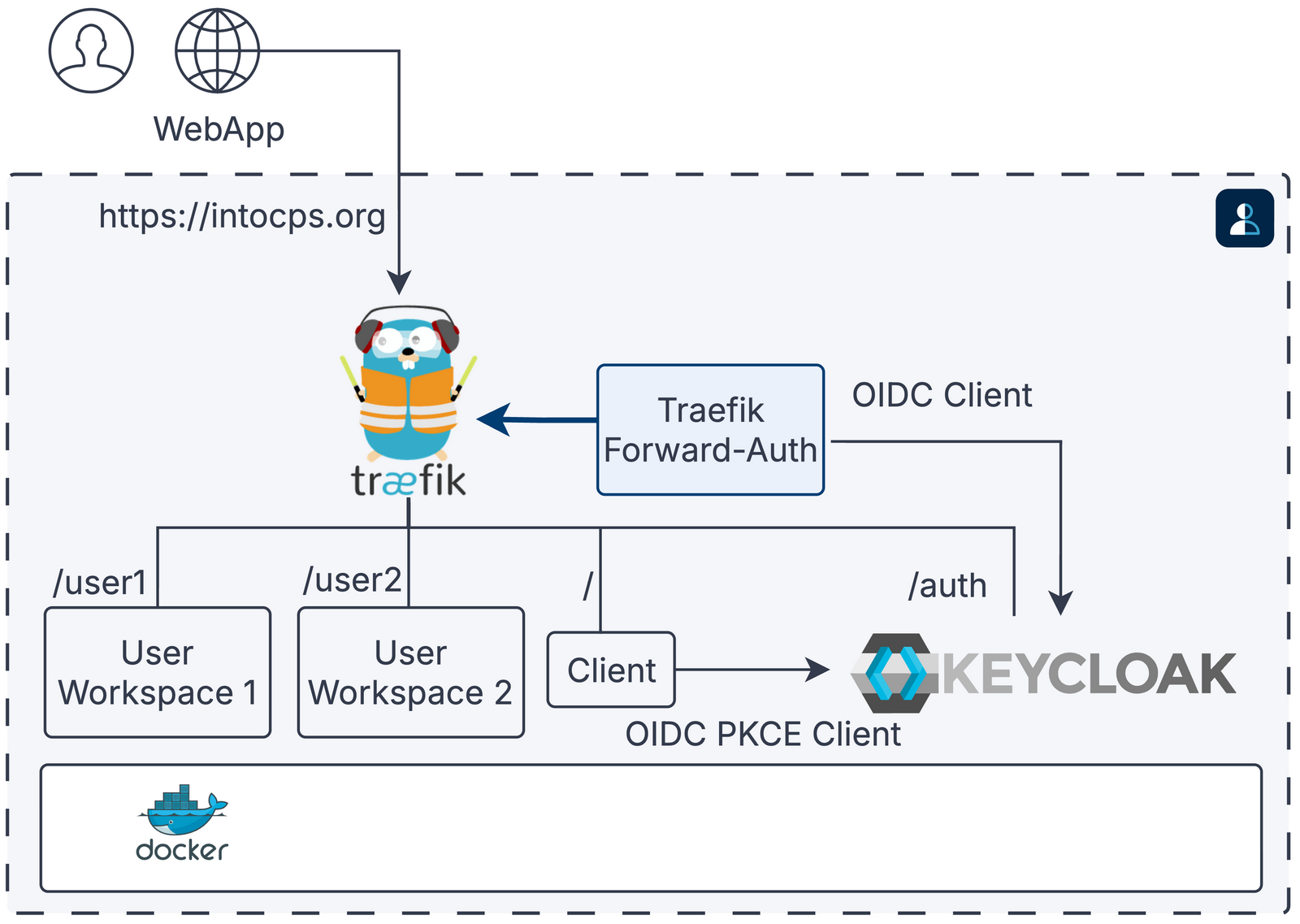
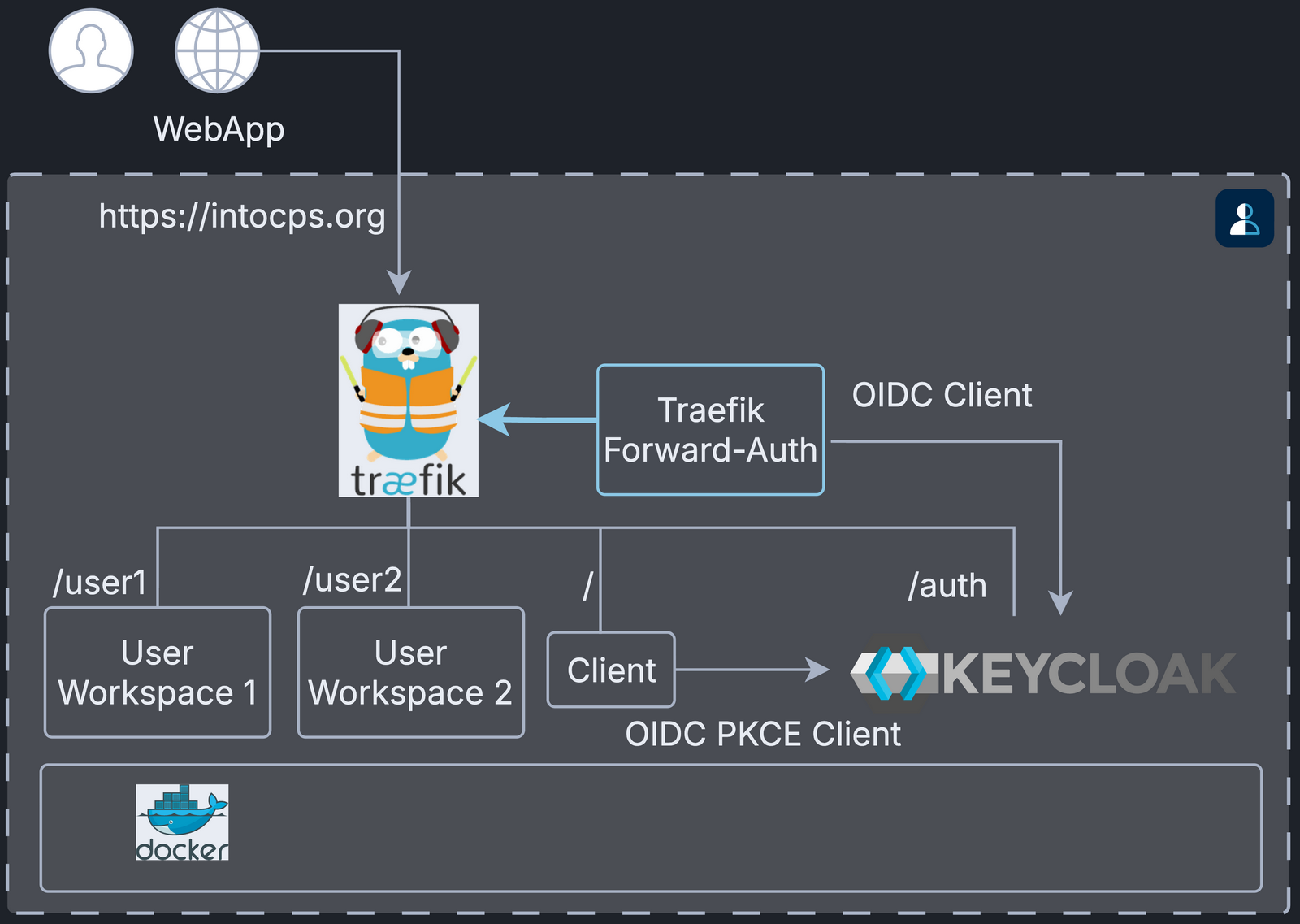
A path such as /user1 is the URL route of that service, for example
https://intocps.org/user1.
The thick arrow is the forward-auth check: Traefik asks
traefik-forward-auth to authorise each request before it routes it.
User Directories
Every deployment option needs user directories for the workspace files.
Create them for the USERNAME1 and USERNAME2 values set in config/.env.
Configuration
Follow the pre-installation steps in
configuration.md to create a valid configuration.
Start the application:
Temporary Issues
The following startup issues are expected at this stage and go away after the post-installation steps:
- The
traefik-forward-authservice keeps restarting. - Visiting
https://intocps.orgshowsHTTP ERROR 500.
Now complete the post-installation steps in
configuration.md, then restart traefik-forward-auth:
The application is now available at https://intocps.org. Log in with the user credentials set in Keycloak.
Stop the application:
To stop and remove volumes:
Customisation
Adding More Users
Create a user account for USERNAME3 in Keycloak.
Create the user's workspace directory:
Add a new service in docker-compose.yml:
Add the USERNAME3 variable to config/.env:
Add a Forward Auth rule for user3 to config/forward-auth-conf:
Troubleshooting
Certificate Issues
Problem: "NET::ERR_CERT_INVALID" in the browser
Solutions:
- Verify that the certificate files exist in the
./certs/directory - Check the certificate file permissions
- For self-signed certificates, add a security exception in the browser
OAuth2 Issues
Problem: Redirect loop after OAuth2 login
Solutions:
- Verify that the OAuth2 callback URL matches
https://intocps.org/_oauth - Check that the
SERVER_DNSenvironment variable is set correctly - Ensure that
SERVER_DNSis correct (COOKIE_DOMAINis derived from it) - Verify that the OAuth2 application is approved and active
Service Access Issues
Problem: Cannot access the workspace after authentication
Solutions:
- Check service health:
docker compose --env-file config/.env ps - View logs:
docker logs - Verify Traefik routes:
docker compose --env-file config/.env logs traefik - Test the OAuth2 service:
docker compose --env-file config/.env logs traefik-forward-auth
Port Conflicts
Problem: Ports 80 or 443 already in use
Solutions:
- Check for other services:
sudo netstat -tlnp | grep -E ':(80|443)' - Stop conflicting services
- Or change the port mappings in the compose file (not recommended for production)