Docker Workflow for DTaaS
This document describes how the Docker files are built and used for developing and installing the DTaaS platform.
NOTE: The Docker workflows need a local Docker CE installation.
Run
The developer/ directory holds two separate things:
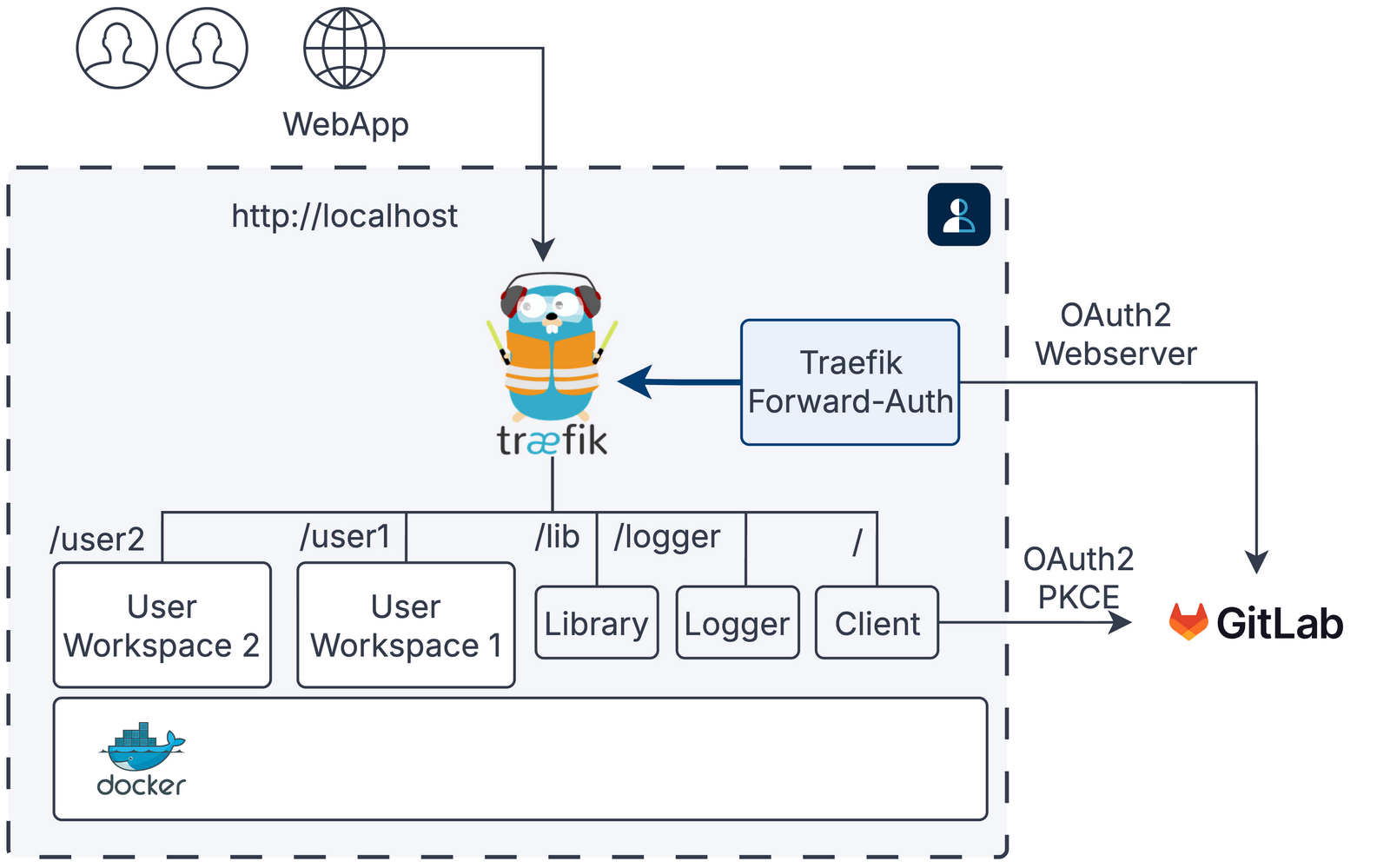
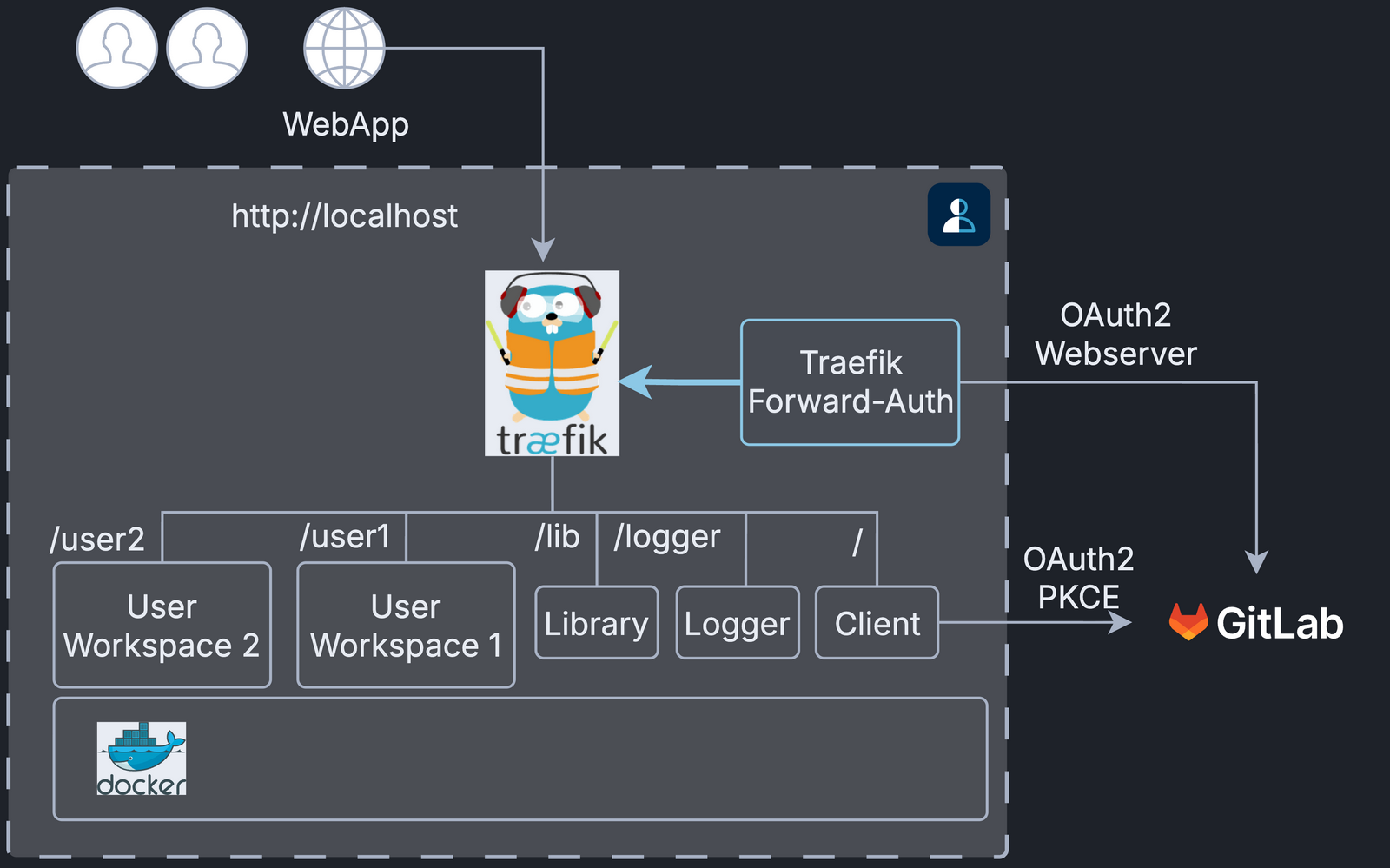
developer/check/checks that DTaaS functions on a developer machine. Follow the instructions indeveloper/check/README.mdto start a localhost instance. It is an end-to-end test of the codebase as it exists in the local git directory.developer/devenv/is the containerised developer environment: the Node, Python and documentation toolchains needed to work on the code. Seedeveloper/devenv/README.md.
The diagram shows the localhost instance that developer/check/ starts:
two user workspaces, the library and logger microservices and the client
behind Traefik, with forward-auth signing users in through GitLab.
CI Dockerfile Validation
A pull request that modifies client/**, servers/lib/**,
servers/logger/** or the relevant Dockerfiles triggers a Docker build
check. The check uses the reusable workflow
.github/workflows/docker-build.yml and runs in parallel with the test
jobs. It builds each image for both linux/amd64 and linux/arm64,
each on a native runner (ubuntu-latest and ubuntu-24.04-arm), so an
image that fails to build on either platform fails the check.
| Workflow | Dockerfile validated | Notes |
|---|---|---|
.github/workflows/client.yml |
developer/check/client.dockerfile |
Full multi-stage build inside Docker |
.github/workflows/client.yml |
developer/check/client.built.dockerfile |
Validates the publish image Dockerfile |
.github/workflows/lib-ms.yml |
developer/check/libms.dockerfile |
Full multi-stage build inside Docker |
.github/workflows/logger-ms.yml |
developer/check/logger.dockerfile |
Full multi-stage build inside Docker |
The Docker build checks also run on pushes. The push triggers of
.github/workflows/client.yml and .github/workflows/lib-ms.yml cover
only the source code directories (client/** and servers/lib/**).
The publish jobs of these two workflows run on pushes to, and manual runs
on, the feature/distributed-demo branch. Because the push trigger
covers only the source code directories, a change to a Dockerfile alone
does not re-publish an already published package version.
In all three workflows, the Docker publish jobs wait for the Docker build check to pass on both platforms. A publish that has started is never cancelled by a newer push; only superseded pull request runs are.
The logger microservice workflow (.github/workflows/logger-ms.yml)
also runs the image from developer/check/logger.dockerfile on amd64
and checks its health endpoint. It publishes that image on pushes to
feature/* and release-v* branches, and its push trigger includes
that Dockerfile.
Publish Docker Images
Build and publish the Docker images. This step is needed only to publish images to Docker Hub.
The CI workflows publish every image for both linux/amd64 and
linux/arm64. The docker build commands below build only for the
platform of the machine they run on. To publish both platforms by hand,
create a builder that supports multi-platform output once with
docker buildx create --use, then run
docker buildx build --platform linux/amd64,linux/arm64 --push
with the same -t and -f arguments instead of docker build and
docker push. The platform that differs from the host is built under
QEMU emulation, which is several times slower. Docker Desktop and
Rancher Desktop provide the emulation; on a plain Linux Docker Engine,
register it first with
docker run --privileged --rm tonistiigi/binfmt --install arm64.
Warning
Only project maintainers publish images. Other developers can skip this step.
The DTaaS development team publishes reusable packages, which together form the complete DTaaS application.
The packages are published on github, npmjs and docker hub.
The packages on github are published more often but are not user tested. The packages on npmjs and docker hub are published at least once per release. Regular users should use the packages from npm and Docker Hub.
The packages are:
| Package Name | Description | Availability |
|---|---|---|
| dtaas-web | React web application | docker hub and github |
| libms | Library microservice | npmjs and github |
| docker hub and github | ||
| logger-ms | Logger microservice | npmjs and github |
| docker hub and github | ||
| runner | REST API wrapper for multiple scripts/programs | npmjs and github |
| dt-automation | Data and business-logic layer of the client | npmjs and github |
React Website
For example, to tag version 0.3.1, use
To test the React website container on localhost, use
Library Microservice
The Dockerfile of the library microservice has a VERSION argument,
which selects the package version to install from http://npmjs.com.
For example, to tag version 0.3.1, use
To test the library microservice on localhost, use
Logger Microservice
The logger microservice image is built from the source code
with logger.dockerfile. Use the version in
servers/logger/package.json as the image tag.
For example, to tag version 0.1.2, use
To test the logger microservice on localhost, use
The captured events are written to logs/workflow-logs.jsonl.