OAuth 2.0 Summary
The Authentication Microservice (Auth MS) follows the OAuth 2.0 RFC specification. This page summarises OAuth 2.0 and how the DTaaS platform uses it.
Entities
OAuth 2.0, when used to verify user identity, has three main entities:
- The User: the entity whose identity the platform is trying to verify. In DTaaS, this is the user of the DTaaS software.
- The Client: the entity that wants to know or verify the identity of a user. In DTaaS, this is the Auth MS, initialised with a GitLab application. Do not confuse it with the DTaaS frontend website, which the rest of the documentation also calls the client.
- The OAuth 2.0 Identity Provider: the entity that lets the client know the identity of the user. In DTaaS, this is GitLab. Users usually already have a protected account with this provider. The account is registered under a unique key, such as an email ID or username, and is usually password protected so that only its owner can log in. After logging in, the user is asked to approve sharing their profile information with the client. If they approve, the client gets access to the user's email ID, username and other profile information, which it uses to verify the user's identity.
Note: In general, the authorization server (which requests user approval) and the resource (user identity) provider can be two different servers. In DTaaS, the GitLab instance handles both through different API endpoints. The concepts stay the same, so this page talks about three entities: the User, the OAuth 2.0 Client and the GitLab instance.
The OAuth 2.0 Client
Many platforms can initialise an OAuth 2.0 client. DTaaS does it by creating an "application" in GitLab. The client does not have to be initialised on the same platform as the identity provider; the two are separate concerns. The DTaaS OAuth 2.0 client is a GitLab instance-wide application, and its configuration has two main elements:
- Redirect URI: the URI to which users are redirected after they approve sharing information with the client.
- Scopes: the types and levels of access the client has to the
user's profile. DTaaS needs only the
read_userscope, which allows access to the user's profile information for identity verification.
Creating the GitLab application generates a Client ID and a Client Secret. Any application that holds these credentials becomes an OAuth 2.0 Client, so the Client Secret must never be shared. The DTaaS Auth MS uses the Client ID and Client Secret to act as an OAuth 2.0 Client and follow the OAuth 2.0 workflow to verify user identity.
OAuth 2.0 Workflows
The DTaaS platform uses two OAuth 2.0 flows.
OAuth 2.0 Authorization Code Flow
In this flow, the client exchanges an authorization code for access tokens. The DTaaS Auth MS, which secures all backend DTaaS services, uses this flow.
The Client (Auth MS) starts the workflow whenever it needs to verify a user's identity. It sends an authorization request to GitLab and tries to obtain an access token, which lets it fetch user information. With that information, the Auth MS verifies the user's identity and decides whether the user may access the requested resource.
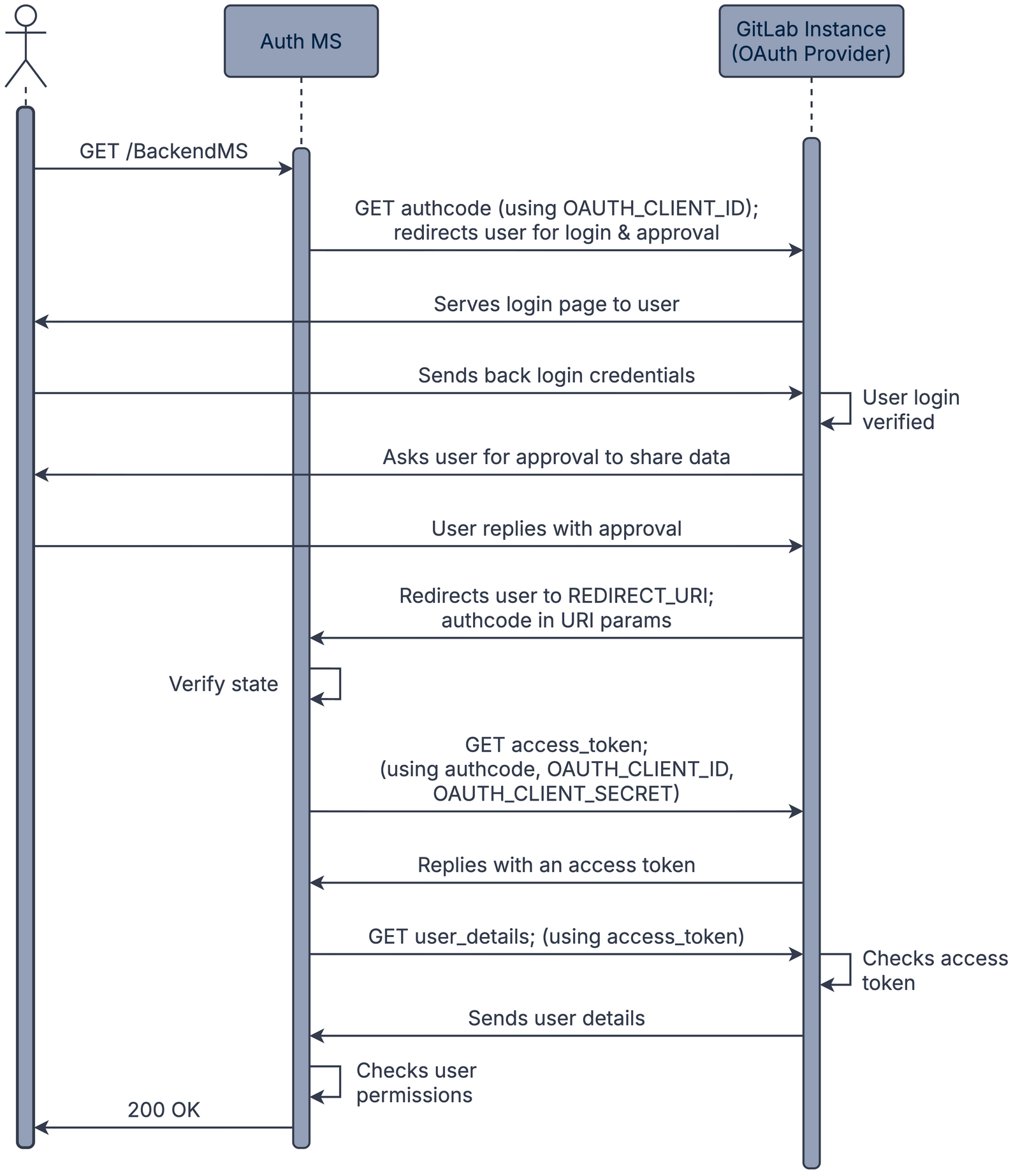
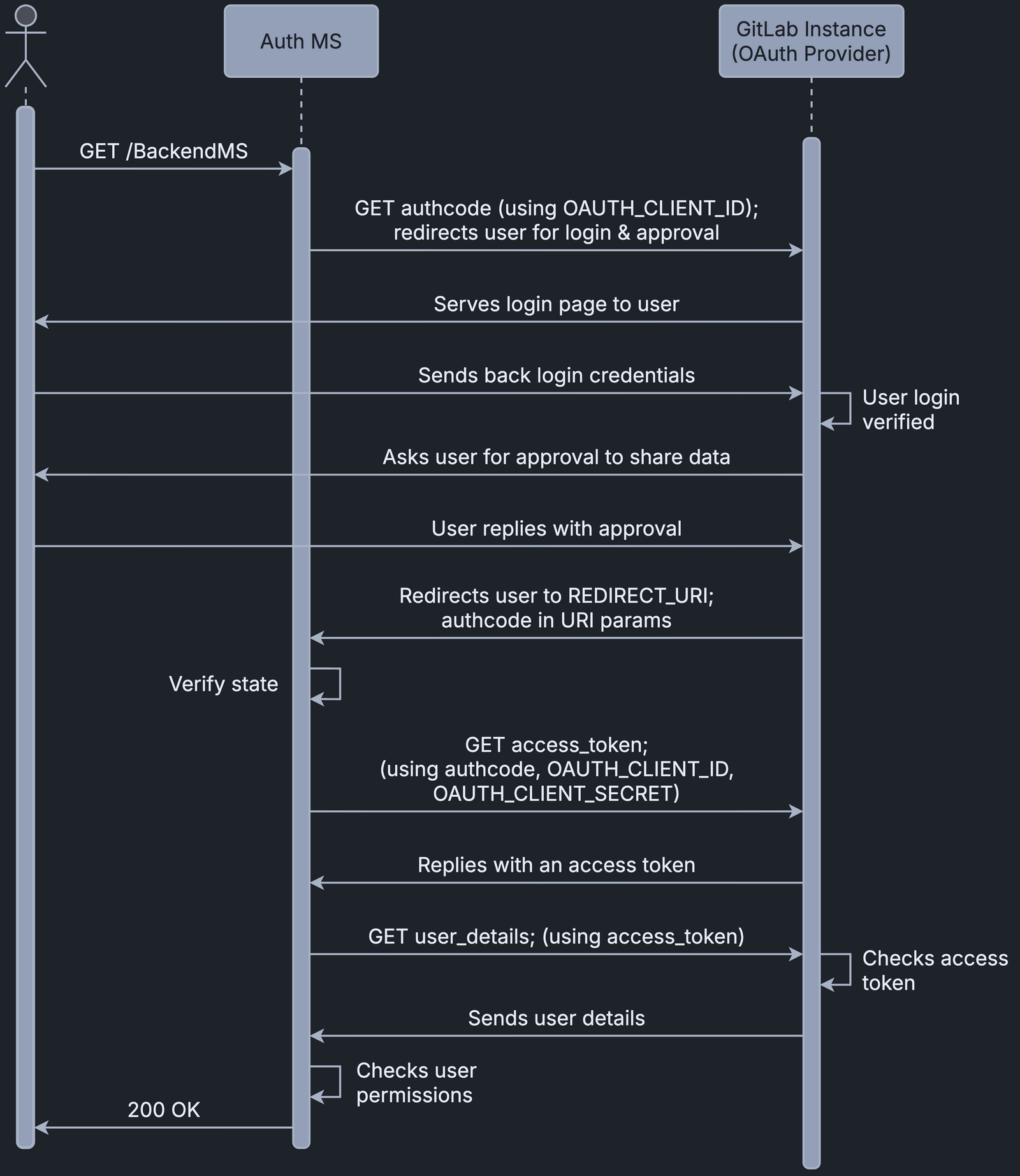
The diagram shows the requests from the Auth MS to the OAuth 2.0 provider in abbreviated form. The Auth MS implementation documentation explains the DTaaS workflow in detail.
OAuth 2.0 PKCE (Proof Key for Code Exchange) Flow
PKCE is an extension to the OAuth 2.0 Authorization Code Flow that adds security for public clients, which cannot store client secrets securely. It protects against attacks such as authorization code interception.
The DTaaS client website uses the PKCE flow for login. The Auth0 documentation describes this flow in more detail.