Install DTaaS on localhost
The installation instructions provided in this document are suitable for running DTaaS on localhost. This installation is intended for single users running DTaaS on their own computers.
Design
An illustration of the docker containers used and the authorization setup is shown here.
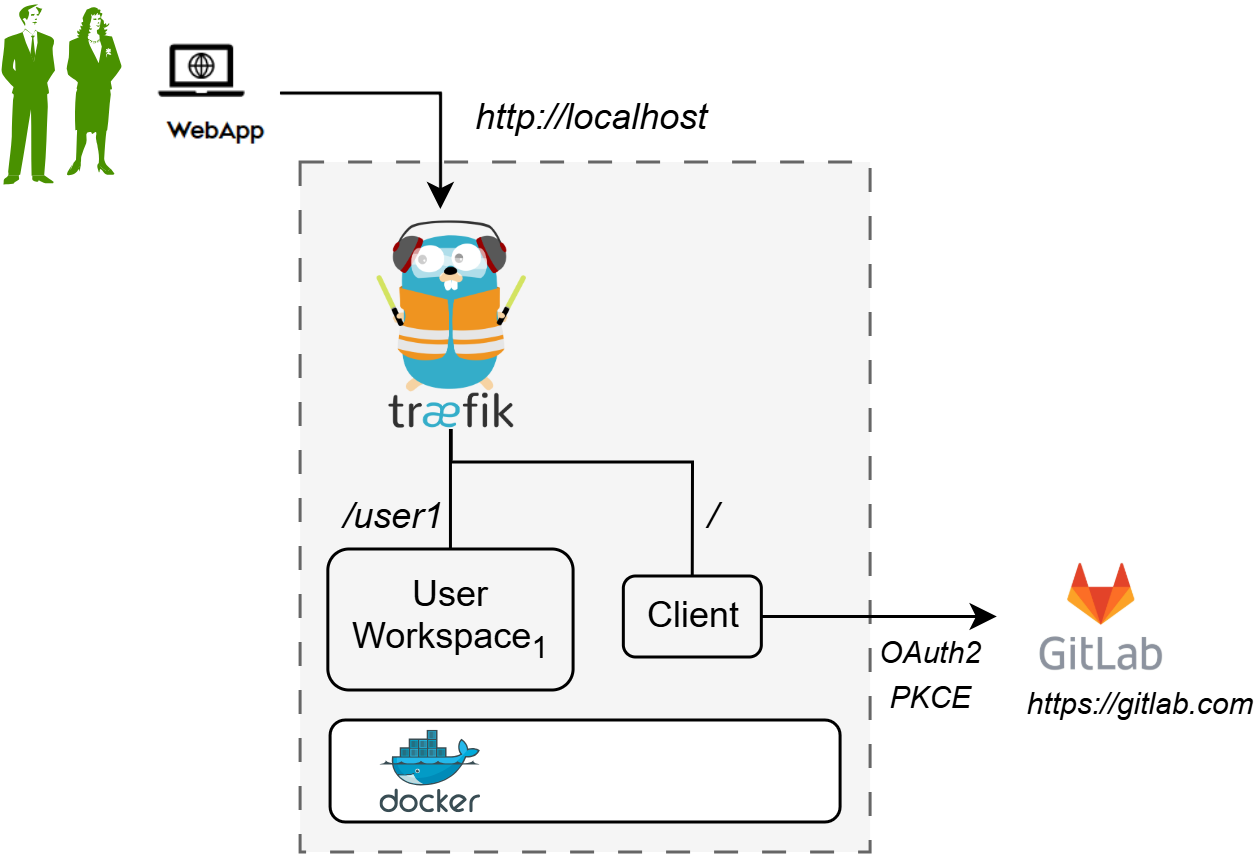
🗒️ The text starting with / at the beginning indicates the URL route
at which a certain service is available. For example, the user workspace
is available at http://localhost/user1.
Requirements
The installation requirements to run this docker version of the DTaaS are:
- docker desktop / docker CE v28.
- User account on GitLab
Tip
The frontend website requires authorization. The default authorization configuration works for https://gitlab.com. If you desire to use locally hosted GitLab instance, please see the client docs.
Download Package
The software is available as a zip package. The package should be downloaded and unzipped. A new DTaaS-v0.8.0 folder is created. The remaining installation instructions assume the use of a Windows/Linux/MacOS terminal in the DTaaS-v0.8.0 folder.
Tip
- The filepaths shown here follow POSIX convention. The installation procedures also work with Windows paths.
- The description below refers to filenames. All file paths mentioned below are relative to the top-level DTaaS directory.
Configuration
Docker Compose
The docker compose configuration is in deploy/docker/.env.local;
it is a sample file.
It contains environment variables
that are used by the docker compose files.
It can be updated to suit the local installation scenario.
It contains the following environment variables.
All fields should be edited according to the specific case.
| URL Path | Example Value | Explanation |
|---|---|---|
| DTAAS_DIR | '/Users/username/DTaaS' | Full path to the DTaaS directory. This is an absolute path with no trailing slash. |
| username1 | 'user1' | The GitLab username |
 Important points to note:
- The path examples given here are for Linux OS. These paths can also be Windows OS compatible paths.
- The client configuration file is located at
deploy/config/client/env.local.js. Beyond this, modification of this file is not necessary.
Create User Workspace
The existing filesystem for installation is configured for user1.
A new filesystem directory must be created for the selected user.
The following commands should be executed from the top-level directory of the DTaaS project.
where username is the selected username registered on GitLab.
Run
The commands to start and stop the appliation are:
To restart only a specific container, for example client
Use
The application will be accessible at: http://localhost from a web browser. Sign in using a GitLab account.
All the functionality of DTaaS should be available through the single page client.
Limitations
The library microservice is not included in the localhost installation scenario.
References
Image sources: Traefik logo, ml-workspace, reactjs, GitLab