Reusable Assets
The reusability of digital twin assets facilitates efficient work with digital twins. Reusability of assets is a fundamental feature of the platform[1].
Kinds of Reusable Assets
The DTaaS platform categorizes all reusable library assets into six categories:
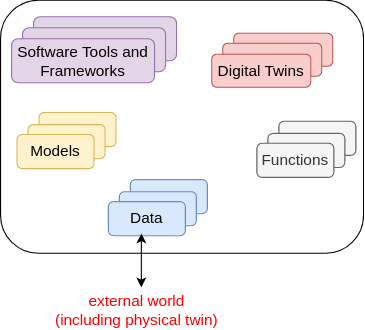
Data
The data sources and sinks available to a digital twins. Typical examples of data sources are sensor measurements from Physical Twins, and test data provided by manufacturers for calibration of models. Typical examples of data sinks are visualization software, external users and data storage services. There exist special outputs such as events, and commands which are akin to control outputs from a Digital Twin. These control outputs usually go to Physical Twins, but they can also go to another Digital Twin.
Models
The model assets are used to describe different aspects of Physical Twins and their environment, at different levels of abstraction. Therefore, it is possible to have multiple models for the same Physical Twin. For example, a flexible robot used in a car production plant may have structural model(s) which will be useful in tracking the wear and tear of parts. The same robot can have a behavioural model(s) describing the safety guarantees provided by the robot manufacturer. The same robot can also have a functional model(s) describing the part manufacturing capabilities of the robot.
Tools
The software tool assets are software used to create, evaluate and analyze models. These tools are executed on top of a computing platforms, i.e., an operating system, or virtual machines like Java virtual machine, or inside docker containers. The tools tend to be platform specific, making them less reusable than models. A tool can be packaged to run on a local or distributed virtual machine environments thus allowing selection of most suitable execution environment for a Digital Twin. Most models require tools to evaluate them in the context of data inputs. There exist cases where executable packages are run as binaries in a computing environment. Each of these packages are a pre-packaged combination of models and tools put together to create a ready to use Digital Twins.
Functions
The functions responsible for pre- and post-processing of: data inputs, data outputs, control outputs. The data science libraries and functions can be used to create useful function assets for the platform. In some cases, Digital Twin models require calibration prior to their use; functions written by domain experts along with right data inputs can make model calibration an achievable goal. Another use of functions is to process the sensor and actuator data of both Physical Twins and Digital Twins.
Digital Twins
These are ready to use digital twins created by one or more users. These digital twins can be reconfigured later for specific use cases.
File System Structure
Each user has their assets put into five different directories named above. In addition, there will also be common library assets that all users have access to. A simplified example of the structure is as follows:
Tip
The DTaaS is agnostic to the format of assets. The only requirement is that they are files which can be uploaded on the Library page. Directories can be compressed as single files and uploaded. The files can be decompressed into directories from a Terminal or xfce Desktop available on the Workbench page.
A recommended file system structure for storing assets is also available in DTaaS examples.
Upload Assets
Users can upload assets into their workspace using the Library page of the website.
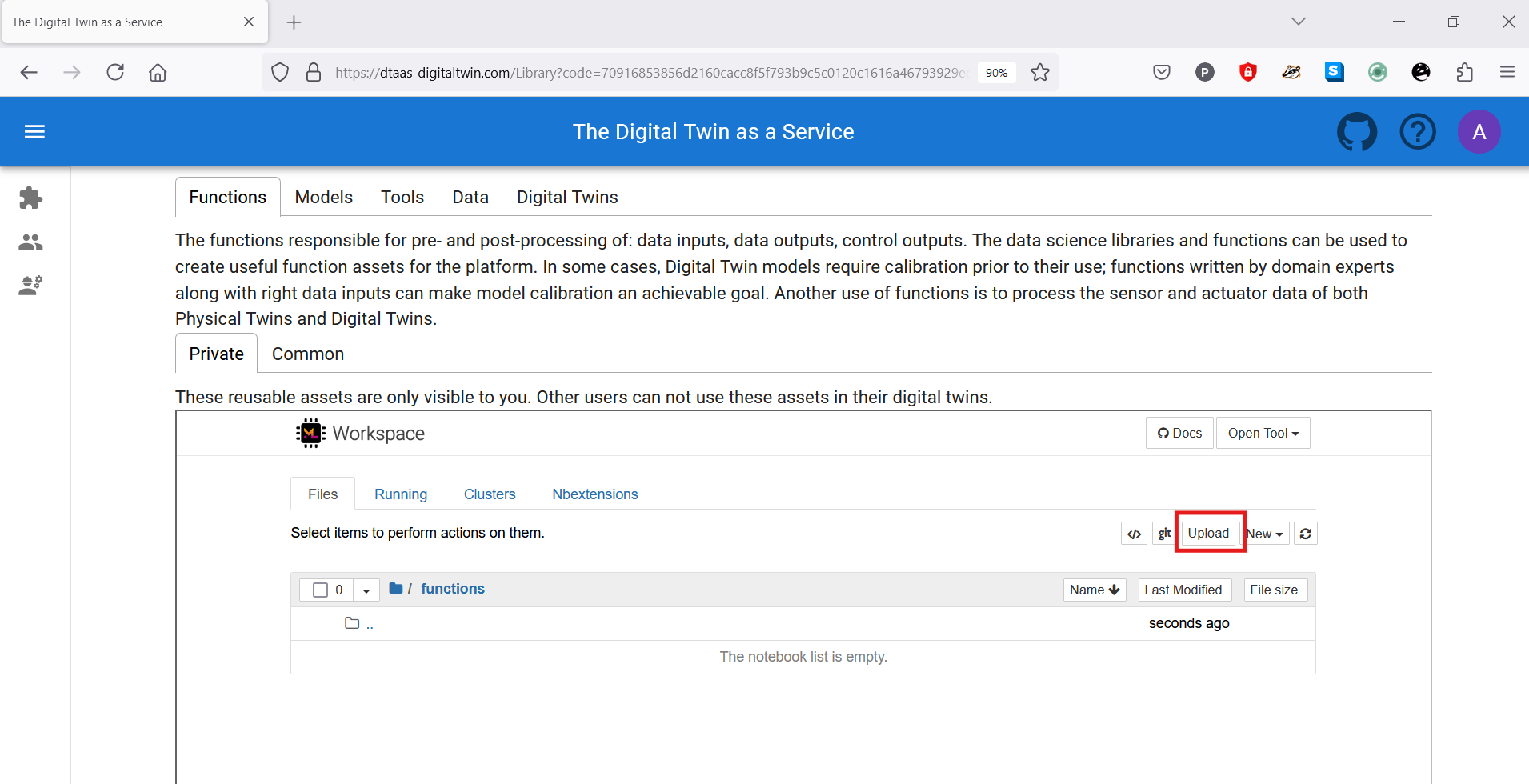
Navigation into a directory followed by clicking on the upload button allows uploading files or directories into the workspace. These assets then become available in all workbench tools. New assets can also be created on the page by clicking on the new dropdown menu. This simple web interface allows creation of text-based files. Other files must be uploaded using the upload button.
The user workbench provides the following services:
- Jupyter Notebook and Lab
- VS Code
- XFCE Desktop Environment available via VNC
- Terminal
Users can also bring DT assets into user workspaces from external sources using any of the above-mentioned services. Developers using git repositories can clone from and push to remote git servers. Users can also use widely-used file transfer protocols such as FTP and SCP to bring the required DT assets into their workspaces.
References
[1]: Talasila, Prasad, et al. "Composable digital twins on Digital Twin as a Service platform." Simulation 101.3 (2025): 287-311.