Library Microservice
The lib microservice is responsible for handling and serving
the contents of library assets of the DTaaS platform.
It provides API endpoints for clients to query, and fetch these assets.
This document provides instructions for using the library microservice.
The assets page describes suggested storage
conventions for library assets.
Once assets are stored in the library, they become
available in the user workspace.
Application Programming Interface (API)
The lib microservice application provides services at
two end points:
GraphQL API Endpoint: http://foo.com/lib
HTTP Endpoint: http://foo.com/lib/files
HTTP protocol
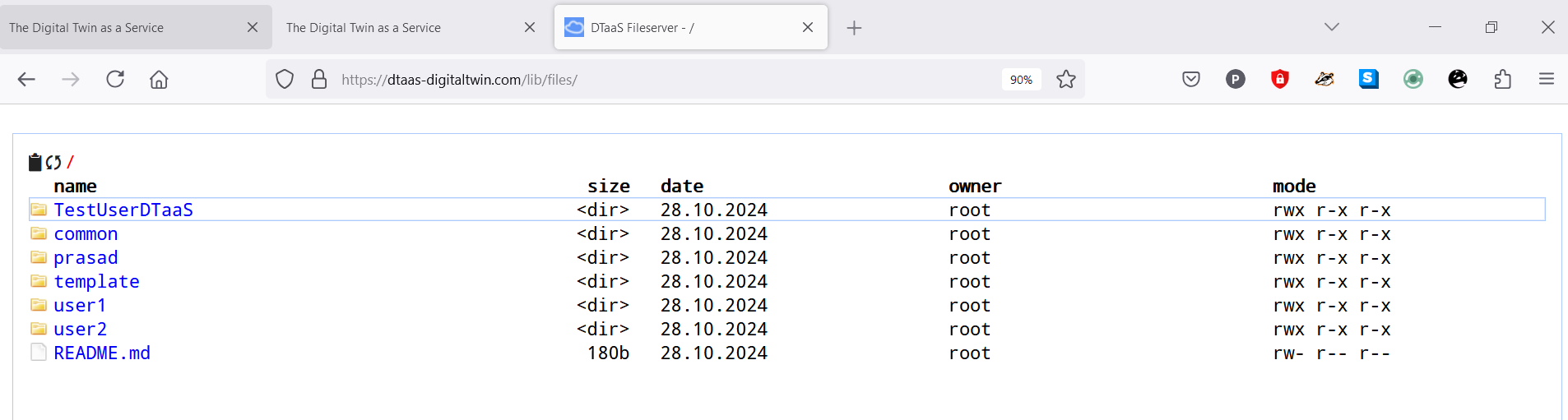
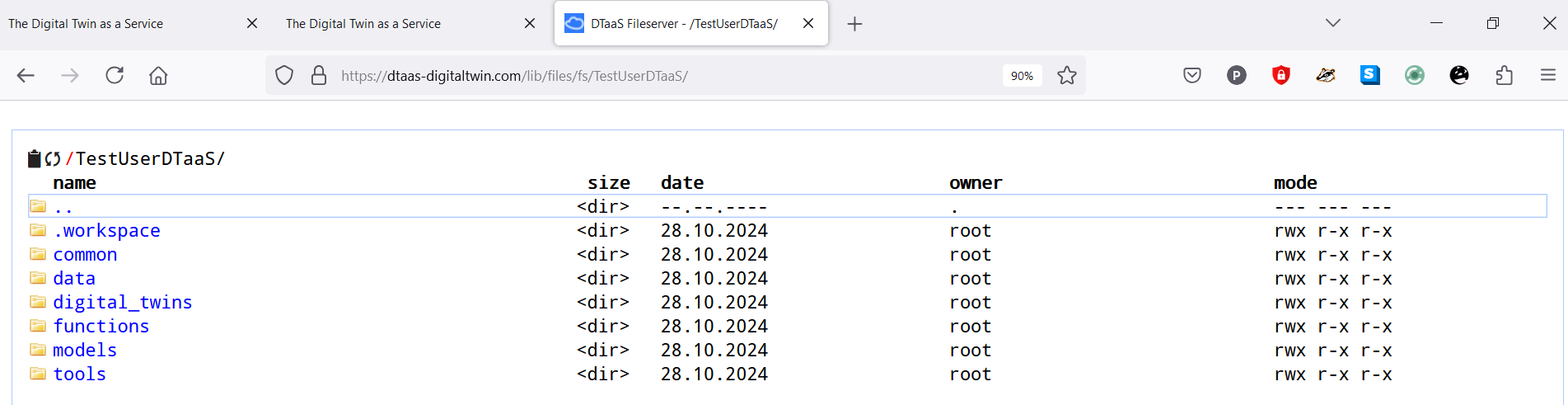
Endpoint: localhost:PORT/lib/files
This option needs to be enabled with -H http.json flag.
The regular file upload and download options become available.
Here are sample screenshots.
GraphQL protocol
Endpoint: localhost:PORT/lib
The http://foo.com/lib URL opens a GraphQL playground.
The query schema can be examined and sample queries can be tested there.
GraphQL queries must be sent as HTTP POST requests to receive responses.
The library microservice provides two API calls:
- Provide a list of contents for a directory
- Fetch a file from the available files
The API calls are accepted over GraphQL and HTTP API endpoints.
The format of accepted queries is:
Provide list of contents for a directory
To retrieve a list of files in a directory, use the following GraphQL query.
Replace path with the desired directory path.
send requests to: https://foo.com/lib
GraphQL query for list of contents
| query {
listDirectory(path: "user1") {
repository {
tree {
blobs {
edges {
node {
name
type
}
}
}
trees {
edges {
node {
name
type
}
}
}
}
}
}
}
|
GraphQL response for list of contents
| {
"data": {
"listDirectory": {
"repository": {
"tree": {
"blobs": {
"edges": []
},
"trees": {
"edges": [
{
"node": {
"name": "common",
"type": "tree"
}
},
{
"node": {
"name": "data",
"type": "tree"
}
},
{
"node": {
"name": "digital twins",
"type": "tree"
}
},
{
"node": {
"name": "functions",
"type": "tree"
}
},
{
"node": {
"name": "models",
"type": "tree"
}
},
{
"node": {
"name": "tools",
"type": "tree"
}
}
]
}
}
}
}
}
}
|
HTTP request for list of contents
| POST /lib HTTP/1.1
Host: foo.com
Content-Type: application/json
Content-Length: 388
{
"query":"query {\n listDirectory(path: \"user1\") {\n repository {\n tree {\n blobs {\n edges {\n node {\n name\n type\n }\n }\n }\n trees {\n edges {\n node {\n name\n type\n }\n }\n }\n }\n }\n }\n}"
}
|
HTTP response for list of contents
| HTTP/1.1 200 OK
Access-Control-Allow-Origin: *
Connection: close
Content-Length: 306
Content-Type: application/json; charset=utf-8
Date: Tue, 26 Sep 2023 20:26:49 GMT
X-Powered-By: Express
{"data":{"listDirectory":{"repository":{"tree":{"blobs":{"edges":[]},"trees":{"edges":[{"node":{"name":"data","type":"tree"}},{"node":{"name":"digital twins","type":"tree"}},{"node":{"name":"functions","type":"tree"}},{"node":{"name":"models","type":"tree"}},{"node":{"name":"tools","type":"tree"}}]}}}}}}
|
Fetch a file from the available files
This query receives directory path and send the file contents to user in response.
To check this query, create a file files/user2/data/welcome.txt
with content of hello world.
GraphQL query for fetch a file
| query {
readFile(path: "user2/data/sample.txt") {
repository {
blobs {
nodes {
name
rawBlob
rawTextBlob
}
}
}
}
}
|
GraphQL response for fetch a file
| {
"data": {
"readFile": {
"repository": {
"blobs": {
"nodes": [
{
"name": "sample.txt",
"rawBlob": "hello world",
"rawTextBlob": "hello world"
}
]
}
}
}
}
}
|
HTTP request for fetch a file
| POST /lib HTTP/1.1
Host: foo.com
Content-Type: application/json
Content-Length: 217
{
"query":"query {\n readFile(path: \"user2/data/welcome.txt\") {\n repository {\n blobs {\n nodes {\n name\n rawBlob\n rawTextBlob\n }\n }\n }\n }\n}"
}
|
HTTP response for fetch a file
| HTTP/1.1 200 OK
Access-Control-Allow-Origin: *
Connection: close
Content-Length: 134
Content-Type: application/json; charset=utf-8
Date: Wed, 27 Sep 2023 09:17:18 GMT
X-Powered-By: Express
{"data":{"readFile":{"repository":{"blobs":{"nodes":[{"name":"welcome.txt","rawBlob":"hello world","rawTextBlob":"hello world"}]}}}}}
|
The path refers to the file path to look at:
For example, user1 looks at files of
user1; user1/functions looks at contents of functions/ directory.