 Digital Twin Lifecycle
Physical products in the real world undergo a product lifecycle. A simplified four-stage product lifecycle is illustrated here.
A digital twin tracking physical products (twins) must evolve in conjunction with the corresponding physical twin.
The possible activities undertaken in each lifecycle phase are illustrated in the figure.
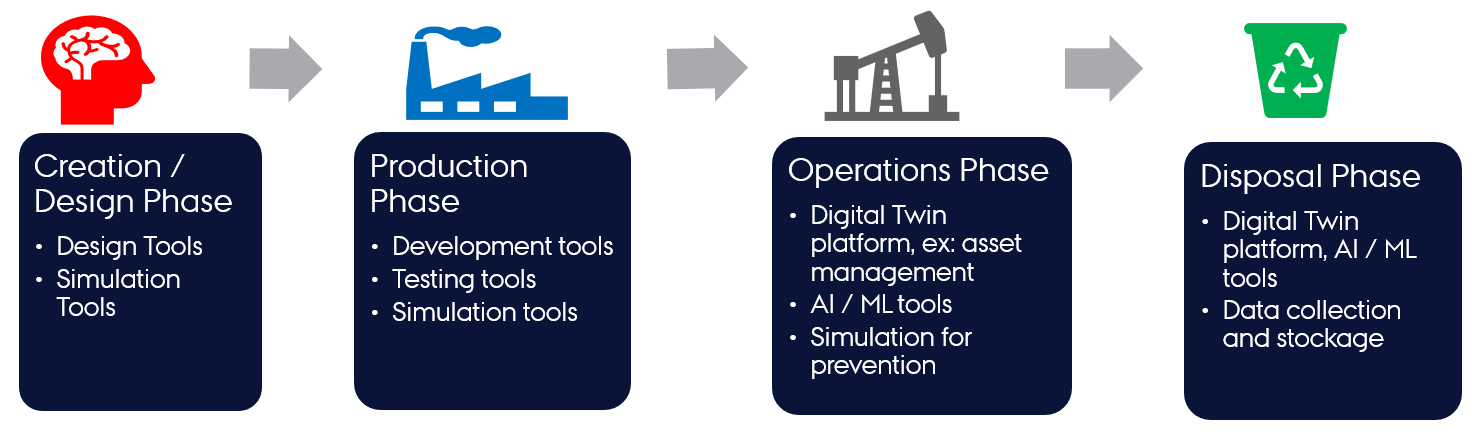
(Ref: Minerva, R, Lee, GM and Crespi, N (2020) Digital Twin in the IoT context: a survey on technical features, scenarios and architectural models. Proceedings of the IEEE, 108 (10). pp. 1785-1824. ISSN 0018-9219.)
Lifecycle Phases
The four-phase lifecycle has been extended to a lifecycle with eight phases. The new phase names and the typical activities undertaken in each phase are outlined in this section[1].
A DT lifecycle consists of explore, create, execute, save, analyse, evolve and terminate phases.
| Phase | Main Activities |
|---|---|
| explore | Selection of suitable assets based on user requirements and verification of their compatibility for DT creation. |
| create | Specification of DT configuration. For existing DTs, no creation phase is required at the time of reuse. |
| execute | Automated or manual execution of a DT based on its configuration. The DT configuration must be verified before starting execution. |
| analyse | Examination of DT outputs and decision-making. Outputs may include text files or visual dashboards. |
| evolve | Reconfiguration of DT primarily based on analysis results. |
| save | Preservation of DT state to enable future recovery. |
| terminate | Cessation of DT execution. |
A digital twin faithfully tracking the physical twin lifecycle must support all the phases. Digital twin engineers may also add additional phases to their implementations. Consequently, the DTaaS platform is designed to accommodate the needs of diverse DTs.
A potential linear representation of the tasks undertaken in a digital twin lifecycle is shown here.
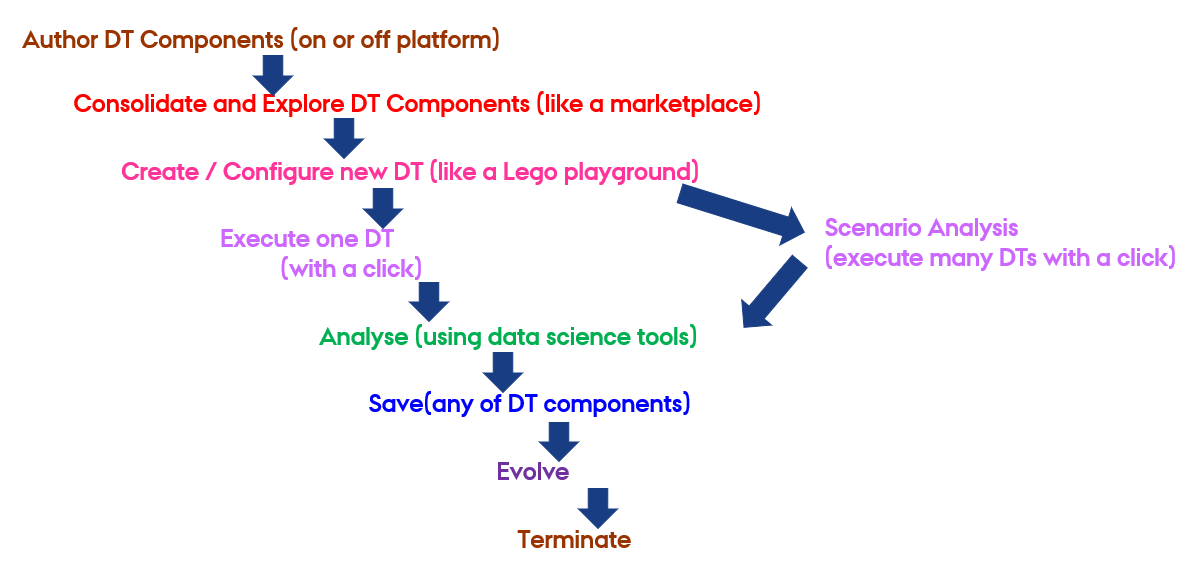
This representation shows only one possible pathway. The sequence of steps may be altered as needed.
It is possible to map the lifecycle phases to the Build-Use-Share approach of the DTaaS platform.
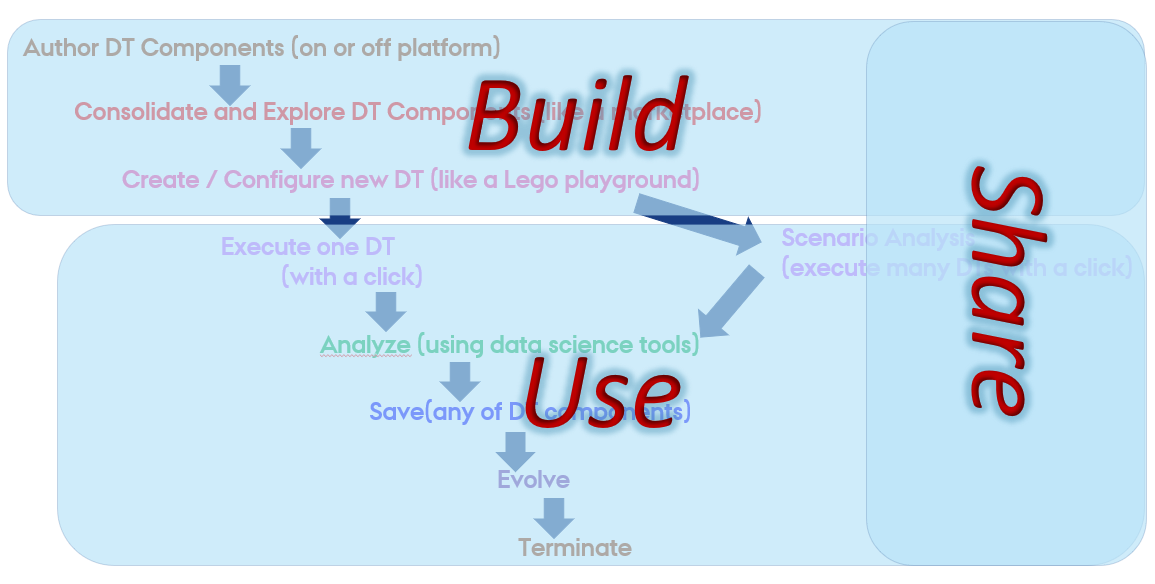
Although not mandatory, maintaining a matching code structure facilitates DT creation and management within the DTaaS platform. The following structure is recommended:
A dedicated program exists for each phase of the DT lifecycle. Each program can be as simple as a script that launches other programs or sends messages to a live digital twin.
The recommended approach for implementing lifecycle phases within DTaaS is to create scripts. These scripts can be implemented as shell scripts.
Example Lifecycle Scripts
The following example programs/scripts demonstrate management of three phases in the lifecycle of the mass-spring-damper DT.
| lifecycle/execute | |
|---|---|
The execute phase utilizes the DT configuration, FMU models, and Maestro tool
to execute the digital twin. The script also stores the output of
co-simulation in /workspace/data/mass-spring-damper/output.
A DT may not support a specific lifecycle phase. This intention can be expressed with an empty script and a helpful message if deemed necessary.
The lifecycle programs can invoke other programs in the codebase.
In the case of the lifecycle/terminate program, it calls another
script to perform the necessary operations.
References
[1]: Talasila, Prasad, et al. "Composable digital twins on Digital Twin as a Service platform." Simulation 101.3 (2025): 287-311.