OAuth 2.0 Summary
The Authentication Microservice (Auth MS) operates according to the OAuth 2.0 RFC specification. This document provides a brief summary of the OAuth 2.0 technology and its implementation within the DTaaS platform.
Entities
OAuth 2.0, as used for user identity verification, has 3 main entities:
- The User: This is the entity whose identity we are trying to verify/know. In our case, this is the same as the user of the DTaaS software.
- The Client: This is the entity that wishes to know/verify the identity of a user. In our case, this is the Auth MS (initialised with a GitLab application). This shouldn’t be confused with the frontend website of DTaaS (referred to as Client in the previous section).
- The OAuth 2.0 Identity Provider: This is the entity that allows the client to know the identity of the user. In our case, this is GitLab. Most commonly, users have an existing, protected account with this entity. The account is registered using a unique key, like an email ID or username and is usually password protected so that only that specific user can login using that account. After the user has logged in, they will be asked to approve sharing their profile information with the client. If they approve, the client will have access to the user’s email id, username, and other profile information. This information can be used to know/verify the identity of the user.
Note: In general, the Authorization server (which requests user approval) and the Resource (User Identity) provider can be two different servers. However, in the DTaaS implementation, the GitLab instance handles both functions through different API endpoints. The underlying concepts remain the same. Therefore, this discussion focuses on the three main entities: the User, the OAuth 2.0 Client, and the GitLab instance.
The OAuth 2.0 Client
Many platforms allow the initialization of an OAuth 2.0 client. For the DTaaS implementation, GitLab is used by creating an "application" within GitLab. However, it is not necessary to initialize a client using the same platform as the identity provider; these are separate concerns. The DTaaS OAuth 2.0 client is initialized by creating and configuring a GitLab instance-wide application. There are two main elements in this configuration:
- Redirect URI: This is the URI to which users are redirected after they approve sharing information with the client.
- Scopes: These define the types and levels of access that the client can have over the user's profile. For the DTaaS, only the "read user" scope is required, which permits access to the user's profile information for identity verification.
After the GitLab application is successfully created, a Client ID and Client Secret are generated. These credentials can be used in any application, effectively making that application an OAuth 2.0 Client. For this reason, the Client Secret must never be shared. The DTaaS Auth MS uses this Client ID and Client Secret, thereby functioning as an OAuth 2.0 Client application capable of following the OAuth 2.0 workflow to verify user identity.
OAuth 2.0 Workflows
Two major OAuth 2.0 flows are employed in the DTaaS platform.
OAuth 2.0 Authorization Code Flow
This flow involves several steps and the exchange of an authorization code for access tokens to ensure secure authorization. This flow is used by the DTaaS Auth MS, which is responsible for securing all backend DTaaS services.
The OAuth 2.0 workflow is initiated by the Client (Auth MS) whenever user identity verification is required. The flow begins when the Auth MS sends an authorization request to GitLab. The Auth MS attempts to obtain an access token, which enables it to gather user information. Once user information is retrieved, the Auth MS can verify the user's identity and determine whether the user has permission to access the requested resource.
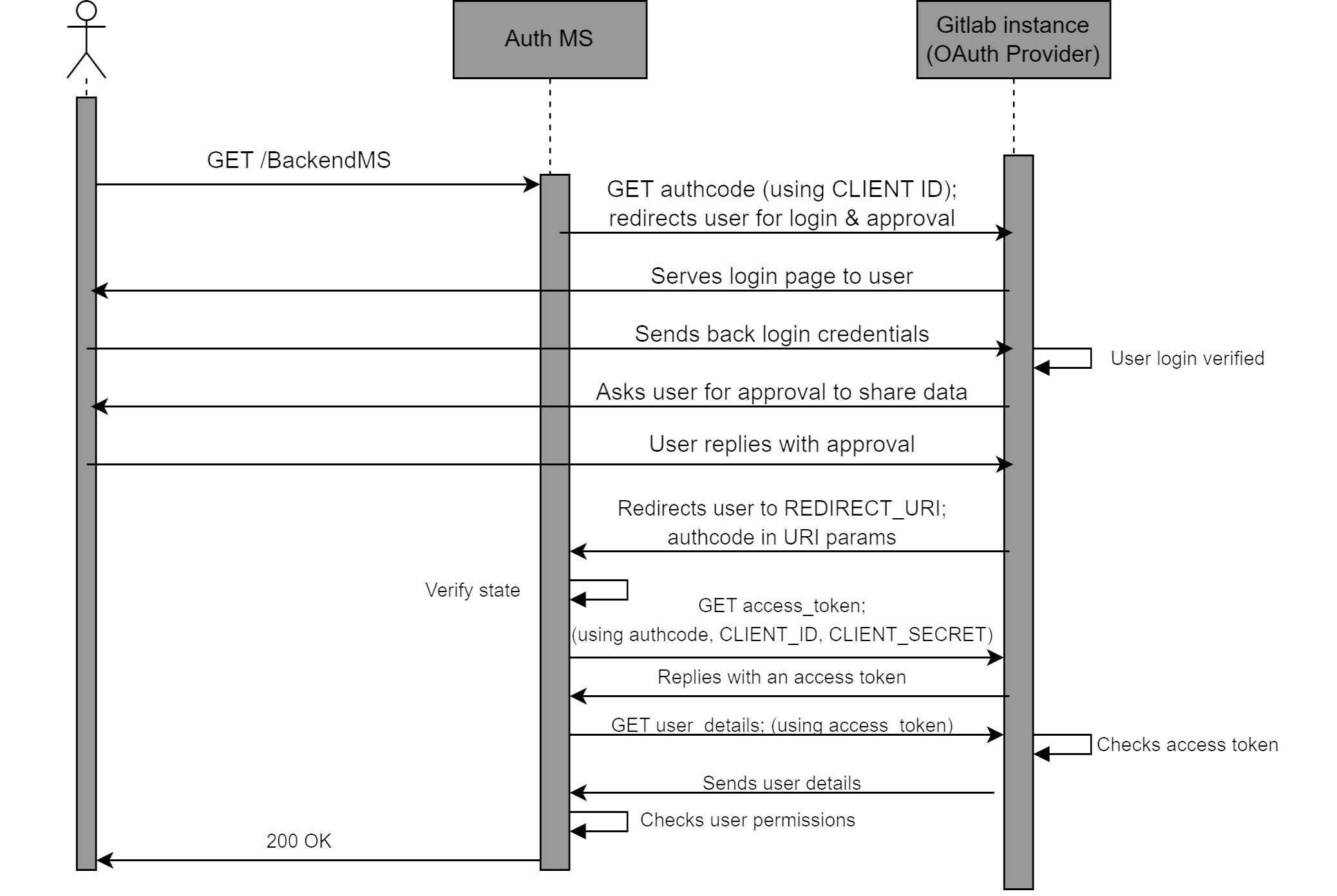
The requests made by the Auth MS to the OAuth 2.0 provider are shown in abbreviated form. A detailed explanation of the workflow specific to the DTaaS can be found in the Auth MS implementation documentation.
OAuth 2.0 PKCE (Proof Key for Code Exchange) Flow
PKCE is an extension to the OAuth 2.0 Authorization Code Flow designed to provide an additional layer of security, particularly for public clients that cannot securely store client secrets. PKCE mitigates certain attack vectors, such as authorization code interception.
The DTaaS client website login is implemented using the PKCE OAuth 2.0 flow. Further details about this flow are available in the Auth0 documentation.