Install

This guide explains how to deploy the workspace application for secure multi-user deployments with Keycloak for authentication.
❓ Prerequisites
✅ Docker Engine v27 or later
✅ Sufficient system resources (at least 2GB RAM per workspace instance)
✅ Port 80 and 443 are available on the host
✅ Valid TLS certificates
✅ Domain name pointing to the server
Download workspace-keycloak-production-xx.zip from the latest release / pre-release page.
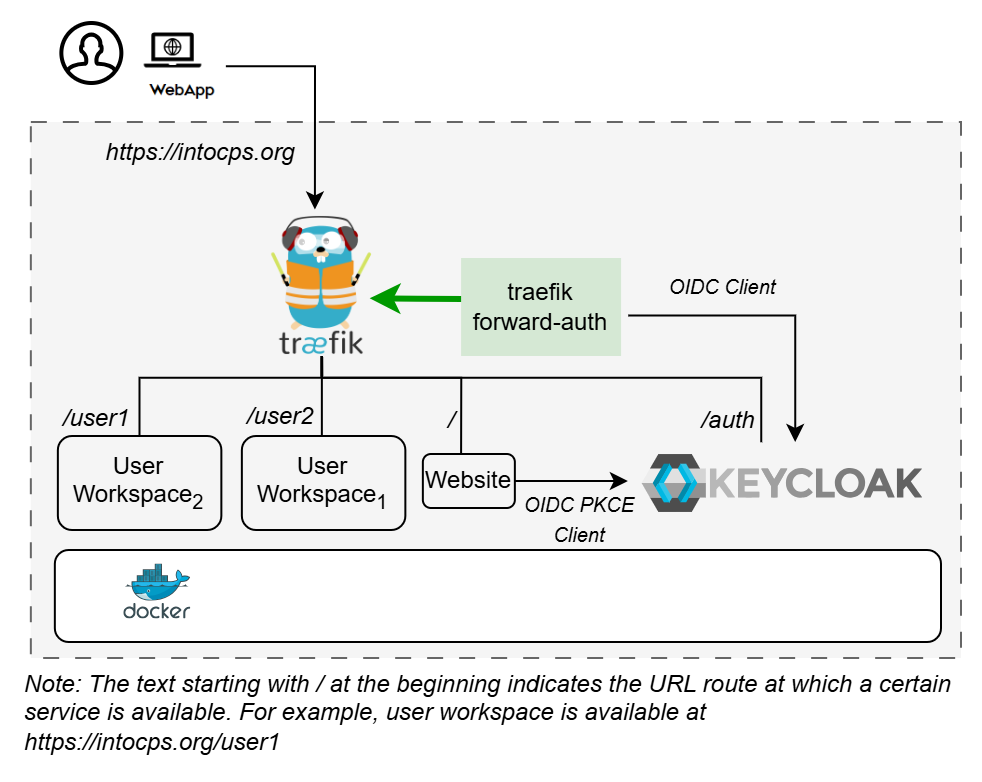
🗒️ Design
An illustration of the installation setup is shown here.
📁 User Directories
All the deployment options require user directories for
storing workspace files. These need to
be created for USERNAME1 and USERNAME2 set in .env file.
⚙️ Configuration
Follow the pre-installation steps in
configuration.md for creating valid configuration.
▶️ Start the application:
🌵 Temporary Issues
The following issues in application startup are expected behaviour. This problem will be resolved during post-installation.
👉 traefik-forward-auth service will be restarting at this stage.
👉 Visiting https://intocps.org shows HTTP ERROR 500.
Now complete the post-installation steps in
configuration.md. Restart traefik-forward-auth
The application will be accessible at https://intocps.org from web browser. Login using the user credentials set in Keycloak.
Stop the demo:
To stop and remove volumes:
🔧 Customisation
Adding More Users
Create user account for USERNAME3 in Keycloak.
Create the user's workspace directory:
Add a new service in docker-compose.yml:
Add the desired USERNAME3 variable in .env:
Add Forward Auth config for user3 in forward-auth-conf:
🐛 Troubleshooting
Certificate Issues
Problem: "NET::ERR_CERT_INVALID" in browser
Solutions:
- Verify certificate files exist in
./certs/directory - Check certificate file permissions
- For self-signed certs, add security exception in browser
OAuth2 Issues
Problem: Redirect loop after OAuth2 login
Solutions:
- Verify OAuth2 callback URL matches
https://intocps.org/_oauth - Check
SERVER_DNSenvironment variable is set correctly - Ensure
COOKIE_DOMAINmatches the domain - Verify OAuth2 application is approved and active
Service Access Issues
Problem: Cannot access workspace after authentication
Solutions:
- Check service health:
docker compose ps - View logs:
docker logs - Verify Traefik routes:
docker compose logs traefik - Test OAuth2 service:
docker compose logs traefik-forward-auth
Port Conflicts
Problem: Ports 80 or 443 already in use
Solutions:
- Check for other services:
sudo netstat -tlnp | grep -E ':(80|443)' - Stop conflicting services
- Or modify port mappings in compose file (not recommended for production)