Install

🛠️ Install
The installation instructions provided in this README are ideal for running the DTaaS on localhost served over HTTP connection.
✅ This installation is ideal for single users intending to use DTaaS on their own computers.
Download workspace-dex-localhost-xx.zip from the latest release / pre-release page.
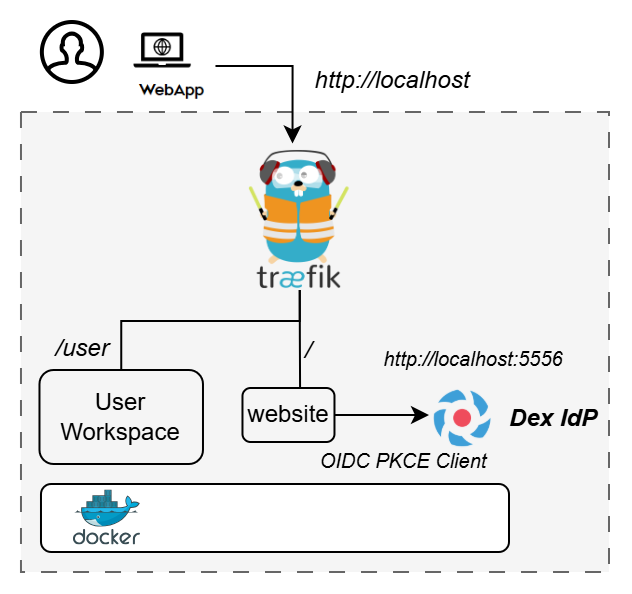
🏗️ Design
An illustration of the installation setup is shown here.
Prerequisites
- Docker Engine v27 or later
- Ports 80 and 5556 available on the host
- At least 2GB RAM available
⚡ Quick Demo
The description below refers to filenames. All the commands mentioned below are to be run this directory.
Copy example configuration files first:
▶️ Start the demo:
The application will be accessible at http://localhost from web browser. Login using the default credentials.
👤 User email: user@intocps.org
🔑 Password: user
⏹️ Stop the demo:
🌵Limitations
- All the functionality of DTaaS except DevOps features should be available through the single page client now.
- The installation has default user credentials. See instructions for help with changing the user credentials.
📚 Documentation
See https://into-cps-association.github.io/DTaaS/development/index.html for complete documentation.
🔗 References
Image sources:
Traefik logo: https://www.laub-home.de/wiki/
Dex IdP: https://dexidp.io/