Water Tank Model Swap
Overview
This example shows multi-stage execution and dynamic reconfiguration of a digital twin (DT). It demonstrates two features of DTs:
- Fault injection into a live DT
- Dynamic auto-reconfiguration of a live DT
The DT is built with the co-simulation methodology.
Example Structure

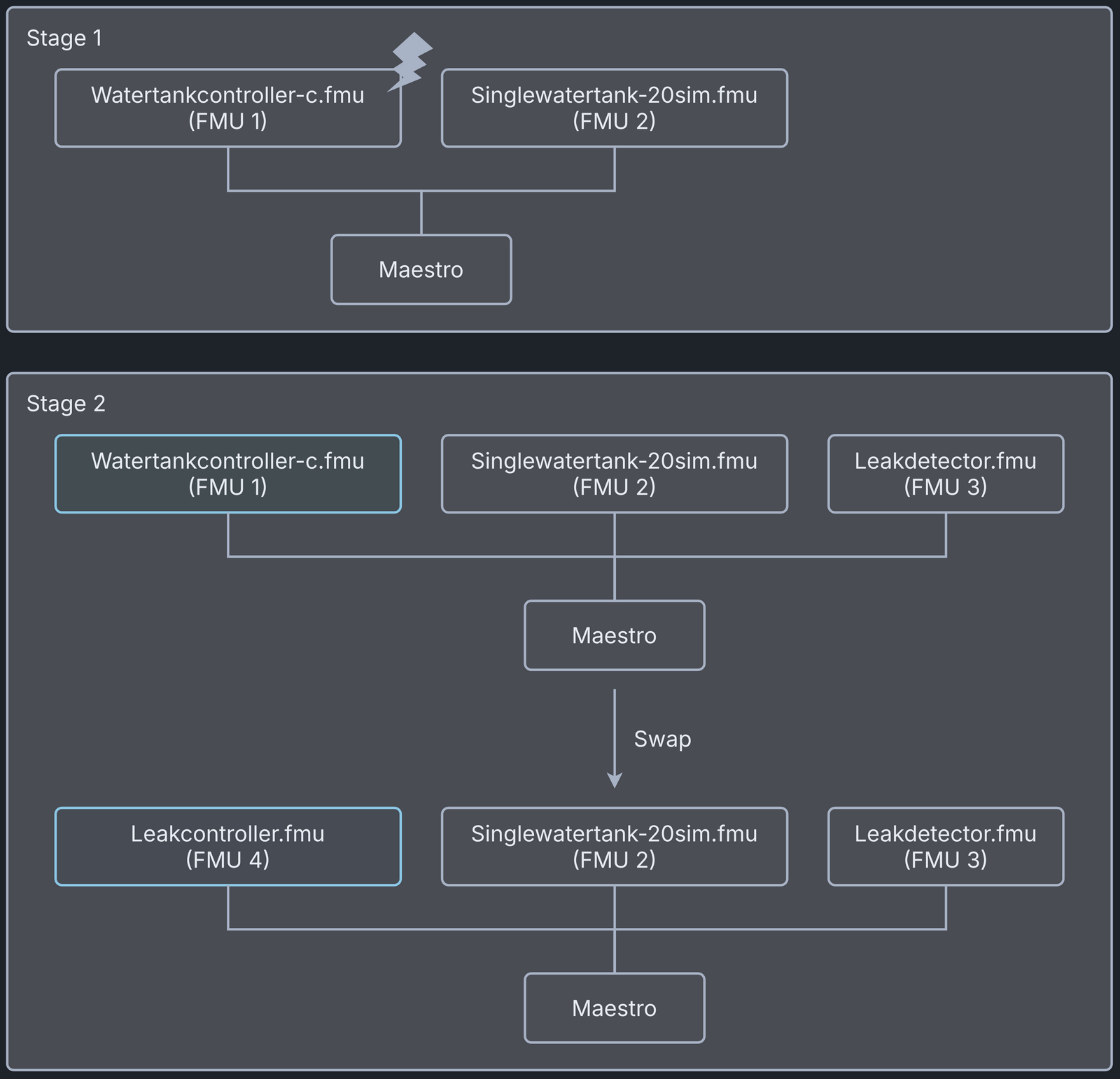
Configuration of assets
This example uses four models and one tool:
| Asset Type | Names of Assets | Visibility | Reuse in Other Examples |
|---|---|---|---|
| Models | watertankcontroller-c.fmu | Private | Yes |
| singlewatertank-20sim.fmu | Private | Yes | |
| leak_detector.fmu | Private | No | |
| leak_controller.fmu | Private | No | |
| Tool | maestro-4.1.0-jar-with-dependencies.jar | Common | Yes |
The DT is executed in two stages, and each stage has its own configuration files. The following table lists the configuration files and their purpose.
| Configuration file name | Execution Stage | Purpose |
|---|---|---|
| mm1.json | stage-1 | DT configuration |
| wt_fault.xml, FaultInject.mabl | stage-1 | faults injected into DT during stage-1 |
| mm2.json | stage-2 | DT configuration |
| simulation-config.json | Both stages | Configuration for specifying DT execution time and output logs |
Lifecycle Phases
| Lifecycle Phase | Completed Tasks |
|---|---|
| Create | Installs Java Development Kit for Maestro tool |
| Execute | Produces and stores output in data/water_tank_swap/output directory |
| Analyze | Processes the co-simulation output and produces plots |
| Clean | Clears run logs and intermediate co-simulation files |
Run the example
To run the example, change to the example directory.
If required, make the lifecycle scripts executable, for example:
Then run the following scripts.
Create
Installs Open Java Development Kit 21 and, from the Ubuntu repositories,
the Python packages used by the plotting script and the Python FMUs
(python3-pandas, python3-matplotlib, python3-protobuf and
python3-zmq).
Execute
This DT runs in two stages. The first stage runs a co-simulation of the watertankcontroller-c.fmu and singlewatertank-20sim.fmu models. During this stage, faults are injected into one of the models (watertankcontroller-c.fmu) and the system performance is checked.
The second stage runs another co-simulation with three FMUs: watertankcontroller-c, singlewatertank-20sim and leak_detector. The Maestro tool has a built-in monitor, which is enabled during this stage, and a swap condition is set at the start of the stage. When the swap condition is satisfied, Maestro swaps out the watertankcontroller-c.fmu model and swaps in the leak_controller.fmu model. This model swap demonstrates the dynamic reconfiguration of a DT.
At the end of the execution phase, the outputs.csv file of each stage is
copied to the stage1 and stage2 subdirectories of
/workspace/examples/data/water_tank_swap/output.
Analyze phase
Processes the co-simulation output and saves a plot in
/workspace/examples/data/water_tank_swap/output/plots/.
Examine the results
The results are in the /workspace/examples/data/water_tank_swap/output directory.
The run logs are in /workspace/examples/digital_twins/water_tank_swap.
Terminate phase
Removes the temporary files.
References
The complete source of this example is in the model swap GitHub repository.
The run-time model (FMU) swap mechanism used in this example is described in the paper:
Runtime reconfiguration of a co-simulation by changing the Functional Mockup Units (FMUs) it uses is described further in the paper: