Three-Tank System Digital Twin
Overview
The three-tank system is a simple case study of three components coupled in a cascade: the first tank is connected to the input of the second tank, and the output of the second tank is connected to the input of the third tank.

This example contains only simulated components, so there is no configuration for a connection to the physical system.
The TwinManager manages the three-tank system. It is packaged as a
jar library in the tools and run from a Java main file.
The TwinManager uses Maestro as a slave for co-simulation,
so it generates the output of the co-simulation.
The main file can be changed to suit the application, that is,
/workspace/examples/tools/three-tank/TankMainDTaaS.java
can be modified to get a different result.
The /workspace/examples/models/three-tank/ folder contains
Linear.fmu, a non-realistic model of a tank with an input and an
output, and TankSystem.aasx, the schema representation as an
Asset Administration Shell.
The three tank instances use the same .fmu file and the same schema
because they belong to the same object class.
The TwinManager reads the values from the co-simulation output.
Example Structure

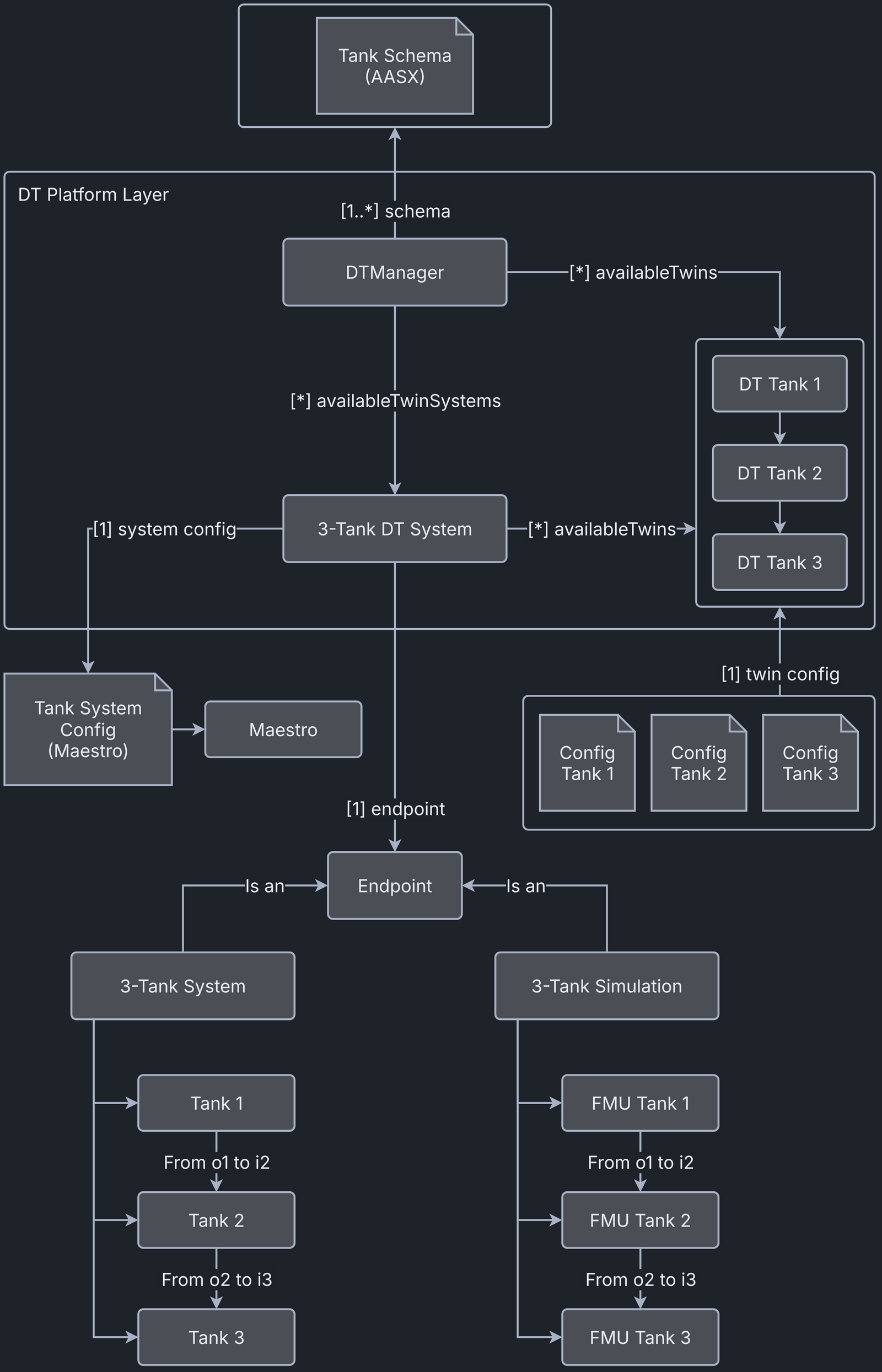
Digital Twin Configuration
This example uses two models, three tools and one data file. The specific assets used are:
| Asset Type | Names of Assets | Visibility | Reuse in Other Examples |
|---|---|---|---|
| Model | Linear.fmu | Private | No |
| TankSystem.aasx | Private | No | |
| Tool | TwinManagerFramework-0.0.2.jar (wraps Maestro) | Common | Yes |
| maestro-4.1.0-jar-with-dependencies.jar (used by TwinManager) | Common | Yes | |
| TankMainDTaaS.java (main script) | Private | No | |
| Data | outputs.csv | Private | No |
The DT has several configuration files. The Maestro tool uses coe.json and multimodel.json. The files tank1.conf, tank2.conf and tank3.conf configure three instances of one model (Linear.fmu).
Lifecycle Phases
The example covers these lifecycle phases:
| Lifecycle Phase | Completed Tasks |
|---|---|
| Create | Installs Java Development Kit 21 and Maven, and builds the TwinManager |
| Execute | The TwinManager executes the three-tank digital twin and produces output in data/three-tank/output directory |
| Terminate | Stops the background processes |
| Clean | Removes the output |
Run the example
To run the example, change to the example directory.
If required, give the lifecycle scripts execute permission, for example:
Maestro 4.1.0 needs Java 21 or newer. The create script installs Java 21. If other Java versions are already installed, the default java may point to another version. Check and change the default version with these commands.
Then run the following scripts.
Create
Installs Open Java Development Kit 21 and Maven, then builds the
TwinManager tool (TwinManagerFramework-0.0.2.jar) from source code.
Execute
Executes the three-tank digital twin using the TwinManager, which in turn
runs the co-simulation using Maestro. The co-simulation output file
outputs.csv is written to /workspace/examples/data/three-tank/output.
Terminate
Stops Maestro running in the background, along with any other Java process started during the execute phase.
Clean
Removes the output generated during the execute phase.
Examining the results
Executing this digital twin generates a co-simulation output. The
results can also be monitored by adding a set of getAttributeValue
calls to /workspace/examples/tools/three-tank/TankMainDTaaS.java,
as shown in the code.
The main file runs the digital twin and its internal components online.
The co-simulation output is written to the
/workspace/examples/data/three-tank/output folder.
In the default example, the co-simulation runs for 10 seconds in
steps of 0.5 seconds. Both the duration and the step size can be changed.
The output stored in outputs.csv contains the level, in/out flow
and leak values.
The example neither generates nor uses data from the physical twin.
References
More information about the TwinManager is available at: