Heart Digital Twin
Overview
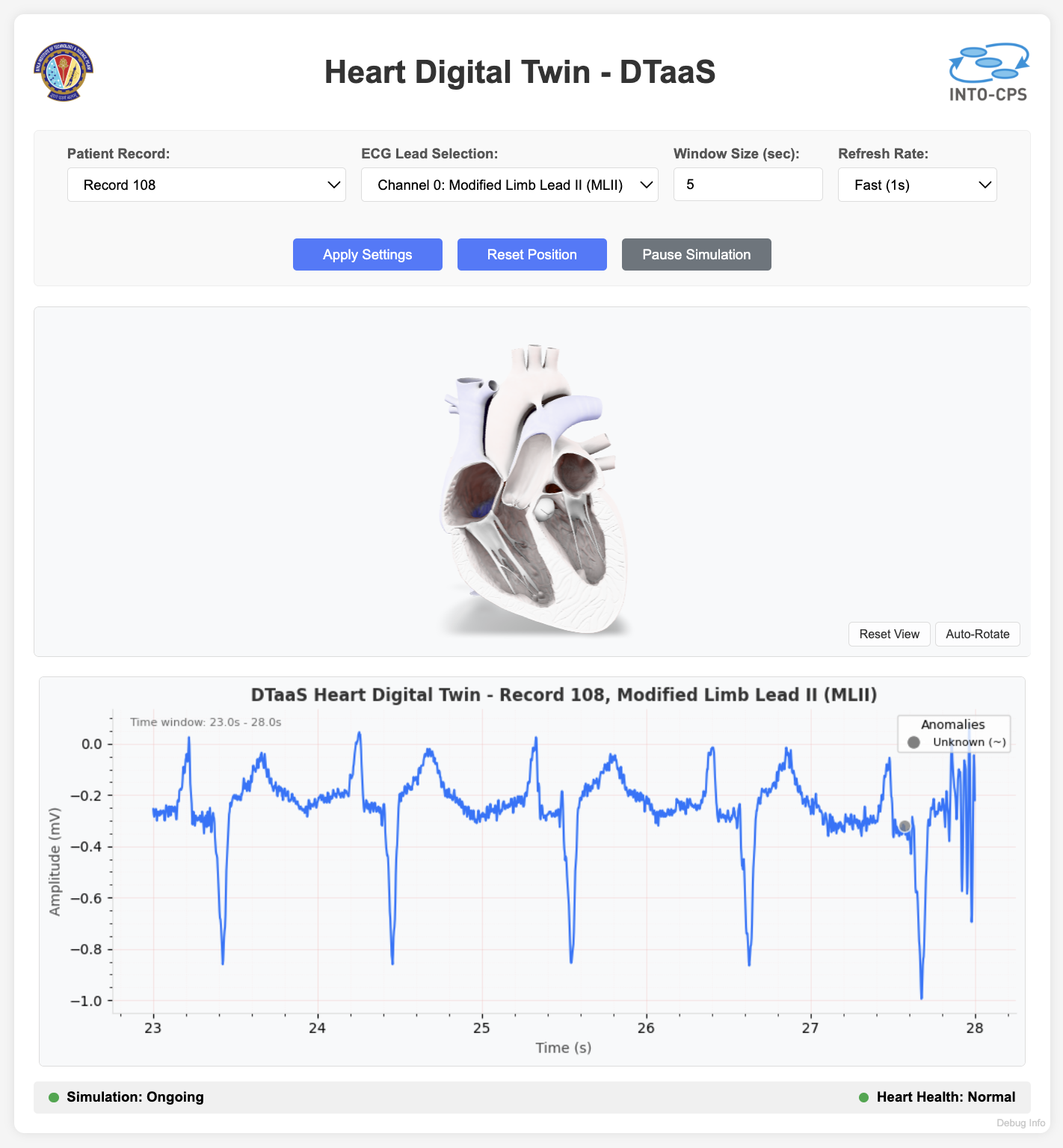
The Heart Digital Twin is a real-time cardiovascular monitoring system that uses ECG data from the MIT-BIH Arrhythmia Database. It shows live ECG plots with anomaly detection, alongside an interactive 3D heart model that beats in time with the cardiac rhythm.
Example Structure
The Heart Digital Twin has these components:
- ECG Data Processing: Real-time processing and visualisation of electrocardiogram signals from the MIT-BIH database
- 3D Heart visualisation: Interactive 3D heart model with synchronised pumping animation
- Anomaly Detection: Real-time identification and highlighting of cardiac anomalies
- Web Interface: Flask-based web application for real-time monitoring and control
MIT-BIH Arrhythmia Database
This digital twin uses the MIT-BIH Arrhythmia Database, which contains 48 half-hour excerpts of two-channel ambulatory ECG recordings. The database includes:
- Records from 47 subjects studied by the BIH Arrhythmia Laboratory
- 360 Hz sampling frequency with 11-bit resolution
- Expert annotations for arrhythmia detection and classification
- Multiple ECG channels (MLII, V1, V2, V4, V5) depending on the record
Records 100-109 are available for simulation. Each contains different types of cardiac rhythms and anomalies.
Digital Twin Configuration
This example uses the following assets:
| Asset Type | Names of Assets | Visibility | Reuse in Other Examples |
|---|---|---|---|
| Data | MIT-BIH Arrhythmia Database Records (100-109) | Public | Yes |
| Models | 3D Heart Model (Beating heart.glb) | Public | Yes |
| Functions | ECG Processing & Anomaly Detection | Public | Yes |
| Tools | Flask Web Server & UI Components | Public | Yes |
You can customise the heart digital twin with these parameters:
- Record Selection: Choose from records 100-109
- Channel Selection: Switch between available ECG channels
- Window Size: Adjust the time window for real-time display
- Update Frequency: Control the refresh rate of the simulation
3D Heart Animation
The digital twin includes a synchronised 3D heart pumping animation:
- Real-time Synchronisation: Heart model animation matches the ECG rhythm
- Interactive Controls:
- Camera controls for 360° viewing
- Auto-rotate functionality
- Reset view option
- Animation Features:
- Realistic beating heart model
- Smooth cardiac cycle animation
- Pause/resume functionality synchronised with ECG simulation
- Model Format: GLB (GL Transmission Format Binary) 3D model
- Rendering: WebGL-based rendering using model-viewer component
The 3D heart moves in step with the electrical activity shown in the ECG, which helps to relate the electrical signals to the mechanical function of the heart.
Lifecycle Phases
| Lifecycle Phase | Completed Tasks |
|---|---|
| Create | Sets up Python virtual environment and installs required dependencies (NumPy, Pandas, Matplotlib, WFDB, Flask) |
| Execute | Starts the Flask web server and launches the heart monitoring interface accessible via web browser |
| Clean | Terminates the running application and removes the virtual environment |
DevOps Automation
This example uses the DevOps features of the DTaaS platform. GitLab DevOps pipelines run its lifecycle scripts.
Pipeline Configuration
The .gitlab-ci.yml file sets the order in which the lifecycle scripts
of the heart digital twin run. It defines two stages:
- create: Sets up the Python virtual environment and installs dependencies
- execute: Runs the heart digital twin application
Runner Requirements
This digital twin requires a shell-based GitLab runner. The application needs:
- Access to the host system's Python environment
- Ability to create and manage Python virtual environments
- File system access for model loading and data processing
- Network access for the web application
Docker-based runners may restrict the network or file system access that this digital twin needs.
Alternative Execution Mode: Docker
The heart digital twin can also run in a Docker container, still on a shell-based GitLab runner.
The GitLab CI file for this approach is .gitlab-ci-docker.yml.
To use it, change the root .gitlab-ci.yml to reference this Docker-based
pipeline (.gitlab-ci-docker.yml) instead of the default one.
Artifacts and Outputs
The create stage saves the Python virtual environment as a GitLab pipeline
artefact, which the execute stage reuses. The artefact expires after
one hour.
Run the example
To run the example, go to the following directory:
If required, make the lifecycle scripts executable:
Now, run the following scripts:
Create
Sets up the Python environment and installs the required dependencies, including WFDB for MIT-BIH data access, Flask for the web interface, and scientific computing libraries.
Execute
Starts the Heart Digital Twin web application in the background. Open it in a web browser for real-time ECG monitoring and 3D heart visualisation.
The application is available at http://localhost:5001. On start-up it:
- Loads the required MIT-BIH records
- Initialises the ECG data processing
- Starts real-time visualisation
- Enables 3D heart model synchronisation
Examine the results
Use the web interface to:
- Monitor Real-time ECG: View live electrocardiogram signals
- Control Simulation: Select different records, channels, and update frequencies
- Interact with 3D Heart: Rotate, zoom, and control the heart animation
- Detect Anomalies: Observe highlighted cardiac irregularities
- Pause/Resume: Control the simulation flow
The application writes its logs to the logs/heart_dt.log file.
Clean
Stops the running application and cleans up the environment.
This script:
- Stops the Flask web server
- Removes the Python virtual environment
References
More information about the MIT-BIH Arrhythmia Database and cardiac monitoring:
The MIT-BIH Arrhythmia Database is available at: https://physionet.org/content/mitdb/