Install

This README provides a quick-start installation guide for a secure, multi-user DTaaS deployment that uses an external GitLab instance for OAuth 2.0 authorisation.
Download dtaas-secure-server-xx.zip from the latest release / pre-release page.
For a full configuration reference, see config.md.
Overview
This package deploys DTaaS with Traefik, OAuth forward-auth, and multiple user workspaces.
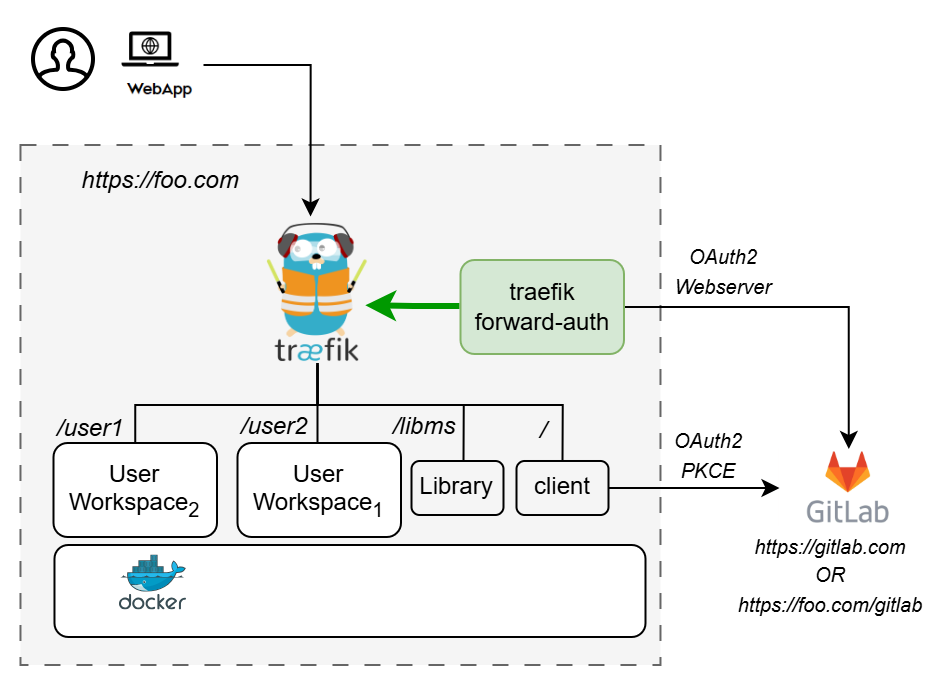
The docker-compose.yml starts the following services:
| Service | Purpose |
|---|---|
| traefik | Reverse proxy with TLS termination |
| client | DTaaS React frontend |
| user1 / user2 | JupyterLab user workspaces |
| libms | Library management microservice |
| traefik-forward-auth | OAuth 2.0 authorisation middleware |
Prerequisites
| Requirement | Details |
|---|---|
| Docker Engine | v28 or later with Compose plugin |
| Domain name | Public DNS name or server IP |
| TLS certificates | fullchain.pem and privkey.pem for the target domain |
| OAuth provider | External GitLab (gitlab.com or self-hosted GitLab) |
Quick Start
1. Create Configuration Files
Edit config/.env:
SERVER_DNSUSERNAME1USERNAME2OAUTH_URLOAUTH_CLIENT_IDOAUTH_CLIENT_SECRETOAUTH_SECRET
Edit config/client.js:
REACT_APP_CLIENT_IDREACT_APP_AUTH_AUTHORITYREACT_APP_REDIRECT_URIREACT_APP_LOGOUT_REDIRECT_URI
See config.md for full details.
2. Create User Workspace Directories
3. Add TLS Certificates
If certificates are missing or invalid, Traefik runs with self-signed certificates.
4. Configure OAuth 2.0 Applications in GitLab 
-
Create user accounts (see GitLab docs). The usernames must match
USERNAME1/USERNAME2inconfig/.env. -
Register two OAuth 2.0 applications in GitLab (Admin Area → Applications):
-
DTaaS Client Authorization — for the React SPA frontend. See client auth docs.
-
DTaaS Server Authorization — for Traefik forward-auth backend. See server auth docs.
-
Update configuration files (
config/.envandconfig/client.js) with the generated OAuth 2.0 tokens: - Set
REACT_APP_CLIENT_IDandREACT_APP_AUTH_AUTHORITYinconfig/client.js. - Set
OAUTH_URL,OAUTH_CLIENT_ID, andOAUTH_CLIENT_SECRETinconfig/.env.
Update config/client.js and config/.env with generated credentials,
then reload affected services:
5. Start Services
6. Verify
| URL | Expected result |
|---|---|
https://<SERVER_DNS> |
DTaaS web interface |
https://<SERVER_DNS>/user1 |
User 1 workspace after sign-in |
https://<SERVER_DNS>/user2 |
User 2 workspace after sign-in |
https://<SERVER_DNS>/lib |
Library service |