Mass Spring Damper with NuRV Runtime Monitor
Overview
This digital twin is derived from the Mass Spring Damper digital twin.
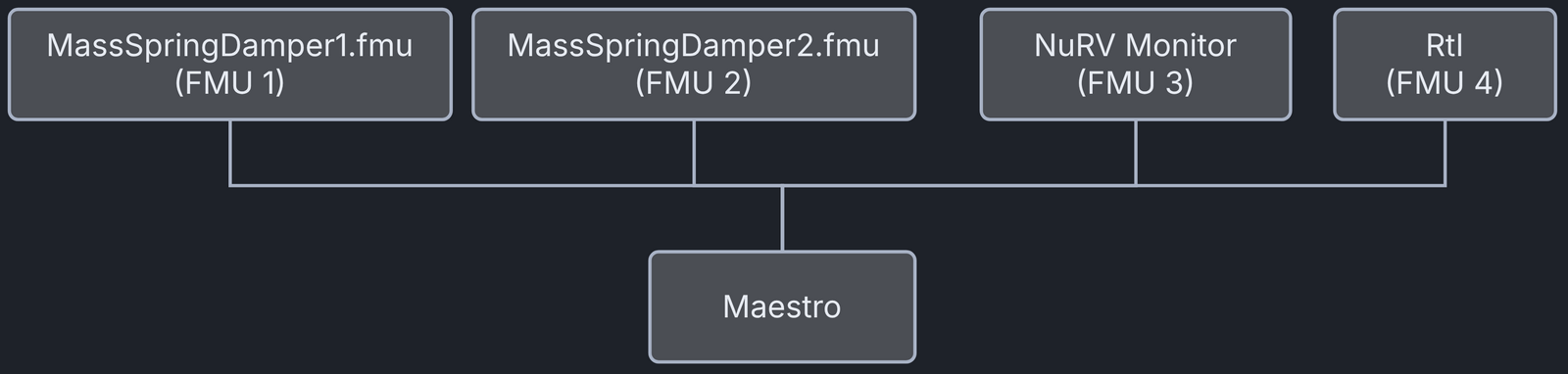
The mass spring damper digital twin (DT) has two mass spring dampers. It shows how to use a co-simulation based DT within the DTaaS. This version of the example adds a monitor generated by NuRV. More information about NuRV is available on the NuRV tool page.
Example Diagram

Example Structure
The study includes two simulators, each representing a mass spring damper system. The first simulator calculates the displacement and speed of mass \(m_1\) for a given force \(F_k\) acting on \(m_1\). The second simulator calculates the force \(F_k\) from a given displacement and speed of mass \(m_1\). Coupling the two simulators computes how the positions of the two masses evolve.
A monitor added to the simulation checks at runtime whether the displacement of the two masses stays below a maximum threshold.

Digital Twin Configuration
This example uses four models, one specification and one tool:
| Asset Type | Names of Assets | Visibility | Reuse in Other Examples |
|---|---|---|---|
| Models | MassSpringDamper1.fmu | Private | Yes |
| MassSpringDamper2.fmu | Private | Yes | |
| m2.fmu | Private | No | |
| RtI.fmu | Private | Yes | |
| Specification | m2.smv | Private | No |
| Tool | maestro-4.1.0-jar-with-dependencies.jar | Common | Yes |
The DT is executed with two configuration files, cosim.json and
time.json. Edit them to customise the DT.
Lifecycle Phases
| Lifecycle Phase | Completed Tasks |
|---|---|
| Create | Installs Java Development Kit for Maestro tool Generates and compiles the monitor FMU |
| Execute | Produces and stores output in data/mass-spring-damper-monitor/output directory |
| Analyze | Processes the co-simulation output and produces a plot |
| Clean | Clears run logs and outputs |
Run the example
To run the example, change to the example directory.
If required, make the lifecycle scripts executable, for example:
Then run the following scripts.
Create
- Installs Open Java Development Kit 21 and the pandas and matplotlib Python packages in the workspace.
- Generates and compiles the monitor FMU from the NuRV specification.
Execute
Runs the digital twin. Because this is a co-simulation based digital twin, the Maestro co-simulation tool runs a co-simulation of the FMU models.
Analyze phase
Processes the co-simulation output and saves a plot in
/workspace/examples/data/mass-spring-damper-monitor/output/plots.
Here is a sample plot.

The plot uses three colours. The blue line is the distance between the two
masses, and the green line is the monitor's verdict. The red dashed line
marks the distance threshold that the monitor checks. The distance between
the masses always stays below the threshold, so the monitor output stays at
unknown (0).
Examine the results
The results are in the /workspace/examples/data/mass-spring-damper-monitor/output directory.
The run logs are in /workspace/examples/digital_twins/mass-spring-damper-monitor.
Terminate phase
Removes the debug files and co-simulation output files.
References
More information about co-simulation techniques and the mass spring damper case study is available in:
The source code for the models used in this DT is in the mass spring damper GitHub repository.