GitLab CI/CD Infrastructure
The files in the Library are stored in a Git repository, so DTaaS uses GitLab's parent-child pipelines to run them. A parent pipeline starts another pipeline, the child pipeline, in the same project. GitLab's documentation on CI/CD Pipelines describes pipelines in more detail.
CI/CD Pipelines
Continuous Integration (CI) and Continuous Deployment (CD) are two parts of the DevOps methodology.
CI means integrating code changes into a shared repository often. Each integration triggers automated builds and tests, so problems are detected early. Changes are checked quickly, which reduces integration problems.
CD automates the release process: code changes are tested and prepared for deployment automatically. Teams using CD can deploy updates quickly and reliably. Together, CI/CD automates the software delivery pipeline and removes most or all of the manual work needed to move a code change from a commit to a production environment. The process covers compilation, testing (unit, integration and regression), deployment and infrastructure provisioning.
GitLab explains CI/CD practices in more detail in this article.
A CI/CD pipeline is a series of automated processes that carry out CI and CD. Once started, a pipeline runs without manual intervention.
GitLab covers the whole DevOps lifecycle in one application, including everything CI/CD needs. Its pipeline documentation was the main reference for this design.
A pipeline is made of jobs and stages. Jobs define the tasks to carry out, and stages define the order in which jobs run. When all jobs in a stage succeed, the pipeline moves on to the next stage. If any job fails, the pipeline stops.
When a pipeline starts, its jobs are distributed among the available runners.
GitLab runners are agents of the GitLab Runner application. They execute jobs according to their configuration and the available resources. Runners can run on virtual machines, in containers or on physical servers, and can be managed locally or in the cloud.
DTaaS uses this parent-child pipeline setup to execute the digital twins stored in a user's GitLab repository.
Note
The recommended way to modify these pipelines is through the Digital Twins Preview Page.
Parent Pipeline
The parent pipeline is the top-level element. It has a single stage,
triggers, which triggers the child pipelines.
The .gitlab-ci.yml file in the user repository holds the triggers for the
DTs. Each trigger belongs to one DT and becomes active when the API call
provides the matching value of the DTName variable. The RunnerTag
variable sets a custom runner tag that executes each job in the DT's
pipeline.
For one parent pipeline execution, the generated DTName rules must
activate exactly one trigger job. The client treats zero downstream
pipelines as a transitional state and rejects multiple downstream pipelines
as a configuration error; it never picks the first result in API order.
The keywords used in the pipeline configuration are:
image: the Docker image, such asfedora:41, that provides the environment for the pipeline.stages: the phases of the pipeline, such astriggers, which run in order.trigger: starts another pipeline, using the configuration from an external file.include: imports configuration from another file.rules: conditions for running a job, based on variables or states.if: a condition withinrulesthat decides, from the value of a variable, whether a job runs.when: when the job runs, such asalways.variables: variables, likeRunnerTag, passed to the pipeline.
Here is an example YAML file that registers a trigger for a DT named
mass-spring-damper:
Digital Twin Structure
The digital_twins folder contains DTs built by one or more users. They
are meant to be flexible enough to reconfigure for specific use cases.
For example, the
dtaas/user1 repository on gitlab.com has a
digital_twins directory with a hello_world example. Its file structure
is:
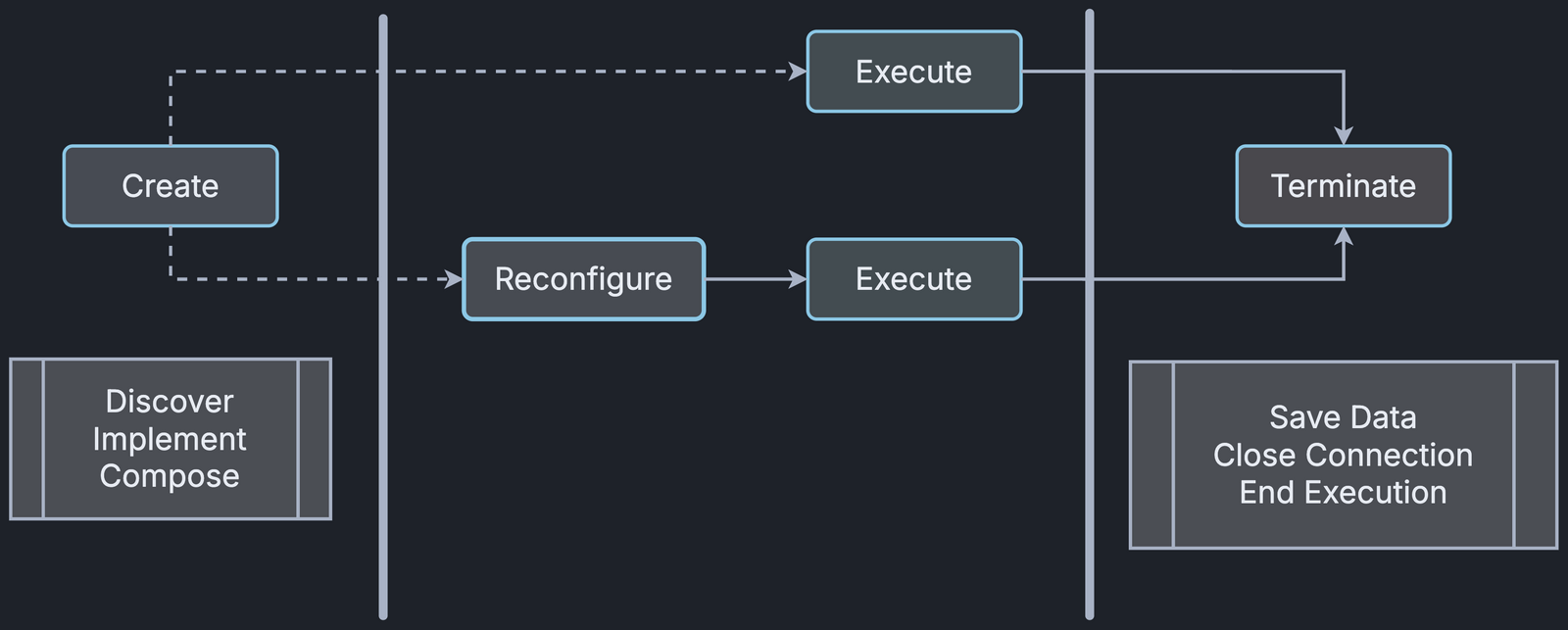
The lifecycle directory contains four files, clean, create, execute
and terminate, which are simple
BASH scripts. They correspond to
stages in a digital twin's lifecycle.

Child Pipelines
Each DT folder contains a child pipeline that automates the DT's lifecycle. Each child pipeline ignores the image given in the parent pipeline and uses the image set in its own YAML configuration, or Ruby's default image if none is set.
The keywords used in a child pipeline, based on GitLab's CI/CD YAML syntax reference, are:
stage: the steps of the pipeline, such as create, execute and clean, which run in a fixed order.script: the commands to run at each step, for example changing directories, modifying permissions or running lifecycle scripts.tags: which runner runs the jobs, giving control over where and how they run.
For the mass-spring-damper DT, the stages create, execute and terminate
the DT simulation, then clean up the environment so it is ready for the
next execution. Here is an example configuration that defines create,
execute and clean in the child pipeline:
Direct API Calls
A GitLab DevOps pipeline can be triggered through an API call with a pipeline trigger token created on the GitLab instance. The call needs these values:
<trigger_token>: the user's GitLab trigger token.<digital_twin_name>: the name of the DT (e.g. mass-spring-damper).<runner_tag>: the tag of the GitLab runner the user wants to use.<project_id>: the ID of the GitLab project, shown on the project overview page.
The example below sets the DTName variable to the DT name and the
RunnerTag variable to the GitLab Runner tag, and runs the pipeline on the
main branch:
Reference
Vanessa Scherma, Design and implementation of an integrated DevOps framework for Digital Twins as a Service software platform, Master's Degree Thesis, Politecnico Di Torino, 2024.