Incubator Co-Simulation Digital Twin validation with NuRV Monitor
Overview
This example shows how to validate digital twin components using FMU monitors. Here the monitors are generated with NuRV[1].
Simulated scenario
This example validates some components of the Incubator digital twin through a simulation in which the components are wrapped inside FMUs and inspected at runtime by an FMU monitor generated by NuRV. The link to the Incubator digital twin is given only for the details of the incubator physical twin. The digital twin (DT) presented here is a co-simulation DT of the Incubator.
The input data for the simulation comes from a purpose-built FMU component named source, which supplies test data to the anomaly detector and simulates an anomaly at time t=60s. A second component, the watcher, checks whether the energy saver activates in response to an anomaly reported by the anomaly detector.
The output of the watcher is then passed to the monitor, which checks that the energy saver activates within three simulation cycles of a detected anomaly.
Example structure
The diagram below shows the logical software structure of the example.

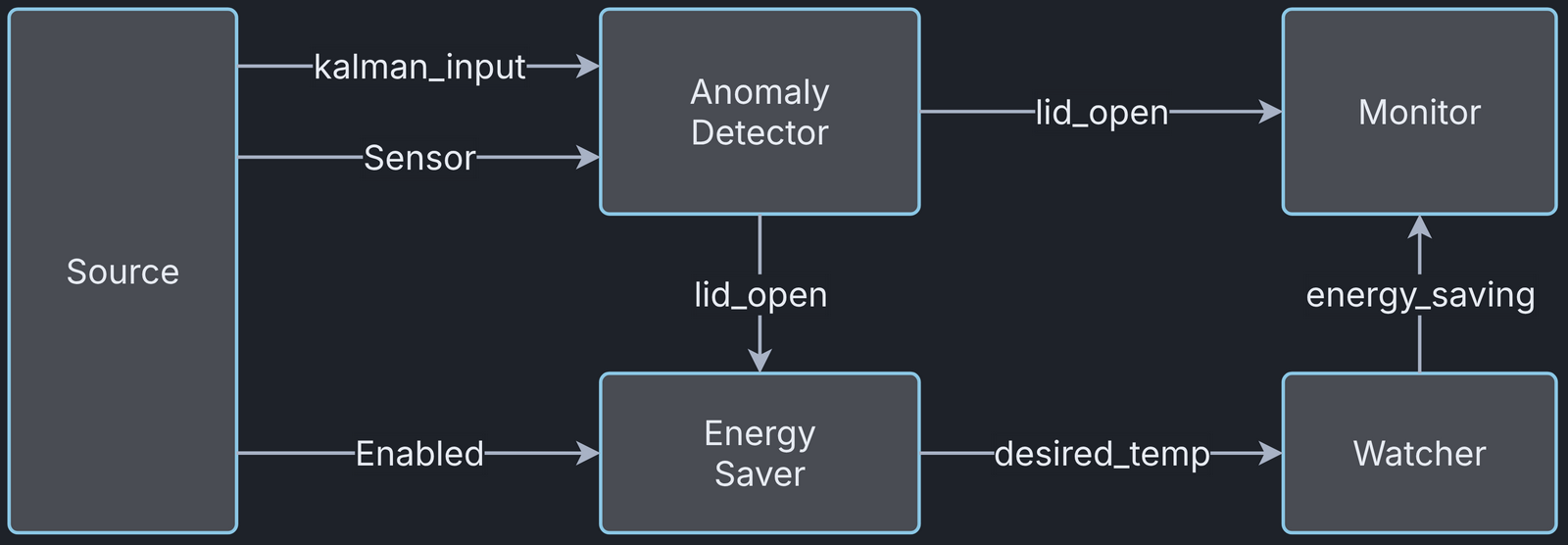
Digital Twin Configuration
The example uses the following assets:
| Asset Type | Names of Assets | Visibility | Reuse in other Examples |
|---|---|---|---|
| Models | anomaly_detection.fmu | Private | No |
| energy_saver.fmu | Private | No | |
| Source.fmu | Private | No | |
| Watcher.fmu | Private | No | |
| Specification | safe-operation.smv | Private | No |
| Tool | maestro-4.1.0-jar-with-dependencies.jar | Common | Yes |
The safe-operation.smv file contains the default monitored specification described in the Simulated scenario section.
Lifecycle phases
The lifecycle phases for this example are:
| Lifecycle Phase | Completed Tasks |
|---|---|
| Create | Installs Java Development Kit for Maestro tool Generates and compiles the monitor FMU |
| Execute | Produces and stores output in data/incubator-NuRV-monitor-validation/output directory |
| Clean | Clears run logs and outputs |
If required, make the lifecycle scripts executable with the following command
where {script} is the name of the script, for example create or execute.
Run the example
To run the example, change to its directory.
If required, make the lifecycle scripts executable, for example:
Now, run the following scripts:
Create
- Installs Open Java Development Kit 21 and, from the Ubuntu repositories,
the Python packages used by the plotting script and the Python FMUs
(
python3-pandas,python3-matplotlib,python3-protobufandpython3-zmq). - Generates and compiles the monitor FMU from the NuRV specification.
Execute
Runs the digital twin. Since this is a co-simulation based digital twin, the Maestro co-simulation tool runs the co-simulation with the FMU models.
Analyze phase
Processes the co-simulation output to produce a plot in
/workspace/examples/data/incubator-NuRV-monitor-validation/output/plots.
A sample plot is given here.

The plot has four colour-coded lines. The blue line is the simulated
temperature and the orange line is the temperature estimate. The red
dashed line is the target temperature set by the energy saver component,
and the green line is the monitor's verdict. When the estimated and
actual temperatures diverge, the energy saver lowers the target
temperature, which shows that the component works as intended. The
monitor output therefore stays at unknown (0), meaning the monitored
property is not violated.
Examine the results
The results, including the logs, are in the /workspace/examples/data/incubator-NuRV-monitor-validation/output directory.
The plots of the results are in the /workspace/examples/data/incubator-NuRV-monitor-validation/output/plots directory.
Terminate phase
Terminate to clean up the debug files and co-simulation output files.
References
- More information about NuRV is available on the NuRV tool page.