Structural Health Monitoring
Overview
This example applies digital twin methodology to structural health monitoring (SHM). The digital twin workflow shown below was developed for the SHM use cases.
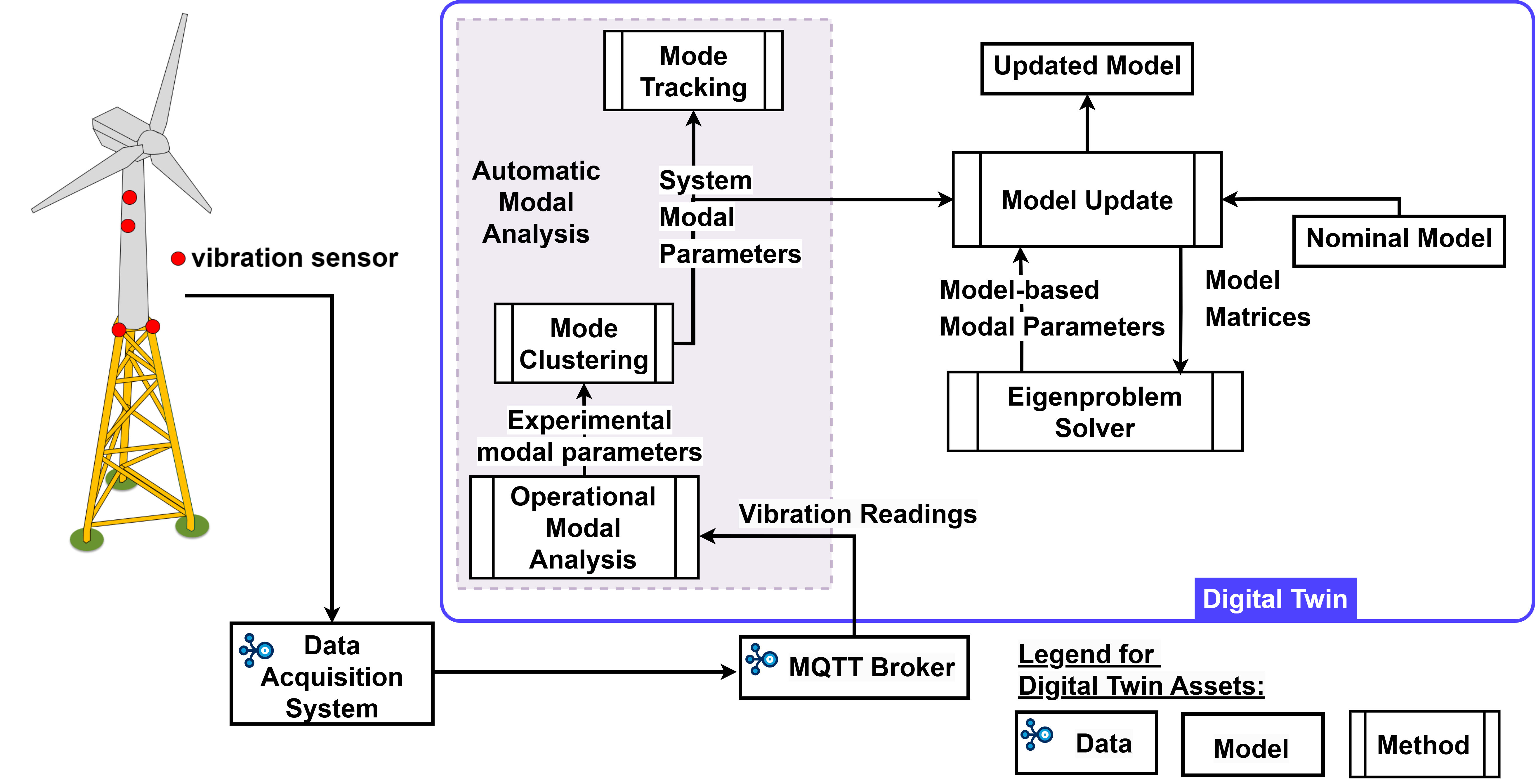
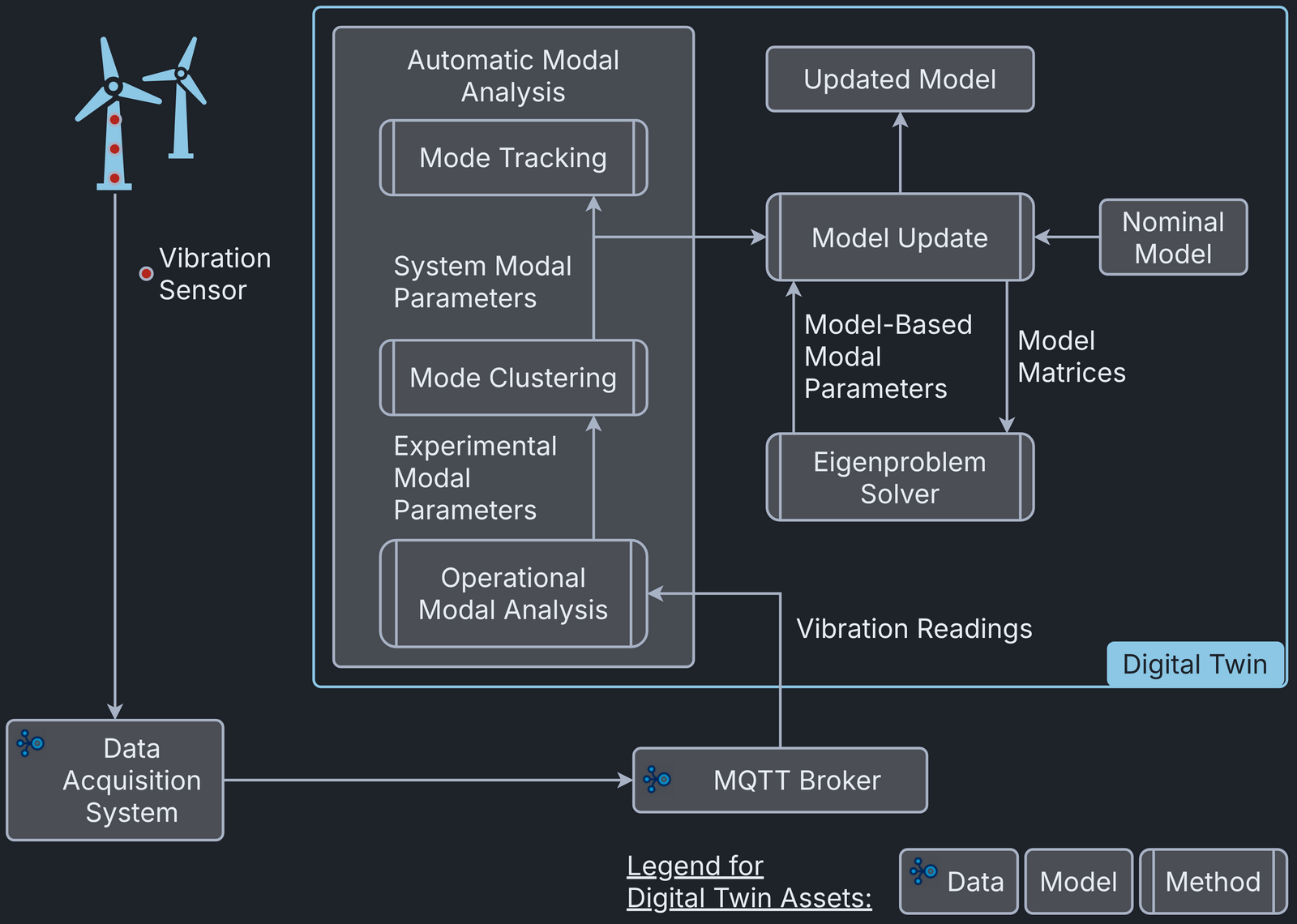
The complete source code for this example is available online.
Example Structure
This digital twin consists of:
- SHM package: implements the digital twin workflow. The package also contains data recorded from the physical twin and replay functions that stream this data into the digital twin workflow.
- replay.json: MQTT configuration file for replaying the recorded data
The package provides these experimental scenarios:
- replay replays the recorded readings from the cantilever beam setup.
- acceleration_readings shows how the
Accelerometerclass extracts accelerometer measurements from an MQTT data stream. -
aligning_readings shows how the
Alignerclass collects and aligns accelerometer measurements from multiple MQTT data streams. -
sysid demonstrates
sysidwith four cases:- sysid-and-plot: plots natural frequencies.
- sysid-and-print: prints sysid output to the console.
- sysid-and-publish: publishes one set of sysid output via MQTT
to the broker given in the
sysidsection of the config. - live-sysid-publish: publishes sysid output continuously via
MQTT to the broker given in the
sysidsection of the config.
-
Clustering demonstrates
clusteringwith four cases:- clustering-with-local-sysid: gets the sysid output by running sysid locally, then runs mode clustering.
- clustering-with-remote-sysid: gets the sysid output by subscribing, then runs mode clustering once.
- live-clustering-with-remote-sysid: gets the sysid output by subscribing, then runs mode clustering in a loop.
- live-clustering-with-remote-sysid-and-publish: gets the sysid output by subscribing, then runs mode clustering in a loop and publishes the cluster results.
-
mode-tracking demonstrates
mode_trackingwith three cases:- mode-tracking-with-local-sysid: gets the sysid output by running sysid locally, then runs mode clustering and mode tracking.
- mode-tracking-with-remote-sysid: gets the sysid output by subscribing, then runs mode clustering and mode tracking once.
- live-mode-tracking-with-remote-sysid: gets the sysid output by subscribing, then runs mode clustering and mode tracking in a loop.
-
model-update demonstrates
model_updatewith three cases:- model-update-with-local-sysid: gets the sysid output, then uses it to update the model and get updated system parameters.
- live-model-update-with-remote-sysid: gets the sysid output by subscribing to an MQTT topic, then runs mode clustering and uses the result to update the model and get updated system parameters.
- live-model-update-with-remote-clustering: gets the mode clustering output by subscribing to an MQTT topic, then uses it to update the model and get updated system parameters.
The following scenarios can run in the automated execution mode:
-
acceleration_readings shows how the
Accelerometerclass extracts accelerometer measurements from an MQTT data stream. -
aligning_readings shows how the
Alignerclass collects and aligns accelerometer measurements from multiple MQTT data streams. -
sysid prints the sysid output to the console.
-
Clustering demonstrates
sysidandclustering. -
mode-tracking demonstrates
sysidandmode_tracking. -
model-update runs the digital twin workflow up to
model_update.
Configuration
This example uses an MQTT broker to replay the data recorded from
the physical twin. The configuration file is replay.json. Update the MQTT
credentials in this file. If no local MQTT broker is available, you can use
the Mosquitto test server.
Use
Run the program without arguments to list the available experimental scenarios:
Run these examples with the replay.json config:
Automated Execution
The pipeline of this example runs two lifecycle scripts:
lifecycle/sysid_print for system identification and
lifecycle/model_update_local_sysid for model update. A truncated sample
output follows, with the execution timestamps removed.
References
- This example corresponds to commit ce47244 of the example-shm repository.
- Talasila, P., Tcherniak, D., Jensen, A. M. D., Mahato, S., Schörghofer-Queiroz, A., Ulriksen, M. D., ... & Damkilde, L. (2025, July). Structural Health Monitoring of Engineering Structures Using Digital Twins: A Digital Twin Platform Approach. In International Conference on Experimental Vibration Analysis for Civil Engineering Structures (pp. 986-996). Cham: Springer Nature Switzerland.