Desktop Robotti with RabbitMQ
Overview
This example shows bidirectional communication between a mock physical twin and a digital twin of a mobile robot (Desktop Robotti). A RabbitMQ broker carries the messages between them.

Example Structure
Two Python scripts make up the mock physical twin of the mobile robot:
- data/drobotti_rmqfmu/rmq-publisher.py
- data/drobotti_rmqfmu/consume.py
The mock physical twin sends its location as (x,y) coordinates and expects the digital twin to return the Cartesian distance \(\sqrt(x^2 + y^2)\).

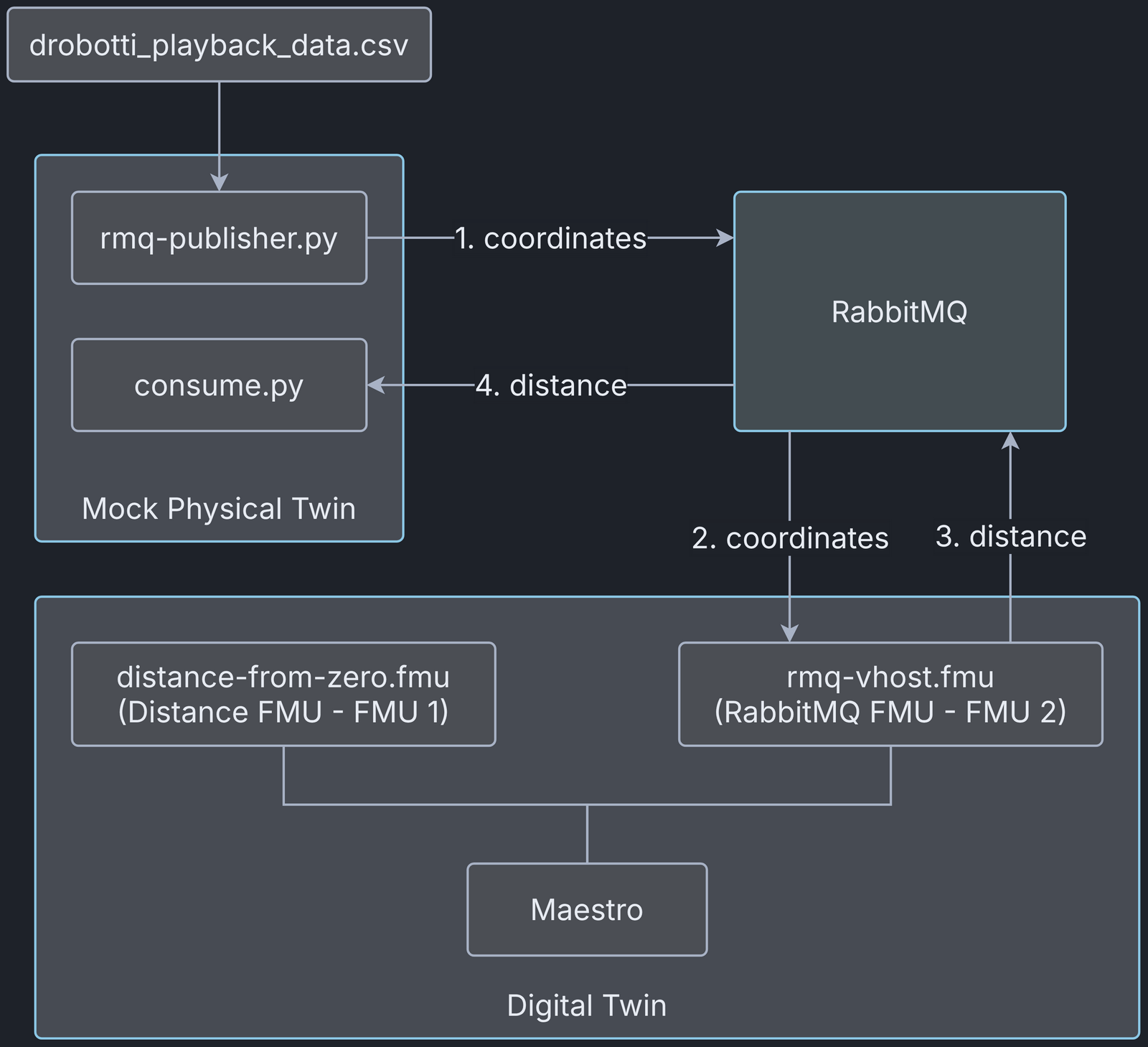
The rmq-publisher.py script reads the recorded (x,y) coordinates of the mobile robot from a data file and publishes them to the RabbitMQ broker, where the digital twin consumes them.
The consume.py script subscribes to the RabbitMQ broker and waits for the distance calculated by the digital twin.
The digital twin is an FMI-based co-simulation, with Maestro as the co-orchestration engine. The co-simulation uses two FMUs: the RMQ FMU (rmqfmu-vhost.fmu) and the distance FMU (distance_from_zero.fmu). The RMQ FMU receives the (x,y) coordinates from rmq-publisher.py and sends the calculated distance to consume.py. It uses the RabbitMQ broker to communicate with the mock mobile robot, that is, rmq-publisher.py and consume.py. The distance FMU calculates the distance between (0,0) and (x,y). The two FMUs exchange values during the co-simulation.
Digital Twin Configuration
This example uses two models, one tool, one data file and two scripts that form the mock physical twin. The specific assets used are:
| Asset Type | Names of Assets | Visibility | Reuse in Other Examples |
|---|---|---|---|
| Models | distance_from_zero.fmu | Private | No |
| rmqfmu-vhost.fmu | Private | Yes | |
| Tool | maestro-4.1.0-jar-with-dependencies.jar | Common | Yes |
| Data | drobotti_playback_data.csv | Private | No |
| Mock PT | rmq-publisher.py | Private | No |
| consume.py | Private | No |
The DT has several configuration files. coe.json and multimodel.json
are used to execute the digital twin and can be modified to customise
the DT.
The RabbitMQ access credentials go in multimodel.json for the RMQ FMU
and in rabbitMQ-credentials.json for the mock PT Python scripts. Add
the appropriate credentials to both files.
Lifecycle Phases
| Lifecycle Phase | Completed Tasks |
|---|---|
| Create | Installs Java Development Kit for Maestro tool and Python packages for python scripts |
| Execute | Runs both DT and mock PT |
| Clean | Clears run logs and outputs |
Run the example
To run the example, change to the example directory.
If required, give the lifecycle scripts execute permission, for example:
Now run the following scripts.
Create
Installs Open Java Development Kit 21 in the workspace, along with the
Python packages needed by the rmq-publisher.py and consume.py scripts
and by the distance_from_zero.fmu model (python3-pika,
python3-protobuf and python3-zmq).
Execute
Starts the Python scripts of the mock physical twin and then the digital twin. Since this is a co-simulation based digital twin, the Maestro co-simulation tool runs the co-simulation with the two FMU models.
Examine the results
The results are in the /workspace/examples/digital_twins/drobotti_rmqfmu directory.
Executing the DT generates and launches a co-simulation (RMQFMU and distance FMU) and two Python scripts: one publishes data read from a file, and the other consumes what the distance FMU sends.
In this example the DT runs for 10 seconds with a step size of 100 ms.
Afterwards, the logs are in
/workspace/examples/digital_twins/drobotti_rmqfmu/target.
The outputs.csv file records the outputs of each FMU: xpos and ypos
for the RMQFMU, and the distance for the distance FMU.
Each FMU and the publisher scripts also write their own logs.
Note that the RMQFMU sends data only when the current input differs from
the previous one.
Terminate phase
Terminate to clean up the debug files and co-simulation output files.
References
The RabbitMQ FMU GitHub repository contains the documentation and source code of the RabbitMQ FMU.
More information about the case study is available in: