Flex Cell Digital Twin with Two Industrial Robots
Overview
The flex-cell digital twin is a case study with two industrial robotic arms, a UR5e and a Kuka LBR iiwa 7, working together in a manufacturing cell.

The case study focuses on positioning the robots in the discrete Cartesian space of the flex-cell. Both robots accept (X,Y,Z) commands that give the target hole and height to move to.
The TwinManager (formerly DT Manager) manages the flex-cell case
study. It is packaged as a jar library in the tools and run from a Java
main file.
The TwinManager uses Maestro as a slave for co-simulation, so it
generates the co-simulation output and, with the proper configuration and
setup, can interact with the real robots at the same time.
The main file can be changed to suit the application, that is,
/workspace/examples/tools/flex-cell/FlexCellDTaaS.java can be
modified to get a different result.
The /workspace/examples/models/flex-cell/ folder contains
the .fmu files for the kinematic models of the robotic arms,
the .urdf files for visualisation (including the grippers), and
the .aasx files for the schema representation as an
Asset Administration Shell.
The case study also uses the RabbitMQ FMU to inject values into the
co-simulation, so the models folder contains that FMU as well. For now,
the RabbitMQ FMU only injects values into the co-simulation and does not
send values out of it.
The TwinManager reads the values from the co-simulation output and the
current state of the physical twins.
Example Structure
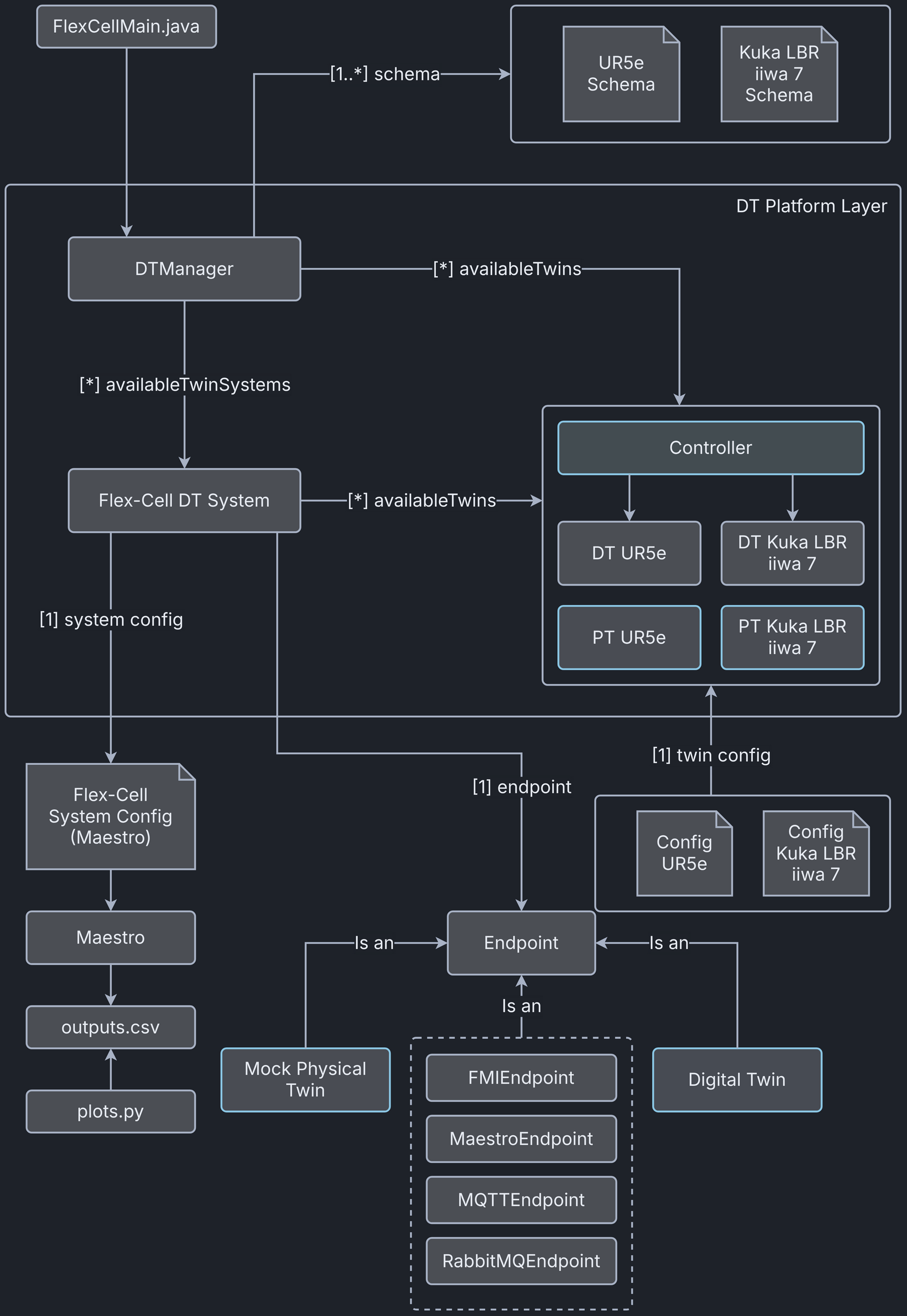
The example structure shows the components of the flex-cell DT
implementation using the TwinManager architecture.
The TwinManager orchestrates the flex-cell DT through the Flex-cell DT System, which is composed of two smaller digital twins, the DT UR5e and the DT Kuka lbr iiwa 7. The TwinManager also provides the interface to the physical twins, PT UR5e and PT Kuka lbr iiwa 7. Each physical twin and digital twin system has its own endpoint (with a different specialization), which is initialized from configuration files and a data model (twin schema).
The current endpoints used in this implementation are:
| Digital or Physical Twin | Endpoint |
|---|---|
| Flex-cell DT System | MaestroEndpoint |
| DT UR5e | FMIEndpoint |
| DT Kuka lbr iiwa 7 | FMIEndpoint |
| PT UR5e | MQTTEndpoint and RabbitMQEndpoint |
| PT Kuka lbr iiwa 7 | MQTTEndpoint and RabbitMQEndpoint |
The Flex-cell DT System has a separate configuration for its integration with the Maestro co-simulation engine.
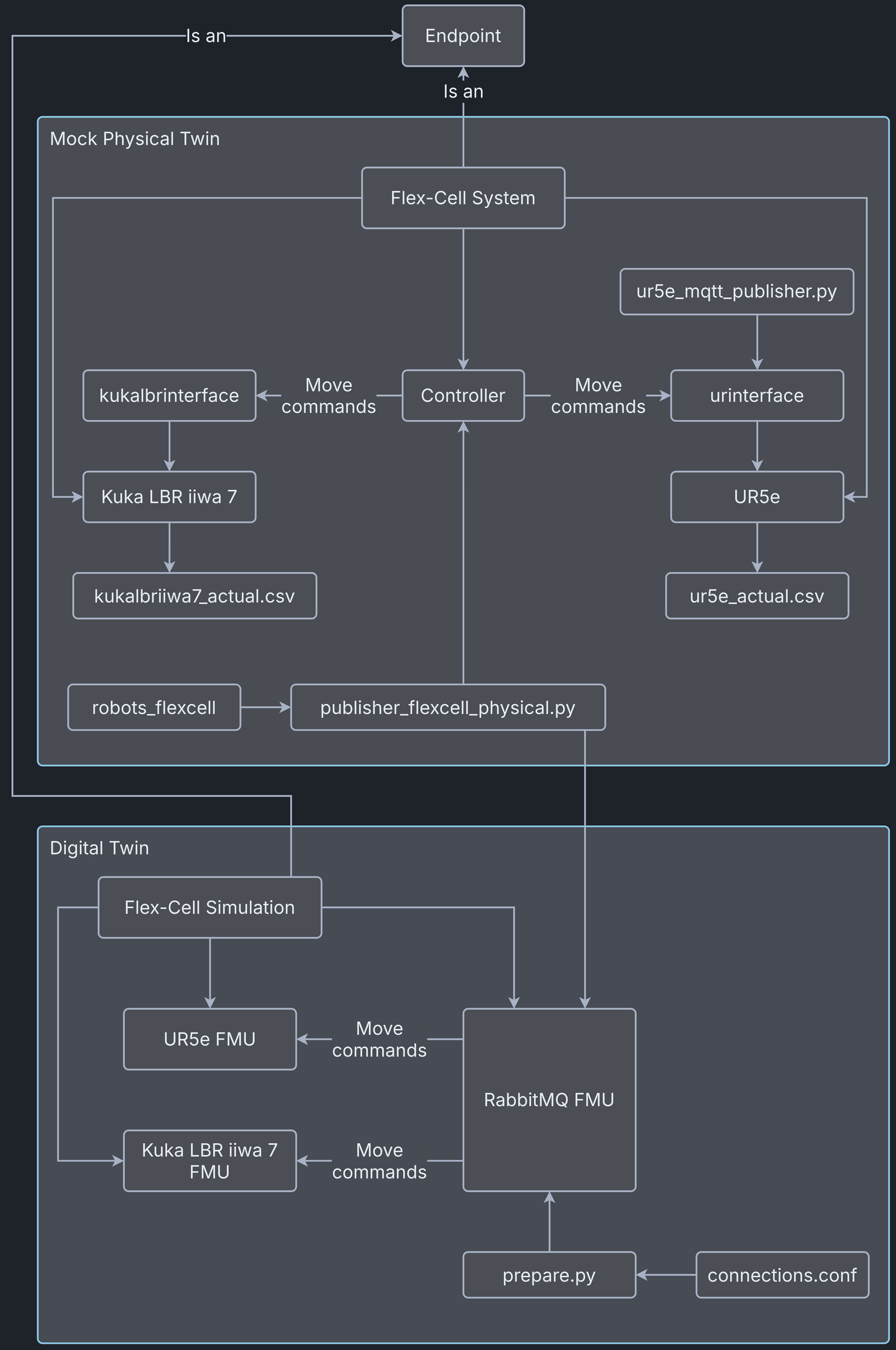
In the lower part of the diagram, the Flex-cell System is the composed physical twin, including the two robotic arms and the controller. The Flex-cell Simulation is the mock-up of the real system, implemented by FMU blocks and their connections.


Digital Twin Configuration
This example uses seven models, five tools, six data files, two functions and one script. The specific assets used are:
| Asset Type | Names of Assets | Visibility | Reuse in Other Examples |
|---|---|---|---|
| Model | kukalbriiwa_model.fmu | Private | No |
| kuka_irw_gripper_rg6.urdf | Private | No | |
| kuka.aasx | Private | No | |
| ur5e_model.fmu | Private | No | |
| ur5e_gripper_2fg7.urdf | Private | No | |
| ur5e.aasx | Private | No | |
| rmqfmu-vhost.fmu | Private | Yes | |
| Tool | maestro-4.1.0-jar-with-dependencies.jar | Common | Yes |
| TwinManagerFramework-0.0.2.jar | Private | Yes | |
| urinterface (installed with pip) | Private | No | |
| kukalbrinterface | Private | No | |
| robots_flexcell | Private | No | |
| FlexCellDTaaS.java (main script) | Private | No | |
| Data | publisher-flexcell-physical.py | Private | No |
| ur5e_mqtt_publisher.py | Private | No | |
| connections.conf | Private | No | |
| outputs.csv | Private | No | |
| kukalbriiwa7_actual.csv | Private | No | |
| ur5e_actual.csv | Private | No | |
| Function | plots.py | Private | No |
| prepare.py | Private | No |
Lifecycle Phases
The example covers these lifecycle phases:
- Installing dependencies in the create phase.
- Preparing the connection credentials in the prepare phase.
- Running the experiment in the execute phase.
- Saving experiments in the save phase.
- Plotting the co-simulation results and the real data from the robots in the analyze phase.
- Stopping the background processes in the terminate phase and cleaning up the outputs in the clean phase.
| Lifecycle Phase | Completed Tasks |
|---|---|
| Create | Installs Java Development Kit 21 and Maven, compiles the source code of TwinManager to create a usable jar package (used as tool) |
| Prepare | Takes the RabbitMQ and MQTT credentials in connections.conf file and configures different assets of DT. |
| Execute | The TwinManager executes the flex-cell DT and produces output in data/flex-cell/output directory |
| Save | Save the experimental results |
| Analyze | Uses plotting functions to generate plots of co-simulation results |
| Terminate | Terminating the background processes |
| Clean | Cleans up the output data |
Run the example
To run the example, change to the example directory.
If required, give the lifecycle scripts execute permission, for example:
This example requires Java 21 because Maestro 4.1.0 needs it. The create script installs Java 21. If other Java versions are already installed, the default java may point to another version. Check and change the default version with these commands.
Now run the following scripts.
Create
Installs Open Java Development Kit 21, Maven, and a Python virtual
environment with pip dependencies. It also builds the
TwinManager tool (TwinManagerFramework-0.0.2.jar) from source code.
Prepare
This step configures the DT assets with connection credentials, using
the functions/flex-cell/prepare.py script. To set up the connection,
update /workspace/examples/data/flex-cell/input/connections.conf with
the connection parameters for MQTT and RabbitMQ, then run the prepare
script.
The script writes the configuration into these files, which need credentials to connect to the RabbitMQ and MQTT brokers:
/workspace/examples/digital_twins/flex-cell/kuka_actual.conf/workspace/examples/digital_twins/flex-cell/ur5e_actual.conf/workspace/examples/data/flex-cell/input/publisher-flexcell-physical.pymodelDescription.xmlof the RabbitMQ FMU
Execute
Executes the flex-cell digital twin using the TwinManager, which in turn
runs the co-simulation using Maestro. The co-simulation output file
outputs.csv is written to /workspace/examples/data/flex-cell/output.
Stop the execution with control + c, because the TwinManager runs the
application in an endless loop.
Save
Each execution of the DT is treated as a single run. The save script
stores the results of one execution as a time-stamped co-simulation
output file in the data/flex-cell/output/saved_experiments directory.
The execute and save scripts can be run in that order any number of
times. Each iteration adds a new file to the
data/flex-cell/output/saved_experiments directory.
Analyze
The plotting functions are in functions/flex-cell/plots.py.
The script plots the co-simulation results against the recorded values
from the two robots.
Terminate
Stops Maestro running in the background, along with any other Java process started during the execute phase.
Clean
Removes the output generated during the execute phase.
Examining the Results
Executing this digital twin generates a co-simulation output. The results
can also be monitored by adding a set of getAttributeValue calls to
/workspace/examples/tools/flex-cell/FlexCellDTaaS.java, as shown in the
code. The main file runs the digital twin and the physical twin online
and compares them at the same time and at the same abstraction level.
The output is written to the
/workspace/examples/data/flex-cell/output folder.
To keep a specific experiment, the save lifecycle script stores the
co-simulation results in the
/workspace/examples/data/flex-cell/output/saved_experiments folder.
In the default example, the co-simulation runs for 10.5 seconds in
steps of 0.2 seconds. Both the duration and the step size can be changed.
The output stored in outputs.csv contains the joint positions of
both robotic arms and the current discrete (X,Y,Z) position of
the robot TCP.
More variables can be added, such as the discrete (X,Y,Z) position
of the other joints.
When connected to the real robots, the tools urinterface and
kukalbrinterface log their data at a higher sampling rate.
References
The RabbitMQ FMU GitHub repository contains the documentation and source code of the RabbitMQ FMU.
More information about the TwinManager (formerly DT Manager) and the case study is available in:
- D. Lehner, S. Gil, P. H. Mikkelsen, P. G. Larsen and M. Wimmer, "An Architectural Extension for Digital Twin Platforms to Leverage Behavioral Models," 2023 IEEE 19th International Conference on Automation Science and Engineering (CASE), Auckland, New Zealand, 2023, pp. 1-8, doi: 10.1109/CASE56687.2023.10260417.
- S. Gil, P. H. Mikkelsen, D. Tola, C. Schou and P. G. Larsen, "A Modeling Approach for Composed Digital Twins in Cooperative Systems," 2023 IEEE 28th International Conference on Emerging Technologies and Factory Automation (ETFA), Sinaia, Romania, 2023, pp. 1-8, doi: 10.1109/ETFA54631.2023.10275601.
- S. Gil, C. Schou, P. H. Mikkelsen, and P. G. Larsen, “Integrating Skills into Digital Twins in Cooperative Systems,” in 2024 IEEE/SICE International Symposium on System Integration (SII), 2024, pp. 1124–1131, doi: 10.1109/SII58957.2024.10417610.